The real challenge with loops isn’t just getting the AI to keep running, but whether it can know when to stop.
"Stop writing prompts"—this phrase is currently sweeping the AI community.
From Peter Steinberger, father of OpenClaw and now focused on next‑generation personal agents at OpenAI, to Boris Cherny, creator of Claude Code, these Silicon Valley heavyweights are collectively turning to "loops."
Google engineer Addy Osmani, who coined the term "loop engineering" for this trend, is also among them.
Cherny says he hardly writes prompts by hand anymore.
An agent writes prompts for Claude on his behalf; he only converses with that new Claude which "orchestrates everything."
He even made a bold statement: a decade from now, loops and similar capabilities will be among his proudest work achievements.
Steinberger puts it more bluntly: stop writing prompts for programming agents; you should design loops that feed them prompts.
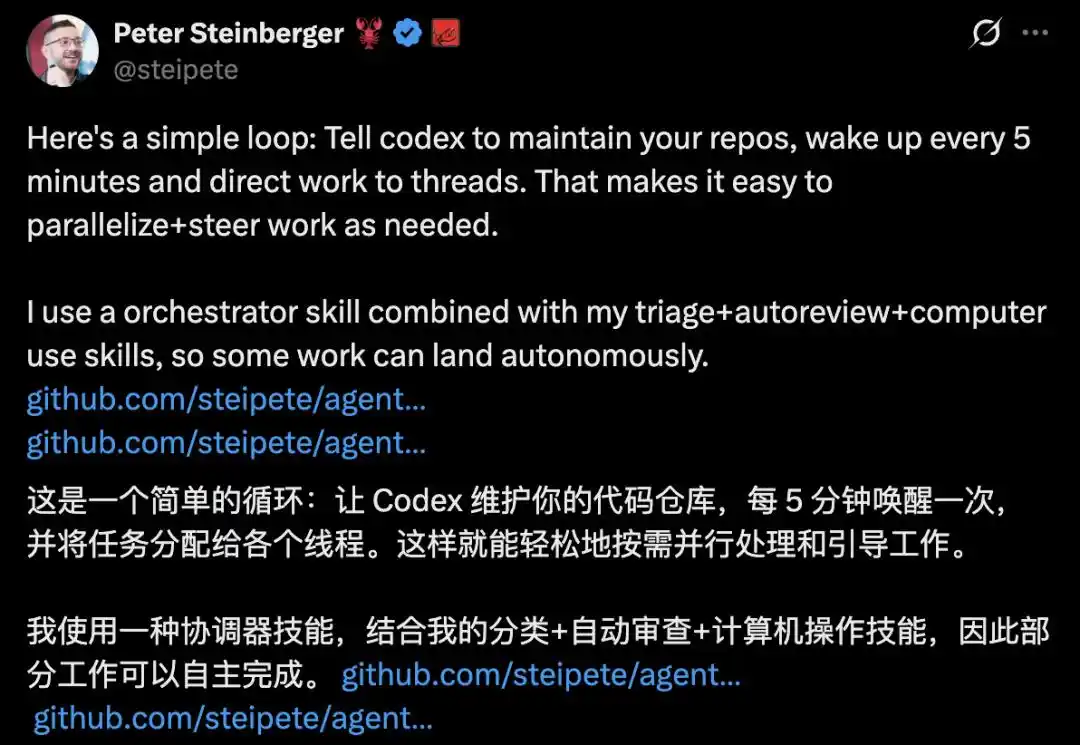
He also demonstrated his loop on X: having Codex wake up every 5 minutes to automatically maintain code repositories, assign tasks, and fully autonomously complete some work.
So, what exactly is this "loop" that these big names keep mentioning?
Recently, the Claude Code team provided a clear definition in an official blog post, breaking it down into four types of loops and establishing engineering rules for "agents working autonomously."
The Claude Code team published an article formally defining "loops" and breaking them down into four typical types: turn‑based, goal, time, and proactive loops.
At its core, this signifies a shift: AI programming is moving from "writing a single instruction" to "designing a system that runs on its own."
A prompt gets you one response; a loop gets you a system that keeps working for you even after you close your laptop.
And programmers are transitioning from being content writers to being system designers.
Four Types of Loops, Four "Stopping Conditions"
What exactly is a loop?
There has been much debate on X, with varied answers. The definition given by the Claude Code team is clear:
A loop is when an agent repeats rounds of work until a stopping condition is triggered.
Four types of loops mean four types of "stopping conditions." This sentence is key to understanding Claude Code's technical blog about loops.
Along the dimensions of "how it's triggered, how it stops, what primitives it uses, and what tasks it's suitable for," Claude Code categorizes loops into four types.
The first type is the turn‑based loop.
Turn‑based loop: human controls round by round, each prompt initiates one round. (Source: Claude official blog)
Human control round by round: you write one instruction, the AI runs one round, you check, then write the next. You hold the steering wheel the entire time. It's suitable for scattered, short tasks that don't enter a process or schedule.
To reduce back‑and‑forth, write the steps you normally check manually into a SKILL.md file and let the AI verify its own work.
The more quantifiable the checks are, the better the AI can judge if it's done correctly, and the less you need to oversee.
The second type is the goal loop (/goal).
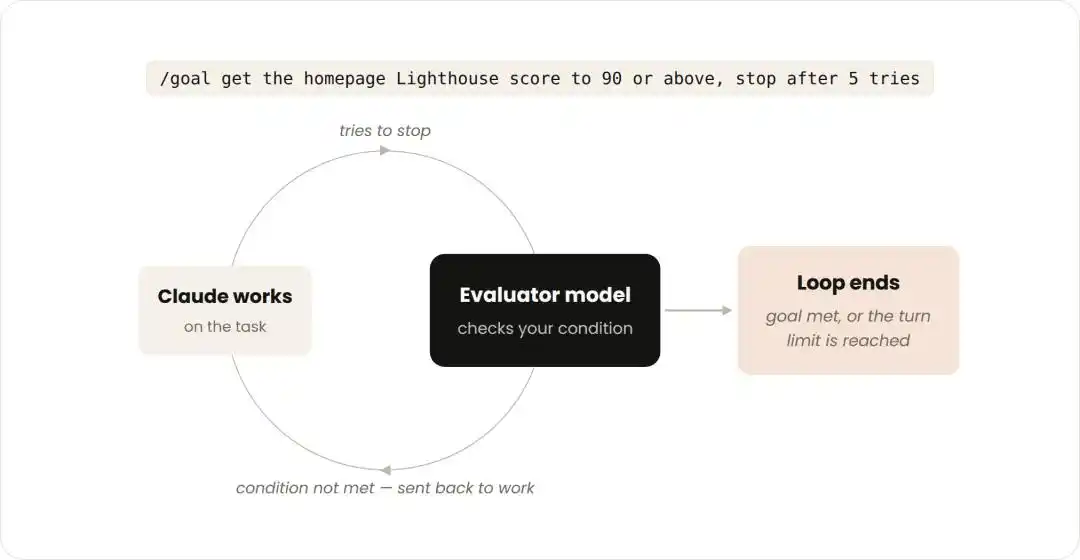
Goal loop: an evaluator model checks against criteria; if not met, sends it back for rework. (Source: Claude official blog)
First, lock in a goal, like "get the homepage Lighthouse score above 90, stop after 5 attempts."
Every time Claude tries to stop, an evaluator model checks against your criteria. If not met, it's sent back to keep working until the goal is achieved or the set number of rounds is exhausted.
Quantifiable standards like number of passing tests or score thresholds work well because Claude doesn't have to agonize over "is it good enough?"—the evaluator decides for it. It won't guess "that's probably enough" and stop prematurely, and the loop can conclude cleanly.
The third type is the time loop (/loop and /schedule).
Triggered at time intervals, like an alarm. Some tasks are repetitive, with the task remaining constant and only the input changing, such as summarizing Slack messages every morning.
Some tasks require monitoring external systems. The simplest way is to check at intervals, see what changed, and then react—for example, a PR that might receive reviews or have a failing CI.
Use /loop to rerun a prompt at intervals. To keep it running after you shut down your computer, use /schedule to move the loop to the cloud.
This logic is almost identical to the cron jobs familiar to programmers.
The fourth type is the proactive loop.
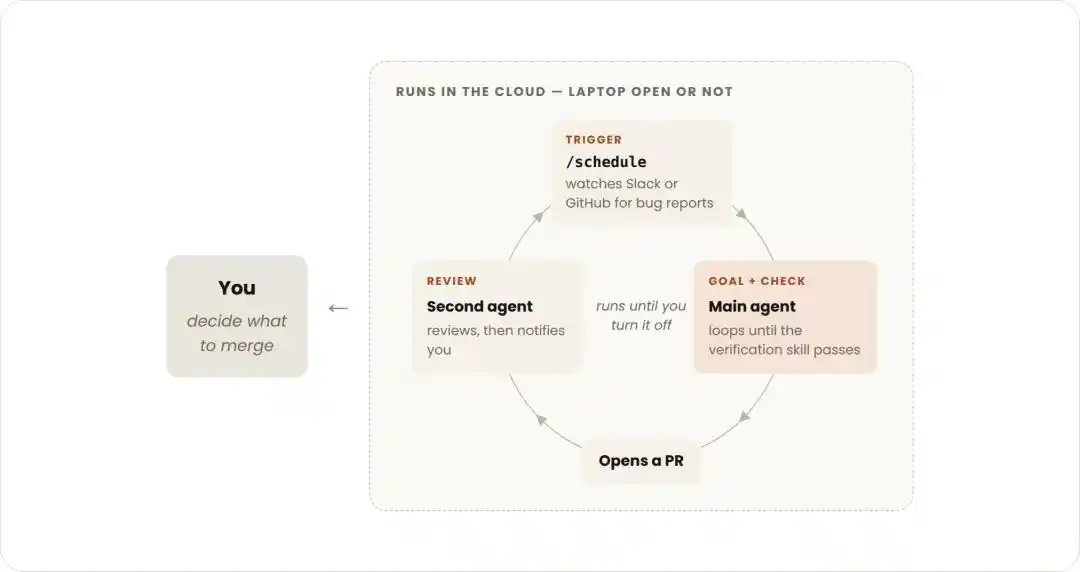
Proactive loop: triggered by events or time, fully unattended, runs until you manually stop it. (Source: Claude official blog)
Triggered by events or time, fully unattended.
Combined with auto mode and dynamic workflows, it fully automates long‑running tasks: scanning a feedback channel hourly, automatically triaging, fixing, and replying to each bug report received—running end‑to‑end without stopping to ask for permissions.
Each subtask exits upon achieving its goal, while the overall routine task runs until you manually stop it. It's suitable for源源不断 (continuous), well‑defined work: bug reporting, issue classification, dependency upgrades.
Four types of loops essentially answer "when to stop" in four ways: judged by a human, judged by an evaluator, judged by time, judged by an event.
Looking one layer deeper.
According to the official Agent SDK documentation, the core mechanism is also quite simple:
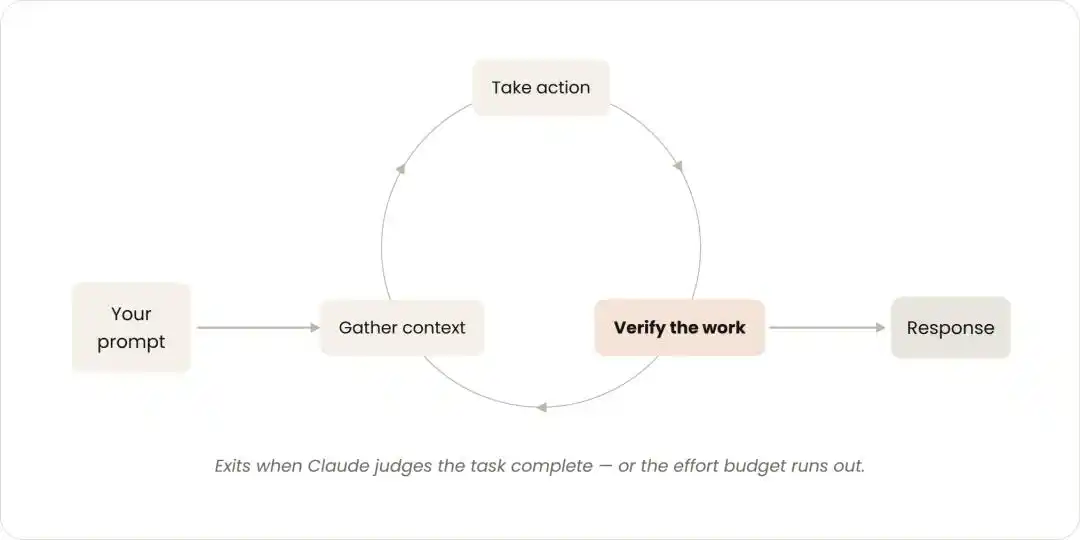
Claude evaluates your prompt, calls tools to act, retrieves results, then repeats until in a round it no longer calls any tools—only then does the loop end.
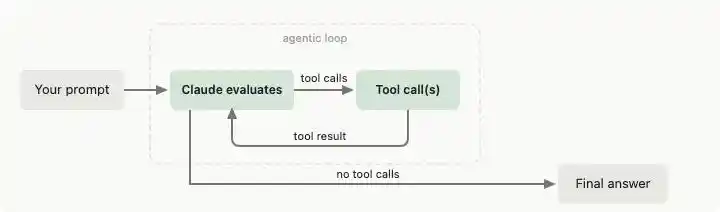
The agent loop from Claude Code's official Agent SDK documentation: after a prompt enters, Claude evaluates, calls tools, results flow back for re‑evaluation, until a round calls no tools, then outputs the final answer. (Source: Claude Code official documentation)
An autonomous agent, in essence, is just such a circle.
What's Really Changing Isn't the Loop Itself
Of course, we can't call "designing loops" a revolution from 0 to 1.
Scheduled tasks, orchestration, feedback loops—these practices have existed for a long time. What Claude is doing here is more about unifying them under a name and categorizing them into a set of standards.
So, what actually changed? The focus is on the "stopping condition."
Among the numerous practical tips summarized by Claude Code's official team, the one singled out and labeled as "the most valuable one" is verification:
Give Claude a way to check its own output.
The reasoning is straightforward.
For example, asking an engineer to build a webpage without giving them a browser—will the page look good? With a browser, they can see the effect immediately after each change, iterating until satisfied before submitting.
And the power of a model loop precisely comes from this ability to "close the loop by itself."
In this process, prompts aren't dead; they've just degenerated into a component within the loop.
The real core becomes designing stopping conditions, designing verifiers, controlling token budgets, and multi‑round execution strategies.
Loops Without Gates Are Powerful and Dangerous
Does a loop mean you can let the AI run on its own all day?
Certainly not.
The first obstacle is money. A loop without limits can burn through token costs.
Reportedly, Steinberger calls himself "the man with unlimited tokens," as unlimited free tokens are one of the perks of working at OpenAI. Ordinary folks don't have that luxury.
The second is more insidious. An agent can fall into a dead loop that "seems to make progress but actually spins in place": repeatedly modifying the same files without ever producing a new passing test.
It might even confidently make an incorrect solution more and more "complete."
The consensus in the engineering community is direct: loops are powerful, but without gating conditions, they are dangerous.
In engineering discussions on Reddit, someone summarized the essential gates into three rules that must be designed before writing a loop.
Done condition: And it must be machine‑determinable, such as all tests passing or a specific spec item being closed.
Hard limits: Including maximum rounds and maximum cost, specifically to prevent cost overruns and infinite loops.
No‑progress detection: Once it's detected repeatedly touching the same set of files without new passing tests, force a stop.
The official team also provides a full set of cost‑saving disciplines:
Don't force multi‑agent setups for small tasks.
If a cheap, fast small model can do it, don't use the strongest one for everything.
Test‑run on a small subset before large‑scale execution.
Hand deterministic work to scripts; running scripts is much cheaper than having a model reason step‑by‑step.
Don't run routine tasks more frequently than necessary.
Therefore, a loop is a整套 (complete set of) design about "how to control the AI," not about "letting the AI run wild."
This also determines that for now, it's most suitable for well‑defined, structured tasks, not free‑form creative exploration.
Before, It Was About Who Could Talk Best; Now, It's About Who Can Build Systems
In this shift, what's truly changing is the focus of programming: moving from "content design" to "behavioral system design."
Previously, you designed the content of a single instruction. Now, you design an entire behavioral system: how it triggers, how it verifies, how it stops.
Claude Code's official team leaves a simple starting point for those wanting to design loops:
Look at the work you do every day, pick one bottleneck环节 (segment), and ask yourself three questions:
Verification: Can I write out that verification check for it?
Goal: Is the goal description clear enough?
Rhythm: Does the work appear at a fixed rhythm?
If the answer to any of these is yes, you've found your first candidate for a loop to hand off.
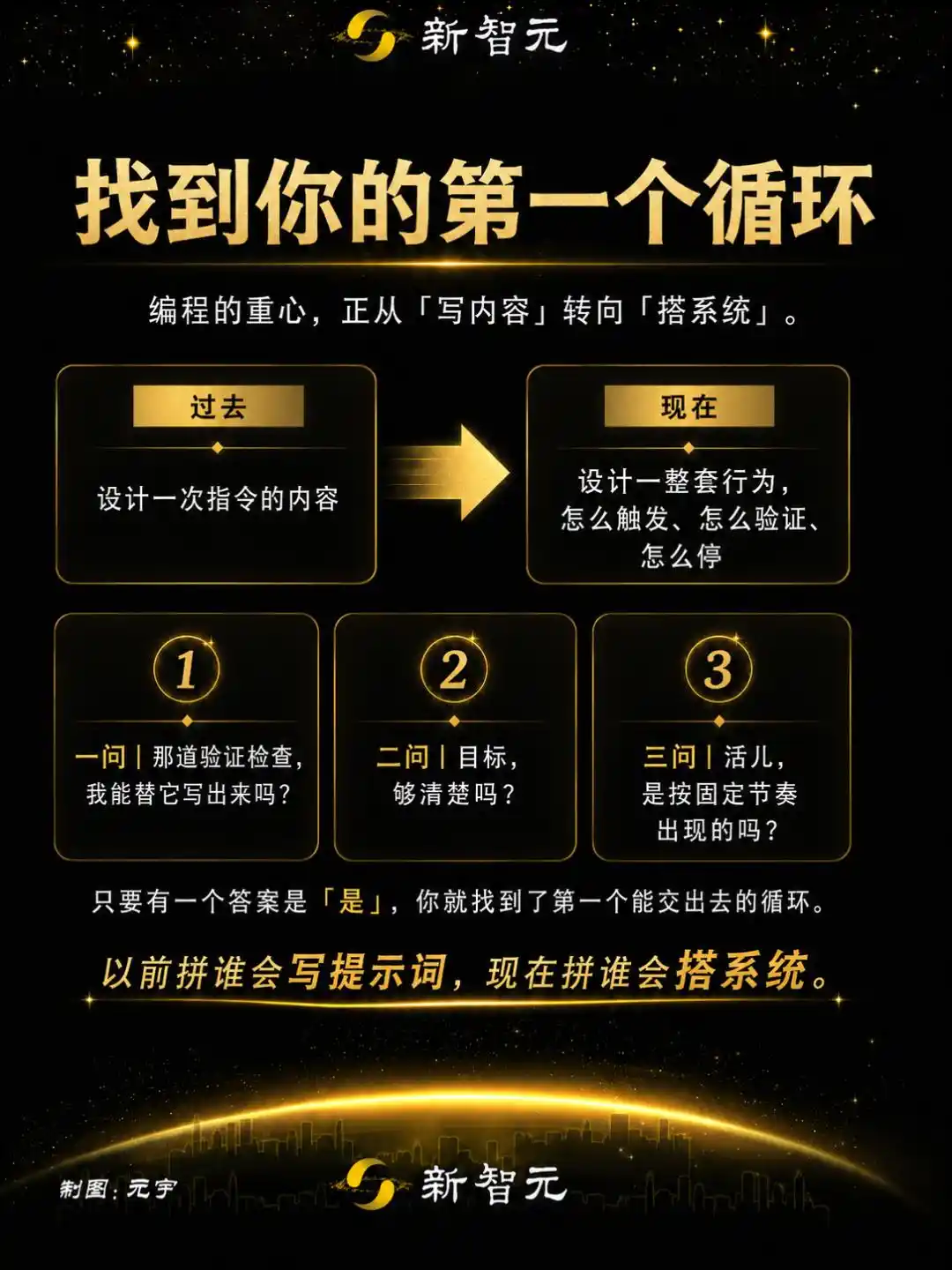
AI programming used to be about prompt engineering技巧 (skills); now it's about who can build systems: who can design a loop that verifies itself and knows when to stop.
The era of writing prompts won't vanish overnight, but its spotlight is shifting toward loops.
And the true designers of loops have just taken the stage.
References:
https://claude.com/blog/getting-started-with-loops
https://code.claude.com/docs/en/agent-sdk/agent-loop
https://support.claude.com/en/articles/14554000-claude-code-power-user-tips?utm_source=chatgpt.com https://www.reddit.com/r/ClaudeWorkflows/comments/1ujy4wq/workflow_designing_robust_claude_agent_loops/
This article is from the WeChat public account "新智元," author: 元宇 (Yuan Yu)