How to Protect Your Digital Assets? A 15-Step Checklist from an OpenAI Co-founder

marsbitPublished on 2026-04-12Last updated on 2026-04-12

Abstract

In the era of advanced AI, cybersecurity is no longer optional but a necessity. As AI tools like Anthropic's Mythos enable highly sophisticated and automated attacks, personal digital security requires proactive measures. OpenAI co-founder Andrej Karpathy’s 15-step "digital hygiene" checklist offers a foundational guide to self-protection: 1. Use a password manager to generate unique passwords. 2. Enable hardware security keys (e.g., YubiKey) for 2FA. 3. Use biometric authentication (Face ID, fingerprint). 4. Treat security questions as passwords—use random answers. 5. Encrypt disks (FileVault/BitLocker). 6. Reduce smart home devices to minimize attack surfaces. 7. Use Signal for encrypted messaging with auto-delete. 8. Switch to privacy-focused browsers like Brave. 9. Use independent search engines (e.g., Brave Search). 10. Employ virtual credit cards (e.g., Privacy.com) for online payments. 11. Use virtual mailing addresses to protect physical location. 12. Avoid clicking email links; manually type URLs. 13. Use VPNs (e.g., Mullvad) on untrusted networks. 14. Enable DNS-level ad/tracker blocking (e.g., NextDNS). 15. Monitor network activity with tools like Little Snitch. With AI-powered threats likely to become widely available soon, implementing these steps now is critical to safeguarding digital assets.

Editor's Note: As AI capabilities approach the boundaries of "general-purpose tools," the meaning of cybersecurity is also changing. It is no longer just a defense issue against hackers, viruses, or data breaches; it is evolving into a game of "asymmetric capabilities."

With Anthropic's release of Claude Mythos demonstrating vulnerability discovery capabilities close to those of top experts, cyber attacks are entering a new, more covert and automated phase. Personal security is shifting from an "option" to a "necessity." On one hand, the barrier to attack is being lowered; on the other, attack efficiency is increasing exponentially. This means "passive security" will become increasingly difficult to sustain.

Against this backdrop, the "digital hygiene" checklist proposed by OpenAI co-founder Andrej Karpathy offers an actionable path forward. In the AI era, security is no longer about "remedies after an incident" but rather "part of daily behavior." Identity verification, permission isolation, information minimization, and the restructuring of behavioral habits. These seemingly trivial 15 steps essentially rebuild a security boundary that an average user can control.

The real risk is not whether you become a target, but whether you are completely unprepared when an attack occurs.

The original text follows:

One thing is certain: when it comes to cybersecurity, you no longer have room to be lazy.

Anthropic's landmark release of Mythos yesterday marks a point of no return.
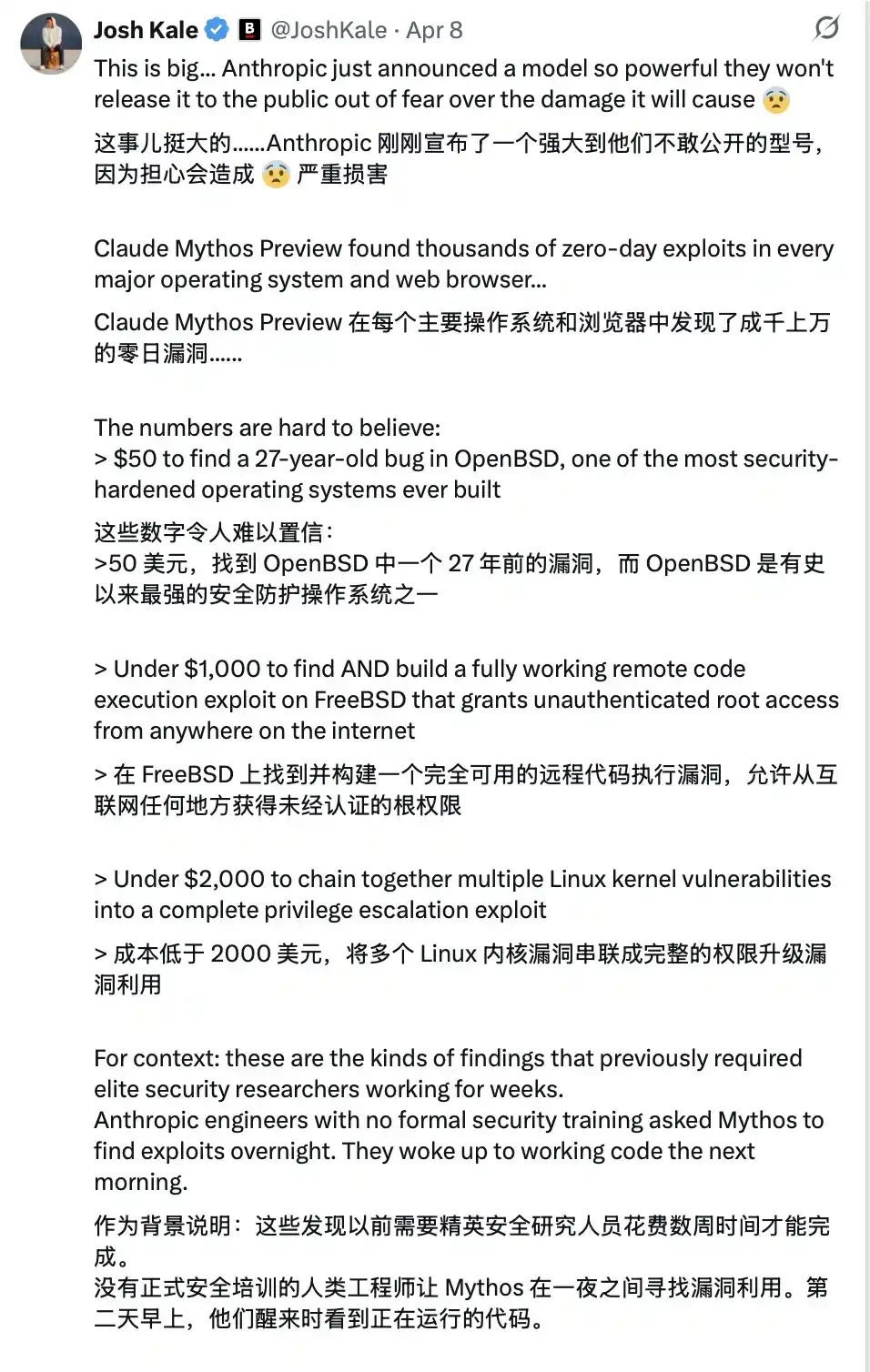
This technology is not yet public, but once it falls into the hands of malicious actors (which is almost inevitable)... you will be facing an extremely advanced cyber attack. Most people will find it's too late even before they realize they have been compromised.

It's like the "COVID-19" of the software world.

And precisely because of this, from now on, your cybersecurity must be watertight.

Karpathy's Digital Hygiene Guide

Last year, Andrej Karpathy (@karpathy, OpenAI co-founder) compiled a "Digital Hygiene Guide," systematically outlining the fundamental methods for protecting oneself in the AI era.

This is one of the most worthwhile introductory guides I have seen.
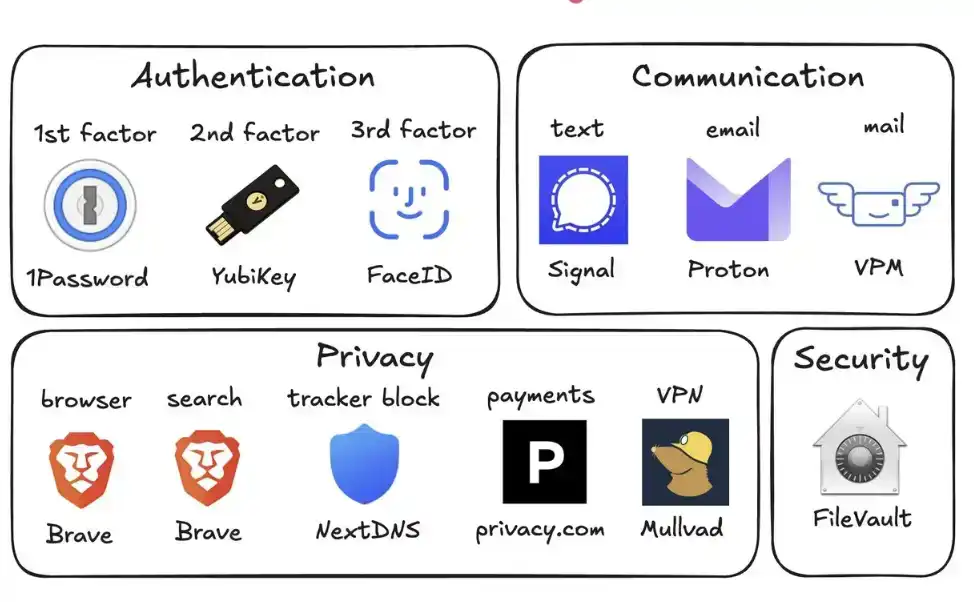
Here are all the security measures you should take in this era of uncertainty:

1. Use a Password Manager (e.g., 1Password)

Generate a unique, random password for every account you own. Once a service is breached, attackers often use these credentials for "credential stuffing" attacks. A password manager completely eliminates this risk and even auto-fills, making it faster to use than reusing passwords.

2. Configure Hardware Security Keys (e.g., YubiKey)

This is a physical device that serves as a second factor for login. An attacker must "physically possess it" to access your account. In contrast, SMS codes are easily stolen via SIM swap attacks (where someone impersonates you to your carrier to transfer your number to their phone).

It's recommended to buy 2–3 YubiKeys and store them separately to avoid being locked out if one is lost.

3. Enable Biometrics Fully

Such as Face ID, fingerprint recognition, etc. Enable it in your password manager, banking apps, and important applications. This is the third layer of verification: you "yourself." No one can steal your face from a database.

4. Treat Security Questions Like Passwords

Questions like "What is your mother's maiden name?" can be found online in 10 seconds. Generate random answers and store them in your password manager. Never provide real information.

5. Enable Disk Encryption

Called FileVault on Mac and BitLocker on Windows. If your computer is stolen, encryption turns it into a "brick" rather than giving the thief all your data. Enabling it takes 2 minutes and runs automatically in the background.

6. Reduce Smart Home Devices

Every "smart device" is essentially an internet-connected computer, often with a microphone. They continuously collect data, frequently connect to the internet, and are often breached. Your connected air quality monitor doesn't need to know your precise location. Fewer devices mean fewer attack vectors.

7. Use Signal for Communication

Signal provides end-to-end encryption. No one (including the platform itself, carriers, or eavesdroppers) can read the content. Regular SMS and even iMessage retain metadata (who, when, frequency of contact). Enable "disappearing messages" (e.g., 90 days) to prevent historical records from becoming a risk.

8. Use a Privacy-Focused Browser (e.g., Brave)

Based on Chromium, compatible with Chrome extensions, the user experience is almost identical.

9. Switch Your Default Search Engine to Brave Search

It has an independent index (unlike DuckDuckGo, which relies on Bing). If a search result is poor, you can add "!g" to jump to Google. The paid version is about $3 per month and is worth it—you become the customer, not the "product being sold."

10. Use Virtual Credit Cards (e.g., Privacy.com)

Generate a unique card number for each merchant and set spending limits. You can even use random names and addresses. If a merchant is breached, only a disposable card number is leaked, not your real financial information.

11. Use a Virtual Mailing Address

Services like Virtual Post Mail receive your physical mail, scan the contents, and let you view it online.

You can decide what to shred and what to forward. This way, you don't have to hand over your real home address to various unfamiliar merchants every time you shop online.

12. Don't Click Links in Emails

Email addresses are extremely easy to spoof. With the help of AI, phishing emails are now almost indistinguishable from real ones. Instead of clicking links, manually type the website address and log in yourself.

Also, disable automatic image loading in your email client, as embedded images are often used to track whether you've opened the email.

13. Use a VPN Selectively (e.g., Mullvad)

A VPN (Virtual Private Network) hides your IP address (the unique number identifying your device and location) from the services you access. You don't need to have it on all the time, but definitely enable it when using public Wi-Fi or accessing less trusted services.

14. Set Up DNS-Level Ad Blocking (e.g., NextDNS)

Think of DNS as the phonebook your device uses to "look up websites." Blocking at this layer means ads and trackers are stopped before they even load.

And it works for all apps and browsers on your device.

15. Install a Network Monitoring Tool (e.g., Little Snitch)

It shows you which applications on your computer are connecting to the internet, how much data they're sending, and where it's going. Any app that "phones home with abnormally high frequency" should be treated with suspicion and likely uninstalled.

Currently, Mythos remains only in the hands of the defense side of Project Glasswing (like Anthropic, Apple, Google, etc.). But models with similar capabilities will soon fall into the hands of malicious actors (perhaps in less than 6 months, or even sooner).

This is why you must strengthen your security now. Spending 15 minutes on these settings now can help you avoid a series of serious problems in the future.

Stay safe, and all the best.

Trending Cryptos

Related Questions

QWhat is the main theme of Andrej Karpathy's digital hygiene guide in the context of AI advancements?

AThe main theme is proactive personal cybersecurity in the AI era, emphasizing that security must become a daily habit rather than a reactive measure, as AI-powered attacks become more automated and sophisticated.

QWhy does the article recommend using hardware security keys like YubiKey instead of SMS-based two-factor authentication?

ABecause SMS codes are vulnerable to SIM swap attacks, where attackers can transfer a victim's phone number to their own device. Hardware security keys require physical possession, providing a much higher level of security.

QAccording to the guide, how should one handle security questions for online accounts?

ASecurity questions should be treated like passwords. Instead of providing real answers, which can often be found online, one should generate random answers and store them in a password manager.

QWhat is one specific financial security practice recommended to protect one's identity when shopping online?

AThe use of virtual credit cards (e.g., from Privacy.com) is recommended. This allows users to generate unique, disposable card numbers for each merchant, with spending limits, to prevent exposing their real financial identity if a merchant is breached.

QWhat analogy does the article use to describe the threat posed by advanced AI tools like Anthropic's Mythos in the wrong hands?

AThe article analogizes it to a 'COVID-19 for the software world,' indicating it is an extremely advanced, highly contagious, and hard-to-detect threat that can cause widespread damage before one even realizes they have been compromised.

Related Reads

CoinShares Analysts Record RWA Growth Amid DeFi Downturn

Analysts from CoinShares and Token Terminal report significant growth in real-world asset (RWA) activity within decentralized finance (DeFi) from Q2 2025 to Q2 2026, contrasting with a broader DeFi downturn. The volume of RWAs on credit platforms and decentralized exchanges surged to $7.4 billion from $2.3 billion a year prior, while overall DeFi deposits fell by approximately 15%. This divergence suggests demand is driven by the financial utility of assets, not just market cycles. Income-generating RWAs, such as tokenized treasury funds (e.g., JTRSY, BUIDL), private credit products (e.g., JAAA), and yield-bearing stablecoins (e.g., sUSDS, sUSDe), now constitute about 6% of all DeFi deposits, up from 1.7%. Their appeal lies in continuing to generate yield even when used as collateral. Most RWA deposits are on Ethereum-based platforms. Spot trading volume for RWAs on DEXs grew 220% year-over-year, albeit from a small base, reaching about $6.3 billion (less than 2% of total DEX spot volume). Trading was concentrated in tokenized gold (XAUT, PAXG) and sUSDe. Perpetual futures trading for traditional assets exceeded $200 billion, nearing 32% of the total perpetuals market, with platforms like Hyperliquid's tradeXYZ seeing 20x growth. Despite this expansion, RWA growth has not yet offset declining revenues from crypto-native trading and lending in DeFi. The segment remains early-stage; for instance, the $2.2 billion market cap of tokenized equities is minuscule compared to the global equities market. Analysts compare its current phase to stablecoins in 2019.

cryptonews.ru2m ago

CoinShares Analysts Record RWA Growth Amid DeFi Downturn

cryptonews.ru2m ago

World Chain Implements EIP-7928 Ahead of Mainnet Launch

World Chain announces it will implement full block access lists on August 17, becoming the first production Layer 2 (L2) network to transmit EIP-7928 access list data within each flash block. This update is a key step in scaling blockchain throughput without increasing hardware demands for independent validators. The implementation allows validators to verify transactions in parallel during block formation, supporting throughputs up to 1 gigagas per second. Block Access Lists (BALs) provide a record of the state read and written by each transaction, enabling independent transactions to be verified simultaneously across multiple CPU cores. World Chain extends the EIP-7928 specification by streaming access list data every 200 milliseconds via its flashblock architecture. This lets validators begin verification as blocks are assembled, reducing latency and distributing the verification workload. While EIP-7928's full deployment on Ethereum is planned for the future Glamsterdam upgrade, World Chain is implementing it via a runtime flag, allowing node operators to update without a coordinated network hard fork. Internal tests on World Chain networks showed stable verification latency even with throughput surges reaching 1 gigagas per second on standard cloud infrastructure. This suggests blockchain networks can scale throughput significantly without a proportional increase in the computational power required for chain validation. This launch marks the first production implementation of streaming EIP-7928 block access lists, contributing to Ethereum's broader scaling roadmap by improving performance while maintaining accessibility for independent validators.

cryptonews.ru6m ago

World Chain Implements EIP-7928 Ahead of Mainnet Launch

cryptonews.ru6m ago

Canadian Users Account for 25% of Losses Related to Coldcard Vulnerability

Canadian Bitcoin users suffered the highest losses, accounting for 25% of the total, from a vulnerability affecting the Coldcard hardware wallet, a situation analysts link to the strong local presence of its parent company Coinkite headquartered in Toronto. Australia followed with 15-20% of losses, while the US and Thailand accounted for 10-15%. Though the exploit hit English-speaking and early Bitcoin-adopting regions hardest, global impact was seen across Western Europe, Latin America, and key African crypto hubs. The total stolen assets reached $116 million. Galaxy Research identified a March 2021 firmware update—specifically the faulty implementation of a new random number generator (RNG)—as the single point of failure. A configuration error rendered the hardware RNG inactive, silently defaulting to a weaker software-based one, which generated private keys with low entropy for over five years before an attacker stole $70 million from 1,200 wallets in 41 minutes. In response, security experts urged manufacturers to eliminate backup RNG mechanisms in production and strictly adhere to validation standards like NIST FIPS 140-3. For incident response, immediate user communication and clear mitigation steps were prioritized alongside rigorous patch testing. For users with compromised seed phrases, a strict protocol was recommended: purchase a new reputable hardware wallet, generate a new seed offline, verify it with a test transaction, transfer all funds to the new setup, *then* attempt to update the original device's firmware. Experts also advised diversifying risk by using hardware wallets from different manufacturers to avoid a single point of failure. The incident sparked a fundamental debate about self-custody security models. Critics argue that offline storage alone isn't foolproof, highlighting that trust is always delegated to third parties, like wallet manufacturers. The consensus is shifting towards multi-vendor setups and mandatory baseline standards like multi-signature or Multi-Party Computation (MPC) wallets. The goal is to move from "trusting one device" to ensuring no single compromised component or entity can move funds, distributing trust across independent organizational and technological failure domains.

cryptonews.ru6m ago

Canadian Users Account for 25% of Losses Related to Coldcard Vulnerability

cryptonews.ru6m ago

Trading

Spot

Hot Articles

Discussions

Welcome to the HTX Community. Here, you can stay informed about the latest platform developments and gain access to professional market insights. Users' opinions on the price of AI (AI) are presented below.

活动图片