How to Protect Your Digital Assets? A 15-Step Checklist from an OpenAI Co-founder

marsbitPublished on 2026-04-12Last updated on 2026-04-12

Abstract

In the era of advanced AI, cybersecurity is no longer optional but a necessity. As AI tools like Anthropic's Mythos enable highly sophisticated and automated attacks, personal digital security requires proactive measures. OpenAI co-founder Andrej Karpathy’s 15-step "digital hygiene" checklist offers a foundational guide to self-protection: 1. Use a password manager to generate unique passwords. 2. Enable hardware security keys (e.g., YubiKey) for 2FA. 3. Use biometric authentication (Face ID, fingerprint). 4. Treat security questions as passwords—use random answers. 5. Encrypt disks (FileVault/BitLocker). 6. Reduce smart home devices to minimize attack surfaces. 7. Use Signal for encrypted messaging with auto-delete. 8. Switch to privacy-focused browsers like Brave. 9. Use independent search engines (e.g., Brave Search). 10. Employ virtual credit cards (e.g., Privacy.com) for online payments. 11. Use virtual mailing addresses to protect physical location. 12. Avoid clicking email links; manually type URLs. 13. Use VPNs (e.g., Mullvad) on untrusted networks. 14. Enable DNS-level ad/tracker blocking (e.g., NextDNS). 15. Monitor network activity with tools like Little Snitch. With AI-powered threats likely to become widely available soon, implementing these steps now is critical to safeguarding digital assets.

Editor's Note: As AI capabilities approach the boundaries of "general-purpose tools," the meaning of cybersecurity is also changing. It is no longer just a defense issue against hackers, viruses, or data breaches; it is evolving into a game of "asymmetric capabilities."

With Anthropic's release of Claude Mythos demonstrating vulnerability discovery capabilities close to those of top experts, cyber attacks are entering a new, more covert and automated phase. Personal security is shifting from an "option" to a "necessity." On one hand, the barrier to attack is being lowered; on the other, attack efficiency is increasing exponentially. This means "passive security" will become increasingly difficult to sustain.

Against this backdrop, the "digital hygiene" checklist proposed by OpenAI co-founder Andrej Karpathy offers an actionable path forward. In the AI era, security is no longer about "remedies after an incident" but rather "part of daily behavior." Identity verification, permission isolation, information minimization, and the restructuring of behavioral habits. These seemingly trivial 15 steps essentially rebuild a security boundary that an average user can control.

The real risk is not whether you become a target, but whether you are completely unprepared when an attack occurs.

The original text follows:

One thing is certain: when it comes to cybersecurity, you no longer have room to be lazy.

Anthropic's landmark release of Mythos yesterday marks a point of no return.
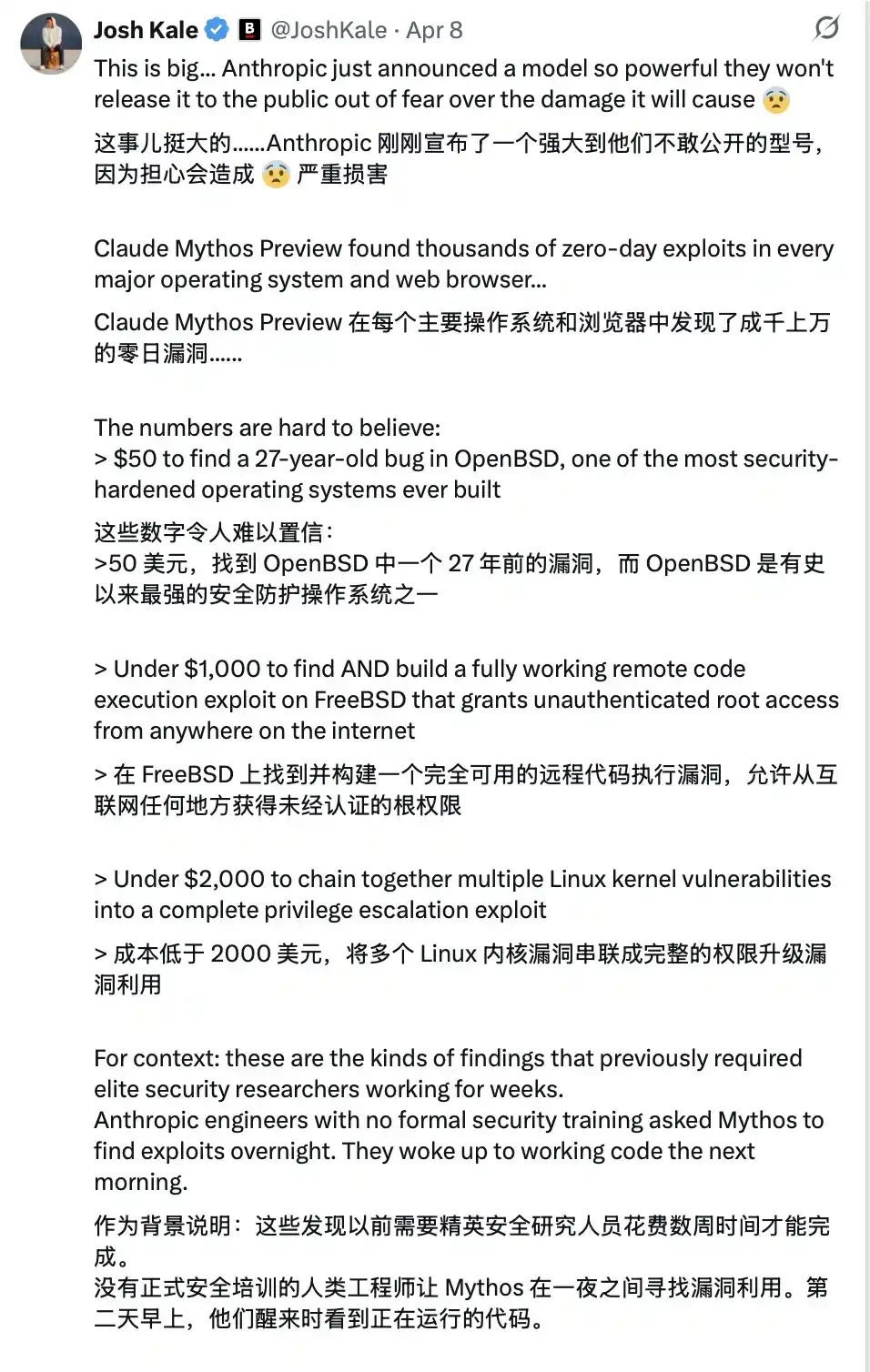
This technology is not yet public, but once it falls into the hands of malicious actors (which is almost inevitable)... you will be facing an extremely advanced cyber attack. Most people will find it's too late even before they realize they have been compromised.

It's like the "COVID-19" of the software world.

And precisely because of this, from now on, your cybersecurity must be watertight.

Karpathy's Digital Hygiene Guide

Last year, Andrej Karpathy (@karpathy, OpenAI co-founder) compiled a "Digital Hygiene Guide," systematically outlining the fundamental methods for protecting oneself in the AI era.

This is one of the most worthwhile introductory guides I have seen.
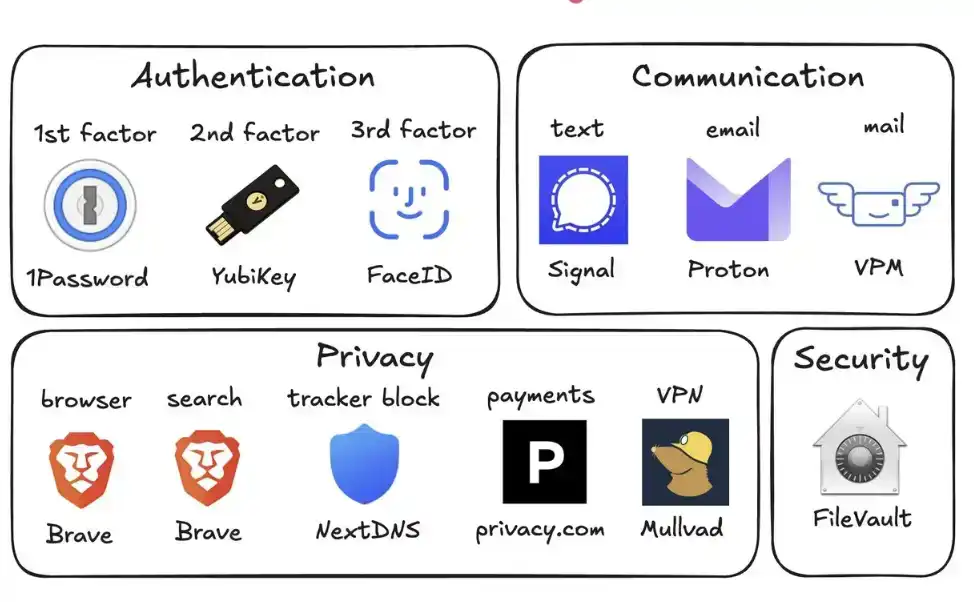
Here are all the security measures you should take in this era of uncertainty:

1. Use a Password Manager (e.g., 1Password)

Generate a unique, random password for every account you own. Once a service is breached, attackers often use these credentials for "credential stuffing" attacks. A password manager completely eliminates this risk and even auto-fills, making it faster to use than reusing passwords.

2. Configure Hardware Security Keys (e.g., YubiKey)

This is a physical device that serves as a second factor for login. An attacker must "physically possess it" to access your account. In contrast, SMS codes are easily stolen via SIM swap attacks (where someone impersonates you to your carrier to transfer your number to their phone).

It's recommended to buy 2–3 YubiKeys and store them separately to avoid being locked out if one is lost.

3. Enable Biometrics Fully

Such as Face ID, fingerprint recognition, etc. Enable it in your password manager, banking apps, and important applications. This is the third layer of verification: you "yourself." No one can steal your face from a database.

4. Treat Security Questions Like Passwords

Questions like "What is your mother's maiden name?" can be found online in 10 seconds. Generate random answers and store them in your password manager. Never provide real information.

5. Enable Disk Encryption

Called FileVault on Mac and BitLocker on Windows. If your computer is stolen, encryption turns it into a "brick" rather than giving the thief all your data. Enabling it takes 2 minutes and runs automatically in the background.

6. Reduce Smart Home Devices

Every "smart device" is essentially an internet-connected computer, often with a microphone. They continuously collect data, frequently connect to the internet, and are often breached. Your connected air quality monitor doesn't need to know your precise location. Fewer devices mean fewer attack vectors.

7. Use Signal for Communication

Signal provides end-to-end encryption. No one (including the platform itself, carriers, or eavesdroppers) can read the content. Regular SMS and even iMessage retain metadata (who, when, frequency of contact). Enable "disappearing messages" (e.g., 90 days) to prevent historical records from becoming a risk.

8. Use a Privacy-Focused Browser (e.g., Brave)

Based on Chromium, compatible with Chrome extensions, the user experience is almost identical.

9. Switch Your Default Search Engine to Brave Search

It has an independent index (unlike DuckDuckGo, which relies on Bing). If a search result is poor, you can add "!g" to jump to Google. The paid version is about $3 per month and is worth it—you become the customer, not the "product being sold."

10. Use Virtual Credit Cards (e.g., Privacy.com)

Generate a unique card number for each merchant and set spending limits. You can even use random names and addresses. If a merchant is breached, only a disposable card number is leaked, not your real financial information.

11. Use a Virtual Mailing Address

Services like Virtual Post Mail receive your physical mail, scan the contents, and let you view it online.

You can decide what to shred and what to forward. This way, you don't have to hand over your real home address to various unfamiliar merchants every time you shop online.

12. Don't Click Links in Emails

Email addresses are extremely easy to spoof. With the help of AI, phishing emails are now almost indistinguishable from real ones. Instead of clicking links, manually type the website address and log in yourself.

Also, disable automatic image loading in your email client, as embedded images are often used to track whether you've opened the email.

13. Use a VPN Selectively (e.g., Mullvad)

A VPN (Virtual Private Network) hides your IP address (the unique number identifying your device and location) from the services you access. You don't need to have it on all the time, but definitely enable it when using public Wi-Fi or accessing less trusted services.

14. Set Up DNS-Level Ad Blocking (e.g., NextDNS)

Think of DNS as the phonebook your device uses to "look up websites." Blocking at this layer means ads and trackers are stopped before they even load.

And it works for all apps and browsers on your device.

15. Install a Network Monitoring Tool (e.g., Little Snitch)

It shows you which applications on your computer are connecting to the internet, how much data they're sending, and where it's going. Any app that "phones home with abnormally high frequency" should be treated with suspicion and likely uninstalled.

Currently, Mythos remains only in the hands of the defense side of Project Glasswing (like Anthropic, Apple, Google, etc.). But models with similar capabilities will soon fall into the hands of malicious actors (perhaps in less than 6 months, or even sooner).

This is why you must strengthen your security now. Spending 15 minutes on these settings now can help you avoid a series of serious problems in the future.

Stay safe, and all the best.

Trending Cryptos

Related Questions

QWhat is the main theme of Andrej Karpathy's digital hygiene guide in the context of AI advancements?

AThe main theme is proactive personal cybersecurity in the AI era, emphasizing that security must become a daily habit rather than a reactive measure, as AI-powered attacks become more automated and sophisticated.

QWhy does the article recommend using hardware security keys like YubiKey instead of SMS-based two-factor authentication?

ABecause SMS codes are vulnerable to SIM swap attacks, where attackers can transfer a victim's phone number to their own device. Hardware security keys require physical possession, providing a much higher level of security.

QAccording to the guide, how should one handle security questions for online accounts?

ASecurity questions should be treated like passwords. Instead of providing real answers, which can often be found online, one should generate random answers and store them in a password manager.

QWhat is one specific financial security practice recommended to protect one's identity when shopping online?

AThe use of virtual credit cards (e.g., from Privacy.com) is recommended. This allows users to generate unique, disposable card numbers for each merchant, with spending limits, to prevent exposing their real financial identity if a merchant is breached.

QWhat analogy does the article use to describe the threat posed by advanced AI tools like Anthropic's Mythos in the wrong hands?

AThe article analogizes it to a 'COVID-19 for the software world,' indicating it is an extremely advanced, highly contagious, and hard-to-detect threat that can cause widespread damage before one even realizes they have been compromised.

Related Reads

Must-Watch Events Next Week|CLARITY Act Could Face Senate Vote; SpaceX, Circle to Report Earnings (8.3-8.9)

**Summary: Key Events and Developments to Watch (August 3-9)** The upcoming week is marked by significant financial disclosures, key legislative deadlines, and notable product updates. **Major Financial Events:** Several companies are scheduled to release their Q2 2026 earnings. American Bitcoin (ABTC) will report on August 3, followed by SpaceX and Hut 8 Mining Corp. on August 4, and Circle on August 5. Notably, a significant portion of SpaceX shares (up to 12% of total shares) will be unlocked on August 6 following their earnings release. **Key Legislative Deadline:** The U.S. Senate faces an August 7 deadline to secure 60 votes for the CLARITY Act, a bipartisan bill aiming to establish a federal regulatory framework for cryptocurrencies. The Senate may hold a full vote on the bill during the week. **Economic Data:** The U.S. July Non-Farm Payrolls report will be released on August 7, providing crucial labor market data. **Technology & Product Updates:** * **Shutdowns:** DeFi portfolio tracker Zapper and wallet app Ctrl Wallet will cease operations on August 3. * **Upgrades:** LayerZero will deprecate its v1 relayers on August 3. XRP Ledger's new version 3.3.0, featuring five new functions, is expected next week. * **AI:** Elon Musk announced that the advanced Grok 4.6 AI model is set for release around August 7. * **Bitcoin:** The BIP-110 forced signaling for a potential Bitcoin network change is scheduled to begin around August 8. **Other Notable Events:** Chinese robotics firm Unitree Tech has set its preliminary price inquiry for its IPO for August 5. South Korean exchange Upbit will delist AQT and AERGO tokens on August 3.

marsbit11m ago

Must-Watch Events Next Week|CLARITY Act Could Face Senate Vote; SpaceX, Circle to Report Earnings (8.3-8.9)

marsbit11m ago

Stocks Are Plummeting More Sharply Than Cryptocurrencies. Where Has the Money Gone?

Stock Markets Plunge Deeper Than Cryptocurrencies: Where Did the Money Go? In late July, Seoul's Kospi index triggered circuit breakers for two consecutive days, plummeting over 40% from its June high. The collapse was led by heavyweight stocks like SK Hynix, whose record profits still disappointed investors, and devastating leveraged ETFs, with one major product losing over 83% of its value. This signaled a global, forced deleveraging targeting the most crowded trades. Interestingly, while stocks exhibited extreme volatility akin to crypto markets, Bitcoin rose nearly 15% in July after a prior steep drop. Analysis shows the money fleeing equities did not flow into Bitcoin. Instead, Bitcoin had already absorbed its sell-off in May-June, when U.S. spot Bitcoin ETFs saw historic outflows. The true safe-haven beneficiary was gold, whose price rose over 20% year-on-year, highlighting a decoupling between Bitcoin and gold as "digital gold." The sell-off was a targeted unwinding of leveraged positions in tech and semiconductors, accelerated by broker-dealer risk management and shifts in the AI narrative, including new competition from Chinese memory chipmakers. The retreat path was clear: from high-valuation tech stocks to cash and U.S. Treasuries, then to gold. For Bitcoin to attract sustained institutional inflows, conditions like eased global liquidity pressure, a "soft-landing" Fed rate cut, and U.S. regulatory clarity via legislation like the stalled CLARITY Act are needed. Currently, Bitcoin is not a safe haven but an already-cleared asset. Its low correlation with tech stocks, however, makes it a potential diversification play for institutional portfolios once the storm passes. The money isn't here yet, but the positioning is underway.

marsbit11m ago

Stocks Are Plummeting More Sharply Than Cryptocurrencies. Where Has the Money Gone?

marsbit11m ago

In Conversation with Ray Dalio: We Are Currently in an AI Bubble, with 1% of My Portfolio in Bitcoin

Ray Dalio, founder of Bridgewater Associates, warns in an interview that the current AI boom shows classic bubble characteristics, which could lead to significant economic downturns as seen in past cycles like 1929 or 2000. He explains that speculative enthusiasm, fueled by debt and overvaluation, often precedes a crash when rising rates or taxation force asset sales, causing widespread losses and recession. Dalio also outlines his "Big Cycle" theory, describing an approximate 80-year pattern where widening wealth gaps, massive government deficits, and shifting geopolitical power (like China's rise) create internal conflict and global instability. He emphasizes that we are in a late-cycle, transitional phase where traditional powers like the US and UK face decline. For personal wealth protection, Dalio advises diversification beyond cash into assets like stocks, bonds, real estate, and particularly gold, which he prefers over Bitcoin. While he holds about 1% of his portfolio in Bitcoin as a non-printable hard asset, he views gold as more secure from technological or governmental threats. Regarding AI's impact, Dalio believes it will disproportionately benefit capital owners, worsening inequality by replacing both physical and cognitive labor. He suggests that human intuition and emotional intelligence, combined with AI, will be key for future workers. On taxation, Dalio argues that wealth taxes are impractical and risk triggering asset sell-offs, reducing productive investment. He points to the UK as a cautionary example of debt, low productivity, and political strife. Geopolitically, Dalio foresees a more regionalized world, with the US showing weakness in prolonged conflicts like with Iran, akin to past imperial declines. The ideal outcome, he suggests, is coexisting powerful blocs (e.g., Americas, China-Asia Pacific) without major war.

marsbit4h ago

In Conversation with Ray Dalio: We Are Currently in an AI Bubble, with 1% of My Portfolio in Bitcoin

marsbit4h ago

Daily 7.2 Trillion KRW: Foreign Capital's Record Net Buying on Friday! Wall Street Says Headwinds for Korean Stock Fund Flows Have Subsided

South Korean stock market sees a dramatic shift in fund flows. On July 31, foreign investors made a record net purchase of approximately KRW 7.2 trillion in KOSPI stocks, marking a fundamental reversal from the persistent large-scale net outflows seen in previous months. This contributed to a significant narrowing of foreign net selling in July to KRW 9.8 trillion, down sharply from KRW 48.4 trillion in June and KRW 44.5 trillion in May. Simultaneously, domestic institutional pressure eased. South Korean pension funds and asset managers turned to a net buying position in July, purchasing KRW 1.0 trillion worth of KOSPI shares, contrasting with net sales in May and June. Market volatility is expected to be dampened by new financial regulations. Effective July 31, the Financial Services Commission tightened access for retail investors to single-stock leveraged ETFs by raising the minimum cash deposit requirement. Trading volumes for these products subsequently dropped to about 50% of their monthly average. Citigroup Research maintains its year-end KOSPI target of 10,000 points. The firm cites several supportive factors: the substantial easing of headwinds from capital outflows, a robust fundamental outlook for the semiconductor sector, historically low market valuations, strong economic fundamentals, and the potential for policy support from financial authorities if needed.

marsbit4h ago

Daily 7.2 Trillion KRW: Foreign Capital's Record Net Buying on Friday! Wall Street Says Headwinds for Korean Stock Fund Flows Have Subsided

marsbit4h ago

Trading

Spot

Hot Articles

Discussions

Welcome to the HTX Community. Here, you can stay informed about the latest platform developments and gain access to professional market insights. Users' opinions on the price of AI (AI) are presented below.

活动图片