Editor's Note: Claude Code is evolving from a coding assistant into a composable Agent workbench.
The workflows introduced in this article are designed to enable Claude to move beyond "thinking and then doing" within the same context window. Instead, it can dynamically generate an execution framework for tasks: decomposing tasks, dispatching sub-agents, parallel processing, cross-validation, iterative cycles, and even allowing different agents to compete with each other before synthesizing the final results.
This signifies a clear expansion of Claude Code's applicable scenarios. It's not just suitable for code migration, refactoring, test reproduction, and code review, but also for non-technical tasks such as deep research, fact-checking, resume screening, incident post-mortems, rule distillation, business plan reviews, and naming brainstorms. Many complex tasks are inherently similar to programming: they require problem decomposition, context isolation, hypothesis validation, handling of extensive details, and making choices among multiple candidate paths.
Dynamic workflows aim to address several common issues with large language models on long tasks: "Agentic laziness," where the agent declares completion prematurely; "Self-preferential bias," where the agent tends to favor its own conclusions; and "Goal drift," where the agent gradually deviates from the original objective over multiple execution rounds. By assigning tasks to multiple Claude instances with independent contexts, it transforms complex tasks from a "single-agent marathon" into "multi-agent collaboration."
Of course, workflows are not a universal solution. They typically consume more tokens and may not be necessary for every routine coding task. However, they point to an important direction: future competition among AI tools may depend not only on the intelligence of a single model but also on its ability to organize reliable, reusable, and reviewable execution processes around complex objectives.
Below is the original article:
Although Claude Code's default execution framework is built for programming, it is also applicable to many other types of tasks. It turns out that many tasks are structurally similar to programming tasks. However, for certain specific task types to perform optimally, we still need to build customized execution frameworks on top of Claude Code, such as for research, security analysis, agent team collaboration, or code review.
Workflows allow you to dynamically create execution frameworks, enabling Claude to solve the aforementioned problems, and more, more natively within Claude Code itself. You can also share and reuse these workflows with others.
In this article, I'll share my initial experiences and insights using workflows to help you leverage their capabilities more fully.
It should be noted, however, that best practices are still emerging. Dynamic workflows typically consume more tokens, so you need to carefully consider when and how to use them.
Note: This article is also published on the Claude Blog.
Example Prompts
Before diving into technical details, I'd like to provide some example prompts to help you understand the possibilities with workflows:
"This test fails approximately once every 50 runs. Set up a workflow to reproduce it, formulate hypotheses, and conduct adversarial testing across different worktrees. /goal Do not stop until one hypothesis is validated."
"Use a workflow to review my last 50 sessions, extract recurring corrections I've made, and convert these persistent issues into CLAUDE.md rules."
"Use a workflow to examine the past six months of the #incidents channel in Slack and identify recurring root causes that no one filed tickets for."
"Run my business plan through a workflow, having different agents critique it from the perspectives of an investor, a customer, and a competitor."
"Here is a folder with 80 resumes. Use a workflow to rank them according to backend role requirements and double-check the top ten. Use the AskUserQuestion tool to query me to help you establish evaluation criteria."
"I need to name this CLI tool. Use a workflow to brainstorm a batch of options, then select the top three through a tournament mechanism."
"Use a workflow to rename our User model to Account everywhere."
"Read my blog draft and use a workflow to verify every technical claim against the codebase. I don't want to publish anything incorrect."
How Dynamic Workflows Work
A dynamic workflow executes a JavaScript file containing special functions for generating and coordinating sub-agents.
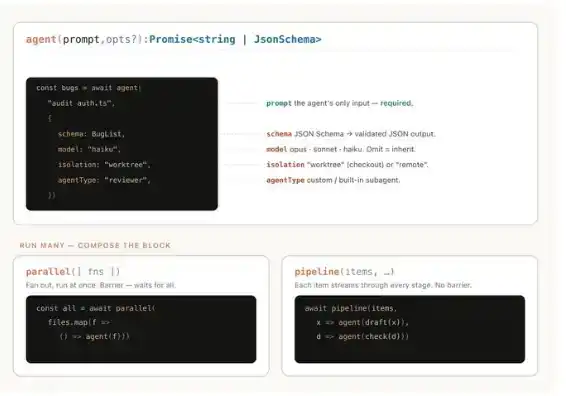
Dynamic workflows also include standard JavaScript functions like JSON, Math, and Array for data manipulation.
Notably, dynamic workflows can decide which model a particular agent uses and whether a sub-agent runs in its own worktree. This allows Claude to autonomously select the required level of intelligence and isolation based on task needs.
If a workflow is interrupted—for example, by a manual user action or terminal exit—it can resume execution from the point of interruption when the session is restored.
Why Dynamic Workflows are Needed
When you have Claude Code's default execution framework handle a task, it needs to perform both planning and execution within the same context window. While this is very effective for many programming tasks, it can sometimes fail on long-running, massively parallel, or highly structured adversarial tasks.
The reason is that the longer Claude works on a complex task within a single context window, the more prone it becomes to several specific failure modes:
Agentic laziness: This occurs when Claude stops prematurely on particularly complex, multi-part tasks, declaring the task complete after only partial progress. For example, processing only 20 out of 50 items in a security audit and announcing completion.
Self-preferential bias: Claude tends to prefer its own results or findings, especially when asked to verify or judge its own output against some evaluation criteria.
Goal drift: Over multiple rounds of execution, Claude's fidelity to the original goal gradually declines, particularly after context compression. Each summarization incurs information loss, and specific details like edge cases or "don't do X" constraints can be lost.
Creating a workflow helps mitigate these issues by orchestrating multiple independent Claude instances, each with its own context window, focused on isolated, well-defined tasks.
Dynamic Workflows vs. Static Workflows
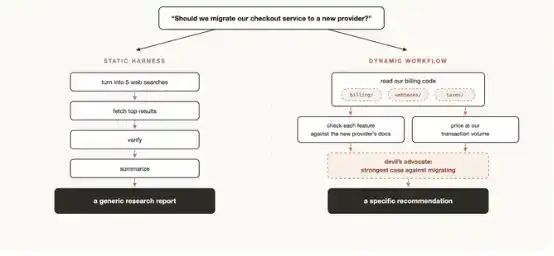
You may have previously created static workflows using the Claude Agent SDK or claude -p to coordinate multiple Claude Code instances.
However, because static workflows need to cover various edge cases, they tend to be more generic. With the advent of Claude Opus 4.8 and dynamic workflows, Claude is now intelligent enough to write a tailored execution framework for your specific use case.
Practical Patterns When Using Dynamic Workflows
You can directly ask Claude to create a dynamic workflow, or use the trigger word "ultracode" to ensure Claude Code creates a workflow.
However, if you build a mental model of how dynamic workflows operate, it's easier to judge when to use them and to guide Claude via prompts.
When constructing workflows, Claude commonly uses and combines the following patterns:
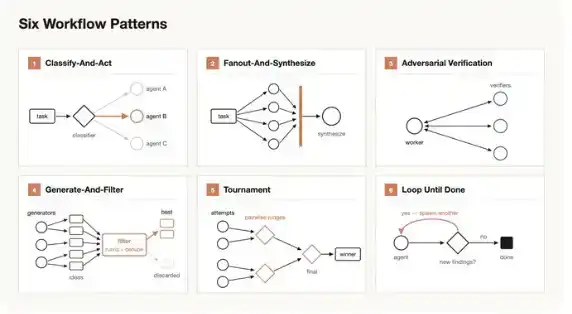
Classify & Execute: Use a classification agent to determine the task type, then route to different agents or behaviors based on that type. A classifier can also be used at the end of the process to judge the output.
Fan-out & Synthesize: Split a task into multiple smaller steps, have each step handled by an agent, and finally synthesize the results. This is particularly suitable for tasks with numerous small steps or where each step needs a clean context window to avoid interference or cross-contamination. The synthesis step acts as a "barrier": it waits for all fanned-out agents to finish, then merges their structured outputs into a single result.
Adversarial Verification: For each generated output, run an independent agent to adversarially verify it against a set of evaluation criteria or guidelines.
Generate & Filter: Generate a large number of ideas around a theme, then filter them based on evaluation criteria or a verification process, removing duplicates and returning only the highest-quality, tested ideas.
Tournament: Instead of splitting the work, have agents compete. Generate N agents, each attempting to complete the same task using different methods. Then, a prompt or model-driven reviewing agent compares the results pairwise until a winner emerges.
Loop Until Done: For tasks with unknown workload, instead of a fixed number of rounds, cycle through generating agents until a stop condition is met, such as no new discoveries or errors in the logs.
Use Cases
You can think more creatively about when and how to have Claude Code create dynamic workflows. I've found workflows can sometimes be even more useful for non-technical work.
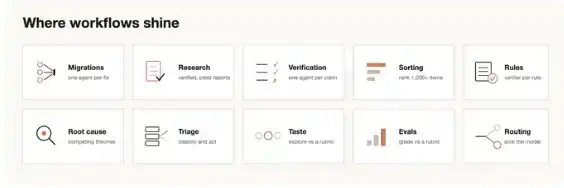
Migration & Refactoring
Bun used workflows for its rewrite from Zig to Rust. You can read Jarred's post on X for details.
The key is to split the task into a series of steps to process, like call sites, failing tests, modules, etc. Launch a sub-agent for each fix in a worktree to complete the repair; then have another agent perform an adversarial review before merging results. You might consider explicitly telling agents not to use overly resource-intensive commands, maximizing parallelism without exhausting local machine resources.
Deep Research
We released a deep research skill (/deep-research) in Claude Code, which uses dynamic workflows. Specifically, it fans out to perform web searches, scrape sources, adversarially verify relevant claims, and synthesize a referenced report.
But this kind of research isn't limited to web searches. For example, you could have Claude compile a status report from Slack context or explore the codebase deeply to study how a feature works.
Deep Verification
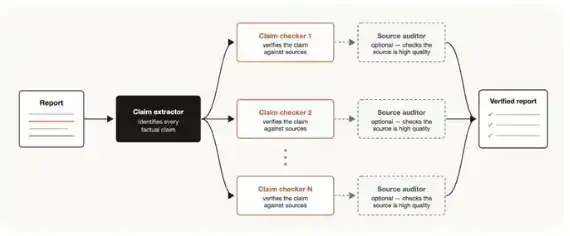
Conversely, if you have a report and want to fact-check every factual claim and source cited, generate a workflow: first, an agent identifies all factual claims; then, launch a sub-agent for each claim to meticulously verify it. You can also have a verification agent check the sourcing sub-agents to ensure their source quality is high enough.
Ranking
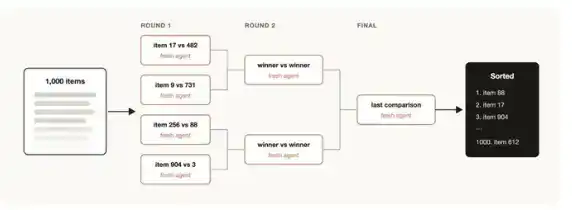
You might have a set of items you want to rank by some qualitative metric, and you believe Claude Code is good at evaluating that metric. For example, ranking support tickets by bug severity.
But if you try to rank 1000+ lines in a single prompt, quality degrades, and it might not fit the context window. It's better to run a tournament, building a pipeline of pairwise comparison agents because comparative judgments are often more reliable than absolute scoring; or perform parallel bucket sorting first, then merge results. Each comparison is done by an independent agent, so a deterministic loop can maintain the tournament structure, with only the current running order needing to stay in context.
Memory & Rule Adherence
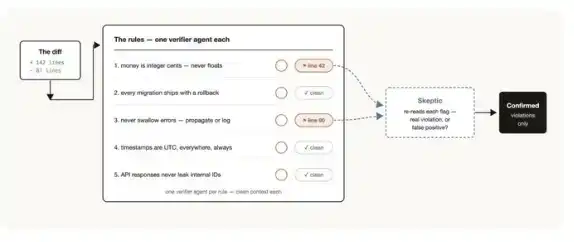
If you have a set of specific rules that Claude often misses or fails to execute well, even when seeing them in CLAUDE.md, create a workflow listing these rules and have verification agents check them one by one—one verifier per rule. Creating a sub-agent with a "skeptic" persona to review whether these rules are sensible can also help avoid excessive false positives.
Conversely: mine your recent sessions and code review comments to find corrections you repeatedly make; have parallel agents cluster these issues; then adversarially validate each candidate rule to judge if it genuinely would have prevented a real mistake; finally, distill the surviving rules back into CLAUDE.md.
Root Cause Investigation
The most effective debugging involves generating several independent hypotheses and testing each. But if you use only one context window, Claude may fall prey to self-preferential bias.
Workflows can structurally prevent this: they can launch multiple agents to generate hypotheses based on non-overlapping evidence. For example, have different agents look at logs, files, and data separately. Then, each hypothesis can be scrutinized by a set of verifiers and refuters.
This isn't just for code. Workflows can also be used for sales analysis, e.g., "Why did March sales drop?"; for data engineering, e.g., "Why did this pipeline fail?"; or for any post-mortem.
Large-Scale Triage
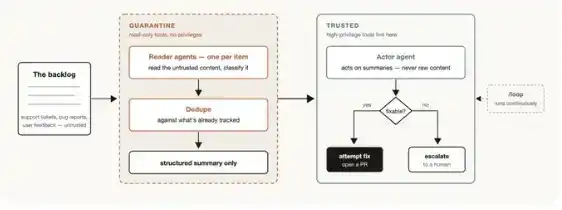
Every team has support queues, bug reports, or other backlogs that can't be fully handled by humans. A triage workflow can classify each item, deduplicate against tracked issues, and take action. This could mean attempting a fix or escalating to a human user.
For triage workflows, a useful pattern is quarantine. That is, forbid agents reading untrusted public content from performing high-privilege actions; high-privilege actions should be done by dedicated action-taking agents.
You can pair triage workflows with /loop for continuous execution of such tasks.
Exploration & Taste Judgment
Workflows are useful when you need to explore different solution paths, especially for tasks involving aesthetic judgment like design or naming, and can benefit from a set of evaluation criteria.
You can have Claude explore numerous options and give a reviewing agent criteria for "what a good solution looks like." The task is done when the reviewing agent deems the result meets the criteria. Different options can also be ranked or filtered via a tournament based on these criteria.
Evals (Evaluations)
You can run lightweight evals for specific tasks by launching independent agents in worktrees and then comparison agents to compare and score outputs against evaluation criteria. For example, you can evaluate and improve a skill you created against specific standards.
Model & Intelligence Routing: You can create a classification agent tuned for your tasks to decide which model to use. This is useful when tasks involve many tool calls and doing research beforehand can help identify the most suitable model.
For example, for the task "explain how the auth module works," the best model depends on how many files are in the auth module and the codebase structure. The classification agent can do this research first, then route the task to Sonnet or Opus based on expected complexity.
When Not to Use Dynamic Workflows
Workflows are still new. While they can deliver far better results in many use cases, not every task needs them, and they can significantly increase token consumption.
It's best to use workflows on tasks that expand Claude Code's capabilities in new ways. For routine programming tasks, ask yourself: does this task really need more compute? For example, most traditional programming tasks don't need a panel of 5 reviewers.
Tips for Building Dynamic Workflows
Prompt Design
When writing prompts for dynamic workflows, more detail usually yields better results, especially using the specific techniques mentioned above.
Workflows aren't only for large tasks. You can also prompt the model to use a "quick workflow." For instance, you could create a quick adversarial review process to check a hypothesis.
Combine with /goal and /loop
When using repeatable workflows like triage, research, or verification workflows, you can pair them with /loop to run at fixed intervals, and /goal to set hard completion requirements.
Token Usage Budget
You can set explicit token usage budgets for dynamic workflows to limit token consumption. You can write something like "use 10k tokens" in the prompt to set a 10k token cap.
Saving & Sharing Dynamic Workflows
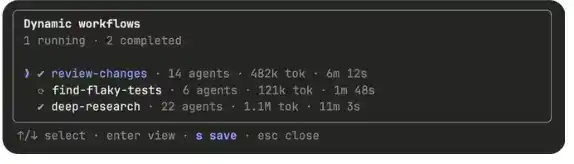
You can save workflows by pressing 's' in the workflow menu. You can commit them to ~/.claude/workflows or distribute them via skills.
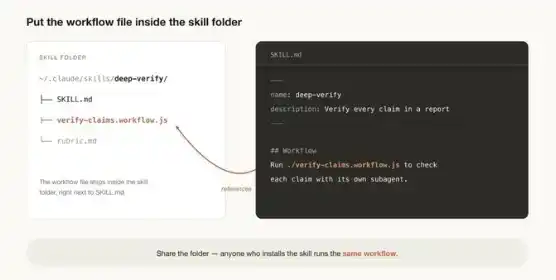
To share them via a skill, place the JavaScript workflow file in the skill folder and reference it in SKILL.md. For greater flexibility, you can also prompt Claude to treat workflows in a skill as templates rather than scripts to be run verbatim.
A Whole New World
Workflows are a useful new way to extend Claude Code. I encourage you to see them as a starting point. There's much more to explore on how best to use them. Please share your findings with us.
Thariq Shihipar and Sid Bidasaria (@sidbid) are members of the Anthropic technical team working on Claude Code.