The most advanced bridge explorer to date is here, announcing the Synapse Explorer.
The Synapse Explorer is a comprehensive overview of every transaction passed through the Synapse Bridge packed into a user-friendly interface. Utilizing a suite of data indexing and analytics tools built, all relevant information relating to bridging transactions, cross-chain messaging and general analytics can now be viewed in real time. The Synapse Explorer is a step function increase in cross-chain transparency, taking the bridging user experience to the next level.
Introduction
The Synapse Explorer is a generic event indexer for all Synapse Bridge events, paired with a smooth user-interface. The explorer displays transaction information in a way that is useful for monitoring activity on the Synapse Bridge. Transaction data is extremely legible and can be parsed by chain, token, address, and more. All of this information is stored in an API that anyone can access and run their own analytics on.
Building the best explorer is useful both for users and developers. For users, the Explorer is a useful tool for tracking and monitoring activity on any bridge: including detailed information on transactions and bridge status. For developers, the explorer is a valuable tool for debugging and troubleshooting problems with the Synapse Bridge, or applications built on top of the bridge. Data and messages transmitted across the bridge provide useful insights into user behavior, which helps developers improve the user experience and make their applications more effective.
A look into the Synapse Analytics suite:
The Synapse Explorer is supported by an advanced data indexing suite that supports numerous operations.
The Synapse Analytics Suite
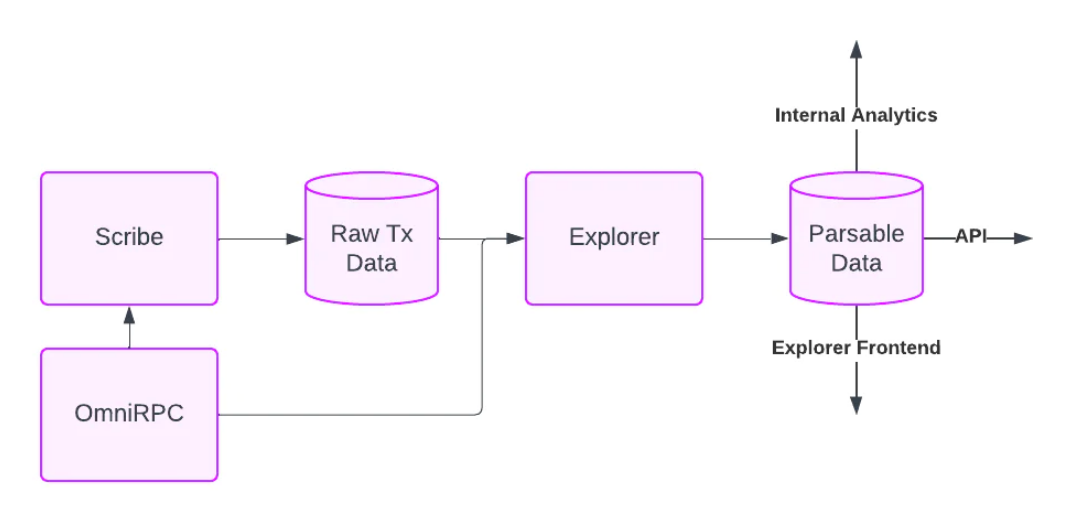
OmniRPC: OmniRPC is an RPC aggregator used to interface across Synapse-supported chains. The number of confirmations required across RPCs to produce a valid result is configurable, ensuring data integrity.
Scribe: Scribe indexes and stores Logs, Receipts, Transactions, and Blockheader data for 850+ contracts across 18 chains. Scribe is built with a reorg protection mechanism to protect data integrity.
Explorer: Downstream from Scribe, Explorer parses raw data from events emitted by Synapse contracts across all platforms - maturing data with historical prices, historical token data, and more. The Explorer provides data for analytics, our API, and the newly released frontend.
These tools will be open-sourced soon so developers can take advantage of them for their own use cases.
The Best Cross-Chain Explorer to date:
Synapse Explorer is built for transparency, to provide a crystal-clear view of all Synapse transactions. Paired with general volume statistics, users can view all transactions, with legible information about transaction status, amounts, chains, and more. Several tools help navigate this information. The search bar lets users search transactions by chain, token, and address, track the status of their own transactions, build more advanced analytics, and monitor recent activity.
Users can also interact with views that segment analytics by origin chain, destination chain, token, and address. These views are useful to asses:
Total transactions
User metrics
Advanced volume metrics
About Synapse
Synapse is a universal cross-chain liquidity network that connects blockchains by offering an extensible cross-chain communication protocol that supports assets, smart contract calls, and more. By leveraging Synapse, blockchains can easily and securely interoperate with each other, and developers can build truly cross-chain applications including cross-chain DEX, lending platforms, margining systems, derivatives markets, yield aggregators, and much more.