10 Claude Code Usage Tips: The Sooner You Know, The Sooner You Benefit

marsbitОпубликовано 2026-04-08Обновлено 2026-04-08

Введение

Here is an English summary of the article "10 Must-Know Claude Code Tips: The Sooner You Know, The Sooner You Benefit": This article shares essential tips for using Claude Code, an AI coding assistant, to significantly boost productivity. It is divided into three main sections. First, it covers three ways to launch Claude: 1) A simple GUI desktop app for non-programmers, 2) A command-line method with a key tip (`claude -c`) to resume from a specific point in the chat history, avoiding restarting context, and 3) A headless mode (`-p` flag) for automation tasks using a subscription token. Second, it details three crucial in-session techniques: 1) Using `Esc` to gracefully interrupt a response and `Esc+Esc` to revert to a previous checkpoint, 2) Using the `!` syntax (e.g., `!ls`) to run shell commands without leaving the chat, and 3) Managing context with `/clear` to remove history or `/compact` to optimize it when performance slows down. Finally, the article recommends companion software to solve human-AI collaboration bottlenecks: 1) **Superpowers**, a structured workflow methodology for higher-quality code output. 2) Voice input tools like **Typeless** and **Douban Input法** to overcome typing speed limit. 3) Tools like **Cmux** (a terminal for managing multiple AI agent instances) and **Vibe Island** (for seamless context switching between tasks) to solve the problem of lost focus when multitasking. The overall goal is to help users focus more deeply on their programming...

Below are the Claude code usage tips that I've often lamented not knowing earlier over the past six months.

They have saved me a massive amount of time, allowing me to enter a state of smooth flow while coding and writing content.


The article is divided into three parts:

1. Three Ways to Launch

2. Usage Tips While Running

3. Using Companion Software to Solve Human-Machine Collaboration Efficiency Issues

All of this is about: allowing you to focus more on programming and other activities at hand.

I wish someone had sent me this guide a few months ago, so I could have taken fewer detours and started smoothly:

1. Save this guide, spend 30 minutes this weekend to master Claude code techniques.

2. Send it to anyone who tells you "I think Claude code is difficult, but I've never tried it".

Alright, first let's start with the simplest launch (you read that right, even launching has its tricks)

Three Ways to Launch Claude

Simple Launch

Launching Claude is a very simple thing, simply in the command line.

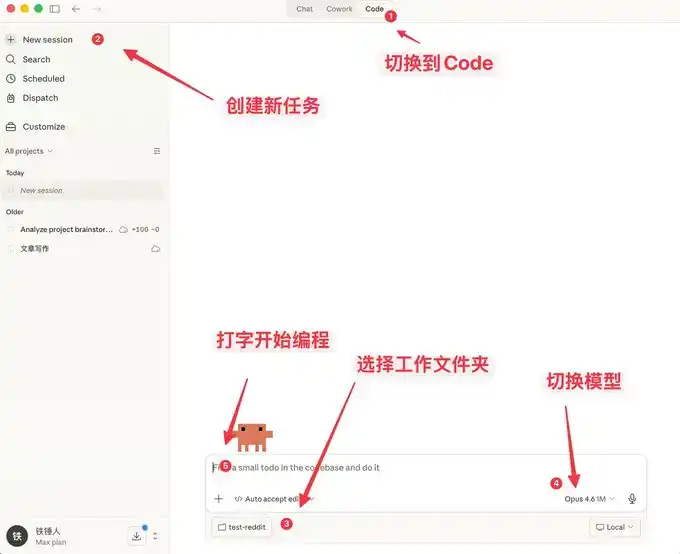
But for friends who don't like command-line tools, Claude code actually has a visual interface.

How to do it?

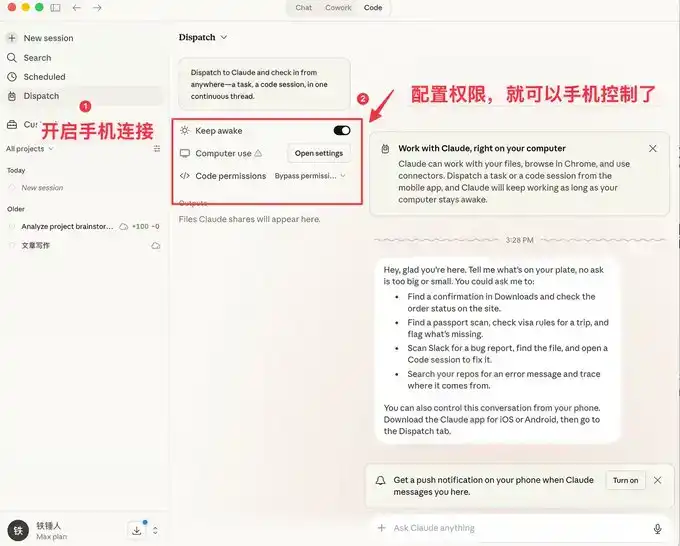
Go to this website: https://claude.com/download, under Claude Desktop, follow the steps below and you'll get a visual Claude.

Here you can not only chat, but it also comes with many features similar to OpenClaw.

The visual interface is easier for ordinary people to use, but programmers prefer the command-line launch method.

Below I'll introduce a few commands to speed up launching.

Command Line Launch

Launch with Specific History

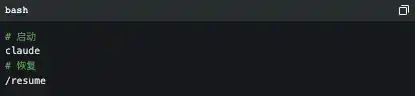
During our use of Claude code, we often encounter situations that require restarting. Every time we restart, we need to restore the previous conversation context:


I used to always use:

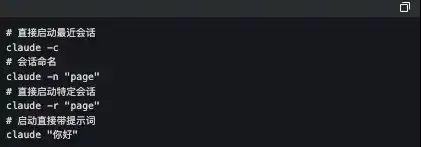
But the official actually provides some pretty good launch commands:

The one I use frequently here is `claude -c`, a short command that has saved me a lot of life.


-p Launch in Automated Mode

Claude Code can be launched without a UI, simply use the following command:

It's worth noting that if you want to use a local subscription Token to automate tasks, this is currently the only way to do it.

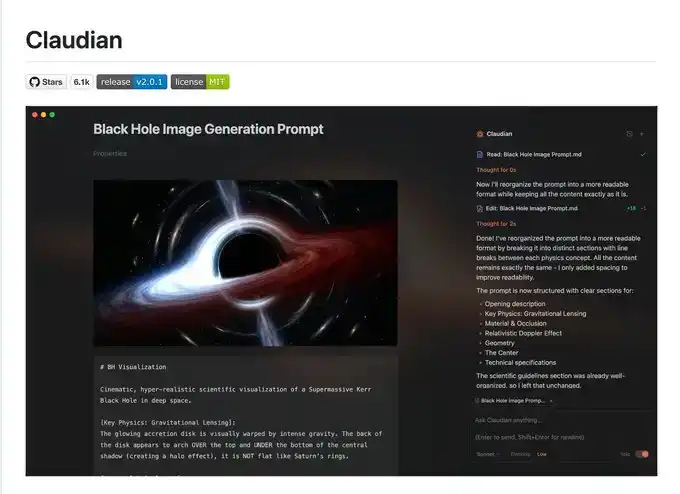
The famous Obsidian + Claude Code tool below made its own SDK to use the local subscription Token this way.

I admit what I said earlier might be a bit complicated, let's talk about a few simple commands to use during operation.

3 Must-Know Small Tips While Using Claude code

Elegantly Terminate and Rollback Tasks

When first using claude code, everyone still likes to use Ctrl+C to close the current conversation, only to find it closes Claude entirely. The correct way is to press the Esc key once, which will interrupt the conversation immediately, preventing things from getting worse.

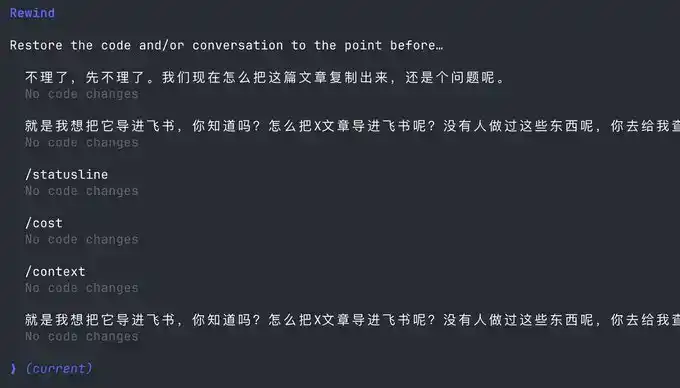
If Claude suddenly goes crazy, we can press Esc+Esc twice, then a list will pop up:

You can use this function to return to any checkpoint, avoiding Claude code messing up the code.

Execute Commands Without Leaving Claude

Sometimes we want to run a test command ourselves, but to not interrupt the current Claude, we have to open another command window.

Actually, we can use the ! syntax:

Context Management

As the conversation continues, the more chat history we accumulate, the more tokens are consumed per interaction, and Claude code will run slower and slower.

You have two choices, open a new window or use the /clear command

A simple command to clean up useless context is like closing 20 chrome tabs at once.

But what if I don't want to clear this context? Use /compact to compress it.

It's like giving claude a Red Bull to wake up and refresh.

I hope the above small tips help you use Claude code more smoothly.

But this is far from enough. Since Claude code is a command-line tool, no matter how many commands you learn, it's a mental burden.

Fortunately, the community has produced quite a bit of companion software to solve the following pain points:

1. Lack of mature prompt methodology, low programming efficiency

2. Slow typing speed leads to low prompt input efficiency

3. During multitasking, humans are fragmented and unable to increase productivity

If any of the above is your pain point, please read on.

Using Companion Software to Solve Human-Machine Collaboration Problems

Now, we are slowly discovering that humans are starting to跟不上 (cannot keep up with) the speed of machines. To address this, the community has produced a series of software.

First, we need a mature programming methodology:

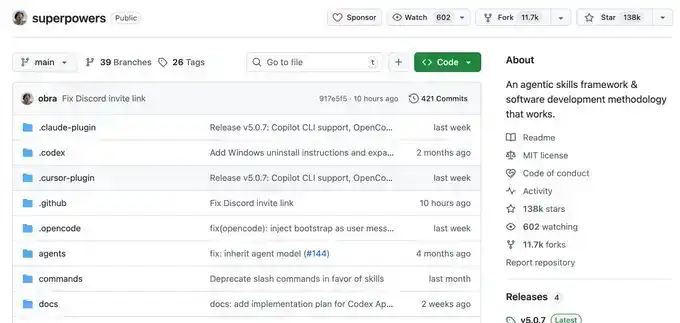
Superpowers

Ordinary people have no method when Vibecoding, they just do whatever comes to mind. This Skills is a programming workflow summarized by an experienced programmer.

He packaged top software engineering best practices into one-click Skills. From requirement梳理 (sorting), Spec confirmation, detailed planning, to TDD test-driven + automatic Code Review, the entire process enforces a structured workflow, allowing AI to output high-quality, maintainable code like a mature engineering team, significantly improving the one-time success rate, so you no longer have to repeatedly put out fires.

This project already has 138k Stars, you can go check it out for details, I won't elaborate here.

Once you have a mature programming Skills, you will find that it requires frequent information input, and then you discover that typing speed becomes your efficiency bottleneck.

You wonder, is there any software that can quietly convert speech to text in the office, with particularly accurate Chinese and English recognition?

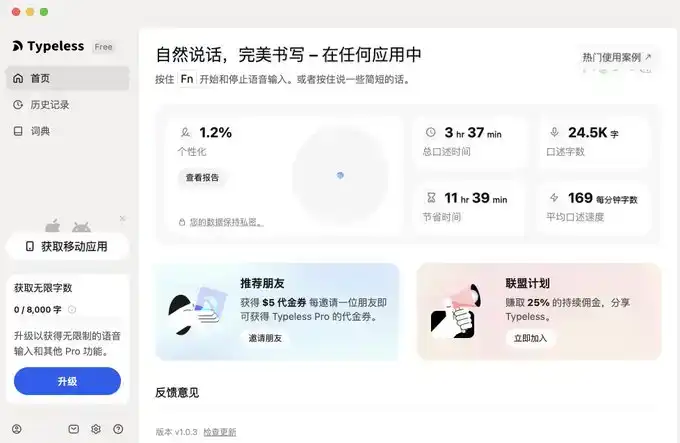
Yes, yes, and there are many, but I only recommend two, typeless and Douban Input Method.

Voice Input Software

The advantage of Douban Input Method is that it's fast, has decent Chinese and English recognition, and most importantly, it's free. It's a bit like the Android system, I use it too.

But typeless, aside from needing payment, doesn't have many shortcomings, and you can try it.

I'll provide links for both below.

typeless (I recommend, affiliate link): https://www.typeless.com/?via=lxfater


Douban Input Method is still in the testing phase, you can search for the installation package.

Once you start voice input, you can provide more context to Claude code, and the one-time success rate will get higher and higher. At this point, the efficiency limitation becomes the running time of Claude code.

We can use multiple Claude code instances simultaneously. At this time, our bottleneck becomes the human problem of losing context when switching between multiple tasks.

Solve Your Attention Switching Problem

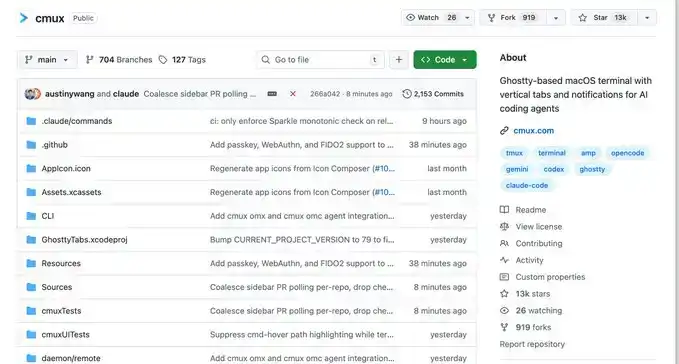
First, I recommend a software called Cmux:

It's a macOS native terminal built based on Ghostty, specifically designed for running multiple coding agents simultaneously: vertical tabs + smart sidebar, flexible split-screen, smart notification highlighting, built-in browser split-screen + Socket API.

This is an open-source project: https://github.com/manaflow-ai/cmux

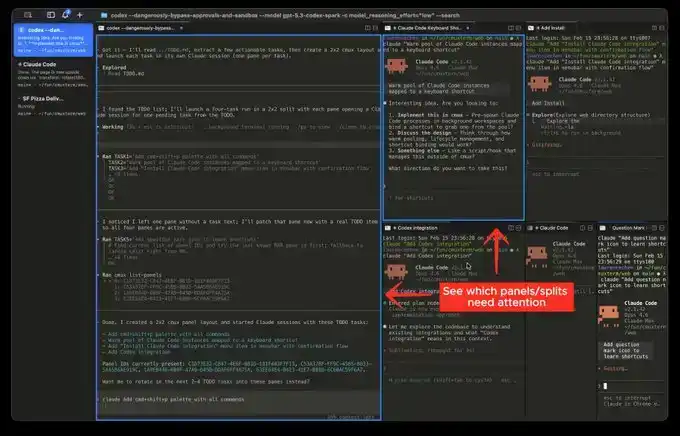
My favorite is the split-screen function, but once you split the screen, you won't know which window completed the task.

Fortunately, this software will directly highlight a certain terminal area, helping you switch to the corresponding window in time.

But the next software I'm about to介绍 (introduce) will make this switching incredibly smooth:

This is a relatively popular product recently, called Vibe Island

The UI is beautiful, right? But the most powerful aspect of this product is its support for switching between many different tools.

And each switch will automatically唤醒 (wake up) and focus the window of the APP you are in, and you can input directly.

Theoretically, as long as you switch fast enough and open enough windows, it will continuously push the windows that need processing in front of you. You'll feel like you're handling an assembly line.

Finally

I hope this content is helpful to you. This is quite beginner-friendly, actually common knowledge for programmers.

But I still hope it can help you. If you feel this content was helpful to you!

Связанные с этим вопросы

QWhat are the three main parts of the Claude code usage guide?

AThe three main parts are: 1. Three ways to launch Claude, 2. Tips for using it while it's running, and 3. Using supporting software to solve human-machine collaboration efficiency problems.

QWhat is the purpose of the `-c` command line argument when starting Claude?

AThe `-c` command line argument is used to start Claude and continue from a specific previous history or context, saving time by avoiding the need to re-establish the previous state manually.

QHow can you gracefully interrupt a Claude code response without quitting the entire application?

AYou can press the Escape (Esc) key once to immediately interrupt the current conversation and prevent it from going further off track.

QWhat command can be used within Claude to execute a system command without leaving the Claude interface?

AYou can use the exclamation mark syntax (`!`) followed by the command to execute a system command without leaving the Claude interface.

QWhat are the two recommended software tools mentioned for voice input to improve efficiency when working with Claude?

AThe two recommended voice input software tools are Typeless and Douban Input法 (Douban Input Method).

Похожее

Claude Bill Skyrockets by 5 Billion, Surges 60-Fold Overnight—Can Your Token Budget Keep Up?

An enterprise reportedly ran up a staggering $500 million bill on Anthropic's Claude AI in just one month due to a simple oversight: failing to set usage limits for employee accounts. This incident highlights a growing trend of runaway AI costs. Other examples include a Google Cloud user hit with an unexpected $18,000 bill from API key abuse, and an OpenAI internal experiment that consumed 603 billion tokens, costing $1.3 million in 30 days. Major AI providers like OpenAI and GitHub are shifting from flat monthly fees to granular, usage-based pricing (per input/output/cached token), causing shock for some users whose costs skyrocketed by orders of magnitude. The root causes extend beyond pricing. The rise of autonomous AI agents executing long, complex tasks has drastically increased token consumption. Furthermore, misaligned incentives, like internal "leaderboards" ranking employees by AI usage, can encourage wasteful "tokenmaxxing"—using powerful models for trivial tasks just to inflate metrics. This has sparked a new industry focused on cost optimization. Solutions include providing AI with better context (reducing redundant searches) and intelligent model routing (matching tasks to the most cost-effective model). Research indicates token consumption for agentic tasks can vary wildly (up to 30x for the same job) without guaranteeing better results, and models often underestimate their own costs. As AI expenses begin to rival or even surpass human labor costs for some teams, companies are being forced to move from indiscriminate usage to meticulous "token accounting." The future belongs to those who can maximize the value of every token spent.

marsbit6 мин. назад

Claude Bill Skyrockets by 5 Billion, Surges 60-Fold Overnight—Can Your Token Budget Keep Up?

marsbit6 мин. назад

24/7 Unstoppable Derivatives Wave: Cryptocurrency Is Forcing Traditional Finance to 'Change Time Zones'

The article discusses how the 24/7 nature of the cryptocurrency market is compelling traditional finance to adapt its operating hours and infrastructure. The key catalyst is the CME Group's planned launch of nearly round-the-clock trading for regulated crypto derivatives, a move driven by strong institutional demand for continuous risk management. This shift highlights a fundamental change: derivatives, not spot trading, now dominate crypto market activity and price discovery. However, integrating continuous trading into traditional finance reveals structural tensions. While execution times can be extended, settlement, clearing, and regulatory reporting largely remain bound to traditional business-day cycles. This creates a lag where weekend price movements can impact risk exposures before traditional control systems are fully active. Furthermore, the article explores new challenges arising from this always-on environment. The inherent transparency of public blockchains, while ensuring auditable settlement, also exposes sensitive corporate information like treasury flows to competitors in real-time. This has elevated privacy from a feature to a core requirement for institutional adoption. The next phase hinges on building systems that balance this necessary privacy with regulatory accountability and compliance. In conclusion, the move towards 24/7 trading signifies more than crypto becoming institutionalized. It represents traditional finance beginning to adopt the temporal structure of crypto-native markets. The future will be defined by how successfully traditional risk, identity, privacy, and settlement frameworks can operate at the continuous speed cryptocurrency markets demand.

marsbit47 мин. назад

24/7 Unstoppable Derivatives Wave: Cryptocurrency Is Forcing Traditional Finance to 'Change Time Zones'

marsbit47 мин. назад

Unitree Passes the Hearing, Hangzhou Reaps the Rewards

Unitree Technology, a leading company in Hangzhou's tech scene known as one of the "Hangzhou Six Dragons," has officially passed the review for listing on the Shanghai Stock Exchange's STAR Market (科创板). It plans to raise 4.202 billion yuan for the research and development of intelligent robot models and robot hardware. This milestone will make Unitree the "first humanoid robotics stock." Founded in 2016 by Wang Xingxing, the company started humbly in a small office in Hangzhou's Binjiang district. Initially, the robotics sector was not viewed favorably by the market, with Unitree's products often labeled as "toys" and struggling to secure funding. At its most critical point, with only around 100,000 yuan left, Wang stopped his own salary to keep the company afloat. A crucial turning point came in 2018 when Hangzhou's state-owned capital system provided timely support. A financial platform under the city's state-owned assets completed due diligence in three days and granted a 20-million-yuan loan within a week. This "patient capital" infusion stabilized Unitree, enabling its transition from prototype development to mass production and commercial viability. Subsequently, Hangzhou Capital, through its two major 100-billion-yuan mother funds—the Hangzhou Science and Technology Innovation Fund and the Hangzhou Innovation Fund—participated in four of Unitree's financing rounds (B2, B3, C, and C+). This continuous backing helped the company grow, attract top-tier industrial investors like China Mobile, Tencent, Alibaba, and Geely, and solidify its position as a global leader in legged robotics. By 2025, Unitree achieved significant scale, with revenue reaching 16.99 billion yuan, net profit of 5.91 billion yuan, global leadership in humanoid robot shipments, and over 33,000 quadruped robots sold worldwide. Unitree's journey exemplifies Hangzhou's strategy of nurturing hard-tech startups from "seedlings" to industry leaders. Beyond Unitree, Hangzhou's capital ecosystem has supported other "Six Dragons" like Cloudwalk, BrainCo, and DeepSeek. The city has established a 500-billion-yuan "3+N" industrial fund cluster and specialized early-stage funds like the "Runmiao Fund" with a 20-year term to fill funding gaps for very early-stage projects. This robust "capital + talent" model, coupled with an influx of over 430,000 young professionals in 2025 alone, has fostered a vibrant innovation ecosystem. Hangzhou is now home to 48 unicorns and 413 potential unicorns, building comprehensive industrial chains in AI, robotics, brain-computer interfaces, and more. As Hangzhou experiences a wave of IPOs, it is solidifying its reputation as an ideal city for entrepreneurs.

marsbit1 ч. назад

Unitree Passes the Hearing, Hangzhou Reaps the Rewards

marsbit1 ч. назад

Торговля

Спот
Фьючерсы
活动图片