Just Now, Claude Code Evolved Again, Drafting 'Feedback Reports' for Users

marsbitОпубліковано о 2026-08-27Востаннє оновлено о 2026-08-27

Анотація

Claude Code has introduced a new feature where it can automatically draft feedback reports on behalf of the user. This occurs in scenarios such as when a tool persistently fails, Claude cannot fulfill a request, an error is identified, or the user explicitly asks for feedback. Drafts are saved locally and are not sent to Anthropic until the user reviews and approves them. Users can view, edit, or delete these drafts via a feedback queue interface and control the feature's behavior through settings. The tool is available in local, interactive terminal sessions using the Claude API but is disabled in non-interactive modes, web sessions, certain cloud platforms, and for organizations with specific data retention policies.

Claude Code has updated with another quite interesting little feature.

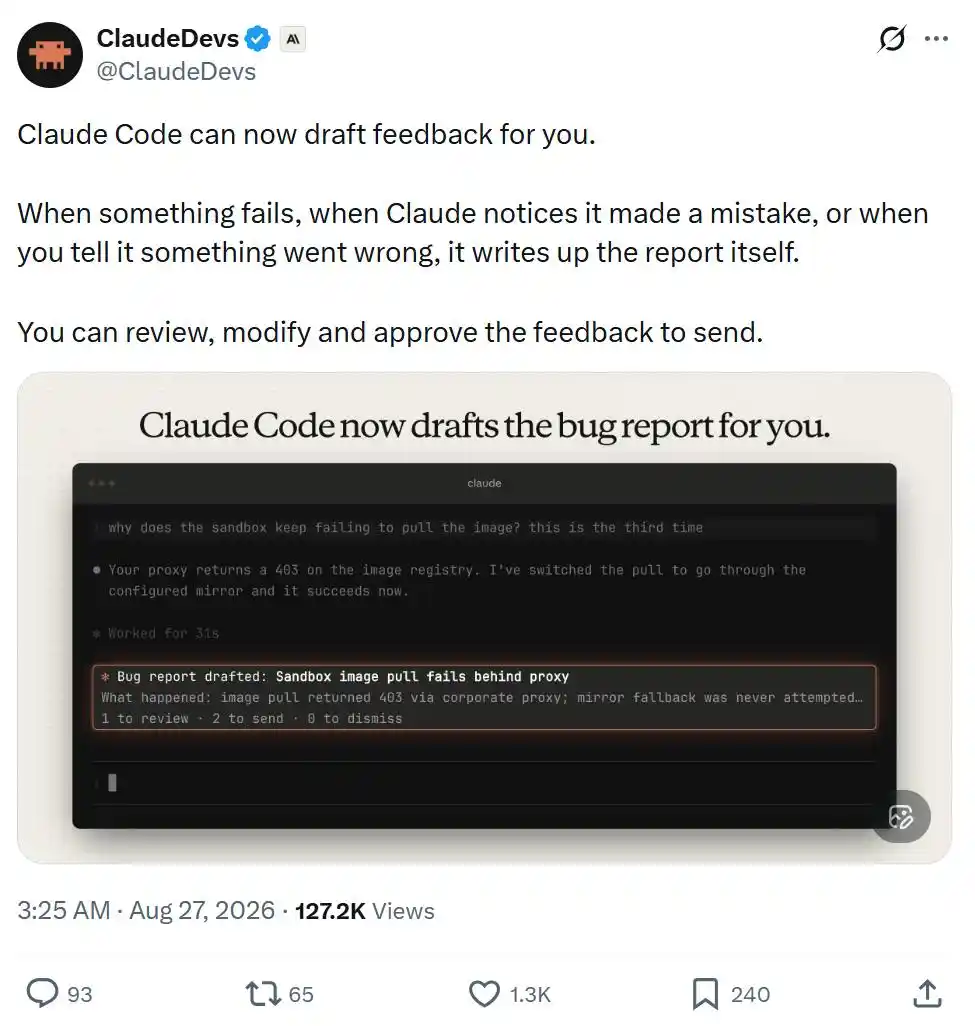
This time, it can help you draft feedback reports.

When a certain feature malfunctions, when Claude realizes it made a mistake, or when you point out where something went wrong, it will automatically compile the relevant situation into a report.

You can review, edit it before sending, and decide whether to approve submission.
However, you can also disable this feature in /config, or modify its behavior settings.
The official team has also compiled detailed documentation; let's take a look at the specific content.

Claude Code Starts 'Writing Feedback Reports' for Itself

Feedback drafted by Claude is a report about Claude Code written by Claude on your behalf. This feature requires using Claude Code v2.1.238 or later.

Claude Code saves each feedback draft on your local device, at the path: ~/.claude/feedback/drafts/. Nothing is sent to Anthropic until you actively send it.

Specifically, Claude will automatically draft feedback via the SendFeedback tool in the following situations:

  • A tool or command continuously fails;
  • Claude cannot complete a certain request you made;
  • You point out that Claude made a mistake, or Claude itself realizes it made an error;
  • You ask Claude to submit feedback.

Documentation address:

https://code.claude.com/docs/en/tools-reference#sendfeedback-tool-behavior

What You See When Claude Drafts Feedback

When Claude queues a feedback draft, you will see a card above the input box, displaying the title of that draft. You can:

  • Press 1 to view the draft;
  • Press 2 twice in a row to send it as-is directly;
  • Press 0 to ignore this card.

Even if you ignore the card, the draft will remain in the feedback queue.

After you ignore a feedback card, Claude Code will ask if you want to turn off Claude's automatic feedback drafting feature. If you choose not to turn it off twice in a row, it will stop asking afterwards.

By default, a maximum of 3 feedback cards are displayed per session.

After exceeding this limit, or when you set feedbackDrafts to quiet, only the number of feedback drafts currently queued will be shown at the bottom of the input box, and no specific cards will pop up.

Viewing and Editing Feedback Drafts

Run /feedback without any parameters to open the feedback queue.

This will list all unprocessed drafts from all your sessions, including those for which you closed the feedback card or never saw a card in the first place.

After selecting a draft, you can review it and perform the following operations:

Edit the title, category, and specific content;

Set Send transcript to yes or no. If the session record corresponding to when Claude created this draft still exists, this option defaults to yes, meaning the conversation segment will be submitted to Anthropic along with the feedback; choosing no sends only the feedback report itself;

Send the draft, delete the draft, or temporarily leave it in the queue to handle later.

If you want to manually write a feedback report yourself, press w to open the standard feedback window.

The /feedback command with text content, as well as the /bug command, will also directly open this standard feedback window.

Sending Feedback Drafts

When you send a draft, Claude Code submits it in the same way as a /feedback report, following the same data retention policies. After sending is complete, the draft is deleted from your local device.

If you send directly from a feedback card, it will show: ✓ Sent. If you send from the feedback queue, a receipt ID will be shown when the window closes.

Note that sending directly from a feedback card does not include the conversation transcript.

Claude Code saves your working directory information in the local draft to find the corresponding conversation transcript, but does not send this working directory.

For organizations with Zero Data Retention (ZDR) enabled, Claude Code does not provide this tool, and /feedback is similarly unavailable.

Deleting or Retaining Feedback Drafts

When you delete a draft, Claude Code simply removes it from your local device.

If you leave a draft in the feedback queue unprocessed, it will automatically expire after 30 days.

The feedback queue can save a maximum of 10 drafts across all sessions.

When Claude creates the 11th draft, Claude Code will automatically delete the earliest one.

Sessions Where Claude Cannot Automatically Draft Feedback

Claude Code only provides this feature in the following scenarios:

Interactive terminal sessions running on the user's own computer and directly using the Claude API, not through a cloud service provider.

The tool is not provided in the following scenarios:

  • Non-interactive -p run modes, and Agent SDK sessions, as these scenarios lack an interface for reviewing the feedback queue;
  • Cloud sessions, such as Claude Code on the web, because it cannot write feedback drafts to your local device;

Sessions run through the following platforms:

  • Amazon Bedrock
  • Claude Platform on AWS
  • Google Cloud Agent Platform
  • Microsoft Foundry

Sessions with the following environment variables or related configurations set:

  • CLAUDE_CODE_SEND_FEEDBACK=0
  • DISABLE_FEEDBACK_COMMAND=1
  • Setting CLAUDE_CODE_DISABLE_NONESSENTIAL_TRAFFIC to any non-empty value
  • Feature-flag fetching is turned off;
  • Organizations that have turned off product feedback functionality;
  • Organizations with Zero Data Retention (ZDR) enabled.

This article is from the WeChat public account "Machine Heart"

Пов'язані питання

QWhat is the main new feature introduced in the latest Claude Code update according to the article?

AThe main new feature is that Claude Code can now automatically draft feedback reports for users when issues occur, such as tool failures, errors made by Claude, or user-reported problems.

QWhere are the feedback drafts saved locally on a user's device, and when is the content transmitted to Anthropic?

AThe feedback drafts are saved locally at ~/.claude/feedback/drafts/. The content is not transmitted to Anthropic until the user actively sends the report.

QHow can a user open the feedback queue to review and manage pending drafts in Claude Code?

AA user can open the feedback queue by running the /feedback command without any parameters.

QUnder what conditions will Claude automatically draft a feedback report using the SendFeedback tool?

AClaude will automatically draft feedback when: a tool or command repeatedly fails; Claude cannot complete a user's request; the user points out an error or Claude realizes it made a mistake; or the user explicitly asks Claude to submit feedback.

QIn which types of sessions is the automatic feedback drafting feature NOT available in Claude Code?

AThe feature is not available in: non-interactive -p run modes and Agent SDK sessions; cloud-based sessions like Claude Code on the web; sessions run through platforms like Amazon Bedrock, Claude Platform on AWS, Google Cloud Agent Platform, or Microsoft Foundry; and sessions with specific environment variables or configurations that disable feedback or non-essential traffic, or in organizations that have disabled product feedback or enabled Zero Data Retention.

Пов'язані матеріали

Podcast Notes | After Watching 141 YouTube Investment Guru Videos, I Found Everyone's Bullish on These 5 Stocks

Podcast Summary: After analyzing 141 YouTube investment videos from 21 creators, five stocks were consistently highlighted: Alphabet (Google), Nvidia, Micron, CoreWeave, and Uber. However, the analysis reveals a key concentration: four of these (Google, Nvidia, Micron, CoreWeave) represent essentially the same AI-focused bet, with only Uber standing as an independent pick. The podcaster, Brian, provides his specific views and entry strategies for each. **Key Stocks & Brian's Stance:** - **Alphabet (Google):** Viewed as cheap based on profits but expensive based on sales. Brian is only buying a half-position via monthly investments at ~$362. - **Nvidia:** Models suggest it is undervalued (~$221 vs. a ~$290-330 fair value range), but significant client debt ($500B) raises risk. Brian holds a 12% position (his cap) and would not buy below $148. - **Micron:** Brian's model fair value is ~$1450, but it's a cyclical stock. He is buying only on schedule after it broke below its 50-day moving average (~$961), with a "story broken" line at $434. - **CoreWeave:** Has large contracts but faces scrutiny over demand sustainability, with Nvidia backing unsold capacity. Brian holds zero position due to limited history and structural concerns. - **Uber:** The only non-AI pick, valued cheaply on strong cash flow (~$100B annually). Brian's fair value is ~$109 (current price ~$67), and he is buying a full position. **Core Insight:** Most discussed topics (76/141 videos) were chips, cloud, and AI models. A portfolio built from such consensus may appear diversified but often constitutes a single, concentrated bet on AI. Brian concludes with a disciplined framework for any investment: compare to its own history, understand what the current price assumes, separate a good company from a good price, and pre-define your exit conditions.

marsbit4 хв тому

Podcast Notes | After Watching 141 YouTube Investment Guru Videos, I Found Everyone's Bullish on These 5 Stocks

marsbit4 хв тому

From 'Interest Rate Trading' to 'Dollar Debasement Trade', the Logic Behind Gold's Rise Has Changed

From "Rate Trade" to "Debasement Trade": The Logic Behind Gold's Rally Has Shifted Gold surged by 17% in August. According to UBS, the key development was a fundamental shift in the driving narrative mid-rally—from the traditional "rate trade" to a "debasement trade" focused on fiscal and dollar concerns. The bank breaks the summer rebound into two acts. The first was a technically-driven bounce from a solid base, supported by light positioning, resilient physical demand (especially from central banks like China's), and softening US economic data. The second act, triggered by the US Treasury's announcement to double long-term bond buybacks, marked a shift in gold's pricing logic. The market began viewing higher long-term yields as a sign of fiscal sustainability risks rather than economic strength, weakening gold's traditional inverse correlation with real rates. Gold's role evolved from an "opportunity cost" asset to a hedge against "fiscal credibility" and currency debasement, further aided by a weakening US dollar. UBS maintains a bullish outlook, noting rising upside risks to its long-term forecasts. While it lowered its 2026 year-end target to $4,675/oz, its 2027+ forecasts are unchanged, with an upside scenario target as high as $6,500/oz. The primary near-term risk is a hawkish Fed pivot, which could trigger a correction. However, UBS views any such dip as a buying opportunity, not a trend reversal, unless AI-driven growth allows for significantly higher rates. The report concludes that as gold is increasingly seen as a hedge against fiscal and currency risks, its strategic role in portfolios is changing. With overall gold allocations still low, there is significant room for further price appreciation if debt sustainability concerns drive sustained strategic buying.

marsbit5 хв тому

From 'Interest Rate Trading' to 'Dollar Debasement Trade', the Logic Behind Gold's Rise Has Changed

marsbit5 хв тому

Not Just Trading and Meme: These 5 Projects on Base Are Exploring New On-Chain Use Cases

Beyond Trading and Memes: 5 Projects Exploring New On-Chain Use Cases on Base While much of the crypto space is dominated by speculation, Base—Coinbase's Ethereum Layer 2 with over $5B TVL—is fostering innovative projects beyond the usual categories. Here are five notable examples: 1. **Hydrex**: A MetaDEX/AMM aggregator that pools native and external liquidity (e.g., from Uniswap, Morpho) to offer optimal swap rates. It features a ve(3,3)-style incentive model and single-signature transactions. 2. **SwapRoyale**: A fantasy trading competition app where users pay a fixed entry fee to trade with a virtual $100k portfolio in real-time contests. It gamifies trading with various tournament formats and has already distributed over $100k in prizes. 3. **BlockRun**: A permissionless AI gateway and payment layer for the on-chain agent economy. It allows autonomous systems to discover, pay for, and execute services using USDC on Base via the x402 micropayment standard, enabling pay-per-use AI. 4. **PixieChess**: A play-to-earn digital chess game where each piece is a collectible NFT with unique abilities that alter classic rules. Value is kept within the ecosystem, with a treasury funding real ETH prizes for winners. 5. **Tokensto**: A platform that lets users sell their unused AI API credits (e.g., from OpenRouter) for cash. It automatically prices credits and facilitates direct payouts to crypto wallets. These projects demonstrate that builders on Base are actively experimenting with consumer experiences, the agent economy, and novel gaming mechanics, suggesting the surface area for meaningful on-chain activity is broader than current narratives imply.

marsbit49 хв тому

Not Just Trading and Meme: These 5 Projects on Base Are Exploring New On-Chain Use Cases

marsbit49 хв тому

Торгівля

Спот
活动图片