Author: BruceBlue
Risk Notice: I am not a licensed financial advisor. This article is based on public information and risk disclosures. It does not constitute a promise of returns or personalized investment advice. On-chain minting, listing orders, granting approvals, executing trades, and tape-outs may all have irreversible consequences. Please only use funds and wallet permissions you can afford to lose entirely for testing.
The vast majority of people entering Tapeout for the first time will first look at prices, check the market, and ask which "chips" are worth minting.
I suggest doing the opposite.
First see if it can do something, then decide if you want to own its components. Because Tapeout is most easily misunderstood as a more complex-looking trading page; what actually makes it different is that you can connect NAND and LATCH gates into logic, run it through the browser, and then tape-out the component into an on-chain circuit.
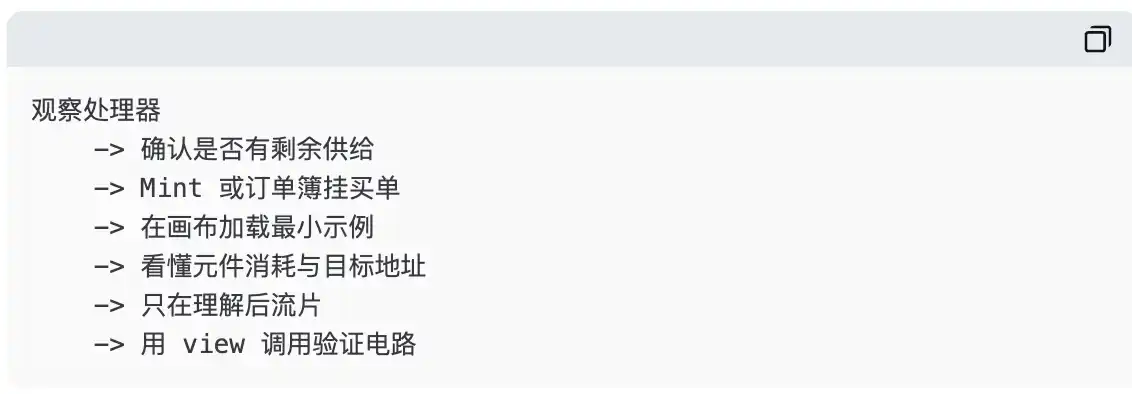
This article is not about telling you which asset to chase. It only provides a minimal, verifiable, and lowest-risk path: first understand the processor, then try minting or the order book on a very small scale, and finally get a minimal circuit running first.
I. Preparation: Don't Use Your Main Wallet for a Lesson in On-Chain Experimentation
In your mobile wallet, go to https://tapeout.net/ and switch to the BNB Smart Chain mainnet. Keep a small amount of $BNB in the wallet for gas; if you intend to mint or place buy orders, you will need additional $BNB to cover the minting amount or escrow amount shown on the page.
Don't think of "connecting a wallet" as an action without consequences. The connection itself usually doesn't transfer funds, but subsequent actions like minting, listing orders, granting approvals, selling, and tape-outs are all different types of signatures. More importantly, the official website currently clearly discloses that the protocol is in an upgradeable stage and is planned to be sealed in the future; therefore, any claims about long-term immutability or absolute trustlessness should not replace your own verification.
For your first time, it is recommended to create a separate experimental wallet containing only a very small amount of $BNB. The truly mature way to participate is not to sign a lot at once, but to first confirm you can explain what each signature actually changes.
II. Step One: Choose a Processor First, Don't Look for the Hottest Row First
The basic unit in Tapeout is not a globally unified token. Each processor has its own component supply and circuit ecosystem; users can mint NAND or LATCH gates under that processor and use the corresponding components for the canvas and tape-outs.
The processor details page typically displays the name, creator, total component supply, minted amount, number of minting addresses, number of holders, created circuits, and minting controls. When entering for the first time, read these fields before touching "Connect Wallet."
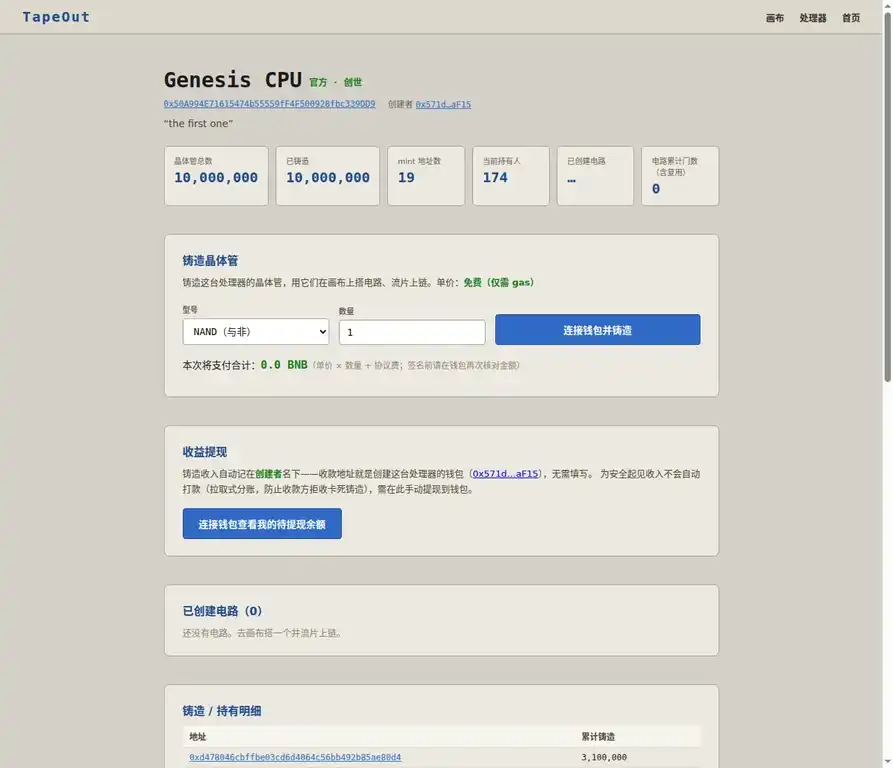
Figure 1|Snapshot of the Genesis CPU details page, accessed on 2026-08-17 (GMT+8). This is an example of a fully minted processor; the interface showing minting controls does not mean there is currently available minting supply.
This screenshot is particularly worth looking at carefully. At that point in time, the Genesis CPU shows both total supply and minted amount as 10000000; so whether you can see a button on the page is not proof you can mint. The real order of judgment should be: what is the total supply, how much has been minted, whether you are choosing NAND or LATCH, what is the unit price and total payment amount, and whether the processor actually has things you are willing to build.
"Official," "Genesis," "Free" are not safety labels. At most, they are attributes, not risk disclaimers.
III. Step Two: When There Is Remaining Supply, the Correct Posture for Minting Is "Small, Slow, Verifiable"
If the processor you choose indeed still has available minting supply, the details page will let you choose NAND or LATCH and then enter a quantity. According to the official website explanation, the minting unit price for a single processor is set at creation; some may be 0 $BNB, i.e., "free mint, only gas costs," but this is not a universal rule for all processors and all times.
Your first mint doesn't require any complex strategy. Just follow this sequence:
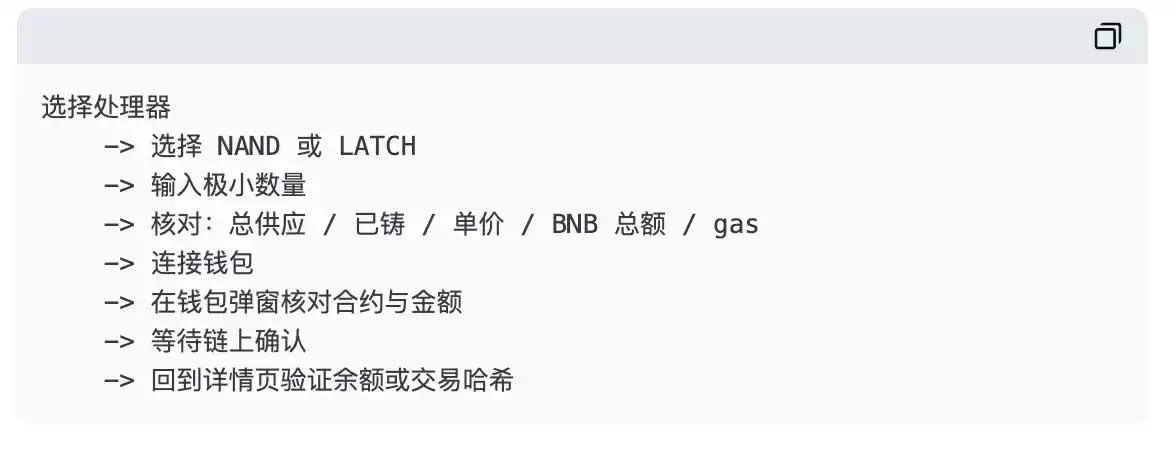
Minting does not mean "buying into Tapeout." What you obtain are components of a specific type under a specific processor. This determines which market they trade in, which types of tape-outs they can be used for, and whether you later have the required combination of NAND/LATCH to complete a circuit.
If you don't understand why a processor needs two types of components, it doesn't prevent you from learning first. But this is precisely why you should only mint the minimum quantity, not mistake a single transaction as a bet on the entire project.
IV. Step Three: When Fully Minted, the Market Is an Order Book, Not a One-Click Buy Button
If a processor is fully minted, the official website provides independent markets split by "Processor × NAND / LATCH." Buyers enter the unit price and quantity they are willing to pay, and $BNB is placed into escrow according to the page logic; sellers select an existing buy order and enter a quantity not exceeding their remaining balance to sell. The official market page indicates a 1% fee for trades and prompts that the first sale will require approval for the market contract.
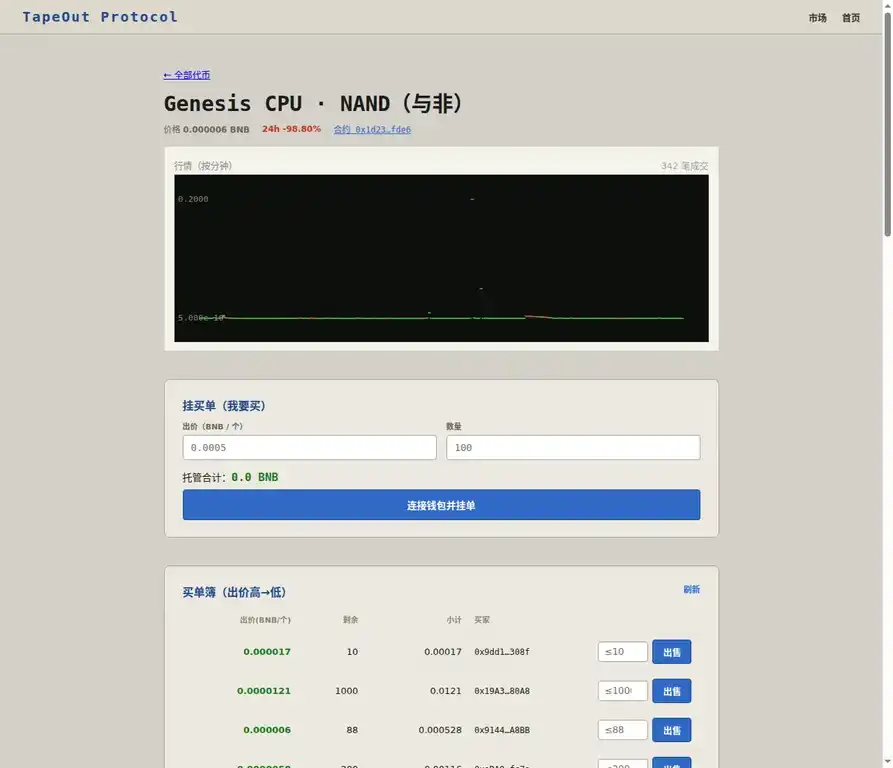
Figure 2|Snapshot of the market order book interface, accessed on 2026-08-17 (GMT+8). The price, 24-hour change, order volume, and trade count shown are dynamic data snapshots and do not constitute executable prices or imply returns.
The easiest mistake to make here is to interpret the most prominent "Latest Price" on the screen as the price at which you can immediately trade. In early, low-liquidity, fragmented markets, a very small trade can create very exaggerated price movements; what really determines whether you can trade is the price, remaining quantity, and escrow status of a specific buy order in the order book.
| Operation |
What Happens on the Page |
What You Need to Confirm |
| Place Buy Order |
Enter BNB unit price and quantity, page calculates total escrow |
Whether the total escrow BNB is within acceptable limits; how funds are handled while the order is unfilled |
| Sell to Buy Order |
For the selected buy order, enter a quantity not exceeding your balance |
Buy order remaining quantity, total trade amount, and 1% fee |
| First Sale |
Wallet requests approval for the market contract |
Whether the approval target is the official publicly known market contract; whether the allowance is excessive |
| Trade Confirmation |
Wallet returns transaction hash, wait for on-chain confirmation |
Check status on a block explorer, not just rely on frontend prompts |
If you can't read the order book, don't place an order. If you don't understand the total amount, don't sign. On-chain transactions are not an exam; there's no need to rush to answer.
V. Step Four: Truly "Playing" Tapeout Is Building a Minimal Circuit in the Canvas
Go to https://tapeout.net/#canvas . The canvas provides input/output pins, constants, NAND, LATCH, as well as examples like 4-bit adder, 8-bit adder, 8-bit multiplier, and 4-bit CPU. The right side displays the number of gates in this layer, sequential units, netlist bytes, and the component consumption required for tape-out.
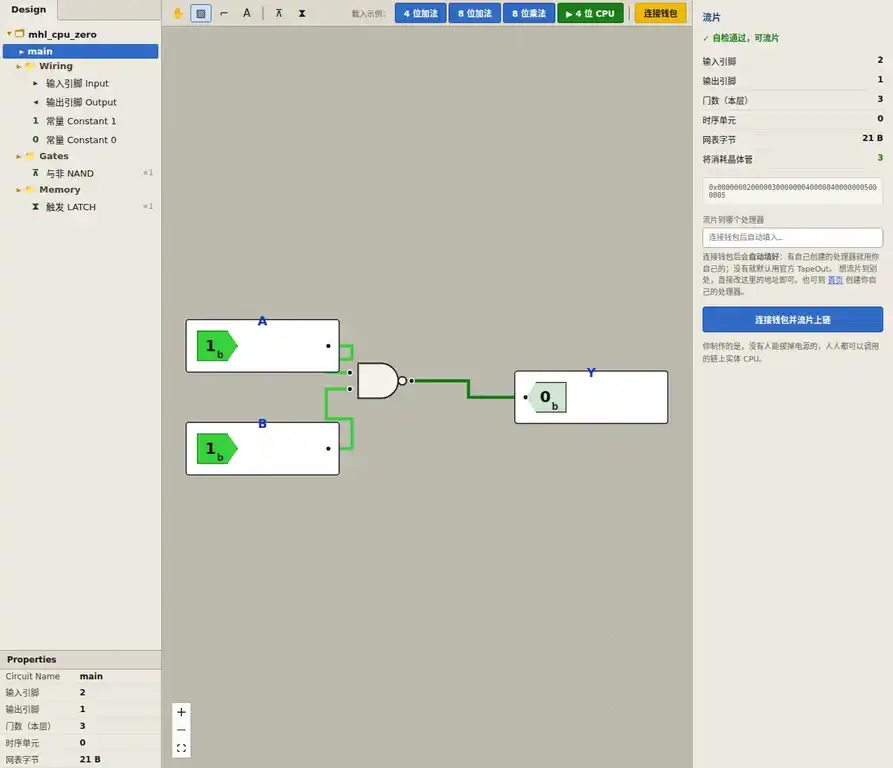
Figure 3|Snapshot of the official website canvas, accessed on 2026-08-17 (GMT+8). The right side shows self-check, component consumption, netlist, and target processor address input. Verify each item before tape-out.
For the first time, don't start from scratch. Choose a minimal example, first observe how inputs and outputs change. You don't need a wallet or to buy any components at this point; just understand: how inputs enter NAND gates, how outputs are computed, and why the right side shows "will consume transistors."
When you are ready to tape-out, you enter the real on-chain action. According to the official website, tape-out consumes the corresponding components and generates a circuit; after connecting your wallet, if you have created a processor yourself, the target processor address will be automatically filled with your own processor. Otherwise, it defaults to the official TapeOut, but users can also manually change it.
This means, before tape-out, you should at least be able to clearly state the following four things:
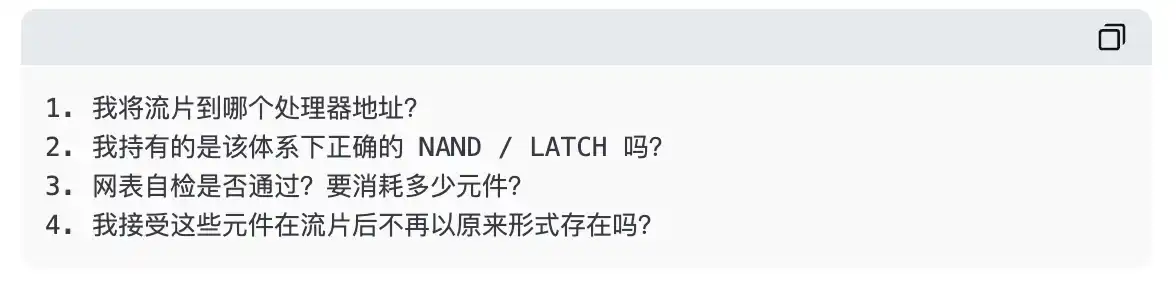
Tape-out is not "saving a draft." It is a transaction that will change your asset status. Doing only the minimal example and consuming the fewest components the first time is the correct way to start.
VI. Step Five: After Tape-Out, Don't Just Look at the NFT ID; Try Calling It
The Tapeout official processor details page describes circuits as on-chain functions that can be read for free. Combinational logic can be queried via eval(circuitId, bytes); circuits containing sequential units can be called using step; the official website also provides examples for BscScan Read Contract, command line, and ethers.js.
So the complete loop shouldn't be:

It should be more like:
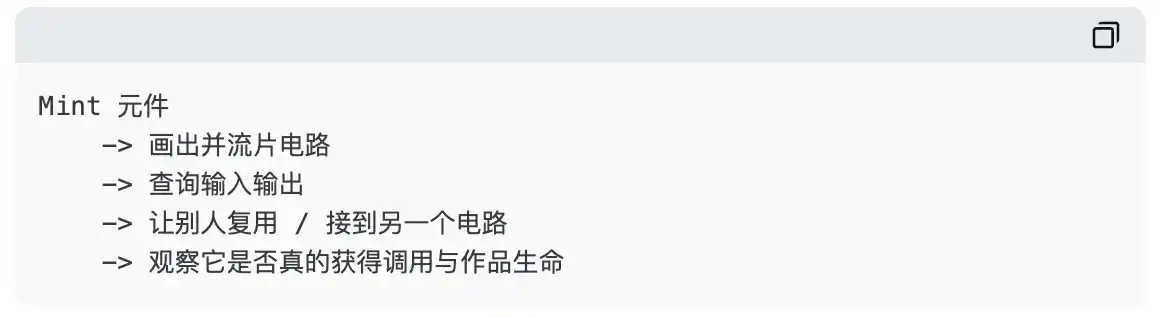
Even if you don't write code, you can first use BscScan's Read Contract. It's a read-only query, doesn't require sending a transaction, and usually doesn't require wallet connection. Do not enter Write Contract without understanding the function's meaning, and definitely do not copy a contract address from some external tutorial directly into your wallet confirmation page.
VII. Don't Misinterpret the "On-Chain BTC Miner" Demo
The Tapeout official website also has a page for "A real on-chain BTC miner built on TapeOut." Its public explanation is very clear: the real-time SHA-256d computation stream is run locally on the backend; the on-chain part is an independently verifiable SHA-256 single-round circuit, and the browser can call it 64 times for free in read-only mode to reproduce the standard SHA-256 result.
This is a great-looking demonstration of "verifiable logic," but it is not an entry point for ordinary users to earn Bitcoin mining rewards. Do not send funds to this page, and do not think you are participating in mining just because the page displays hashrate, block height, and leading zeros.
The fact that the project team clearly separates the labels "real-time execution" and "on-chain verifiable" is actually the most respectable aspect of this page. When looking at on-chain projects, being able to clearly define boundaries is harder and more valuable than claiming everything is on-chain.
VIII. Final Ten Seconds: Ask Yourself Before Every Signature
| Question |
Only continue if you can answer clearly |
| Am I on the official website? |
I manually navigated to tapeout.net, I did not follow a link from an unknown private message or ad. |
| Am I on the correct network? |
BNB Smart Chain mainnet. |
| What am I signing? |
Minting, placing a buy order, granting approval, selling, or tape-out; their consequences are completely different. |
| How much am I paying or placing in escrow? |
I have checked the total BNB amount in my wallet, gas, and any escrow amount. |
| What is the target contract? |
I cross-checked from the official website and a block explorer, I'm not just looking at a truncated address. |
| Can I withdraw? |
Minting, trading, and tape-out usually cannot; tape-out also consumes components. |
| If it all goes to zero, can I accept it? |
If not, the amount, permission, or action is not suitable for me right now. |
If you have completed the minimal path in this article and truly understand the loop of "components — tape-out — circuit — calling," you are already closer to Tapeout than the vast majority of people who only look at price charts.
Whether you continue to participate after this is your own choice. At the very least, don't turn an interesting lesson in on-chain logic into a tuition fee paid because you didn't read a pop-up window carefully.