Futures Copy Trading Guide for Lead Traders (App)

- Guide per il copy trading

HTX Futures Copy Trading offers experienced traders a platform to share strategies and monetize value. By sharing your trading strategy, you not only help other users, but also earn a considerable profit share, creating a win‑win outcome.
- How to Apply to Become a Lead Trader
- Enter the "Copy Trading" page.
- Tap the … icon on the top right, and select "Become a Trader".
- Complete the form in full as required, then tap "Submit".
- After submission, please wait patiently and you will receive the review result within 1 working days.
Notes
Once an application has been submitted and is under review, the form cannot be resubmitted.

- How to Set Profit Sharing and Enable Trader Mode
Note: After your application is approved, you must enable the trader mode before trading.
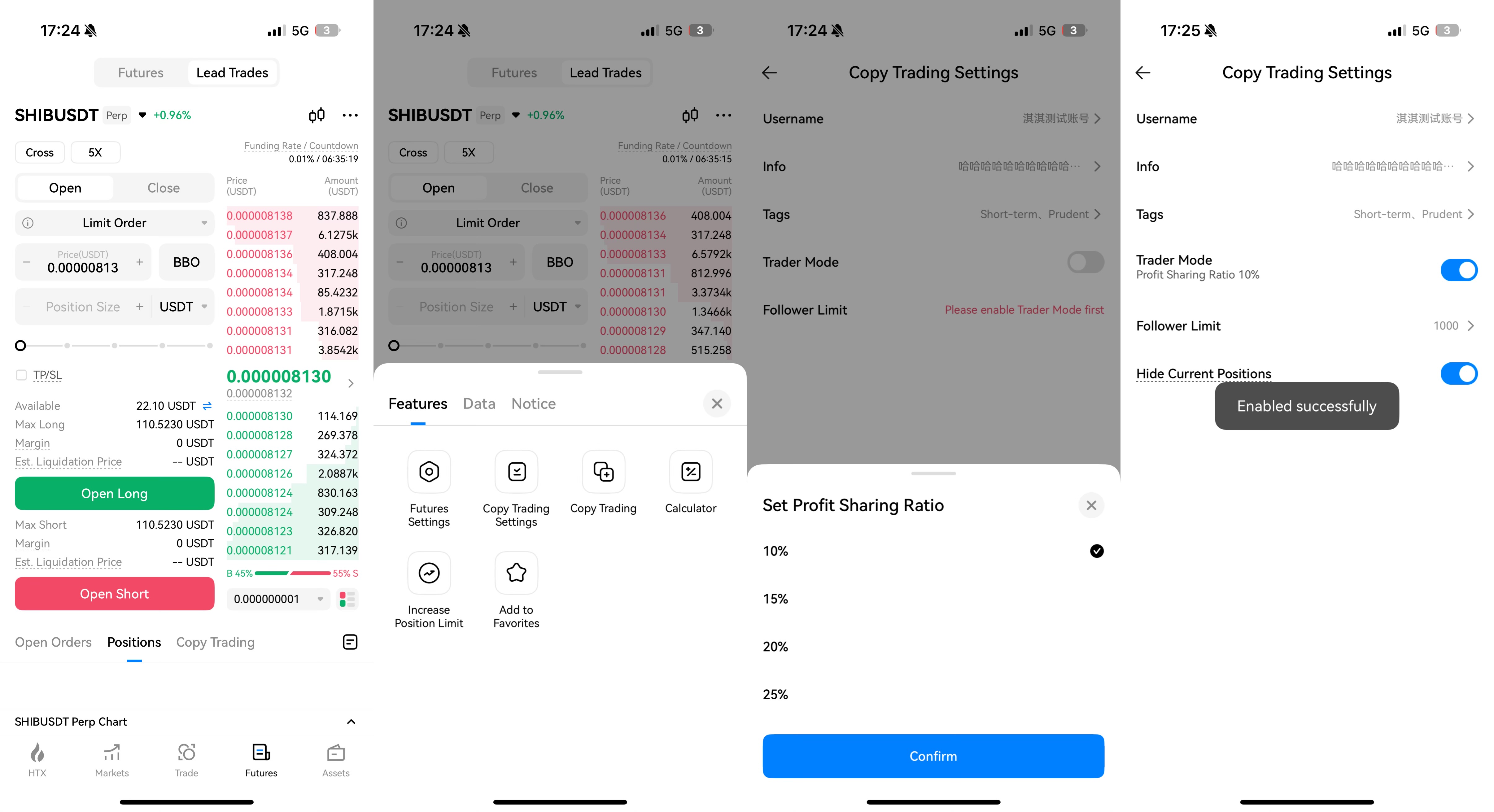
- Go to the futures trading page, find "Lead Trades", tap the … icon on the top right, and select "Copy Trading Settings".
- Tap "Trader Mode" and a window for setting a profit sharing ratio will pop up.
- Set a profit sharing ratio. You may select one from 10%, 15%, 20%, and 25%.
- Please check the box "I have read and agree to the Copy Trading Trader Agreement."
- Tap "Confirm" and you have now successfully enabled Trader Mode.
- How to Modify Copy Trading Settings
- Go to the futures trading page, find "Lead Trades", tap the … icon on the top right, and select "Copy Trading Settings".
- On the "Copy Trading Settings" page, you may freely modify your copy trading settings.

- How to Access the "Lead Trades" Page
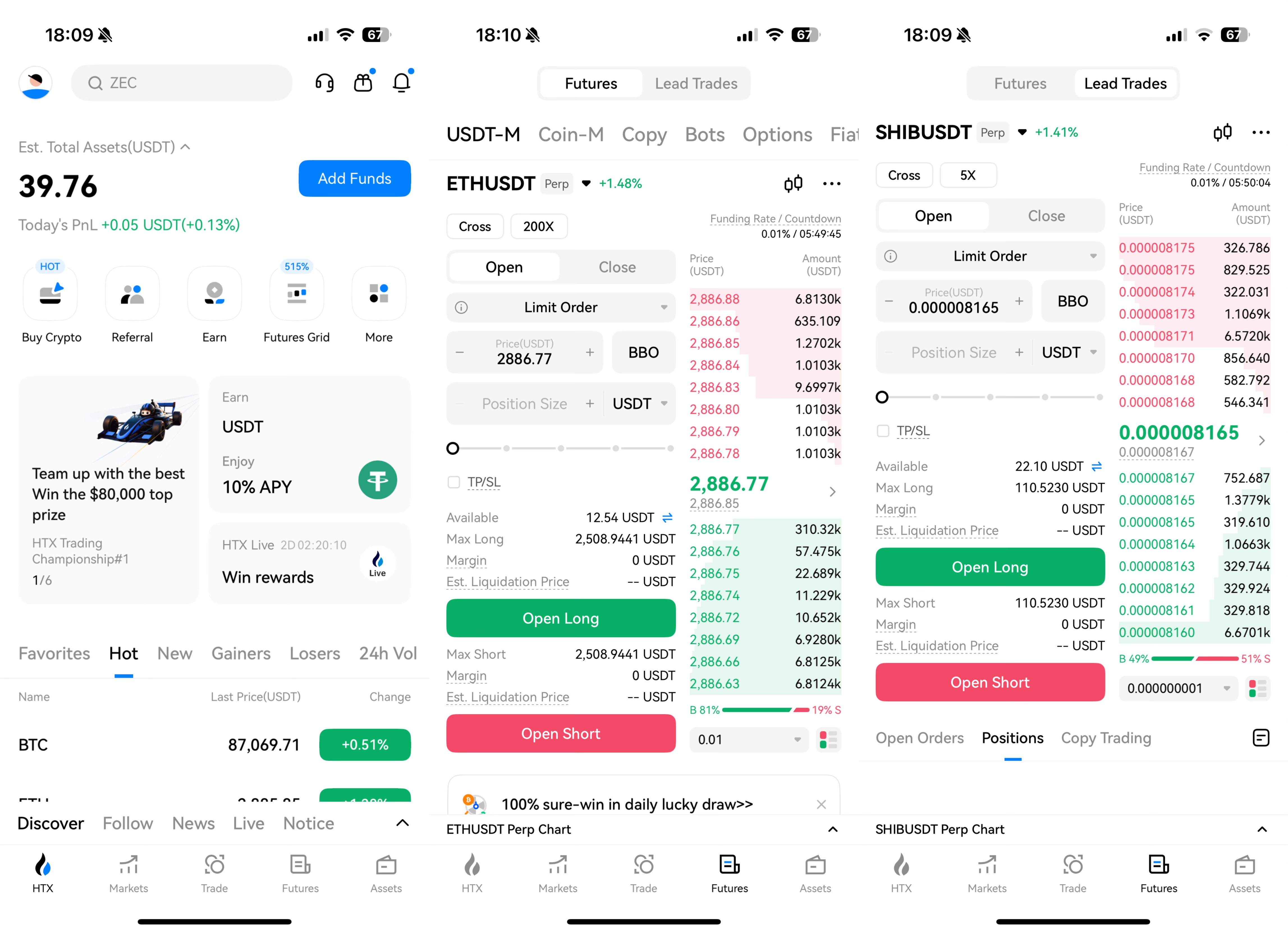
- Open your app and tap "Futures" at the bottom.
- On the futures trading homepage, switch the top tab to "Lead Trades" to start leading trades.
- How to Transfer Funds
- On the futures "Lead Trades" page, tap the transfer icon.
- On the transfer page, enter the amount of funds you want to transfer.
- Tap "Transfer". Upon successful completion, the funds will be credited immediately.
Please note only lead traders with their Futures Leading account balance > 10 USDT can be found and followed.

- How to Redeem and Use the Trial Bonus Coupon
- On the futures "Lead Trades" page, locate and tap the coupon icon.
- In the "Trial Bonus Coupon" popup window, browse and select the coupon you want to use.
- Tap "Confirm" and the system will issue the trial bonus to your account.
- Return to the futures "Lead Trades" page and you may commence trading.
Please refer to the announcement Futures Trial Bonus Rules for detailed usage guidelines.

- Look Up Announcements in Support
- Tap the … icon on the top right of the copy trading homepage and a popup window would appear.
- In the popup window, tap "Notice" to view the three most recent copy-trading announcements. Tap the desired one to see it in details.
- Tap "View More" to navigate to the copy-trading announcements list in Support, where you can browse all related announcements.

- How to Turn Off Trader Mode
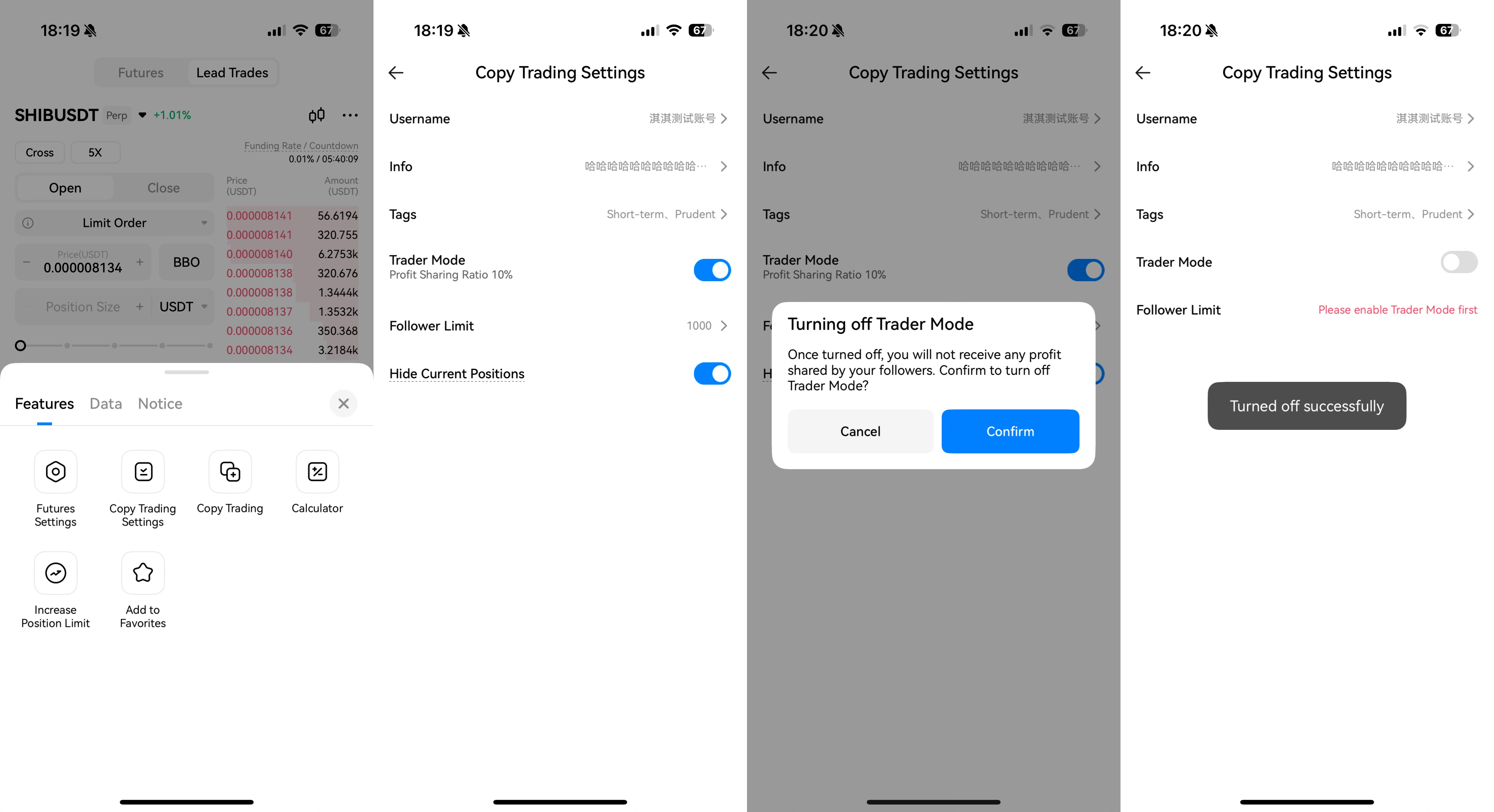
- Go to the futures trading page, find "Lead Trades", tap the … icon on the top right, and select "Copy Trading Settings".
- On the "Copy Trading Settings" page, disable the "Trader Mode".
- In the confirmation popup, tap "Confirm".
- The page will display "Turned off successfully". Your trader mode is now disabled.
- How to Check Leading History
Note: The system currently supports checking historical data within the previous 3 months before the upgrade.
- Go to the "Copy Trading" homepage and tap "Me".
- Tap the … icon on the top right.
- From the popup menu select "Original System Data" to view.

- How to View Profit Share
- Go to "Copy Trading" > "Me" and switch the top tab to "Lead Trades".
- About Data Indicators:
Note: To ensure your asset security and trading accuracy, each data update may take approximately 5 minutes to refresh to the latest data.
Cumulative Profit Shared: The amount of profit that has been settled and distributed to a lead trader's account.
Last Profit Shared: The profit share during the previous settlement cycle, including both regular and special settlements.
Est. Current Profit Shared: The amount of profit shared that the lead trader anticipates receiving in the upcoming settlement period.
- For detailed profit-sharing rules, please refer to the announcement HTX Futures Copy Trading Profit Sharing Rules.

- "Lead Trades" Page Data Explained
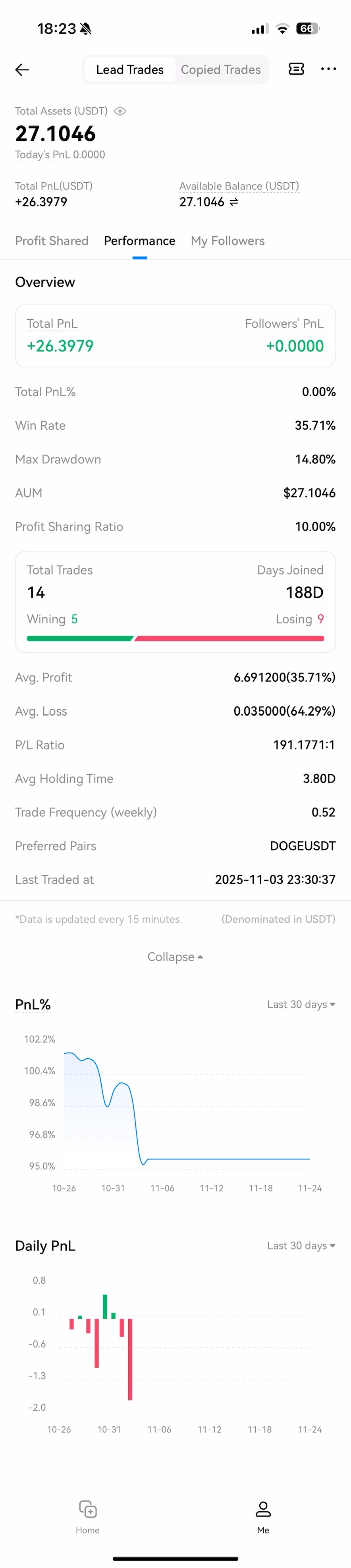
- Total Assets: The account's total equity (including static equity and unrealized P&L).
- Today's PnL: Current account assets − Starting assets at 00:00 − Amount transferred in + Amount transferred out.
- Total PnL: The cumulative realized profit and loss.
- Available Balance: The margin balance available for opening positions (including trial bonus).

- Performance Page Data Explained
Note: Data is updated every 15 minutes.
- Today's PnL: Current account assets − Starting assets at 00:00 − Amount transferred in + Amount transferred out.
- Total PnL: The cumulative realized profit and loss.
- Available Balance: The margin balance available for opening positions (including trial bonus).
- Followers’ PnL: The total profits from all followers’ profitable orders.
- Total PnL% = PnL% in the current calculation period + Carryover PnL% (the previous PnL% at the time of transfer).
For more detailed calculation, please refer to the official announcement New Rules Explanation for HTX Copy Trading Profits.
- Win Rate: (Quantity of the profitable closed orders / Quantity of the closed orders) * 100%.
- Maximum Drawdown: The maximum loss of the lead trader.
Drawdown Rate: (Historical highest PnL% - Current PnL%) / (Historical highest PnL% + 1).
- AUM: The total futures margin of the lead trader and their followers.
- Followers: The number of followers currently copying this trader.
- Cum. Followers: The cumulative number of followers of this trader.
- Total Trades: The total number of orders placed by this trader to open positions.
- Days Joined: The number of days since the user first became a lead trader.
- Avg. Profit: Total profits of profitable orders / Number of profitable orders.
- Avg. Loss: Total losses of unprofitable orders / Number of unprofitable orders.
- P/L Ratio: The ratio of average profit to average loss.
- Avg Holding Time: Cumulative holding time / Number of fully closed positions.
- Trade Frequency (weekly): Total order count / Number of weeks joined (days joined / 7).
- Preferred Pairs: The futures trading pair with the highest number of trades.
- Last Traded at: The time of the last order executed.
- My Followers Page Data Explained
On this page you will see a list of all your followers, sorted by their total contribution to your profit share from the highest to the lowest.


