Just Now, Claude Code Evolved Again, Drafting 'Feedback Reports' for Users

marsbitPublished on 2026-08-27Last updated on 2026-08-27

Abstract

Claude Code has introduced a new feature where it can automatically draft feedback reports on behalf of the user. This occurs in scenarios such as when a tool persistently fails, Claude cannot fulfill a request, an error is identified, or the user explicitly asks for feedback. Drafts are saved locally and are not sent to Anthropic until the user reviews and approves them. Users can view, edit, or delete these drafts via a feedback queue interface and control the feature's behavior through settings. The tool is available in local, interactive terminal sessions using the Claude API but is disabled in non-interactive modes, web sessions, certain cloud platforms, and for organizations with specific data retention policies.

Claude Code has updated with another quite interesting little feature.

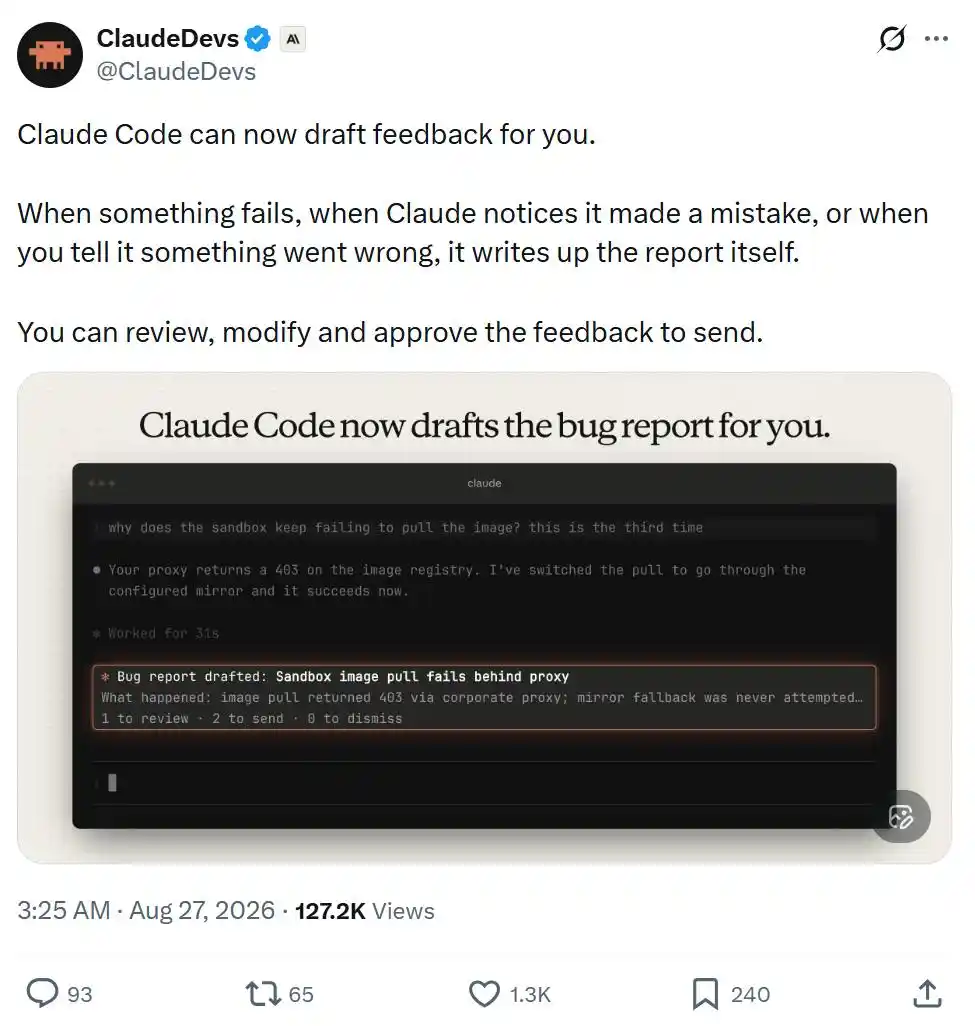
This time, it can help you draft feedback reports.

When a certain feature malfunctions, when Claude realizes it made a mistake, or when you point out where something went wrong, it will automatically compile the relevant situation into a report.

You can review, edit it before sending, and decide whether to approve submission.
However, you can also disable this feature in /config, or modify its behavior settings.
The official team has also compiled detailed documentation; let's take a look at the specific content.

Claude Code Starts 'Writing Feedback Reports' for Itself

Feedback drafted by Claude is a report about Claude Code written by Claude on your behalf. This feature requires using Claude Code v2.1.238 or later.

Claude Code saves each feedback draft on your local device, at the path: ~/.claude/feedback/drafts/. Nothing is sent to Anthropic until you actively send it.

Specifically, Claude will automatically draft feedback via the SendFeedback tool in the following situations:

  • A tool or command continuously fails;
  • Claude cannot complete a certain request you made;
  • You point out that Claude made a mistake, or Claude itself realizes it made an error;
  • You ask Claude to submit feedback.

Documentation address:

https://code.claude.com/docs/en/tools-reference#sendfeedback-tool-behavior

What You See When Claude Drafts Feedback

When Claude queues a feedback draft, you will see a card above the input box, displaying the title of that draft. You can:

  • Press 1 to view the draft;
  • Press 2 twice in a row to send it as-is directly;
  • Press 0 to ignore this card.

Even if you ignore the card, the draft will remain in the feedback queue.

After you ignore a feedback card, Claude Code will ask if you want to turn off Claude's automatic feedback drafting feature. If you choose not to turn it off twice in a row, it will stop asking afterwards.

By default, a maximum of 3 feedback cards are displayed per session.

After exceeding this limit, or when you set feedbackDrafts to quiet, only the number of feedback drafts currently queued will be shown at the bottom of the input box, and no specific cards will pop up.

Viewing and Editing Feedback Drafts

Run /feedback without any parameters to open the feedback queue.

This will list all unprocessed drafts from all your sessions, including those for which you closed the feedback card or never saw a card in the first place.

After selecting a draft, you can review it and perform the following operations:

Edit the title, category, and specific content;

Set Send transcript to yes or no. If the session record corresponding to when Claude created this draft still exists, this option defaults to yes, meaning the conversation segment will be submitted to Anthropic along with the feedback; choosing no sends only the feedback report itself;

Send the draft, delete the draft, or temporarily leave it in the queue to handle later.

If you want to manually write a feedback report yourself, press w to open the standard feedback window.

The /feedback command with text content, as well as the /bug command, will also directly open this standard feedback window.

Sending Feedback Drafts

When you send a draft, Claude Code submits it in the same way as a /feedback report, following the same data retention policies. After sending is complete, the draft is deleted from your local device.

If you send directly from a feedback card, it will show: ✓ Sent. If you send from the feedback queue, a receipt ID will be shown when the window closes.

Note that sending directly from a feedback card does not include the conversation transcript.

Claude Code saves your working directory information in the local draft to find the corresponding conversation transcript, but does not send this working directory.

For organizations with Zero Data Retention (ZDR) enabled, Claude Code does not provide this tool, and /feedback is similarly unavailable.

Deleting or Retaining Feedback Drafts

When you delete a draft, Claude Code simply removes it from your local device.

If you leave a draft in the feedback queue unprocessed, it will automatically expire after 30 days.

The feedback queue can save a maximum of 10 drafts across all sessions.

When Claude creates the 11th draft, Claude Code will automatically delete the earliest one.

Sessions Where Claude Cannot Automatically Draft Feedback

Claude Code only provides this feature in the following scenarios:

Interactive terminal sessions running on the user's own computer and directly using the Claude API, not through a cloud service provider.

The tool is not provided in the following scenarios:

  • Non-interactive -p run modes, and Agent SDK sessions, as these scenarios lack an interface for reviewing the feedback queue;
  • Cloud sessions, such as Claude Code on the web, because it cannot write feedback drafts to your local device;

Sessions run through the following platforms:

  • Amazon Bedrock
  • Claude Platform on AWS
  • Google Cloud Agent Platform
  • Microsoft Foundry

Sessions with the following environment variables or related configurations set:

  • CLAUDE_CODE_SEND_FEEDBACK=0
  • DISABLE_FEEDBACK_COMMAND=1
  • Setting CLAUDE_CODE_DISABLE_NONESSENTIAL_TRAFFIC to any non-empty value
  • Feature-flag fetching is turned off;
  • Organizations that have turned off product feedback functionality;
  • Organizations with Zero Data Retention (ZDR) enabled.

This article is from the WeChat public account "Machine Heart"

Related Questions

QWhat is the main new feature introduced in the latest Claude Code update according to the article?

AThe main new feature is that Claude Code can now automatically draft feedback reports for users when issues occur, such as tool failures, errors made by Claude, or user-reported problems.

QWhere are the feedback drafts saved locally on a user's device, and when is the content transmitted to Anthropic?

AThe feedback drafts are saved locally at ~/.claude/feedback/drafts/. The content is not transmitted to Anthropic until the user actively sends the report.

QHow can a user open the feedback queue to review and manage pending drafts in Claude Code?

AA user can open the feedback queue by running the /feedback command without any parameters.

QUnder what conditions will Claude automatically draft a feedback report using the SendFeedback tool?

AClaude will automatically draft feedback when: a tool or command repeatedly fails; Claude cannot complete a user's request; the user points out an error or Claude realizes it made a mistake; or the user explicitly asks Claude to submit feedback.

QIn which types of sessions is the automatic feedback drafting feature NOT available in Claude Code?

AThe feature is not available in: non-interactive -p run modes and Agent SDK sessions; cloud-based sessions like Claude Code on the web; sessions run through platforms like Amazon Bedrock, Claude Platform on AWS, Google Cloud Agent Platform, or Microsoft Foundry; and sessions with specific environment variables or configurations that disable feedback or non-essential traffic, or in organizations that have disabled product feedback or enabled Zero Data Retention.

Related Reads

EASY Residency Season 4 Roster Announced: These 9 Projects Already Have Onboarding Angles

EASY Residency Season 4 Announces 24 Selected Projects, Highlighting 9 with Early User Interaction Opportunities On August 25th, YZi Labs revealed the 24 early-stage companies selected for the fourth season of its EASY Residency flagship incubation program, with each project receiving $500,000 in funding. The selection reflects a focus on more programmable, localized, and compliant solutions in global payments, on-chain markets, and "agentic finance." Among the 24, nine projects currently offer clear avenues for early user participation. Here is a summary: * **Neutral Trade:** An on-chain quantitative strategy marketplace. Users can participate in its "Autopilot Deposit" campaign for 2x NT Points. * **Primus:** A cryptography infrastructure for institutional on-chain finance. It is currently running a "Warm Up" creator campaign on Kaito.ai with an $8,000 prize pool. * **Roostoo:** An AI trading agent training and screening platform. Users can join the early waitlist via its website. * **SmartX:** A terminal for on-chain transactions. Its new website is live, with the application launching next month (currently invite-only). * **Alloco:** An on-chain ETF issuance platform. Its core products are upcoming; users can join its Telegram channel for early access announcements. * **XHunt:** An influence data platform for creators and projects. A Chrome extension is available for use, but no points system is active yet. * **Nara:** A PayFi digital dollar protocol for stablecoin payments. The platform is live (TVL ~$10M), but users should await its PayFi product launch or potential points campaigns in September. * **ElfomoFi:** An on-chain market-making protocol for EVM. Users can deposit into curated vaults, though no points system is yet implemented. * **Liquorice:** A liquidity protocol for professional market makers. The app allows deposits, but also lacks a live points system. The report positions these interaction opportunities as potential avenues for users to engage with the projects early, possibly ahead of future token distributions.

Odaily星球日报32m ago

EASY Residency Season 4 Roster Announced: These 9 Projects Already Have Onboarding Angles

Odaily星球日报32m ago

Spending Without Selling: Galaxy Turns BTC, ETH, SOL Into Personal Lines of Credit

On August 25th, Galaxy Digital launched a Crypto Portfolio Line of Credit on its GalaxyOne retail platform. Users can borrow USD or USDC at a fixed 8.99% APR using a mix of BTC, ETH, and SOL (including staked SOL) as collateral. The initial loan-to-value ratio is 50%, and the service is currently available in 40 U.S. states. Galaxy emphasizes that client collateral will not be rehypothecated, and staked SOL will continue to earn rewards. This product targets high-net-worth individuals, family offices, and founders who hold significant crypto assets but seek liquidity without triggering capital gains taxes by selling. Key features include combined collateral across multiple assets, acceptance of staked SOL, and flexible fund usage for expenses, investments, or trading within GalaxyOne. The launch occurs amidst a contracting crypto-backed lending market, which declined to $56.16 billion in Q2 2026. Galaxy's entry, led by BlockFi's former founder Zac Prince, positions itself with a safety-first promise of no rehypothecation, directly addressing failures seen in 2022. However, risks remain for borrowers, including potential margin calls if collateral values drop significantly and the ongoing cost of the 8.99% interest rate. The product is most advantageous during bullish markets where asset appreciation outweighs interest costs, functioning best as a short-term liquidity tool rather than a long-term leverage strategy.

marsbit33m ago

Spending Without Selling: Galaxy Turns BTC, ETH, SOL Into Personal Lines of Credit

marsbit33m ago

Hash Global: After BTC, Who Will Take the Baton for the Next Bull Market?

"Hash Global: After Bitcoin, Who Will Take the Baton in the Next Bull Run?" The market, following a period of consolidation, has re-entered a bull trend, initiated by Bitcoin's surge past key resistance levels. However, this cycle may differ from the last. While BTC remains a crucial entry point, the primary growth narrative is shifting from traditional capital flowing into crypto (TradFi → Crypto) to traditional assets migrating on-chain (TradFi → Onchain). This "Everything-on-chain" trend, fueled by evolving regulatory frameworks like Regulation Crypto, signifies a potential explosion in high-quality tokenized real-world assets (RWA) like stocks and bonds. The critical question becomes: which infrastructure will host this influx? The answer likely lies not in new entrants, but in mature, concentrated ecosystems with proven networks. Ethereum (ETH) offers **deterministic value** as the most established decentralized finance (DeFi) infrastructure, poised to capture the largest share of new demand. Binance Coin (BNB) represents **growth elasticity**, building a comprehensive financial network that connects users, assets, and liquidity, evidenced by its rapid RWA expansion. Robinhood mirrors this trend from the TradFi side, bridging traditional finance to the blockchain. In summary, while BTC opens the door, the next bull market's major beneficiaries could be the foundational platforms—like ETH and BNB—that enable and profit from the mass migration of real-world assets onto crypto networks.

marsbit39m ago

Hash Global: After BTC, Who Will Take the Baton for the Next Bull Market?

marsbit39m ago

Trading

Spot
活动图片