10 Claude Code Usage Tips: The Sooner You Know, The Sooner You Benefit

marsbitОпубліковано о 2026-04-08Востаннє оновлено о 2026-04-08

Анотація

Here is an English summary of the article "10 Must-Know Claude Code Tips: The Sooner You Know, The Sooner You Benefit": This article shares essential tips for using Claude Code, an AI coding assistant, to significantly boost productivity. It is divided into three main sections. First, it covers three ways to launch Claude: 1) A simple GUI desktop app for non-programmers, 2) A command-line method with a key tip (`claude -c`) to resume from a specific point in the chat history, avoiding restarting context, and 3) A headless mode (`-p` flag) for automation tasks using a subscription token. Second, it details three crucial in-session techniques: 1) Using `Esc` to gracefully interrupt a response and `Esc+Esc` to revert to a previous checkpoint, 2) Using the `!` syntax (e.g., `!ls`) to run shell commands without leaving the chat, and 3) Managing context with `/clear` to remove history or `/compact` to optimize it when performance slows down. Finally, the article recommends companion software to solve human-AI collaboration bottlenecks: 1) **Superpowers**, a structured workflow methodology for higher-quality code output. 2) Voice input tools like **Typeless** and **Douban Input法** to overcome typing speed limit. 3) Tools like **Cmux** (a terminal for managing multiple AI agent instances) and **Vibe Island** (for seamless context switching between tasks) to solve the problem of lost focus when multitasking. The overall goal is to help users focus more deeply on their programming...

Below are the Claude code usage tips that I've often lamented not knowing earlier over the past six months.

They have saved me a massive amount of time, allowing me to enter a state of smooth flow while coding and writing content.


The article is divided into three parts:

1. Three Ways to Launch

2. Usage Tips While Running

3. Using Companion Software to Solve Human-Machine Collaboration Efficiency Issues

All of this is about: allowing you to focus more on programming and other activities at hand.

I wish someone had sent me this guide a few months ago, so I could have taken fewer detours and started smoothly:

1. Save this guide, spend 30 minutes this weekend to master Claude code techniques.

2. Send it to anyone who tells you "I think Claude code is difficult, but I've never tried it".

Alright, first let's start with the simplest launch (you read that right, even launching has its tricks)

Three Ways to Launch Claude

Simple Launch

Launching Claude is a very simple thing, simply in the command line.

But for friends who don't like command-line tools, Claude code actually has a visual interface.

How to do it?

Go to this website: https://claude.com/download, under Claude Desktop, follow the steps below and you'll get a visual Claude.
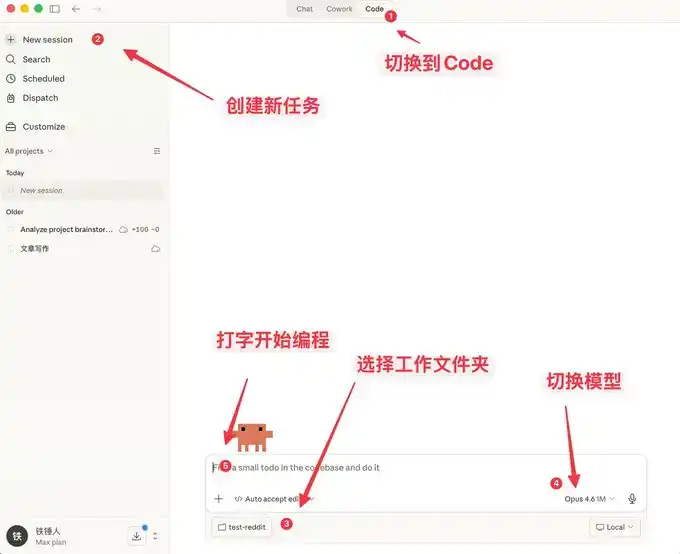
Here you can not only chat, but it also comes with many features similar to OpenClaw.
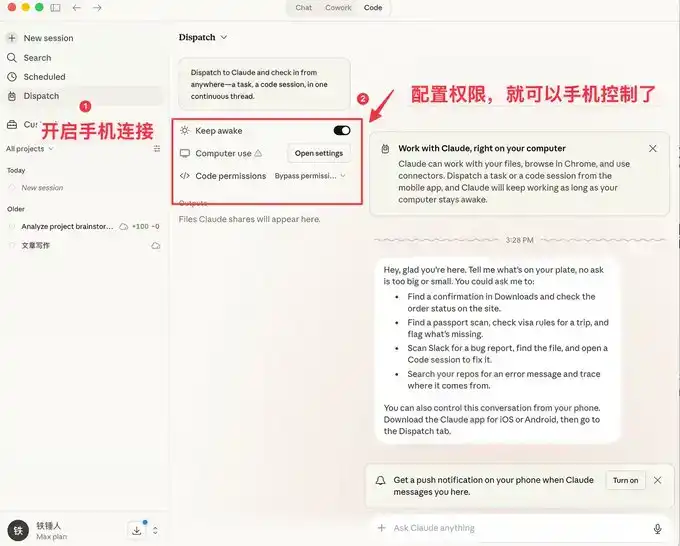
The visual interface is easier for ordinary people to use, but programmers prefer the command-line launch method.

Below I'll introduce a few commands to speed up launching.

Command Line Launch

Launch with Specific History

During our use of Claude code, we often encounter situations that require restarting. Every time we restart, we need to restore the previous conversation context:


I used to always use:
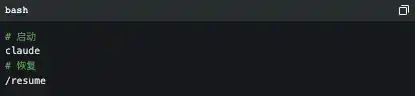
But the official actually provides some pretty good launch commands:
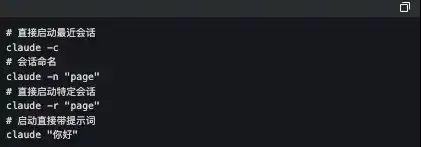
The one I use frequently here is `claude -c`, a short command that has saved me a lot of life.


-p Launch in Automated Mode

Claude Code can be launched without a UI, simply use the following command:

It's worth noting that if you want to use a local subscription Token to automate tasks, this is currently the only way to do it.

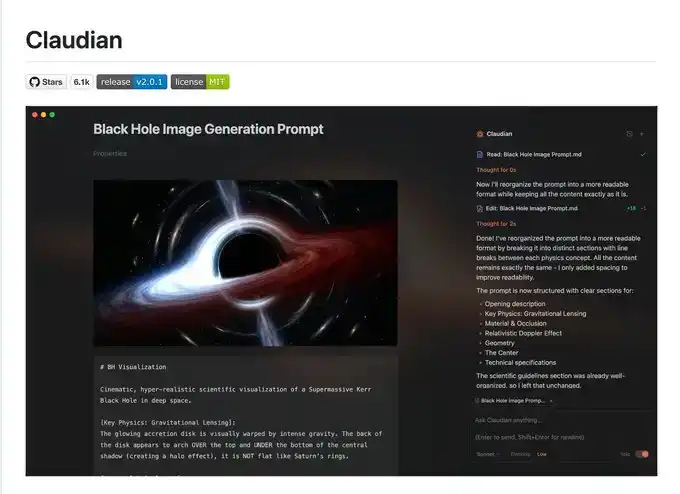
The famous Obsidian + Claude Code tool below made its own SDK to use the local subscription Token this way.
I admit what I said earlier might be a bit complicated, let's talk about a few simple commands to use during operation.

3 Must-Know Small Tips While Using Claude code

Elegantly Terminate and Rollback Tasks

When first using claude code, everyone still likes to use Ctrl+C to close the current conversation, only to find it closes Claude entirely. The correct way is to press the Esc key once, which will interrupt the conversation immediately, preventing things from getting worse.

If Claude suddenly goes crazy, we can press Esc+Esc twice, then a list will pop up:
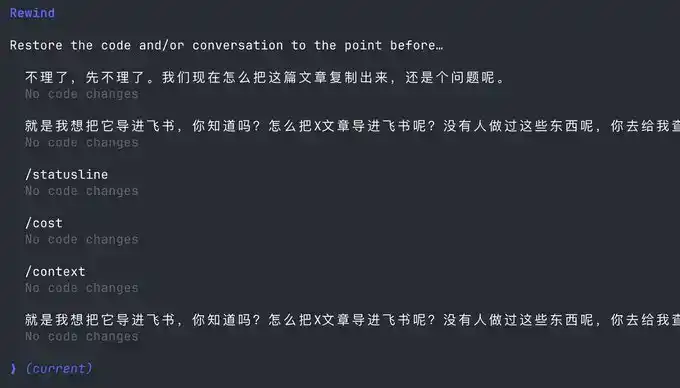
You can use this function to return to any checkpoint, avoiding Claude code messing up the code.

Execute Commands Without Leaving Claude

Sometimes we want to run a test command ourselves, but to not interrupt the current Claude, we have to open another command window.

Actually, we can use the ! syntax:

Context Management

As the conversation continues, the more chat history we accumulate, the more tokens are consumed per interaction, and Claude code will run slower and slower.

You have two choices, open a new window or use the /clear command

A simple command to clean up useless context is like closing 20 chrome tabs at once.

But what if I don't want to clear this context? Use /compact to compress it.

It's like giving claude a Red Bull to wake up and refresh.

I hope the above small tips help you use Claude code more smoothly.

But this is far from enough. Since Claude code is a command-line tool, no matter how many commands you learn, it's a mental burden.

Fortunately, the community has produced quite a bit of companion software to solve the following pain points:

1. Lack of mature prompt methodology, low programming efficiency

2. Slow typing speed leads to low prompt input efficiency

3. During multitasking, humans are fragmented and unable to increase productivity

If any of the above is your pain point, please read on.

Using Companion Software to Solve Human-Machine Collaboration Problems

Now, we are slowly discovering that humans are starting to跟不上 (cannot keep up with) the speed of machines. To address this, the community has produced a series of software.

First, we need a mature programming methodology:

Superpowers

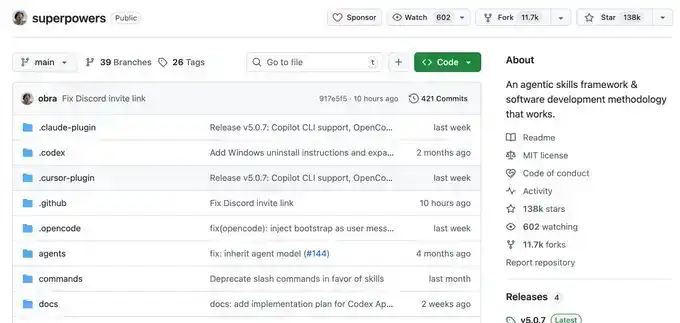
Ordinary people have no method when Vibecoding, they just do whatever comes to mind. This Skills is a programming workflow summarized by an experienced programmer.

He packaged top software engineering best practices into one-click Skills. From requirement梳理 (sorting), Spec confirmation, detailed planning, to TDD test-driven + automatic Code Review, the entire process enforces a structured workflow, allowing AI to output high-quality, maintainable code like a mature engineering team, significantly improving the one-time success rate, so you no longer have to repeatedly put out fires.

This project already has 138k Stars, you can go check it out for details, I won't elaborate here.
Once you have a mature programming Skills, you will find that it requires frequent information input, and then you discover that typing speed becomes your efficiency bottleneck.

You wonder, is there any software that can quietly convert speech to text in the office, with particularly accurate Chinese and English recognition?

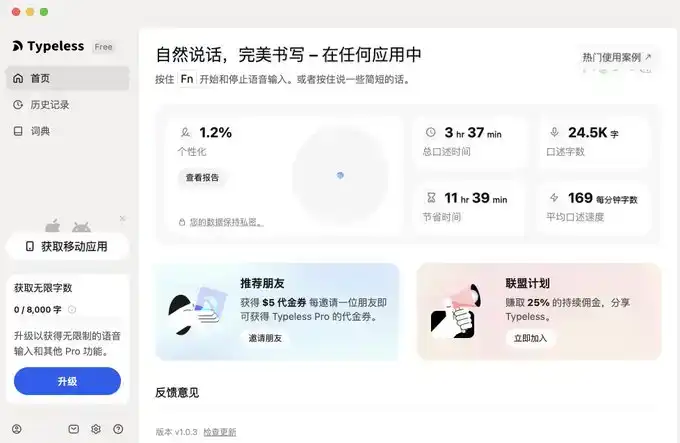
Yes, yes, and there are many, but I only recommend two, typeless and Douban Input Method.

Voice Input Software

The advantage of Douban Input Method is that it's fast, has decent Chinese and English recognition, and most importantly, it's free. It's a bit like the Android system, I use it too.

But typeless, aside from needing payment, doesn't have many shortcomings, and you can try it.
I'll provide links for both below.

typeless (I recommend, affiliate link): https://www.typeless.com/?via=lxfater


Douban Input Method is still in the testing phase, you can search for the installation package.

Once you start voice input, you can provide more context to Claude code, and the one-time success rate will get higher and higher. At this point, the efficiency limitation becomes the running time of Claude code.

We can use multiple Claude code instances simultaneously. At this time, our bottleneck becomes the human problem of losing context when switching between multiple tasks.

Solve Your Attention Switching Problem

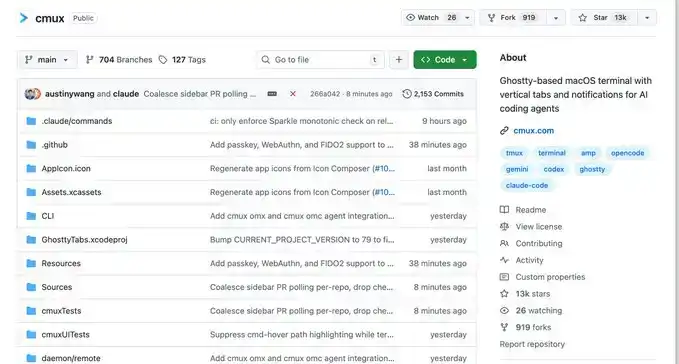
First, I recommend a software called Cmux:

It's a macOS native terminal built based on Ghostty, specifically designed for running multiple coding agents simultaneously: vertical tabs + smart sidebar, flexible split-screen, smart notification highlighting, built-in browser split-screen + Socket API.

This is an open-source project: https://github.com/manaflow-ai/cmux
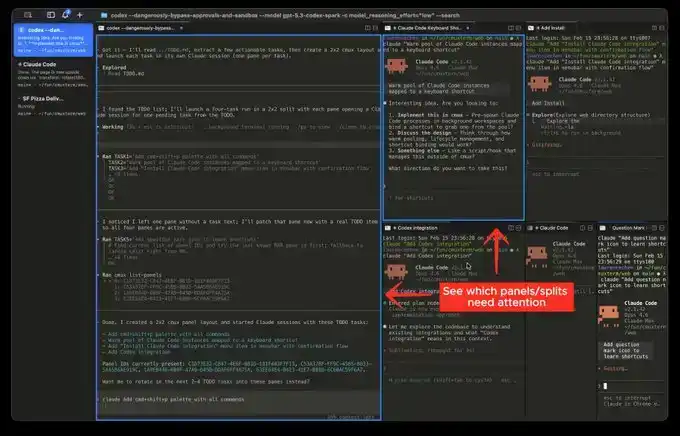
My favorite is the split-screen function, but once you split the screen, you won't know which window completed the task.

Fortunately, this software will directly highlight a certain terminal area, helping you switch to the corresponding window in time.
But the next software I'm about to介绍 (introduce) will make this switching incredibly smooth:

This is a relatively popular product recently, called Vibe Island

The UI is beautiful, right? But the most powerful aspect of this product is its support for switching between many different tools.

And each switch will automatically唤醒 (wake up) and focus the window of the APP you are in, and you can input directly.

Theoretically, as long as you switch fast enough and open enough windows, it will continuously push the windows that need processing in front of you. You'll feel like you're handling an assembly line.

Finally

I hope this content is helpful to you. This is quite beginner-friendly, actually common knowledge for programmers.

But I still hope it can help you. If you feel this content was helpful to you!

Пов'язані питання

QWhat are the three main parts of the Claude code usage guide?

AThe three main parts are: 1. Three ways to launch Claude, 2. Tips for using it while it's running, and 3. Using supporting software to solve human-machine collaboration efficiency problems.

QWhat is the purpose of the `-c` command line argument when starting Claude?

AThe `-c` command line argument is used to start Claude and continue from a specific previous history or context, saving time by avoiding the need to re-establish the previous state manually.

QHow can you gracefully interrupt a Claude code response without quitting the entire application?

AYou can press the Escape (Esc) key once to immediately interrupt the current conversation and prevent it from going further off track.

QWhat command can be used within Claude to execute a system command without leaving the Claude interface?

AYou can use the exclamation mark syntax (`!`) followed by the command to execute a system command without leaving the Claude interface.

QWhat are the two recommended software tools mentioned for voice input to improve efficiency when working with Claude?

AThe two recommended voice input software tools are Typeless and Douban Input法 (Douban Input Method).

Пов'язані матеріали

Vitalik: Building Index-Tracking Assets Based on Options Rather Than Debt

Vitalik Buterin proposes constructing index-tracking assets using synthetic options rather than debt-based mechanisms. The core problem is enabling exposure to a price index (T, e.g., USD/ETH) in a trust-minimized environment where only ETH is a trustless asset, relying solely on a decentralized oracle. Traditional approaches, like algorithmic stablecoins, use debt positions and require real-time, binding oracles for liquidations, which are difficult to secure. This article suggests a paradigm shift: eliminating liquidation and using options as the fundamental building block, requiring only a "slow" oracle. The design defines two synthetic assets, P and N, with parameters for the index T, a strike price S, and an expiry M. At any time, 1 ETH can be split to create a (P, N) pair or merged back. At expiry M, the oracle determines T's value x. P receives min(1, S/x) ETH, and N receives max(0, 1 - S/x) ETH. This structure inherently avoids insolvency risk (P+N=1) and can share an oracle with prediction markets. To gain stable exposure to T (e.g., USD), a user would hold deeply "in-the-money" P options (with S significantly below the current price) and periodically "roll" them to lower strikes as the price approaches the current strike, rebalancing their portfolio. This transfers the decision of *when* to act from a protocol-enforced liquidation (requiring a real-time oracle) to the user or an automated wrapper. Users can manage MEV risk and oracle dependency by choosing their rebalancing timing and data sources. A key trade-off is accepting some quadratic drift (deviation from perfect peg), estimated at 1-4% annualized volatility. Buterin argues this cost is reasonable compared to fiat currency volatility or equilibrium shifts in other stablecoins. The success of this model depends heavily on designing low-slippage market mechanisms for the rebalancing process, leveraging users' low time preference to execute trades patiently.

marsbit32 хв тому

Vitalik: Building Index-Tracking Assets Based on Options Rather Than Debt

marsbit32 хв тому

"Water Scarcity": The Hidden Fatal Flaw of AI Infrastructure

“Water Scarcity: The Hidden Vulnerability of AI Infrastructure” In June 2026, SpaceX revised its IPO prospectus to highlight a core resource constraint alongside power and processors: water. This move signals a pivotal shift where water scarcity has transformed from an operational cost to a major, uncontrollable investment risk, directly threatening AI data center expansion. The scale of the problem is immense. U.S. data centers consumed an estimated 17 billion gallons of water for direct cooling in 2023, with indirect water use for power generation exceeding 211 billion gallons. Giants like Google alone use billions of gallons annually, with single sites consuming volumes equivalent to a medium-sized city. This water is largely “consumptive,” evaporated into the atmosphere and lost. This massive demand is colliding with scarcity. Tech companies are building “water tigers” in arid regions, sparking community protests in places like Mexico and Arizona, where data centers can legally use millions of gallons daily—enough for tens of thousands of residents. These conflicts are not about illegality, but about a mismatch between historic water allocation frameworks and new, colossal demand. The consequences are real. Community opposition, largely centered on water, has reportedly stalled or canceled $64 billion in U.S. data center projects over two years. Simultaneously, investors are pressuring companies for greater water footprint transparency, viewing it as a financial risk, not just an ESG metric. Technological solutions like air or liquid cooling involve trade-offs between water and electricity use, with final choices dictated by local constraints. The irony is stark: while industry leaders envision AI as a utility “like water,” its physical infrastructure is straining real-world water supplies. The race for AI supremacy may ultimately be governed not by the fastest chip, but by the slowest water meter.

marsbit1 год тому

"Water Scarcity": The Hidden Fatal Flaw of AI Infrastructure

marsbit1 год тому

Global Card Issuance Enters a Compliance-Driven Era: WasabiCard is Building the Next-Generation Payment Infrastructure

Global card issuance is entering a compliance-driven era, with WasabiCard building next-generation payment infrastructure. The platform asserts that as stablecoins increasingly enter cross-border payments, corporate settlements, and global commerce, the industry is shifting focus from "availability" and "growth-driven" models to long-term, compliant operation under global frameworks. Competition will center on sustainable compliance and global infrastructure capabilities. Stablecoins are evolving from on-chain assets into key payment tools in global business, with card issuance acting as critical infrastructure connecting digital assets to traditional payment networks like Visa and Mastercard. This expansion has revealed structural issues, including cross-regional issuance, BIN resource management, and insufficient AML and risk controls. In response, the industry is moving away from reliance on "grey efficiency" towards prioritizing compliance, risk management, and long-term operational stability. WasabiCard outlines its strategy: collaborating with licensed principals and local partners for localized operations, building robust KYC/AML systems, strictly separating commercial and consumer BIN usage, and enhancing global issuance, payment, and cross-border fund flow infrastructure. The goal is to build stable, scalable payment infrastructure amid evolving global regulations, shifting industry competition from scale to infrastructure capability. As stablecoins integrate further with global commerce, payment infrastructure will become a fundamental, embedded component of internet business. WasabiCard will continue to develop capabilities in global card issuance, stablecoin payments, cross-border fund flows, and API-driven financial workflows.

marsbit1 год тому

Global Card Issuance Enters a Compliance-Driven Era: WasabiCard is Building the Next-Generation Payment Infrastructure

marsbit1 год тому

Торгівля

Спот
Ф'ючерси
活动图片