Hands-On Guide to Participating in CZ-Supported predict.fun

Odaily星球日报2025-12-19 tarihinde yayınlandı2025-12-19 tarihinde güncellendi

Özet

Odaily Planet Daily introduces predict.fun, a prediction market platform founded by dingaling, a former Binance employee, and backed by CZ and YZi Labs. Launched on December 17, the platform airdropped initial points to eligible users, including BNB Chain meme traders and Aster participants. Unlike traditional prediction markets like Polymarket, predict.fun allows users to earn additional yield on funds used for predictions. The step-by-step guide includes: registering on the website, checking airdrop eligibility by wallet address, depositing at least $10 to unlock a referral link, sharing the invite on Twitter, verifying the tweet, and trading to unlock points (e.g., $500 trading volume for 200 points). Only event betting counts toward trading volume. The platform emphasizes user engagement and integrated yield generation.

Original | Odaily Planet Daily (@OdailyChina)

Author | Asher (@Asher_ 0210)

On December 17, dingaling, the founder of the prediction market platform predict.fun, announced on X that the platform is officially open and has airdropped initial points to Meme traders on BNB Chain, Aster participants, and active users of various prediction markets.
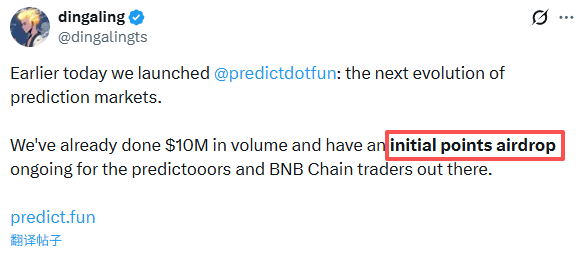
Unlike traditional prediction markets such as Polymarket and Kalshi, predict.fun has introduced a key innovation: funds used for predictions are no longer idle but can simultaneously generate additional returns during the prediction period.

It is worth mentioning that on December 4, Binance founder CZ posted on X, stating that the founder of predict.fun had worked at Binance several years ago and that the project was incubated by YZi Labs and received "investment" (for more details, read: CZ Reconciles and Joins Forces, dingaling Returns to the Prediction Trend with predict.fun).

Next, Odaily Planet Daily will guide you step-by-step through the interactive experience of participating in predict.fun.

Step-by-Step Participation Tutorial

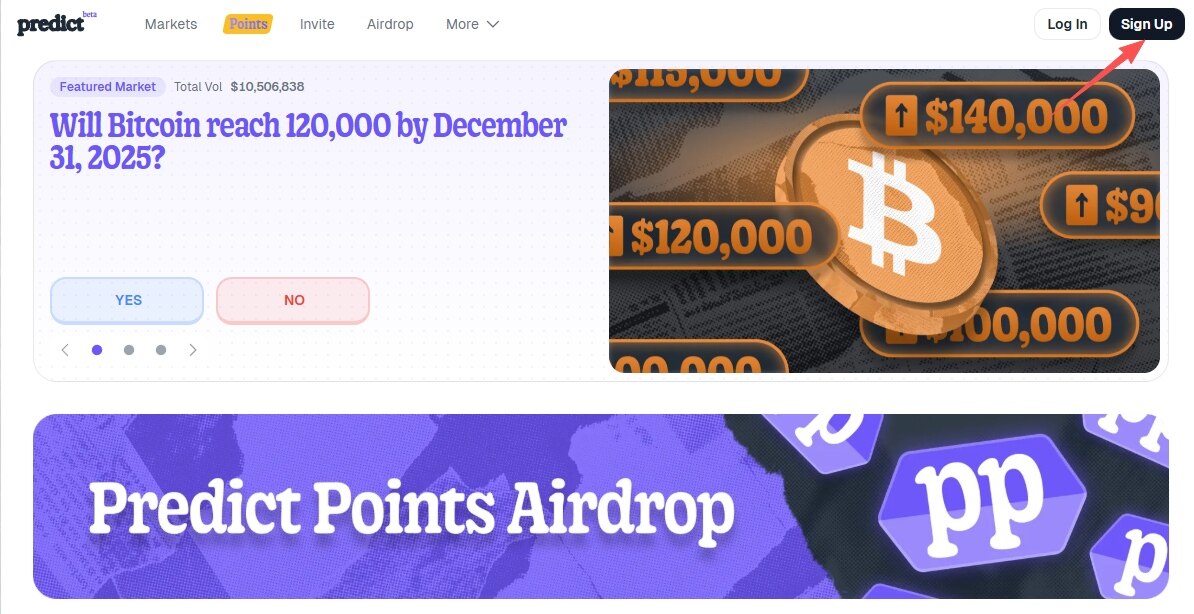
STEP 1. After logging into the project’s official website (link: https://predict.fun/), first-time users should click "Sign Up" to register and log in.
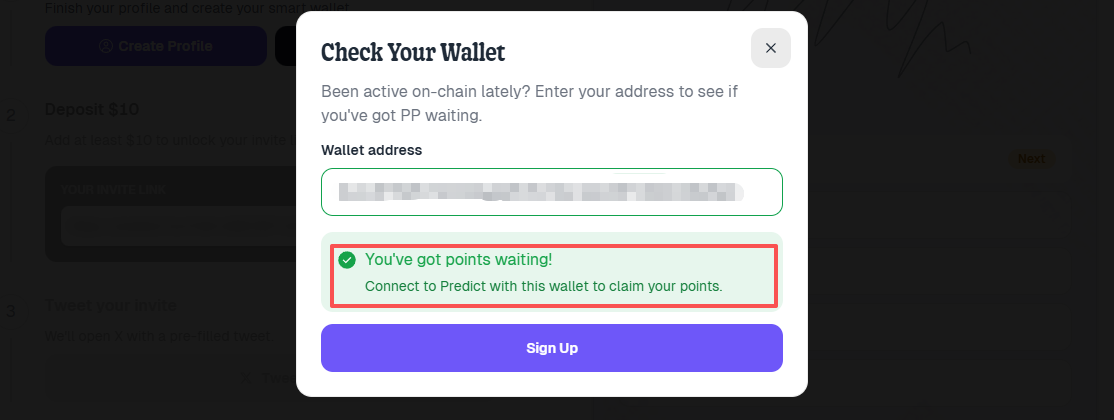
STEP 2. Click on "Airdrop" at the top to check airdrop eligibility: on the page, click "Check Wallet Eligibility" and enter your wallet address to view (as shown in the prompt below, indicating eligibility).
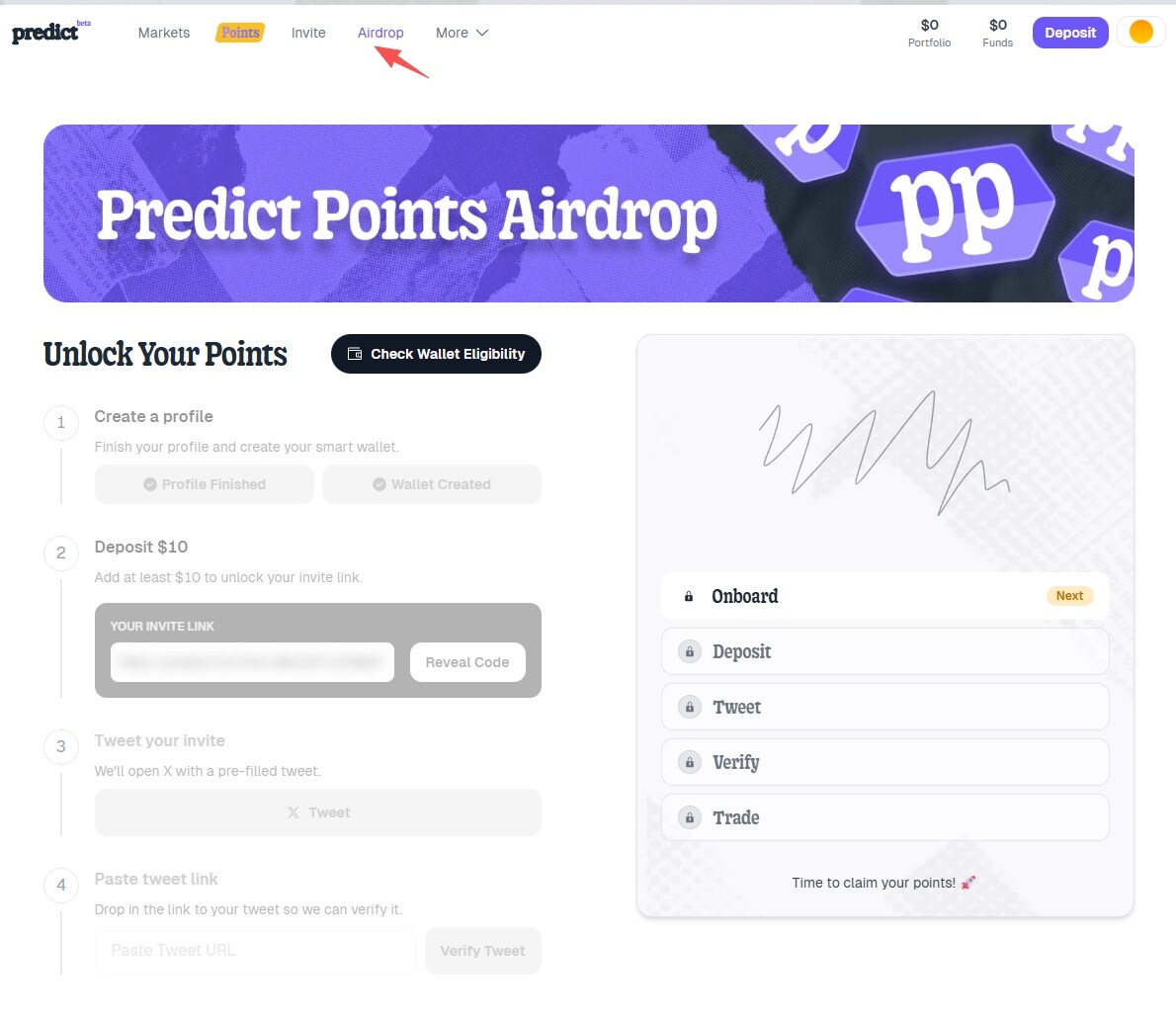
STEP 3. If eligible, click on "Deposit" at the top to deposit at least $10 into the platform and unlock your personal referral link.
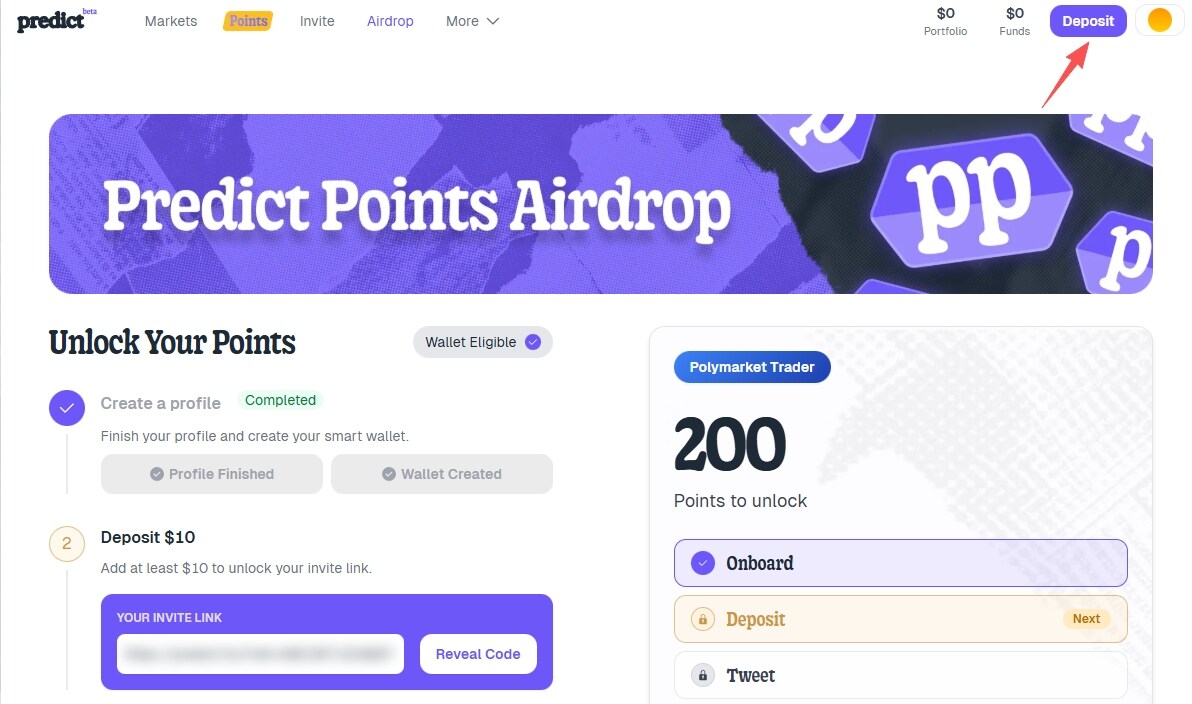
STEP 4. Click "Tweet" in step 3 to share the referral tweet. The system will automatically generate a personal referral tweet, or you can edit the content yourself.
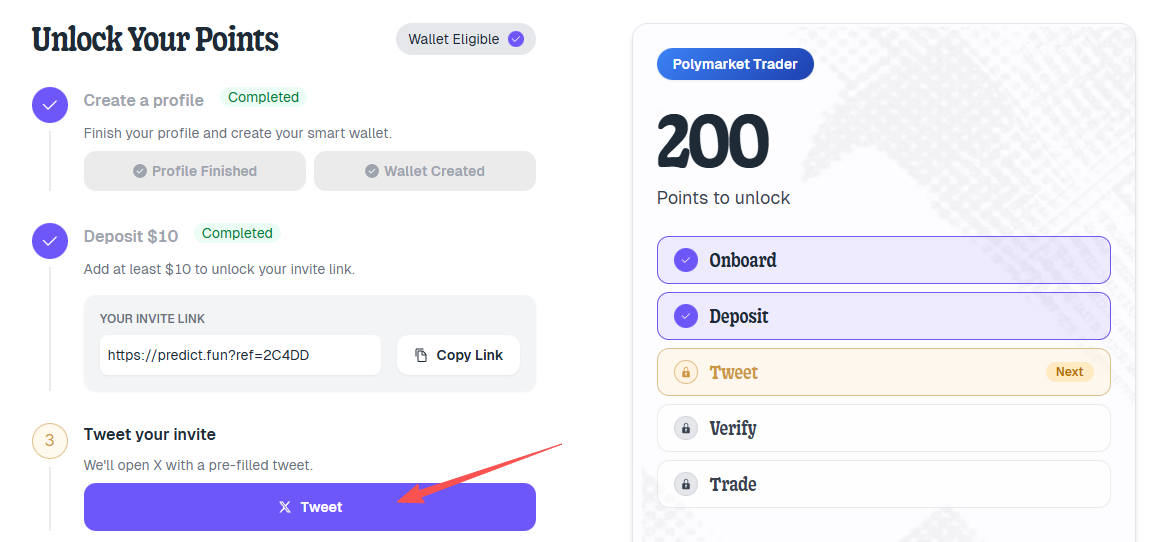
STEP 5. Fill in the link to the published referral tweet and click "Verify Tweet" to complete verification.

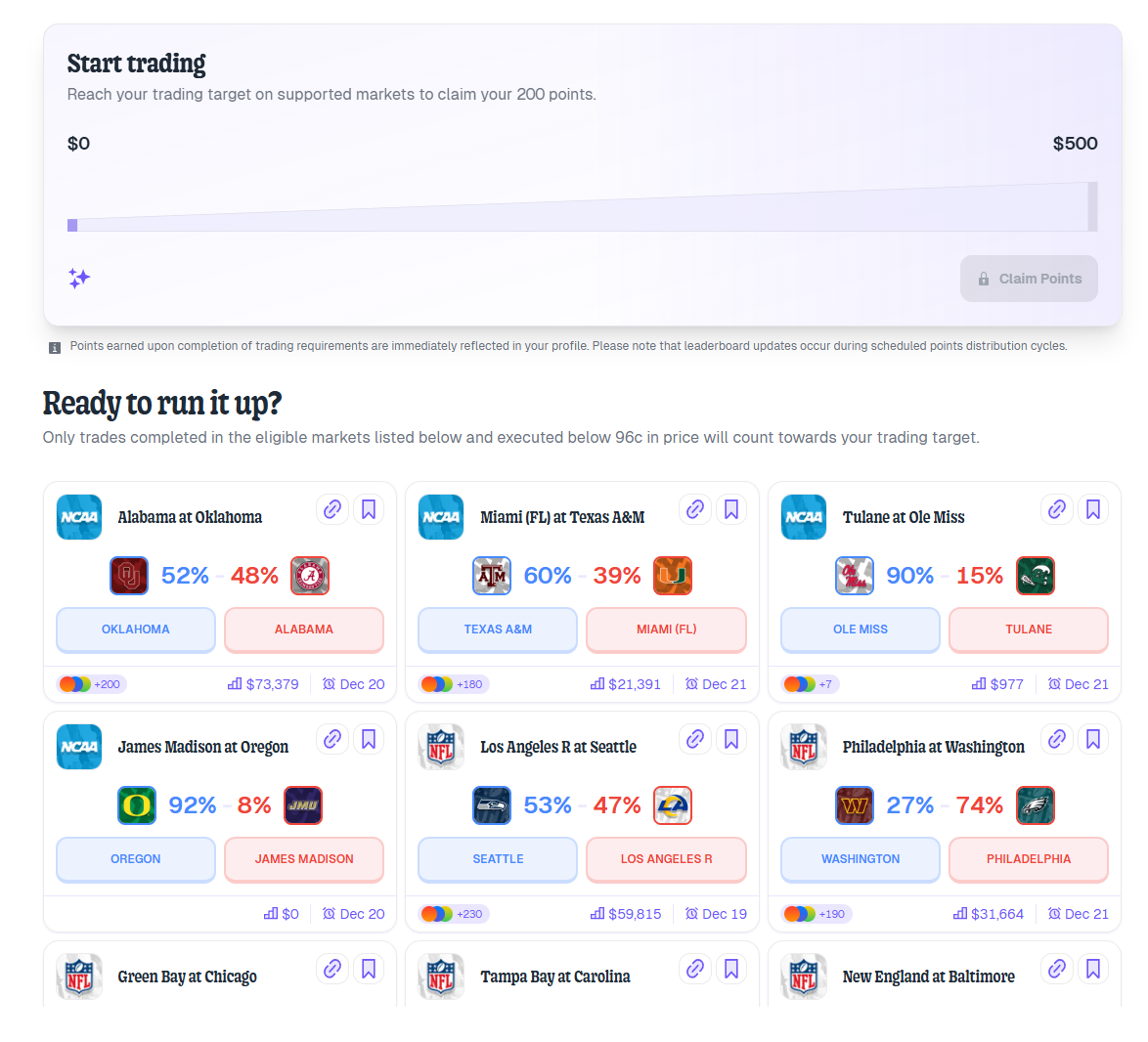
STEP 6. Unlock personal points by trading on the platform. As shown in the image, the account needs to complete $500 in trading volume to unlock 200 points. Note that only event-based bets count as valid trades.
İlgili Sorular

QWhat is the key innovation of predict.fun compared to traditional prediction markets like Polymarket and Kalshi?

Apredict.fun allows users' funds to generate additional yields during the prediction period, unlike traditional platforms where funds remain idle.

QWho is the official launch of predict.fun announced by on X platform?

AThe official launch was announced by predict.fun's founder, dingaling, on the X platform.

QWhat is the minimum deposit required to unlock a personal referral link on predict.fun?

AA minimum deposit of at least $10 is required to unlock the personal referral link.

QWhich user groups received the initial airdrop of points from predict.fun?

AThe initial points airdrop was distributed to Meme traders on BNB Chain, Aster participants, and active users of various prediction markets.

QWhat is the relationship between CZ and predict.fun's founder as mentioned in the article?

ACZ mentioned that predict.fun's founder previously worked at Binance several years ago, and the project is incubated and invested in by YZi Labs.

İlgili Okumalar

First Day Review of "Musk's WeChat" XChat: Even Worse Than Expected

Elon Musk's much-anticipated "WeChat-like" app, XChat, has officially launched after multiple delays. The initial review reveals a product that falls short of expectations, offering an experience largely similar to X Platform's (formerly Twitter) direct messages, despite being marketed as an encrypted communication tool. Key observations from the first-day test include: 1. The app's promoted "end-to-end encryption" and its claimed relation to Bitcoin's architecture were criticized by experts as a superficial attempt to capitalize on crypto buzz, with no real technical connection. 2. Musk's vision of an ad-free "secure communication system" is technically met, but only because the app is currently extremely basic, featuring only a single chat interface. 3. A promised anti-screenshot feature appears inconsistent; it works in X Platform group chats but fails within the XChat app itself, where screenshots still capture avatars. 4. The app supports 45 languages and has a 16+ age rating, indicating a broader tolerance for content compared to WeChat's 13+ rating. 5. A puzzling login process requires users to verify the email associated with their X account. 6. The touted encryption" feels minimal in practice, with its presence only indicated by a simple "Encrypted - Yes" label on messages. 7. Disappearing message timers for groups can be set from 5 minutes to 4 weeks, with the timer starting upon being read by a user. 8. Group invite links are shared with X Platform groups. 9. Group size limits are planned to be increased, aiming for 1000 members, a move that has drawn user criticism. 10. The app offers 8 different colored icons, and its chat bubbles are notably similar to WeChat's. Message deletion options mimic Telegram's. Crucially, many pre-announced features like importing X contacts, integrating Grok AI, X Money payments, and Cashtags are not yet available. The initial release is seen as a bare-bones and underwhelming first step.

Odaily星球日报48 dk önce

First Day Review of "Musk's WeChat" XChat: Even Worse Than Expected

Odaily星球日报48 dk önce

İşlemler

Spot
Futures

Popüler Makaleler

FUN Nasıl Satın Alınır

HTX.com’a hoş geldiniz! FUNTOKEN (FUN) satın alma işlemlerini basit ve kullanışlı bir hâle getirdik. Adım adım açıkladığımız rehberimizi takip ederek kripto yolculuğunuza başlayın. 1. Adım: HTX Hesabınızı OluşturunHTX'te ücretsiz bir hesap açmak için e-posta adresinizi veya telefon numaranızı kullanın. Sorunsuzca kaydolun ve tüm özelliklerin kilidini açın. Hesabımı Aç2. Adım: Kripto Satın Al Bölümüne Gidin ve Ödeme Yönteminizi SeçinKredi/Banka Kartı: Visa veya Mastercard'ınızı kullanarak anında FUNTOKEN (FUN) satın alın.Bakiye: Sorunsuz bir şekilde işlem yapmak için HTX hesap bakiyenizdeki fonları kullanın.Üçüncü Taraflar: Kullanımı kolaylaştırmak için Google Pay ve Apple Pay gibi popüler ödeme yöntemlerini ekledik.P2P: HTX'teki diğer kullanıcılarla doğrudan işlem yapın.Borsa Dışı (OTC): Yatırımcılar için kişiye özel hizmetler ve rekabetçi döviz kurları sunuyoruz.3. Adım: FUNTOKEN (FUN) Varlıklarınızı SaklayınFUNTOKEN (FUN) satın aldıktan sonra HTX hesabınızda saklayın. Alternatif olarak, blok zinciri transferi yoluyla başka bir yere gönderebilir veya diğer kripto para birimlerini takas etmek için kullanabilirsiniz.4. Adım: FUNTOKEN (FUN) Varlıklarınızla İşlem YapınHTX'in spot piyasasında FUNTOKEN (FUN) ile kolayca işlemler yapın.Hesabınıza erişin, işlem çiftinizi seçin, işlemlerinizi gerçekleştirin ve gerçek zamanlı olarak izleyin. Hem yeni başlayanlar hem de deneyimli yatırımcılar için kullanıcı dostu bir deneyim sunuyoruz.

220 Toplam GörüntülenmeYayınlanma 2025.06.25Güncellenme 2025.06.25

FUN Nasıl Satın Alınır

Tartışmalar

HTX Topluluğuna hoş geldiniz. Burada, en son platform gelişmeleri hakkında bilgi sahibi olabilir ve profesyonel piyasa görüşlerine erişebilirsiniz. Kullanıcıların FUN (FUN) fiyatı hakkındaki görüşleri aşağıda sunulmaktadır.

活动图片