Author: Yanhua
Curated from: Podwise
OpenClaw is exploding in popularity lately, and everyone is talking about it. But honestly, most of the content focuses on theory, architecture, and vision. Not many people clearly explain what you can actually *do* with this thing or how to implement it in daily work.
Matthew Berman recently released a video where he lays out all the use cases he's built with OpenClaw. No concepts, all practical application. CRM, knowledge base, business advisory board, security review, social media tracking, video topic pipeline, daily briefings, food diary... One person, one MacBook, doing the work of a small company's mid-office team.
Let's break down his core use cases. No hype, no bashing. We'll go through each one: what it is, how it runs, and what's good about it.
Use Case 1: Natural Language CRM, from Zero to Usable in 30 Minutes
This is the first use case Berman demonstrated, and the most intuitive one.
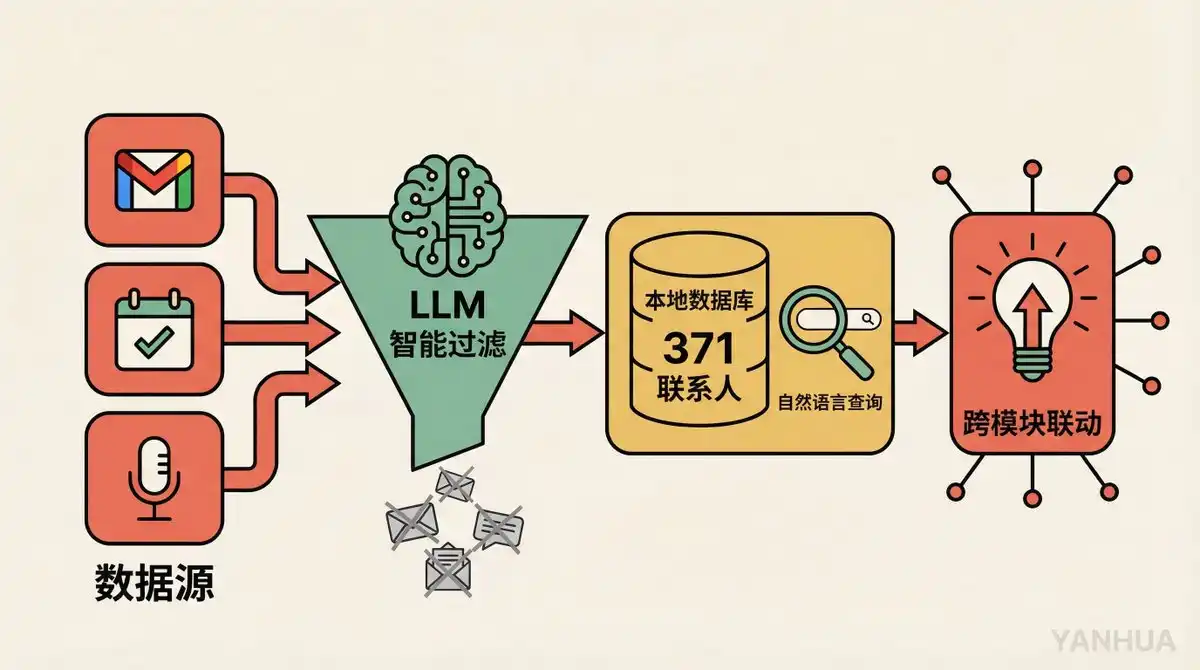
Build Process: He used natural language to tell OpenClaw, "Build me a CRM that pulls data from Gmail, Google Calendar, and Fathom, filters out marketing emails and cold outreach, and only keeps valuable conversations and contacts." Not a single line of code was written. It was up and running in 30 minutes.
Data Ingestion: The system scans emails every 30 minutes and checks Fathom (an AI meeting transcription tool) every 5 minutes during work hours. All data is first judged by an LLM before being stored: Is this email worth saving? Is this contact important?
Core Capabilities:
-
371 contacts, all queryable with natural language. "What did I last discuss with John?" "Who was my final contact at Company X?"
-
Relationship health scoring, automatically flags people not contacted for a long time
-
Duplicate contact detection and merge suggestions
-
Vector embedding search, supports semantic-level fuzzy matching
The Most Impressive Detail: When Berman is in other contexts (like brainstorming video topics), the CRM proactively interjects: "You talked about a similar topic with a certain sponsor before, maybe they'd be willing to sponsor this episode." The system links across modules, not just passively storing data but actively creating connections.
Berman's exact words: "If I can build a fully custom CRM in 30 minutes, and spend another hour or two iterating, then why would I ever pay a CRM company?"
Use Case 2: Automatic Meeting Action Item Tracking
This use case works closely with the CRM but deserves its own mention.
Workflow: Meeting ends → Fathom transcribes full text → OpenClaw matches CRM contact → Extracts action items → Sends to Berman on Telegram for approval → Approved items automatically enter Todoist
Key Design Points:
-
Distinguishes between "my" and "their" action items. Things the other party promised to give you are marked as "waiting on," automatically tracking if they deliver.
-
Self-learning filter. If Berman rejects an action item ("This isn't my task"), the system learns the reason and updates the extraction rules. It won't capture similar cases next time.
-
Automatically checks completion 3 times daily. For example, if you said in a meeting "I'll send the email today," the system checks if you actually sent it, and marks it done if you did.
-
Automatically archives after 14 days. Items not completed past the deadline are automatically cleaned up, keeping the list tidy.
The value of this setup isn't in any single feature, but in how it fully automates the "meeting follow-up"环节, which is最容易烂尾的环节 (prone to stalling).
Use Case 3: Personal Knowledge Base, Just Throw a Link In
Berman had a long-standing pain point: see good content, save it, then never find it again.
His solution is extremely simple: throw all links into Telegram, let OpenClaw handle the rest.
The system automatically processes these types of content:
-
Articles: Directly fetches full text, uses browser automation to log in and extract from paywalled sites
-
YouTube Videos: Fetches subtitles/transcript text
-
X (Twitter) Posts: Doesn't just grab a single post, automatically tracks the entire thread, ingests linked articles too
-
PDFs: Directly parses text
All content is vectorized and embedded, stored in a local SQLite database. Afterwards, you can search with natural language: "Show me all articles about OpenAI," retrievable with one click.
Team Collaboration Bonus: Each piece of ingested content is automatically synced to Slack in the form of "Matt wants you to see this." The team knows the boss personally read it, it's not just randomly pushed by AI.
The key to this use case isn't technical complexity, but extremely low usage barrier. No need to tag, no need to categorize, no need to organize. Just throw it in, AI does the rest.
Use Case 4: Business Advisory Board, 8 Experts Hold a Meeting for You Every Night
Personally, I think this is the most insane use case in the entire video.
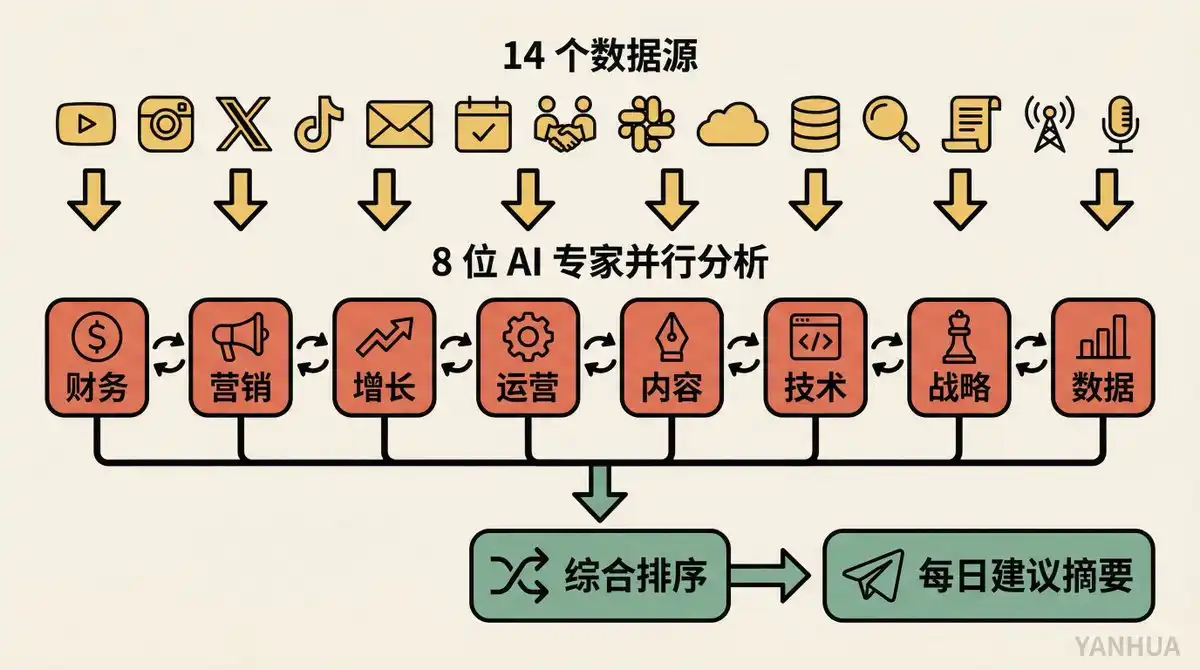
Data Input: 14 business data sources. YouTube analytics, Instagram per-post engagement, X analytics, TikTok data, email campaigns, meeting notes, Cron job health status, Slack messages... Basically covers all dimensions of his business.
Analysis Process: 8 AI expert roles (Finance, Marketing, Growth, Operations, etc.), each independently analyzes all the data, running in parallel. After analysis, they discuss findings amongst themselves, reconcile disagreements, and merge into a prioritized list of recommendations.
Delivery Method: Runs automatically every early morning, results sent as a numbered summary to Telegram. Berman scans it after waking up, and can ask for details on any point: "Elaborate on point 3."
The启发性的 (enlightening) aspect of this use case is the multi-agent collaboration model. It's not one AI giving you advice, but a group of AIs debating and then giving you advice. Like a real board of directors: Finance says save money, Marketing says spend money, finally compromising on a practical plan.
Use Case 5: Security Committee, AI Reviews AI Every Night
Similar architecture to the Business Advisory board, but completely different direction.
Run Time: Every night at 3:30 AM (staggered from other tasks to avoid Anthropic API quota conflicts).
Review Team: Security experts from four perspectives. Offensive perspective, defensive perspective, data privacy perspective, operational authenticity perspective.
Review Scope: The entire codebase, Git commit history, runtime logs, error logs, stored data. Not just static rule scanning, but having the AI actually read code and understand logic.
Output: Opus 4.6 synthesizes all findings, numbers them, and sends to Telegram. Critical issues trigger immediate alerts. Berman can directly reply "fix it," and the system auto-fixes.
Self-Improvement: Experience from each fix is remembered, review rules continuously iterate. Some nights have no new suggestions because the system confirms the current state is secure.
The best part of this use case is using AI to review AI itself. Berman is very candid: prompt injection protection can never be perfect. But rather than pretending the risk doesn't exist, it's better to have the system perform a daily self-check.
Use Case 6: Social Media Tracking + Daily Briefing
Tracking Scope: Four platforms: YouTube, Instagram, X, TikTok. Automatically pulls daily snapshots, stores in SQLite database.
Data Dimensions: YouTube tracks views, watch time, engagement rate per video; other platforms track post-level performance data.
Dual Purpose:
-
Daily Briefing. Sent to Telegram every morning, telling him what content performed well or poorly yesterday.
-
Fed to the Business Advisory Board. Social media data is one of the 14 data sources, directly participating in the nightly business analysis.
This demonstrates the flywheel effect of the entire system: the social media tracking module doesn't run in isolation; the data it generates serves both the briefing and the advisory board downstream use cases.
Use Case 7: Video Topic Pipeline, from an Idea to an Asana Card
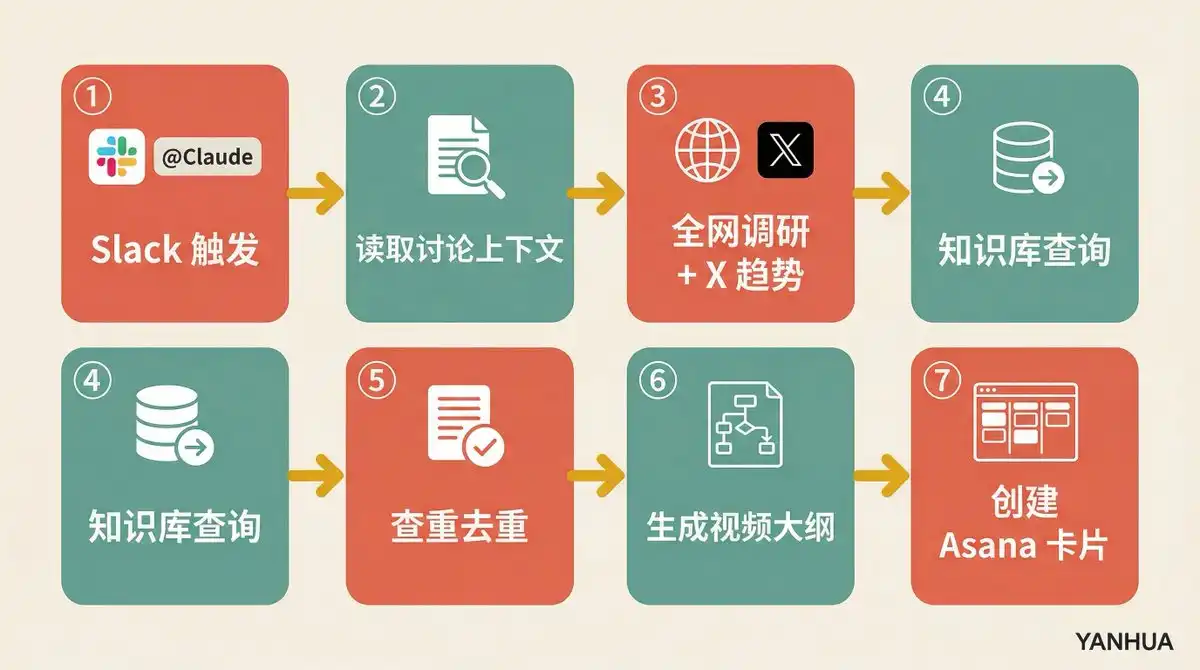
Trigger: In a Slack discussion, anyone replies to a post with "@Claude, this is a video idea."
Automated Process:
-
Reads the full context of the Slack discussion thread
-
Web search + X trend research
-
Queries knowledge base to see if relevant stored material exists
-
Checks for duplicates, verifies if it overlaps with existing topics
-
Generates a complete video outline: title suggestions, thumbnail suggestions, opening hook, video flow framework
-
Makes an assessment: "Is this topic worth doing?"
-
Creates a project card in Asana,附带 (including) all research materials and links
Berman demonstrated a real case in the video: news of Quen 3.5's release was shared on Slack, someone marked it as a video idea, the system automatically generated a complete topic package, including discussions from different KOLs on Twitter, reactions from the open-source community, and suggested video perspectives.
The value of this use case: Compresses the distance from "inspiration capture" to "executable plan" to almost zero.
Use Case 8: Memory System, Making the AI Understand You Better Over Time
Most people's experience with ChatGPT is: every conversation feels like a first meeting. Berman's OpenClaw is not.
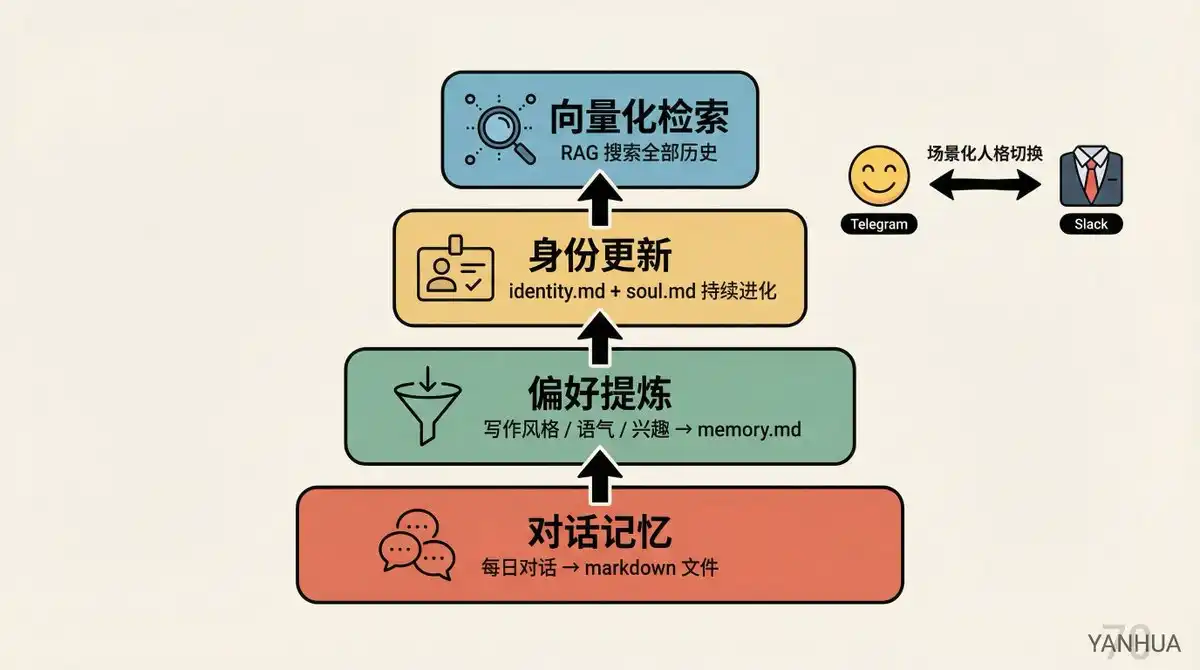
Memory Levels:
-
Conversation Memory: Daily conversations automatically saved as markdown files
-
Preference Extraction: Extracts writing preferences, tone style, interests, stock tracking, email categorization rules, etc., from conversations, stores in memory.md
-
Identity Update: At the start of each new conversation, the system reads memory files, updates identity.md and soul.md
-
Vectorized Retrieval: All memory files vectorized, supports RAG search
Contextual Personality Switching: Berman gave the AI two sets of personalities. In Telegram private chats, it's like a friend, humorous and casual; in Slack team channels, it automatically becomes a professional colleague style. These are defined in soul.md.
This use case turns the AI from a "tool" into a "partner." It doesn't just execute commands, it truly understands who you are and what you want.
Use Case 9: Food Diary, AI Helps You Discover Allergens
This is the most unexpected use case.
Usage: Take a photo of food and send it to OpenClaw, it automatically识别 (recognizes) and logs it. Receive reminders 3 times a day to report stomach feelings. All data stored in a food log.
Analytical Capability: Triggers analysis once a week, cross-references food records and symptom reports to identify patterns.
Real Result: The system, by analyzing food成分 (ingredients) in photos and Berman's symptom feedback, discovered his stomach is sensitive to onions. This was something he himself was completely unaware of.
A chatbot helped someone identify a food allergen. This previously required specialized hospital testing.
Use Case 10: Scheduled Tasks + Auto Backup + Auto Update
This part isn't as sexy, but might be the most important infrastructure.
Cron Task List:
| Frequency | Task |
|------|------|
| Every 5 min | Check Fathom meeting notes |
| Every 30 min | Scan emails |
| 3 times daily | Action item completion check |
| Nightly | Doc sync, CRM scan, security review, log ingestion, video data refresh, morning briefing generation |
| Weekly | Memory synthesis, revenue preview |
| Hourly | Git commit + database backup |
Backup Strategy: All SQLite databases automatically discovered, encrypted, packaged, uploaded to Google Drive, last 7 days retained. Code pushed to GitHub hourly via Git. Any backup failure triggers immediate Telegram alert.
Auto Update: Checks for new OpenClaw versions every night at 9 PM, shows changelog, one "update" command auto-upgrades and restarts.
API Tracking: Records each LLM call: which model was used, how many tokens consumed. Even downloaded official prompting guides for various models, letting the system optimize prompt writing based on the actual model used.
The design philosophy of this infrastructure is one thing: while you sleep, the system works; when the system has problems, you know第一时间 (first thing).
Image & Video Generation: On-Demand Visual Content Creation
Berman integrated Veo (video generation) and NanoBanana Pro (Gemini image generation) into OpenClaw.
Usage is simple: Say "Italian Tuscan villa video" in Telegram, the system calls Veo to generate, automatically downloads and sends to Telegram, then deletes local file to save space. Images同理 (similarly), tell it what you want, NanoBanana Pro generates and pushes directly.
This use case itself isn't stunning, but its value lies in being embeddable into other workflows. For example, when the video topic pipeline generates thumbnail suggestions, it can directly call image generation to produce the image.
Back to the Big Picture: The Relationships Between These Use Cases Are Key
If you only look at individual use cases, you might think "Pretty cool, but not that special." ChatGPT can also help you look up contacts, Notion AI can also help you organize a knowledge base.
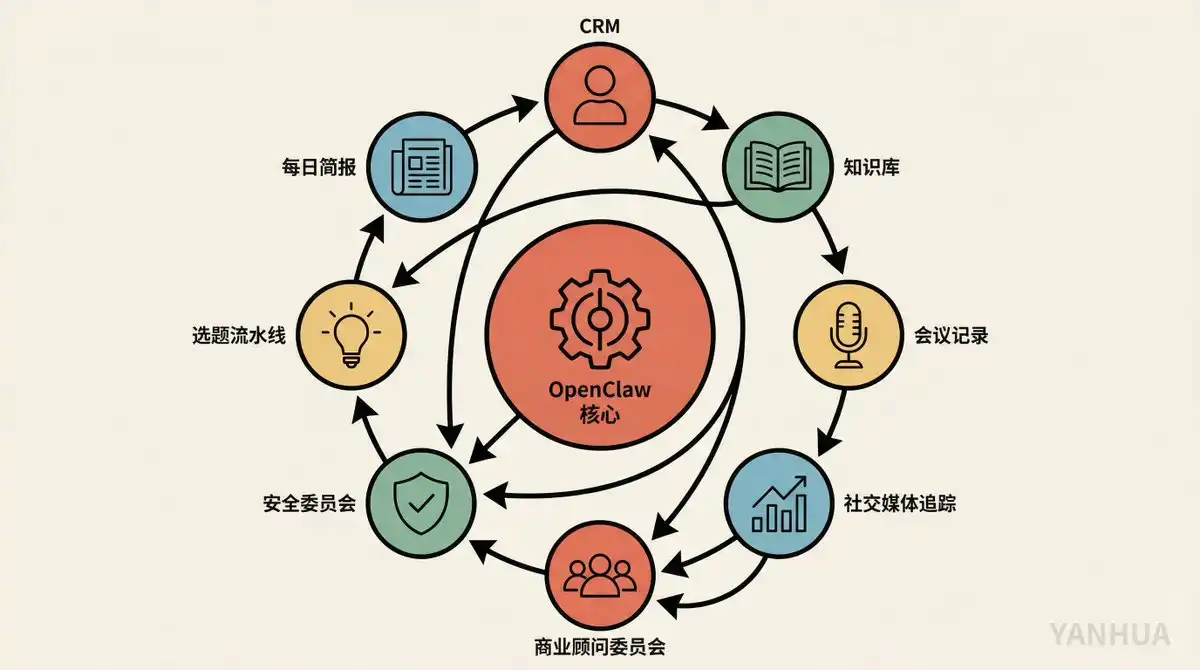
But the real power of Berman's system lies in the data flow *between* use cases:
-
CRM Data → Fed to Business Advisory Board
-
Knowledge Base Content → Fed to Video Topic Pipeline
-
Social Media Data → Fed to Daily Briefing + Advisory Board
-
Meeting Notes → Fed to CRM + Action Item System
-
All module run logs → Fed to Security Committee
Each module is not an island. They form a mutually reinforcing data flywheel. This is why one person + one MacBook can output the effect of a small team.
Berman has one quote I find particularly apt: "You'll start to see how all the different parts I've built interact and make each other more powerful."
Security Reminder: Buckle Up Before You Run
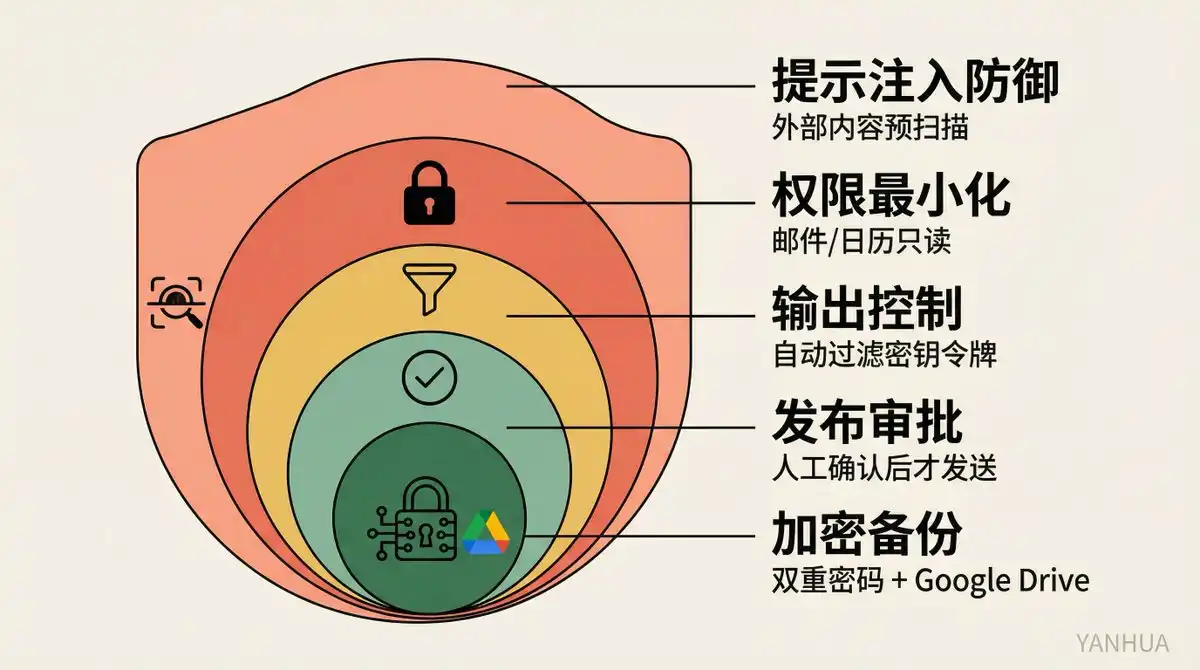
The effort Berman puts into security deserves special emphasis:
-
Prompt Injection Defense: All external content treated as potentially malicious, deterministic code pre-scan before入库 (ingestion)
-
Minimal Permissions: Email, Calendar read-only, no write permissions
-
Output Control: Summarizes without verbatim repetition, automatically filters keys and tokens
-
Publish Approval: Manual confirmation required before sending emails, tweets
-
Encrypted Backups: Double password protected, .env file never committed to repository
He states it very clearly himself: "There is no perfect security solution. Large language models are non-deterministic systems, completely preventing prompt injection is impossible. But that doesn't mean you do nothing."
After seeing these use cases, my biggest takeaway is: "Full-stack" in the AI era no longer means knowing front-end and back-end development, but means being able to build and manage a complete set of AI workflows. Berman doesn't write code, but he has an extremely clear understanding of his own needs and knows how to translate those needs into a running system using natural language.
This might be the most valuable skill to learn in 2026.
Based on Matthew Berman's video "21 INSANE Use Cases For OpenClaw", curated by podcast Podwise. The original video contains the full prompt for each use case, recommended viewing. If you're also using OpenClaw or similar frameworks to build your own AI system, comment on which use case you built first.