How an Anthropic Engineer Saved 300 Million Tokens in a Week: A Claude Code Caching Guide

marsbitPublicado em 2026-05-24Última atualização em 2026-05-24

Resumo

Anthropic engineers reveal how prompt caching in Claude Code dramatically reduces token consumption. By reusing already-processed context, cached tokens cost only 10% of regular input tokens. The author saved over 300 million tokens in a week, with 91 million cached tokens in a single day counted as roughly 9 million for billing. Caching works via prefix matching across three layers: system (instructions, tools), project (CLAUDE.md, rules), and conversation (chat history). As long as the beginning of a request matches cached content, Claude reuses it instead of reprocessing. Key points for users: - Claude Code's cache TTL is 1 hour (vs. 5 minutes for API/Sub-agents). Avoid pausing a session beyond this. - Switching models (including enabling "Opus plan" mode) breaks cache, forcing a full reprocess. - For task switching, use a clear session handoff instead of letting an old session expire. - Place large documents in Projects, not directly in chat, for better caching. High cache reuse benefits both users (longer sessions) and Anthropic (lower costs). Monitoring cache hit rates is crucial internally. By managing context as an asset and avoiding cache-breaking habits, users can make their Claude Code sessions more efficient and cost-effective.

Editor's Note: When many people use Claude Code, the most intuitive feeling is that Token consumption is too fast, and long sessions can easily eat up the quota. But from the perspective of an Anthropic engineer, what truly affects cost is often not how much code you write, but whether the system consistently reuses context that has already been processed.

The core of this article is how to save Tokens through caching mechanisms. The author reused over 300 million Tokens through caching in one week, with a single-day cache hit reaching 91 million. Since the cost of a cached Token is only 10% of a regular input Token, this means 91 million cached Tokens are billed roughly equivalent to 9 million regular Tokens. The reason Claude Code long sessions seem more "durable" isn't because the model works for free, but because a large amount of repeated context is successfully reused.

The key to prompt caching is "don't break the cache." Claude Code caches system prompts, tool definitions, CLAUDE.md, project rules, and conversation history in layers; as long as the prefix of subsequent requests remains consistent, Claude can directly read from the cache instead of reprocessing the entire context. Anthropic internally also monitors prompt cache hit rates because it affects not only user quotas but also directly impacts model service costs and operational efficiency.

For ordinary users, you don't need to understand all the underlying details, just master a few key habits: don't let a session sit idle for more than 1 hour; perform a clean session handoff when switching tasks; avoid frequently switching models; put large documents into Projects instead of repeatedly pasting them into the conversation.

This article is less about a Token-saving trick and more about providing a Claude Code usage approach closer to an engineer's mindset: treat context as an asset to manage, let the cache be continuously reused, and make long sessions do less repetitive computation.

The following is the original text:

I saved 300 million Tokens this week, 91 million in a single day, over 300 million in a week.
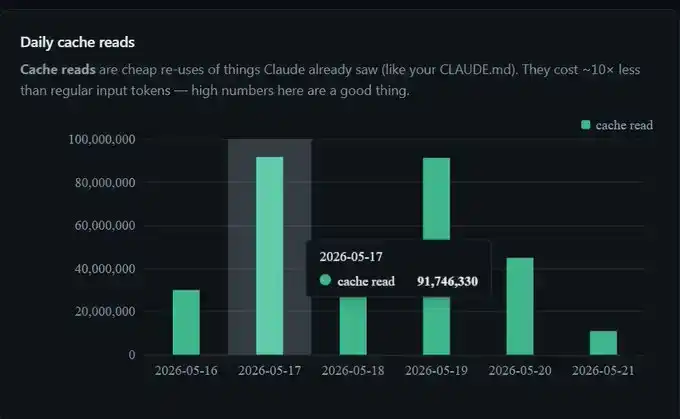
I didn't change any settings. This is just prompt caching working normally in the background.

But after I truly understood what caching is and how to avoid "breaking" it, with the same usage quota, my sessions could last longer. So, here is a compiled 80/20 introductory guide to Claude Code prompt caching, without delving into deep API-level details.

TL;DR

Cached Tokens cost only 10% of regular input Tokens. 91 million cached Tokens are billed approximately equivalent to 9 million Tokens.

Claude Code subscription cache TTL is 1 hour; API default is 5 minutes; Sub-agent is always 5 minutes.

Caching is divided into three layers: system, project, and conversation.

Switching models mid-conversation breaks the cache, including enabling "opus plan" mode.

How is caching actually billed?

Every cached Token costs 10% of a regular input Token.
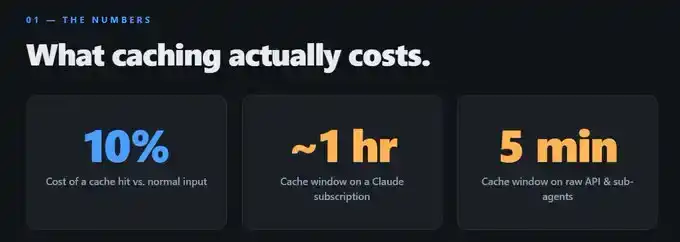
So, when my dashboard shows 91 million Tokens hitting cache on a particular day, the actual billing is roughly equivalent to processing only 9 million Tokens. This is also why, compared to having no cache, using Claude Code for long periods makes the session feel almost "free" to extend.

Two numbers on the dashboard are worth focusing on:

Cache create: The one-time cost incurred when writing content to the cache. It starts to take effect in the next round of conversation.
Cache read: Tokens Claude reuses from the cache, such as your CLAUDE.md, tool definitions, previous messages, etc. Cost is 10 times cheaper compared to reprocessing them as input.
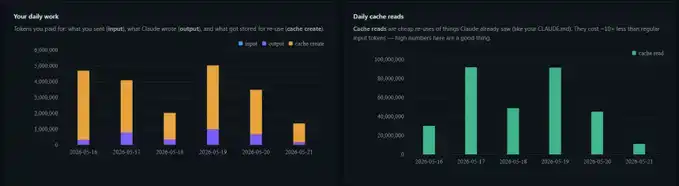
If your Cache read number is high, it means you are effectively utilizing the cache; if this number is low, it means you are repeatedly paying for the same context.

Anthropic's Thariq once said something that left a deep impression on me: "We actually monitor prompt cache hit rates, and if the hit rate gets too low, it triggers an alert, even declaring a SEV-level incident."

He also wrote a great X article. When cache hit rates are high, four things happen simultaneously: Claude Code feels faster, Anthropic's service costs decrease, your subscription quota seems more durable, and long coding sessions become more realistic.

But if the hit rate is low, everyone loses.
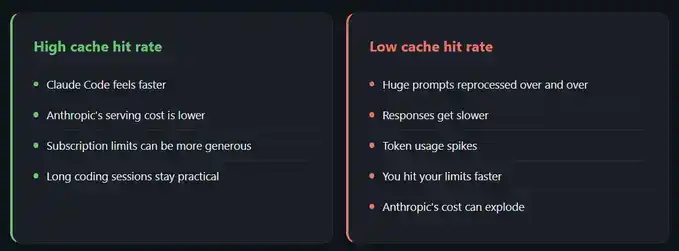
So, the incentives are actually aligned: Anthropic wants your cache hit rate higher, and you yourself want the hit rate higher. What truly holds things back are some seemingly insignificant habits that quietly reset the cache.

How does the cache grow with each conversation turn?

Caching relies on prefix matching.

Without getting too deep into technical details, you just need to understand one thing: as long as the content before a certain position is completely identical to what's already cached, Claude can reuse those cached Tokens.

A brand new session typically unfolds like this:
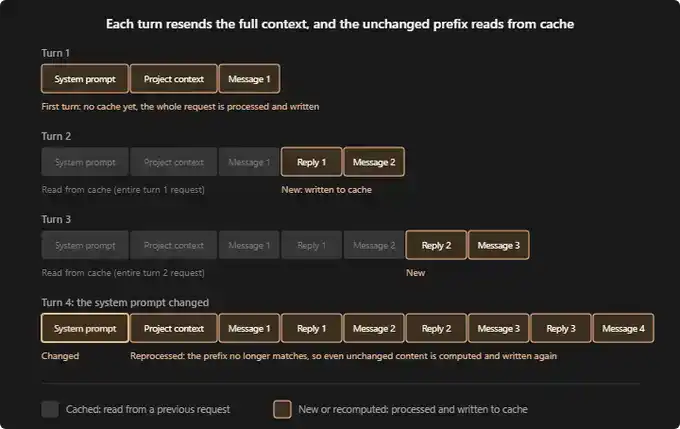
According to Claude Code documentation, a fresh session usually runs like this:

First conversation turn: No cache exists yet. The system prompt, your project context (like CLAUDE.md, memory, rules), and your first message are all processed from scratch and written to the cache.

Second conversation turn: All content from the first turn is now cached. Claude only needs to process your new reply and the next message. This round is much cheaper.

Third conversation turn: Same logic. Previous conversation remains in the cache, only the latest round of interaction needs reprocessing.

The cache itself can be divided into three layers:
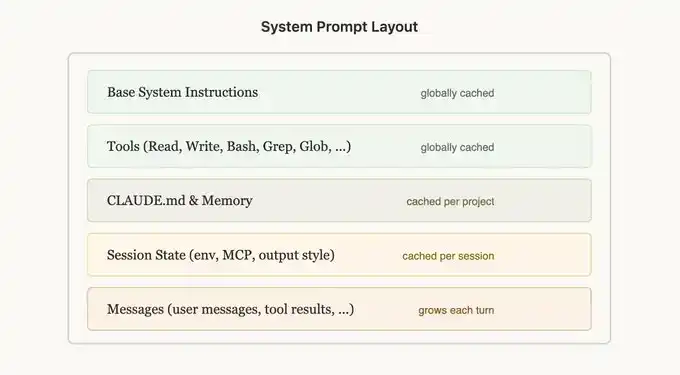
From Thariq's X article:

System layer: Includes base instructions, tool definitions (read, write, bash, grep, glob), and output style. This layer is cached globally.

Project layer: Includes CLAUDE.md, memory, project rules. This layer is cached per project.

Conversation layer: Includes replies and messages, growing with each conversation turn.

If anything in the system or project layer changes mid-session, everything must be recached from scratch. This is the most "expensive" operation. Imagine: you're already on the 16th message, then suddenly change the system prompt, or pause for an hour, all Tokens from message 1 onward need to be reprocessed.

The confusion between 1 hour and 5 minutes

This is the most easily misunderstood point.

Claude Code subscription: Default TTL is 1 hour.

Claude API: Default TTL is 5 minutes. You can pay a higher cost to increase it to 1 hour.
Sub-agent on any plan: Always 5 minutes.

Claude.ai web chat: Not officially documented. Likely same as subscription, but I haven't confirmed.

A few months ago, many people complained that Claude subscription quotas were being consumed too quickly. Some thought Anthropic had quietly reduced TTL from 1 hour to 5 minutes without notifying users. But that wasn't the case; Claude Code's TTL remains 1 hour.

The problem is, Claude Code and API documentation are kept separate, and these are two completely different things, leading to much confusion.

If you're running many Sub-agent workflows, or using the API directly, the 5-minute figure is important. But for 95% of Claude Code users, what really matters is that 1-hour window.

Three habits that cover 95% of users

The following are parts I find truly useful for daily use.

Don't pause too long

If you've been idle for more than an hour, previous content has mostly expired from the cache. Your next message will rebuild the cache. In such cases, instead of resuming an old session that has "gone cold," it's often cheaper to do a clean handoff and start a new session.

When switching tasks, just start fresh

/compact or /clear inherently break the cache, so it's better to use that moment for a true reset.

I made a session handoff skill to replace /compact. It summarizes what we've completed, what pending decisions remain, which files are most important, and where to continue next. Then I run /clear, paste this summary in, and can proceed as if nothing was interrupted.

The compact command sometimes runs slowly too. This handoff skill usually finishes in under a minute.

In Claude chat, put large documents into Projects

The caching mechanism on Claude.ai isn't officially documented in great detail, but Projects clearly use different optimizations compared to regular chat threads. So, if you need to paste large documents, it's better to put them in a Project rather than directly into the chat.

Which operations quietly break the cache?

A few things can completely reset the cache without obvious warning.

Switching models: Because caching relies on prefix matching, and each model has its own cache. Switching models means the next request will read the full history with no cache hits.

"Opus plan" mode: This setting uses Opus for planning and Sonnet for execution. I recommended it in some token optimization videos for a reason. But it's important to understand that each plan switch is essentially a model switch, meaning the cache must be rebuilt. In the long run, it still helps extend session quota, but you need to know what's happening under the hood.

Editing CLAUDE.md mid-session is okay: This change doesn't take effect immediately; it applies on the next restart. Therefore, the currently running cache isn't affected.

My free Token dashboard

The screenshot I showed earlier is from a token dashboard.
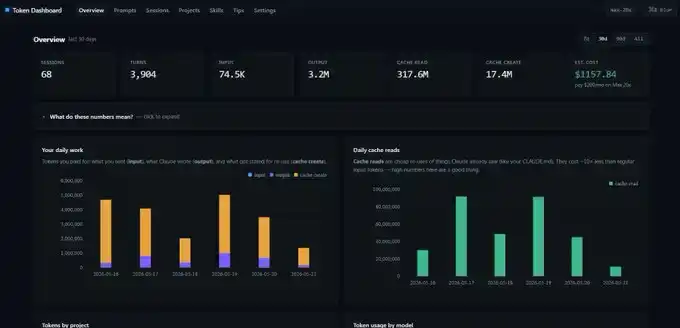
It's a simple GitHub repo. You give the link to Claude Code, have it deploy locally on localhost, and it will read all your past session records instead of starting statistics from scratch. You immediately see daily input, output, cache create, and cache read data.

One thing to note: this dashboard counts Token data on your local device. If you switch from desktop to laptop, the numbers won't match exactly. Each device has its own statistical view.

Summary

Prompt caching is something you can research deeply. Thariq's article covers it more completely than here; if you want the full picture, it's worth reading.

But you don't need to understand all the details to benefit. You just need to grasp the key 80/20: cached Tokens are 10 times cheaper than regular Tokens; Claude Code TTL is 1 hour; switching models breaks the cache; making a clean handoff between tasks is usually more cost-effective than forcing an old session back to life after it "expires."


Perguntas relacionadas

QWhat is the core mechanism described in the article for significantly reducing Claude Code costs?

AThe core mechanism is prompt caching, where previously processed context (system prompts, tool definitions, project files, conversation history) is stored and reused. If a new request's prefix matches the cached content, Claude reads from the cache instead of reprocessing, costing only 10% of a standard input token.

QWhat is the key financial benefit of high cache read rates mentioned in the article?

ATokens read from the cache are billed at only 10% of the cost of standard input tokens. This means high cache read rates make a Claude Code subscription last significantly longer, as repeated context is not fully re-processed and paid for.

QWhat are the three main layers of prompt caching in Claude Code, according to the article?

AThe three layers are: 1. System Layer (global cache for base instructions, tool definitions like read/write/bash, and output style). 2. Project Layer (cached per project, includes CLAUDE.md, memory, project rules). 3. Conversation Layer (cached per session, includes the growing history of messages and replies).

QWhat is the single most common user action that will completely reset the prompt cache in an active Claude Code session?

ASwitching the model mid-conversation. Because cache relies on prefix matching and each model has its own cache, switching models forces Claude to reprocess the entire context from scratch with no cache hits.

QWhat practical habit does the author recommend for switching tasks to better preserve caching benefits?

APerform a clear session handoff instead of letting a session idle past the TTL. The author uses a custom 'session handoff skill' to summarize progress, pending decisions, and key files before using /clear. This summary is pasted into the new session, providing continuity while allowing a fresh, efficiently cached session to begin.

Leituras Relacionadas

AI PCs Are Here, Going Toe-to-Toe with 120B Models Locally! NVIDIA Redefines the "Personal AI Computer" Foundation with RTX Spark

NVIDIA has redefined the "AI PC" standard with the launch of the RTX Spark super chip at GTC 2026. Boasting 1 petaflop (1000 TOPS) of AI performance, it dwarfs the 45-50 TOPS NPUs in current AI PCs. The SoC features a Blackwell GPU, a 20-core Arm CPU co-designed with MediaTek, and crucially, up to 128GB of unified memory shared between CPU and GPU. This architectural shift enables local execution of 120-billion-parameter large language models with million-token context windows, a massive leap from the 9B-40B models typical on current consumer hardware. Beyond AI, use cases include 12K video editing and high-fps ray-traced gaming. Key to enterprise adoption is a security collaboration with Microsoft. Windows security is upgraded, and NVIDIA's OpenShell sandbox runtime is integrated to safely contain AI agent actions. Major software support comes from Adobe, which announced a deep,底层-level rewrite of Photoshop and Premiere to leverage the unified memory for up to 2x performance gains. Six OEMs, including Dell, HP, Lenovo, and Microsoft Surface, will release RTX Spark-based轻薄本 and compact desktops this fall. However, questions remain about real-world performance,功耗, thermal management in laptops, pricing, and the actual impact of the OpenShell sandbox. The RTX Spark represents a fundamental power shift in the PC industry, moving from an x86 CPU-centric model to a GPU-centric SoC platform, but its ultimate success hinges on the upcoming product rollouts and ecosystem validation.

marsbitHá 5m

AI PCs Are Here, Going Toe-to-Toe with 120B Models Locally! NVIDIA Redefines the "Personal AI Computer" Foundation with RTX Spark

marsbitHá 5m

Jensen Huang: Vera Rubin Full Mass Production, AI Agent a Key Focus, Challenging Intel to Target the Next-Generation AI PC Gateway

NVIDIA CEO Jensen Huang delivered the keynote speech at GTC Taipei 2026, announcing several major product launches and strategic directions. The company's Vera Rubin architecture is now in full-scale production, with OpenAI, Anthropic, and SpaceX among the first customers. NVIDIA highlighted AI Agent as a key future focus, introducing the Vera CPU designed for AI agents and the Vera BlueField-4 STX for secure, chip-level AI storage processing. A significant move involves challenging Intel in the PC market. NVIDIA, in collaboration with MediaTek, is developing the RTX SPARK PC chip (manufactured by TSMC) for Windows systems, set to launch this fall for laptops and desktops. This signals NVIDIA's push into the next-generation AI PC arena, aiming to provide a vertically integrated core computing platform for the entire Windows ecosystem, similar to Apple's approach. Other announcements include the new Nemotron 3 Ultra AI model and the NVIDIA DSX platform, described as a complete "playbook" for building AI factories, allowing performance simulation and validation before physical deployment. In automotive, the DRIVE Hyperion platform was positioned as a global robotaxi platform, with major Chinese automakers like BYD, Geely, Zeekr, Xiaomi, and Pony.ai already adopting or developing autonomous driving solutions based on it. The Alpamayo 2 super open inference model for robotaxis was also introduced. For robotics, NVIDIA unveiled the Isaac GR00T humanoid robot reference platform for academic research and a large open-source agent tools and skills suite for Physical AI. The company plans to collaborate with global humanoid robot manufacturers, including China's Unitree, whose H2 Plus robot served as the reference hardware for the GR00T platform demonstration.

marsbitHá 32m

Jensen Huang: Vera Rubin Full Mass Production, AI Agent a Key Focus, Challenging Intel to Target the Next-Generation AI PC Gateway

marsbitHá 32m

Running MoE on Mobile Phones? Meta Proposes MobileMoE, Speeding Up iPhone 16 Pro by 3.8x

Meta's MobileMoE, a mobile-optimized Mixture-of-Experts (MoE) language model architecture, enables efficient on-device large language model (LLM) inference for the first time on commercial smartphones. Designed for decoder-only Transformers, it replaces dense feed-forward layers with MoE layers. Key design choices include 8 experts with granularity g=8, top-4 routing, and a shared expert. The model undergoes a four-stage training process: pre-training, intermediate training, supervised fine-tuning, and quantization-aware training. Results show MobileMoE models, with similar memory footprint, achieve equal or higher average accuracy across 14 foundational benchmarks while using only 1/2 to 1/4 of the FLOPs compared to dense baselines. After INT4 quantization, they remain competitive. Notably, on an iPhone 16 Pro, MobileMoE-S demonstrates significant speedups: up to 3.8x faster in the prompt phase and 2.2-3.4x faster in per-token generation compared to a dense counterpart, with lower peak memory usage. While MobileMoE establishes a new Pareto frontier for on-device LLMs in accuracy-compute trade-offs, particularly excelling in code and math tasks, it currently lags behind models like Qwen3.5 2B in advanced instruction following and knowledge reasoning. Future work includes improving post-training techniques, exploring NPU deployment, and managing the runtime memory sensitivity of MoE models to varying inputs.

marsbitHá 37m

Running MoE on Mobile Phones? Meta Proposes MobileMoE, Speeding Up iPhone 16 Pro by 3.8x

marsbitHá 37m

Trading

Spot
Futuros

Artigos em Destaque

Como comprar PEOPLE

Bem-vindo à HTX.com!Tornámos a compra de ConstitutionDAO (PEOPLE) simples e conveniente.Segue o nosso guia passo a passo para iniciar a tua jornada no mundo das criptos.Passo 1: cria a tua conta HTXUtiliza o teu e-mail ou número de telefone para te inscreveres numa conta gratuita na HTX.Desfruta de um processo de inscrição sem complicações e desbloqueia todas as funcionalidades.Obter a minha contaPasso 2: vai para Comprar Cripto e escolhe o teu método de pagamentoCartão de crédito/débito: usa o teu visa ou mastercard para comprar ConstitutionDAO (PEOPLE) instantaneamente.Saldo: usa os fundos da tua conta HTX para transacionar sem problemas.Terceiros: adicionamos métodos de pagamento populares, como Google Pay e Apple Pay, para aumentar a conveniência.P2P: transaciona diretamente com outros utilizadores na HTX.Mercado de balcão (OTC): oferecemos serviços personalizados e taxas de câmbio competitivas para os traders.Passo 3: armazena teu ConstitutionDAO (PEOPLE)Depois de comprar o teu ConstitutionDAO (PEOPLE), armazena-o na tua conta HTX.Alternativamente, podes enviá-lo para outro lugar através de transferência blockchain ou usá-lo para transacionar outras criptomoedas.Passo 4: transaciona ConstitutionDAO (PEOPLE)Transaciona facilmente ConstitutionDAO (PEOPLE) no mercado à vista da HTX.Acede simplesmente à tua conta, seleciona o teu par de trading, executa as tuas transações e monitoriza em tempo real.Oferecemos uma experiência de fácil utilização tanto para principiantes como para traders experientes.

487 Visualizações TotaisPublicado em {updateTime}Atualizado em 2025.03.21

Como comprar PEOPLE

Discussões

Bem-vindo à Comunidade HTX. Aqui, pode manter-se informado sobre os mais recentes desenvolvimentos da plataforma e obter acesso a análises profissionais de mercado. As opiniões dos utilizadores sobre o preço de PEOPLE (PEOPLE) são apresentadas abaixo.

活动图片