AI has taken over the task of writing code. But the job of acceptance still falls on you.
Whether a piece of code is written correctly or not is not AI's responsibility; ultimately, you still have to go through it line by line. This hurdle has stumped many people.
Recently, Anthropic has also integrated AI acceptance into the loop.
They made Claude, after writing code, not immediately hand it over. Instead, it runs four checks itself first:
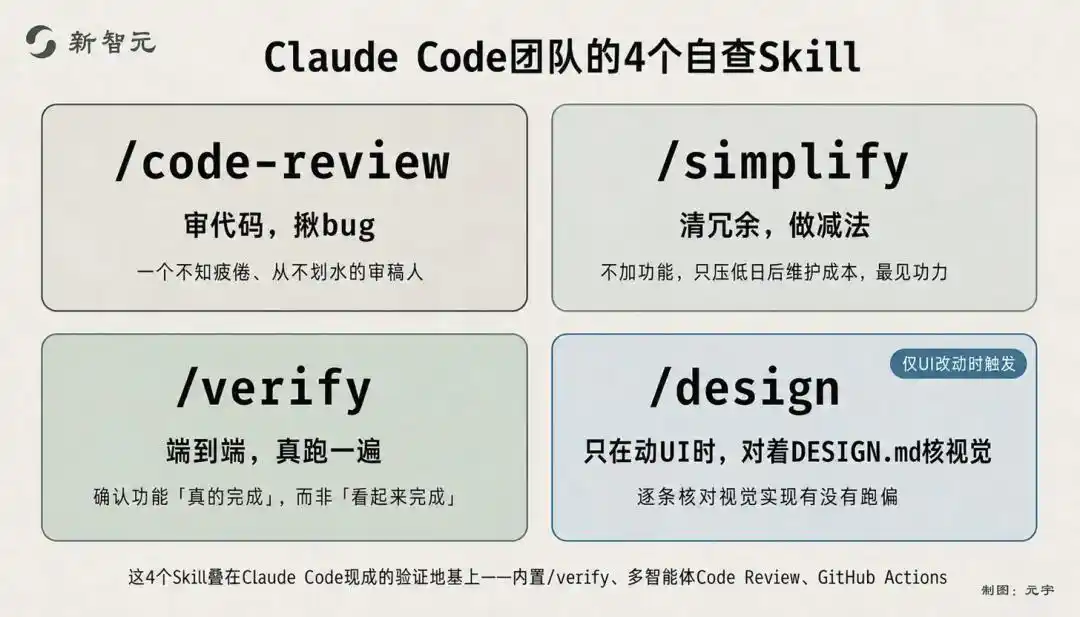
/code-review to root out bugs, /simplify to clean up redundant implementations, /verify to perform end-to-end verification, and if the UI was touched this time, use /design to cross-check against the visual specifications in DESIGN.md.
Only after running through all four does it count as delivered.
On July 22nd, the Claude Code team publicly shared this internal "verification loop."
In other words, after Claude writes code, it first finds and fixes errors on its own before coming back to you.
This signifies AI evolving from "being able to write code" to "being able to check the code it wrote."
Agent Work Loop Gains an Extra Verification Step
Anthropic gave this system a name: the verification loop.
The official definition is simple: it's an iterative process where Claude checks and attempts to fix its own work.
What it changes is the agent's work cycle.
Previously, it was "gather context → execute action → manual check." The final step rested on humans: the AI hands over the work, and you have to review it line by line.
Now this line is extended to "gather context → execute action → automatic verification → fix → verify again." Checking and fixing are placed back inside the loop.
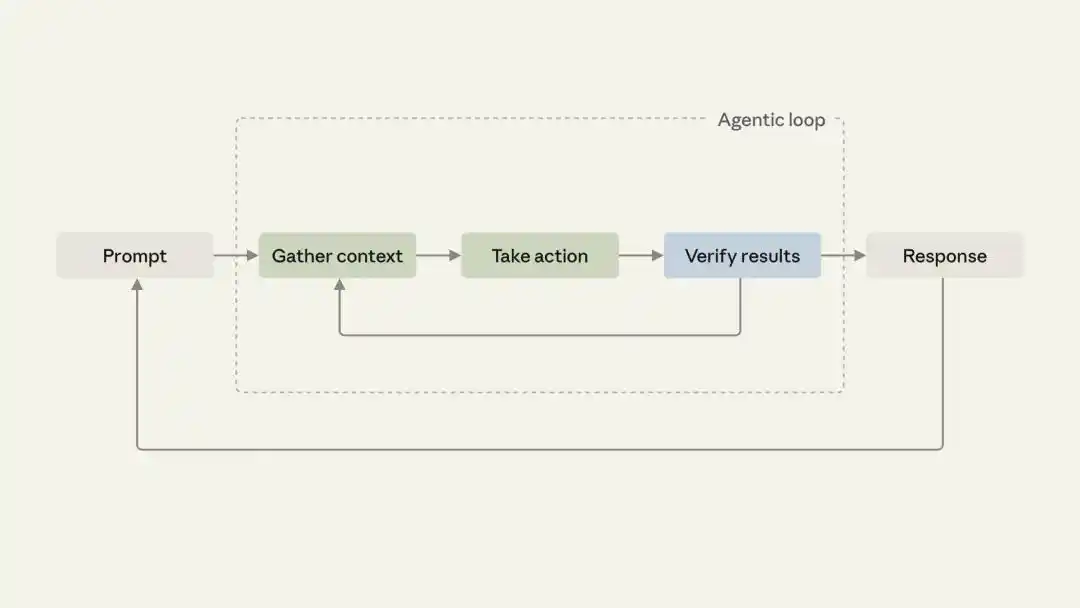
Anthropic's official agent cycle diagram: after a prompt comes in, Claude gathers context, executes actions, verifies results. If verification fails, it loops back; only when it passes does it return.
Some checks Claude already knows how to do. Deterministic signals in the codebase, like type checker, linter, running tests, runtime errors—it can read these and will fix them as it goes.
The real trouble lies with another category: whether the UI changes are correct, whether the user flow is smooth, whether this change has buried unseen pitfalls...
In the past, these could only be caught by humans watching, performing the same checks dozens or hundreds of times.
Anthropic's solution is to write down each of those manual checks you perform every time, package them into Skills, and have Claude execute them automatically for each task.
For decades, all software engineering processes—writing requirements, planning, layer upon layer of reviews, endless meetings—were essentially because: writing code was too slow, and engineers' time was too valuable.
But when AI makes the act of writing code faster and cheaper, this premise disappears.
The Claude Code team's own assessment is: the bottleneck hasn't vanished; it has merely shifted: from "writing code" to verification, code review, security, and other such stages.
Code is generated too quickly. The new problem becomes: are these codes correct, who will maintain them, can people keep up with the pace of reviewing code.
Faced with this new bottleneck, the Claude Code team first experimented on themselves.
The 4 Self-Check Skills the Claude Code Team Uses Daily
Internally, the Claude Code team uses these four self-check Skills every day.
/code-review, specialized in reviewing code changes, rooting out potential bugs, and providing review comments along the way.
This is like having a tireless reviewer on standby.
/simplify, cleans up the diff for this change, removing convoluted, complex implementations to make the structure simpler.
It doesn't add features for you; instead, it removes redundancy, simplifies implementation, pushing down future maintenance costs.
This point is crucial and requires real skill. Most people write code by adding more; tools that proactively simplify are particularly valuable.
/verify, performs end-to-end verification, actually running things to confirm the feature is truly complete, not just "looks complete."
/design, only comes into play when the UI is touched. It cross-checks against the DESIGN.md in the repository, verifying point by point if your visual implementation has deviated.
These 4 Skills didn't appear out of thin air.
Underlying them, Claude Code has already laid a foundation of existing verification support:
The built-in /verify can run the application to observe changes; you specify the build and test commands in CLAUDE.md, and it follows them. There's also Code Review specifically for multi-agent reviews on PRs, and GitHub Actions that automatically trigger on every commit.
The team's 4 Skills are like adding their own layer of process on top of this general foundation.
How to Write Your Own Verification Skill?
Anthropic's method is also simple:
Write down that manual step you always perform in plain language, as if you were explaining precautions to a new colleague on their first day.
If you're even stuck on how to describe this check step, you can first ask Claude to provide a version of general best practices and then modify it.
Your version will likely differ from the generic approach at a few key points, and those differences are precisely the things most worth documenting.
Checks don't necessarily have to be vague judgments like "feels right or not."
For example: any change that deletes a database field without an accompanying data migration step should be rejected. This is a "local rule" that a generic linter will never catch but is specific to your project.
Any rule you've only been able to enforce by manually watching like a hawk is worth writing into a loop.
What to do after writing it?
Throw it to skill-creator to have it interview you back, or simply drop a Markdown file into .claude/skills/.
The simplest verification Skill is a few lines of instructions plus a body paragraph. Then test it once on a new task to confirm this check step actually runs. If not, fix it.
For Skills you can't modify, like built-in ones or those hosted by plugins, there's a workaround: write a wrapper Skill that first calls the original, then calls your verification. A detour, but it still embeds the check.
Verification Isn't One-Size-Fits-All; It Has 4 Levels
After packaging checks into Skills, the next question is: when should this thing trigger?
Anthropic provides 4 levels of automation, from loose to tight.
Standalone: You remember to manually invoke it.
Embedded: Embedded into a specific task flow, running alongside it.
Chained: Several verification Skills strung into a chain, automatically running one after another.
On every PR: The strictest level, automatically running on every code commit.
The official term for the middle layer transition is "from habit to contract."
What was "I always remember to run /verify after /simplify" as a personal habit becomes "automatically call /verify after /simplify runs" as a fixed contract once chained.
The entire chain completes the development loop on its own, only coming back to you when your approval is needed.
The longer the chain, the higher the reliability, but the official team specifically cautioned: chained verification will genuinely burn through tokens.
So don't immediately set all checks as PR gates that block every commit. The right approach is to first see if it's stable, then gradually add more.
Behind the 4 Skills: AI Programming is Changing Tracks
Behind the 4 Skills, the competition in AI programming is shifting from generation to verification.
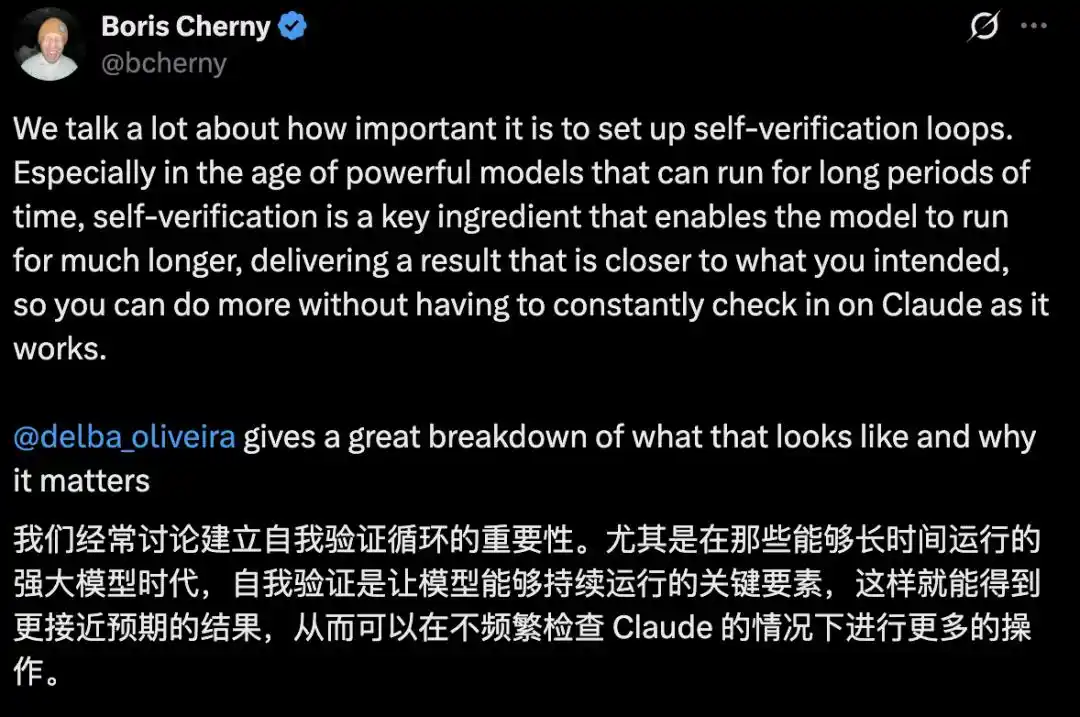
The creator of Claude Code has given the same assessment.
On June 9th of this year, he tweeted: In an era where powerful models can run autonomously for long periods, self-verification is key to letting models run longer and produce results closer to your expectations. You don't have to watch Claude frequently to hand over more work.
Simply put, the more solid the verification, the more confidently an agent can run; the longer it runs, the less hassle for humans.
In the past, we relied on prompts, but they have a ceiling too: they only solve the task at hand; next time you start from scratch.
Let's first correct a common misunderstanding: A Skill is not a piece of Markdown prompt.
It's a capability module containing instructions, file structure, scripts, tool calls, configuration, and an entire workflow. It's about solidifying a team's check steps, design norms, and lessons learned into a package readily available for Claude to reference when needed.
More crucially, Skills are evolving from a feature of Claude Code into an open standard across vendors.
According to industry analysis, GitHub Copilot, Cursor, OpenAI Codex, and Gemini CLI have already adopted the same format.
This means the Skills you solidify for your team won't be locked into one specific tool. They will encapsulate your team's experience, norms, and check processes, turning into reusable capabilities.
This also highlights a stark reality: the same Claude might yield efficiency differences of several times between different teams. This gap isn't due to the model but rather the workflow:
Have you written checks into Skills? Have you set up verification loops? Have you enabled the agent to run its own feedback loop to completion?
Ultimately, an agent's capability is an addition problem: model, plus tools, plus verification mechanisms, plus workflow.
The model aspect is becoming more similar across vendors. What truly creates distance are the latter three items, all of which are in the user's hands.
Of course, what this blog post demonstrates is the process optimization of AI-assisted development, not "AI can already write software independently." It still requires engineers and cannot handle production-grade delivery without humans.
Therefore, it's not about agents coming to take human engineers' jobs, but the direction is already clear.
In the past, we've been teaching AI how to write code. Now we need to start teaching it to verify if what it wrote is correct.
For someone who uses AI to write code every day, the day when "having to manually review everything before leaving work" can finally be entrusted to AI with peace of mind is the day it truly starts carrying the load for you.
References:
https://claude.com/blog/building-verification-loops-in-claude-code-with-skills
https://claude.com/blog/getting-started-with-loops?utm_source=chatgpt.com
This article is from the WeChat public account "New Zhiyuan", author: ASI Revelation