Today, we are launching a new update for the /usage command, designed to help you understand your usage of Claude Code more clearly. This decision stems from multiple in-depth conversations we've had with users recently.
In these conversations, we repeatedly heard about a phenomenon: everyone's habits when managing sessions are incredibly diverse. Especially since Claude Code recently upgraded its Context Window to a massive 1 million tokens, this difference has become even more pronounced.
Do you prefer to have only one or two sessions open in your terminal? Or do you start a new session for every prompt input? When do you typically use Compact, Rewind, or Subagents? And what causes a bad compression?
There's actually a lot of nuance here. These seemingly minor details greatly impact your experience using Claude Code. And the core of all this boils down to one thing: how to manage your context window.
Quick Primer: Context, Context Compression, and Context Decay
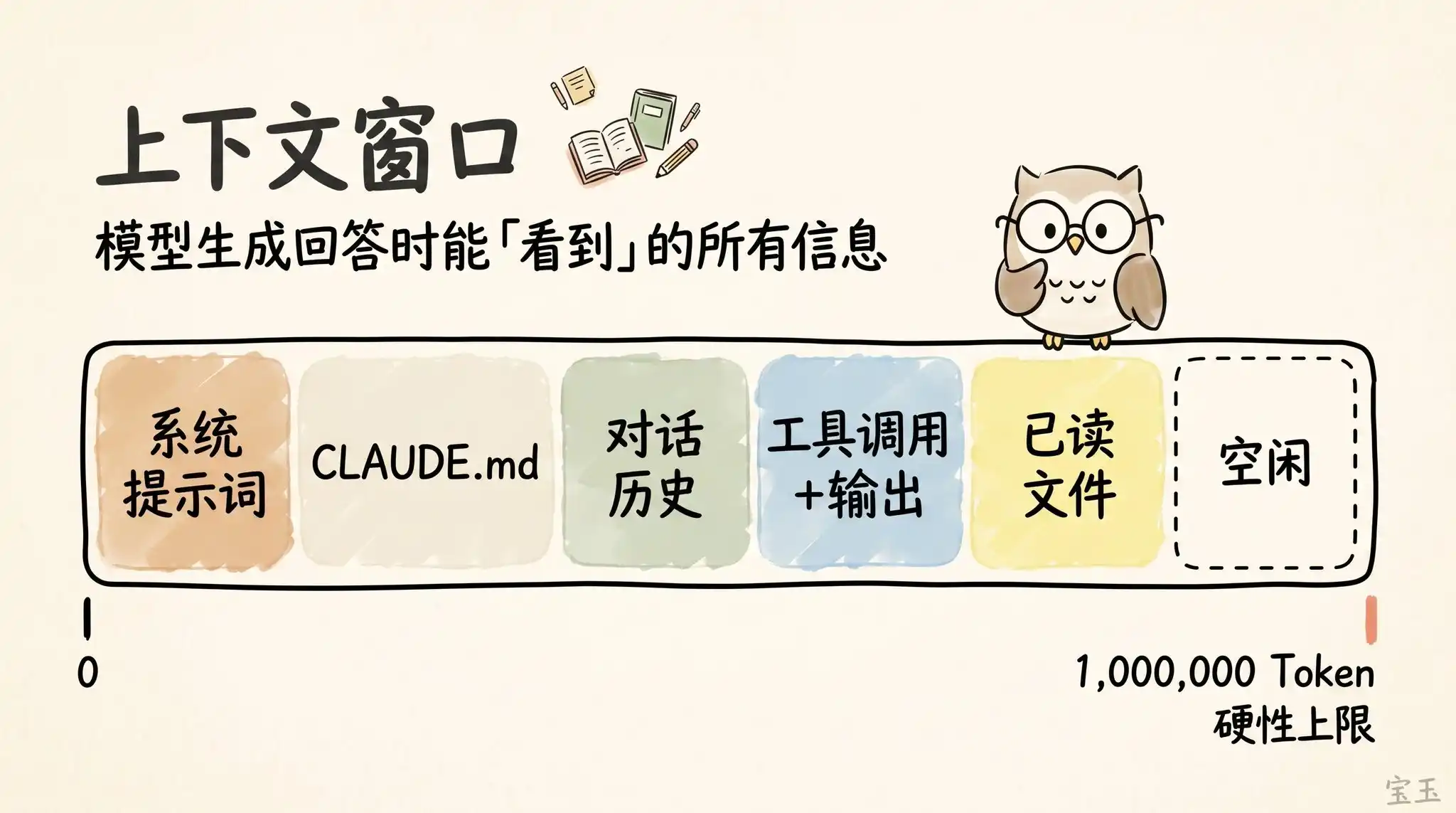
The "Context Window" is like all the information the model can simultaneously "see" when generating its next response. It includes your System Prompt, the chat history so far, every Tool Call and its output results, and even every file it has read. Now, Claude Code boasts a super large context window of up to 1 million Tokens(Note: A Token is the basic unit of text processed by large models. Typically, one English word is about 1 Token, and one Chinese character may take 1-2 Tokens).
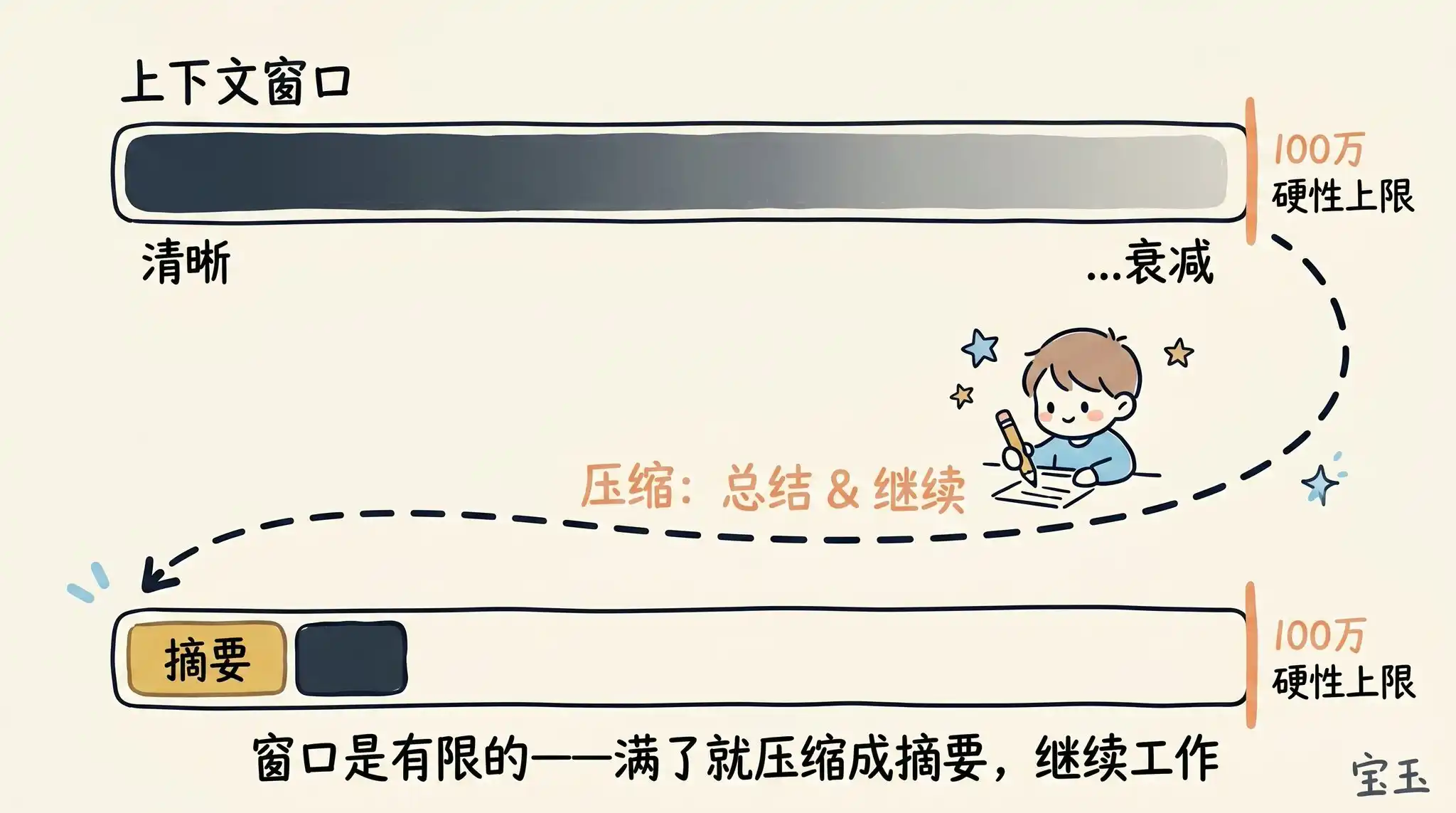
Unfortunately, using context comes at a cost, often referred to as Context Decay(Note: Refers to the phenomenon where as the conversation history grows longer, the model needs to process an excessive amount of information, leading to distracted attention, forgetting early important information, or being interfered with by irrelevant content). As the context grows longer, the model's performance often deteriorates because its attention is spread over more Tokens. Those early, lingering, and now irrelevant contents begin to interfere with the task the model is currently performing.
The context window has a hard capacity limit. So, when you're about to fill it up, you must summarize the task you're working on into a brief description and then carry that description into a new context window to continue working.
We call this process Context Compression (Compaction)(Note: The process of refining lengthy historical records into concise summaries to free up memory space). Of course, you can also manually trigger this compression process at any time.
Imagine you just asked Claude to do something, and it's finished. Now, your context is filled with some information (like tool calls, tool outputs, your instructions).
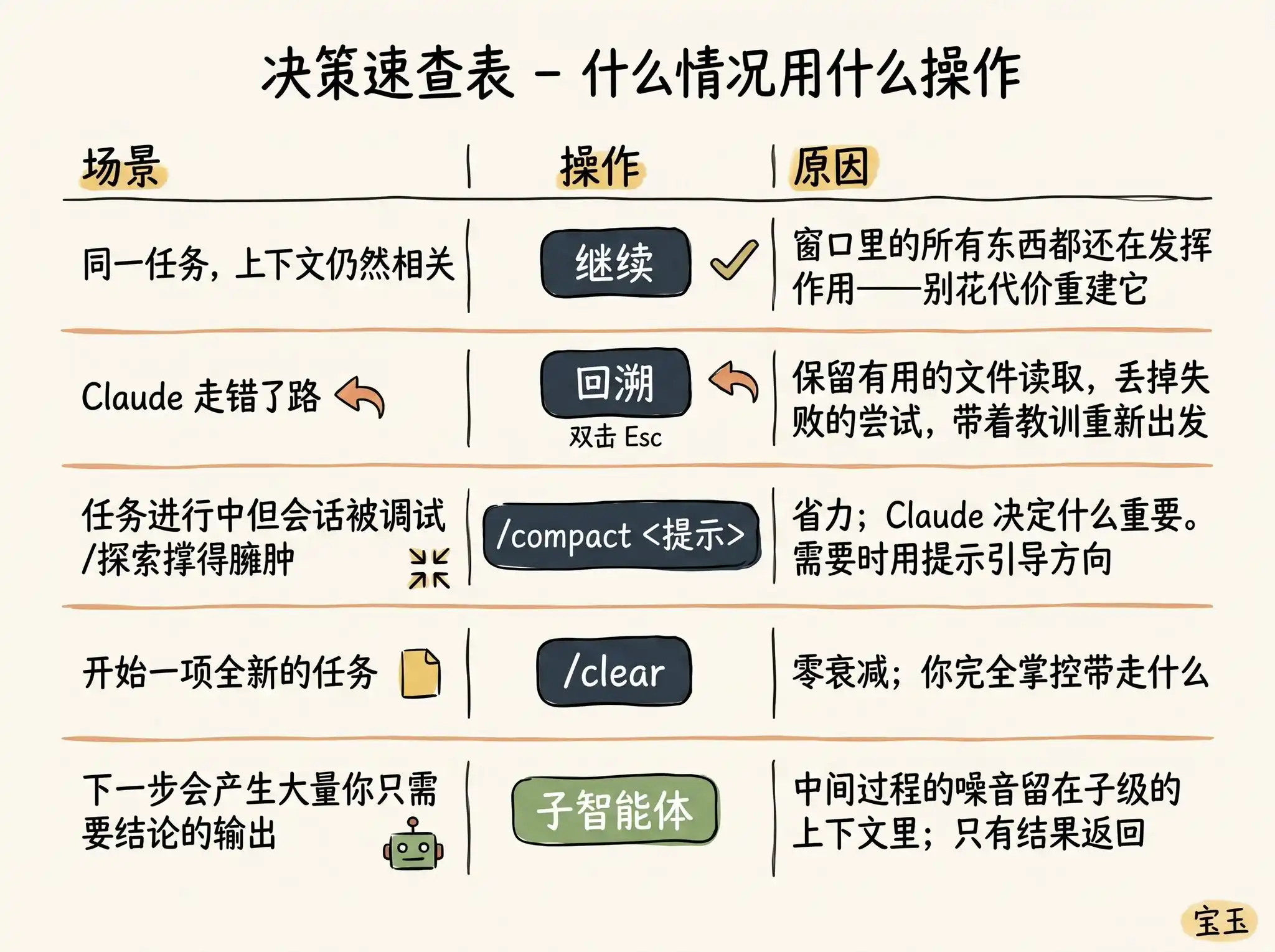
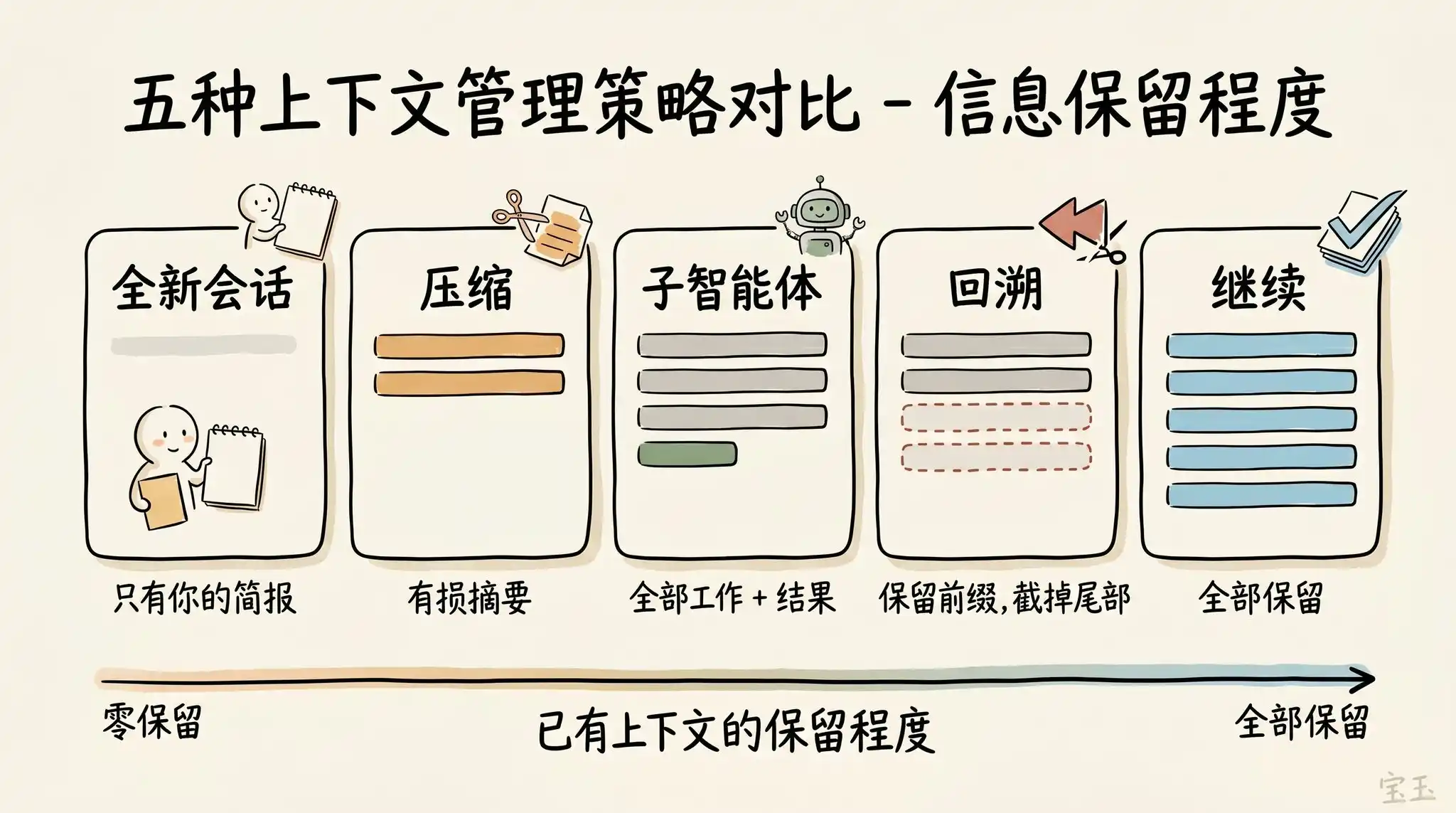
What should you do next? You might be surprised to find you have so many choices:
· Continue—In the same session, directly send the next message
· Rewind (/rewind or double-press Esc key)—Turn back time, revert to a previous message, and start trying again from there
· Clear (/clear)—Start a brand new session, usually bringing a short summary you've distilled from the previous conversation
· Compact—Summarize the current conversation, then continue working based on this summary
· Subagents—Delegate the next phase of work to another AI Agent with its own clean context, and only pull back its final work result
While directly "Continuing" is the most natural reaction, the other four options are specifically designed to help you better manage your context.
When Should You Start a New Session?
When exactly should you maintain a long old session, and when should you start fresh? Our rule of thumb is: when you start a new task, you should also start a new session.
A 1 million token context window means you can now very reliably complete longer, more complex tasks. For example, having Claude build a full-stack application for you from scratch.
But sometimes, you might be working on sequential tasks. In this case, you need to retain some of the previous context, but not all of it. For example, you just finished writing a new feature and now need to write usage documentation for it. You could start a new session, but that would require Claude to re-read all the code files you just wrote—this is not only slower but also more expensive.
Use "Rewind" Instead of "Correcting"
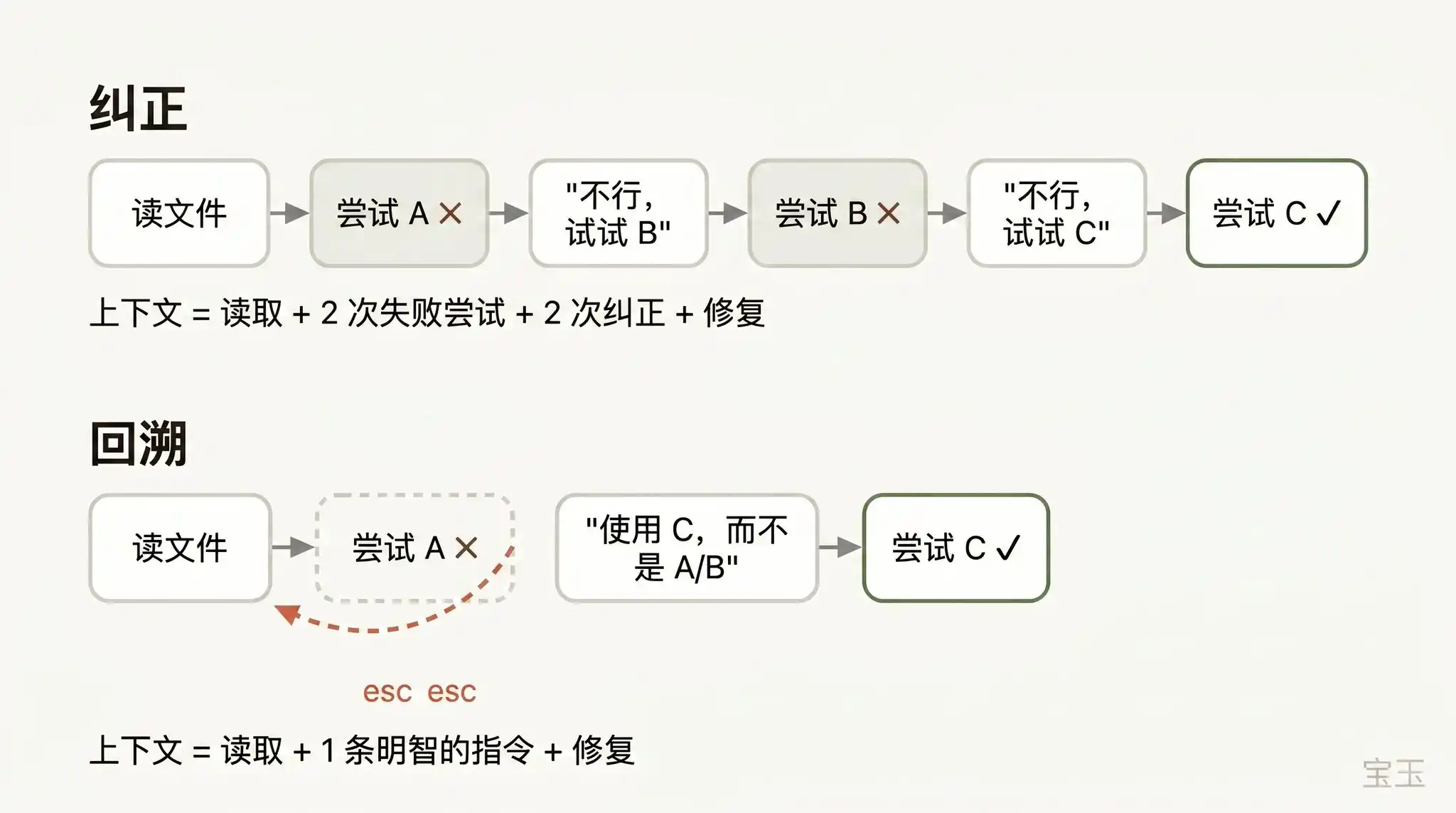
If I had to pick one habit that represents "good context management skills," it would be using "Rewind" effectively.
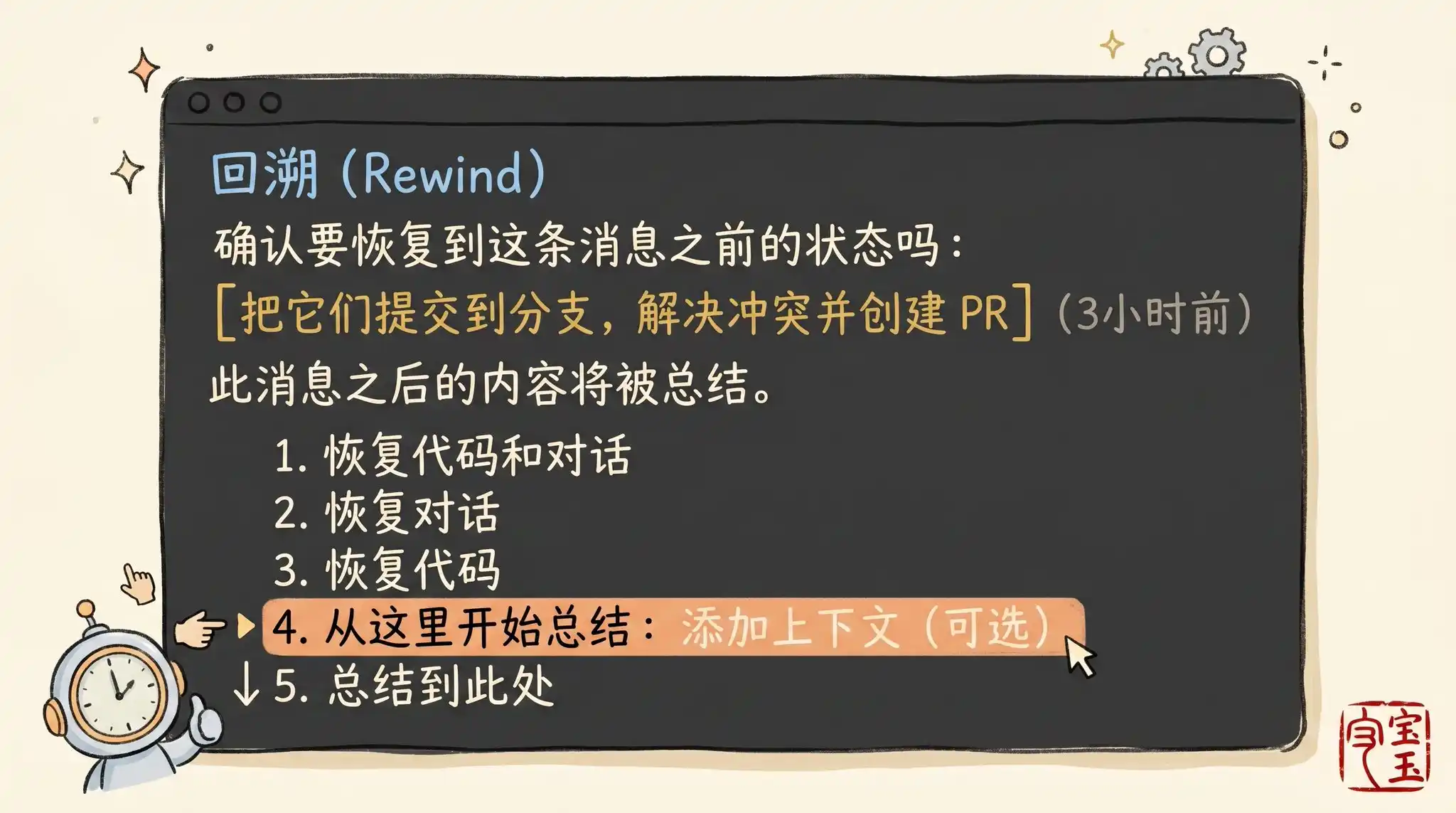
In Claude Code, double-clicking the Esc key (or running the /rewind command) allows you to travel back to any previous message and then re-issue a prompt from there. All conversations that occurred after that point are completely discarded from the context.
When correcting AI errors, "Rewinding" is often a smarter approach. For example: Claude read five files, tried one method, and it failed. Your instinct might be to type in the dialog box: "That didn't work, try method X." But the smarter move is to rewind to the moment it just finished reading those five files, and then say to it with your newly learned lesson: "Don't use method A, the foo module doesn't support that—go straight to trying method B."
You can even use the "summarize from here" function to have Claude itself summarize the lessons learned into a "handover message." It feels like the "future Claude" that just stepped on the landmine left a note for its past self who hasn't started acting yet.
Context Compression vs. New Session
When a session becomes increasingly long, you have two ways to "lighten its load": use /compact (compress) or /clear (clear and start from scratch). These two operations sound similar but perform quite differently.
Compression (Compact) asks the model to summarize the conversation so far and then replace the lengthy history with this summary. This process is "lossy," meaning you hand over the power to decide "what content is important" to Claude.
The benefit is you don't have to write anything, and Claude might be more thoughtful than you in retaining important lessons learned or file records. You can also control the direction of compression by giving it instructions (e.g., /compact focus on the refactoring of the authentication module, discard the content about test debugging).
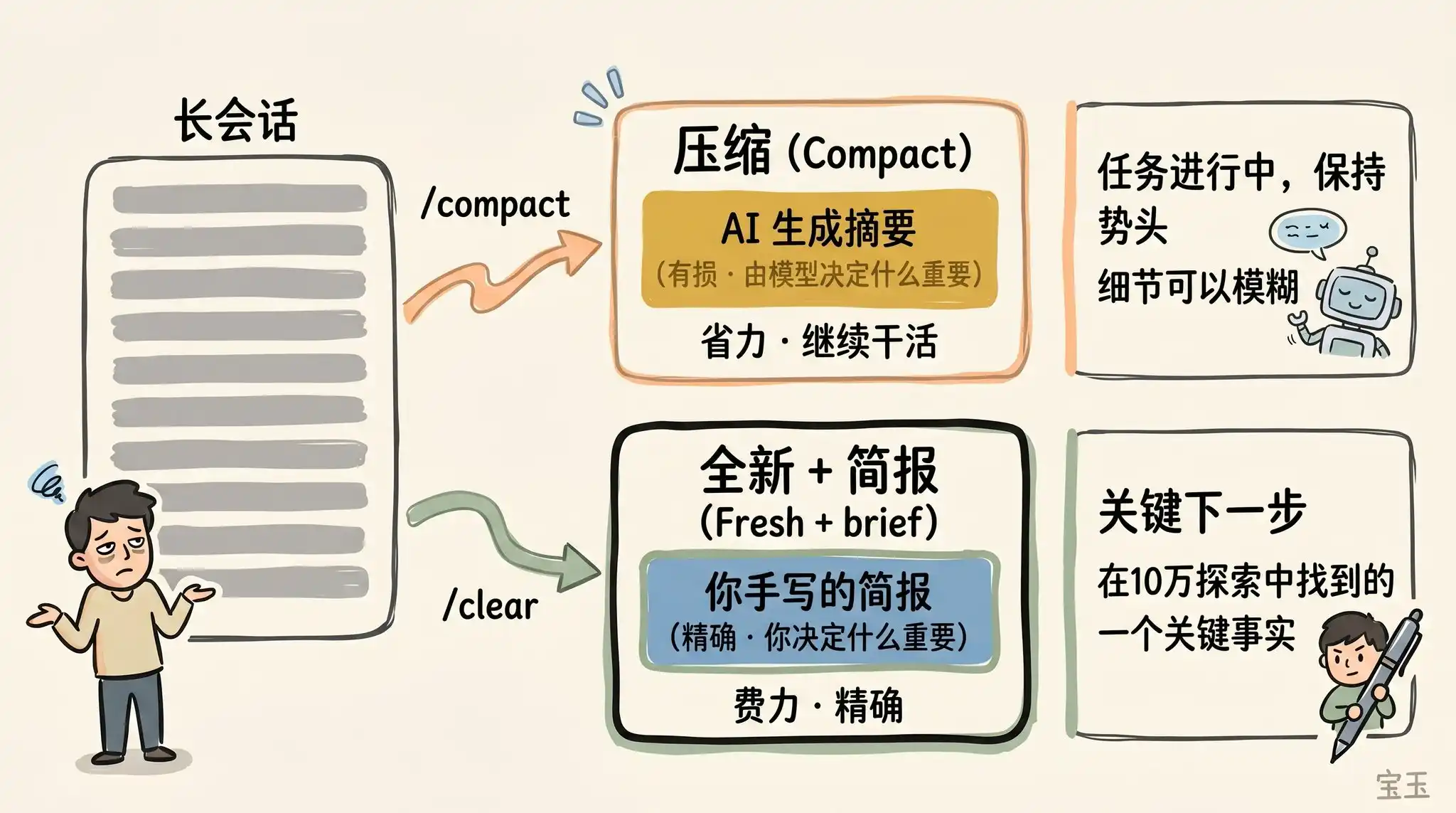
Using /clear, on the other hand, requires you to write the key points yourself (e.g., "We are refactoring the authentication middleware, the current constraints are X, the important related files are A and B, and we have already ruled out method Y") and then start over in an impeccably clean state. Although this takes more effort, the resulting new context is 100% the essence of what you deem truly relevant.
What Kind of "Compression" Fails?
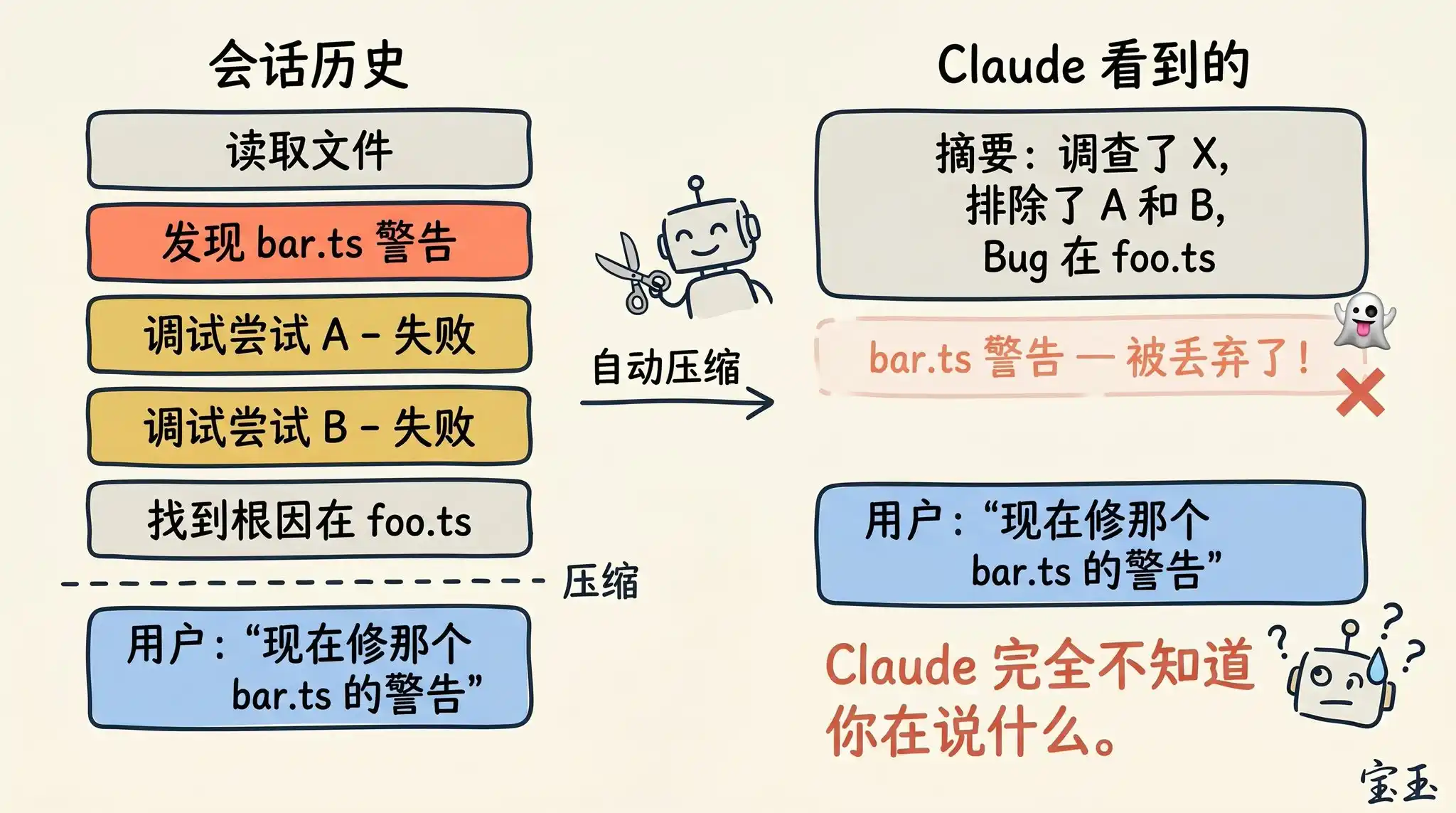
If you often keep extremely long sessions open, you've likely encountered situations where "compression" works extremely poorly. We've found that this kind of "failure" usually happens at a specific moment: when the large language model (LLM) cannot predict the direction of your next work.
For example, after a long code debugging session, the system triggers automatic compression, summarizing the previous troubleshooting process. Then you immediately send a message: "Now, let's fix that other warning we saw earlier in bar.ts."
However, since the previous session focused entirely on debugging the first bug, that unfixed warning was likely deemed irrelevant and discarded during the summary.
This is a tricky problem. Because, limited by context decay, the moment the model performs compression is often when its "intelligence" is at its lowest. Fortunately, with the 1 million token capacity, you now have more space to proactively execute /compact by including a description of "what I want to do next."
Subagents and Brand New Context Windows
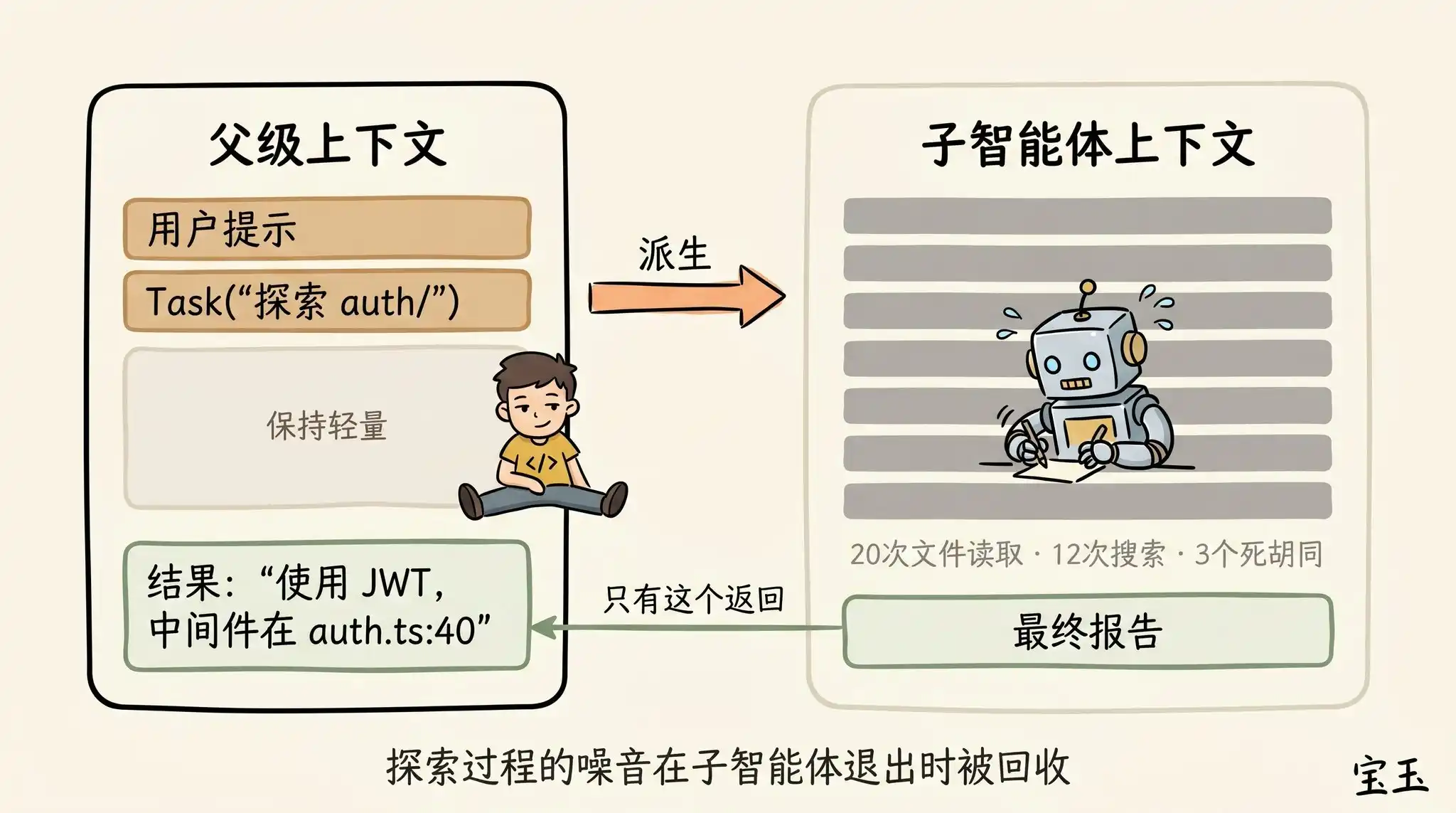
Subagents are also an excellent means of managing context. This trick is particularly useful when you anticipate in advance that a certain task will generate a large amount of "disposable" (will never be used again) intermediate results.
When Claude spawns a subagent via the Agent tool, this little guy gets a completely new context window. It can mess around freely inside, doing as much work as it wants. Once the job is done, it will refine the results and only return the final report to the "parent" Claude.
Our "soul-searching" for judging whether to use a subagent is: will I need to see the detailed output of these tool runs later, or do I just want a final conclusion?
Although Claude Code will automatically call subagents behind the scenes, sometimes you can also command it very explicitly. For example, you can tell it:
· "Send a subagent to verify if the work we just did is correct based on this specification document."
· "Send a subagent to read through another codebase and summarize how it implements the authentication flow, then you mimic it and implement one here too."
· "Send a subagent to write a documentation for this new feature based on my Git commit history."
In summary, when Claude finishes a round of answers and you are about to send a new message, you stand at a decision crossroads.
We hope that in the future, Claude will be smart enough to manage all this for you. But for now, mastering these decisions is the necessary path for you to guide Claude to produce high-quality results.