86% Return? How to Use a Bot to 'Earn Passively' on Polymarket

marsbitPubblicato 2025-12-30Pubblicato ultima volta 2025-12-30

Introduzione

This article details the development and backtesting of an automated trading bot for the "BTC 15-minute UP/DOWN" market on Polymarket. The author identified market inefficiencies and automated a manual strategy to exploit them. The bot operates in two modes. In manual mode, users can directly place orders. In auto mode, it runs a two-leg cycle: First, it observes the market for a set time after a round begins. If either the "UP" or "DOWN" side drops by a specified percentage (e.g., 15%) within seconds, it triggers "Leg 1" and buys the crashed side. It then waits for "Leg 2," a hedging trade on the opposite side, which is only executed if the sum of the Leg 1 entry price and the opposite ask price meets a target threshold (e.g., ≤ 0.95). Due to a lack of historical market data from Polymarket's API, the author created a custom backtesting system by recording 6 GB of live price snapshots over four days. A conservative backtest with parameters of a 15% crash threshold and a 0.95 sum target showed an 86% ROI, turning $1,000 into $1,869. An aggressive parameter set resulted in a -50% loss, highlighting the critical role of parameter selection. The author acknowledges significant limitations of the backtesting, including its short data period, failure to model order book depth, partial fills, variable network latency, and the market impact of the bot's own orders. Future improvements include rewriting the bot in Rust for performance, running a dedicated node, and deploying on a ...

A few weeks ago, I decided to build my own Polymarket bot. The full version took me a few weeks to complete.

I was willing to invest this effort because there are indeed inefficiencies on Polymarket. Although there are already some bots exploiting these inefficiencies for profit, it's far from enough. The opportunities in this market still far outnumber the bots.

Bot Construction Logic

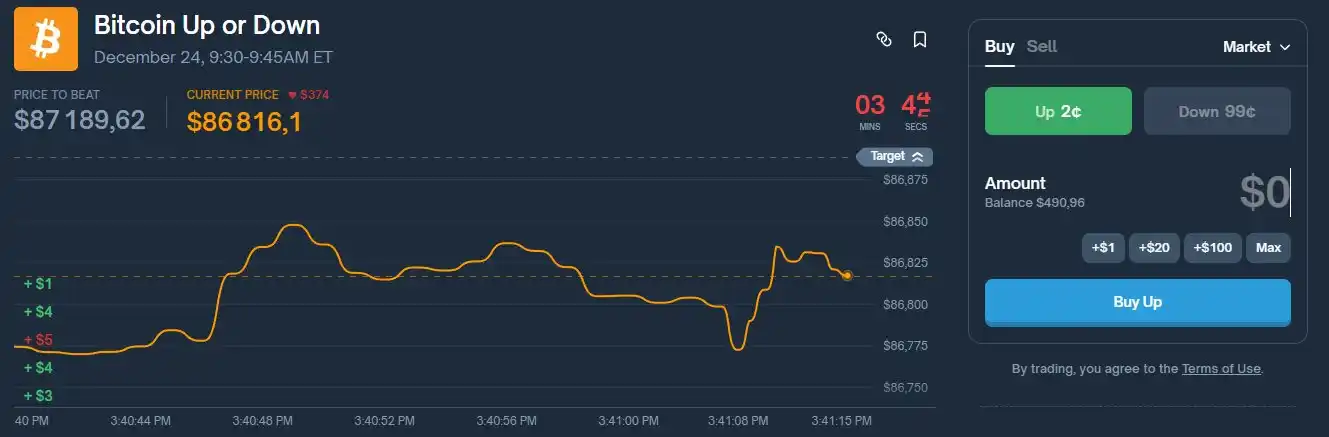
The bot's logic is based on a strategy I previously executed manually. To improve efficiency, I automated it. This bot runs on the "BTC 15-minute UP/DOWN" market.
The bot runs a real-time monitoring program that can automatically switch to the current BTC 15-minute round, stream the best bid/ask via WebSocket, display a fixed terminal UI, and allow full control via text commands.
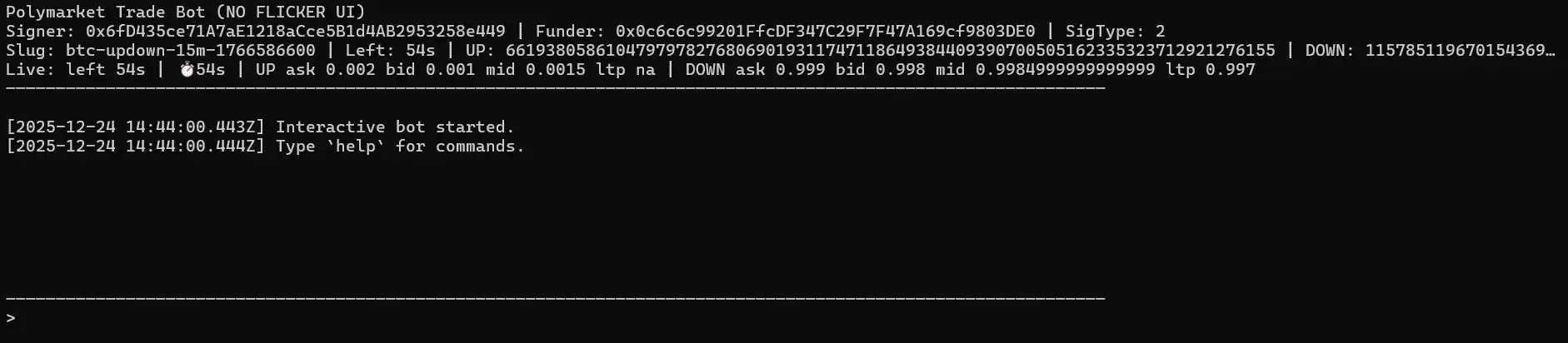
In manual mode, you can place orders directly.

buy up / buy down : Buy a specific USD amount.

buyshares up / buyshares down : Purchase an exact number of shares using user-friendly LIMIT + GTC (Good-Til-Cancelled) orders, filled at the current best ask price.

Automatic mode runs a repeating two-leg cycle.

First, it only observes price fluctuations within the first windowMin minutes after each round starts. If either side drops sufficiently fast (a drop of at least movePct within about 3 seconds), it triggers "Leg 1," buying the side that just crashed.

After completing Leg 1, the bot will never buy the same side again. It waits for "Leg 2 (the hedge)" and only triggers it when the following condition is met: leg1EntryPrice + oppositeAsk <= sumTarget.

When this condition is met, it buys the opposite side. After Leg 2 is completed, the cycle ends, and the bot returns to the observation state, waiting for the next crash signal using the same parameters.

If the round changes during the cycle, the bot abandons the open cycle and restarts with the same settings in the next round.

The parameters for automatic mode are set as follows: auto on [sum=0.95] [move=0.15] [windowMin=2]

· shares: The position size used for both legs of the trade.

· sum: The threshold allowed for hedging.

· move (movePct): The crash threshold (e.g., 0.15 = 15%).

· windowMin: The duration from the start of each round during which Leg 1 is allowed to execute.

Backtesting

The bot's logic is simple: wait for a violent price drop, buy the side that just finished dropping, then wait for the price to stabilize and hedge by buying the opposite side, while ensuring: priceUP + priceDOWN < 1.

But this logic needed testing. Does it really work in the long run? More importantly, the bot has many parameters (shares, sum, move percentage, window minutes, etc.). Which parameter set is optimal and maximizes profit?

My first thought was to let the bot run live for a week and observe the results. The problem was that this would take too long and only test one parameter set, while I needed to test many.

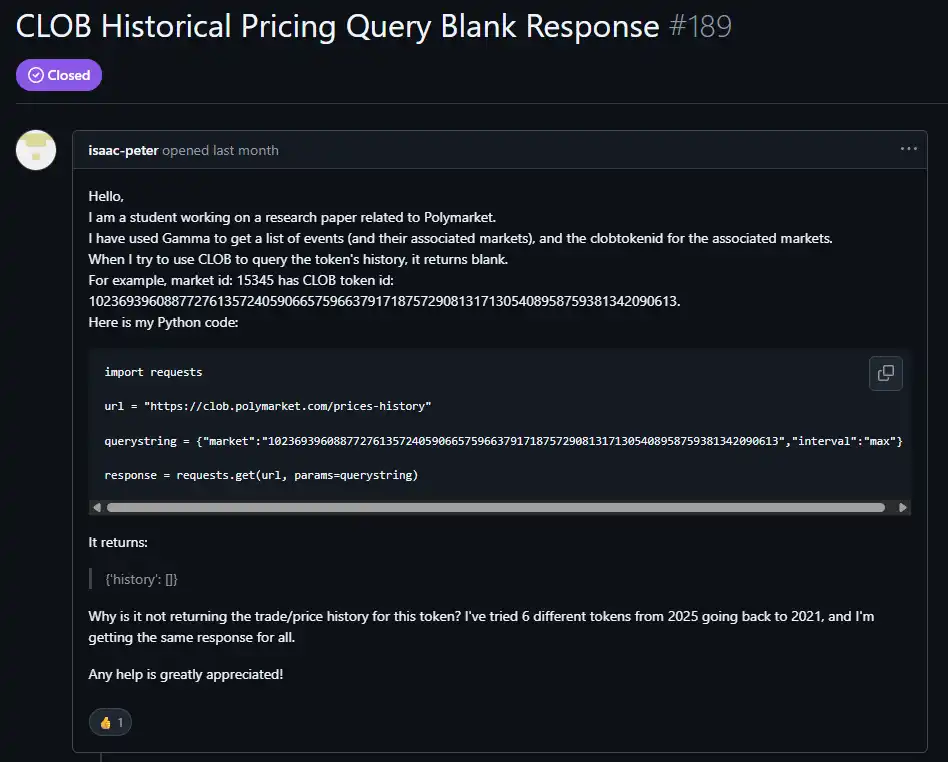
My second thought was to backtest using historical data from the Polymarket CLOB API. Unfortunately, for the BTC 15-minute UP/DOWN market, the historical data endpoint kept returning empty datasets. Without historical price ticks, the backtest couldn't detect "a crash within about 3 seconds," couldn't trigger Leg 1, and would yield 0 cycles and 0% ROI regardless of parameters.

After further investigation, I found other users encountered the same issue fetching historical data for certain markets. I tested other markets that did return historical data and concluded that for this specific market, historical data simply isn't retained.

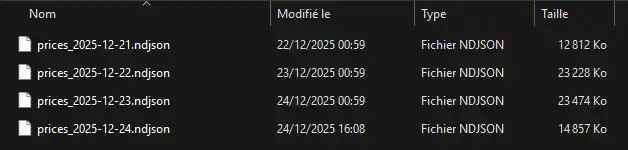
Due to this limitation, the only reliable way to backtest this strategy was to create my own historical dataset by recording the real-time best-ask prices while the bot was running.
The logger writes snapshots to disk containing:

· Timestamp

· Round identifier (round slug)

· Seconds remaining

· UP/DOWN token IDs

· UP/DOWN best ask prices

Subsequently, the "recorded backtest" replays these snapshots and deterministically applies the same automatic logic. This guarantees access to the high-frequency data needed to detect crashes and hedging conditions.

I collected 6 GB of data over 4 days in total. I could have recorded more, but I deemed it sufficient for testing different parameter sets.
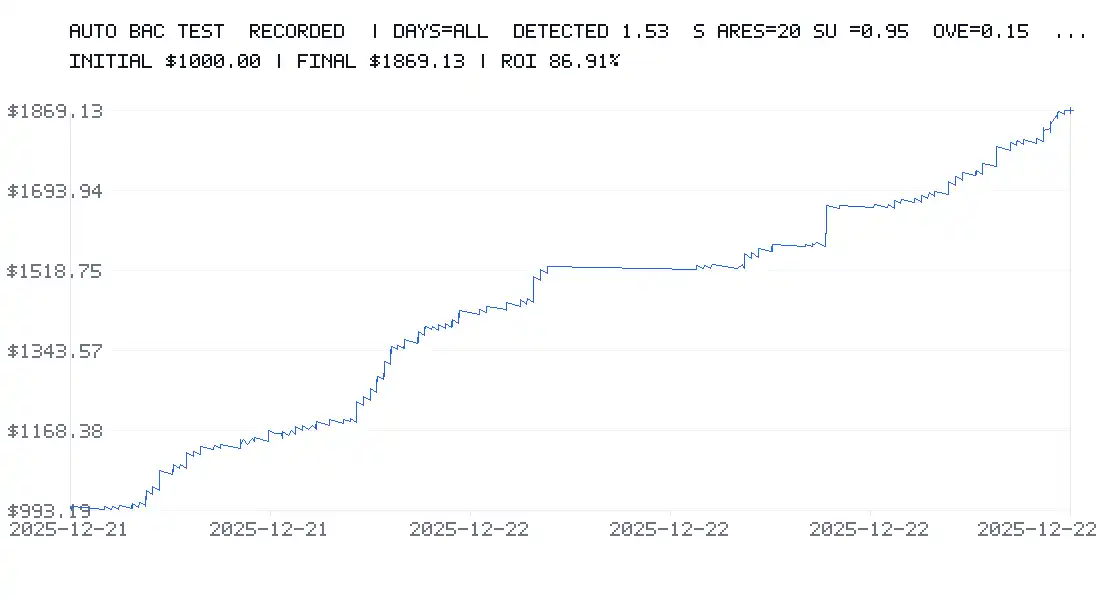
I started testing this parameter set:

· Initial balance: $1,000

· 20 shares per trade

· sumTarget = 0.95

· Crash threshold = 15%

· windowMin = 2 minutes

I also applied a constant 0.5% fee and a 2% spread to stay in a conservative scenario.

The backtest showed an ROI of 86%, turning $1,000 into $1,869 in just a few days.
Then I tested a more aggressive parameter set:

· Initial balance: $1,000

· 20 shares per trade

· sumTarget = 0.6

· Crash threshold = 1%

· windowMin = 15 minutes

Result: -50% ROI after 2 days.
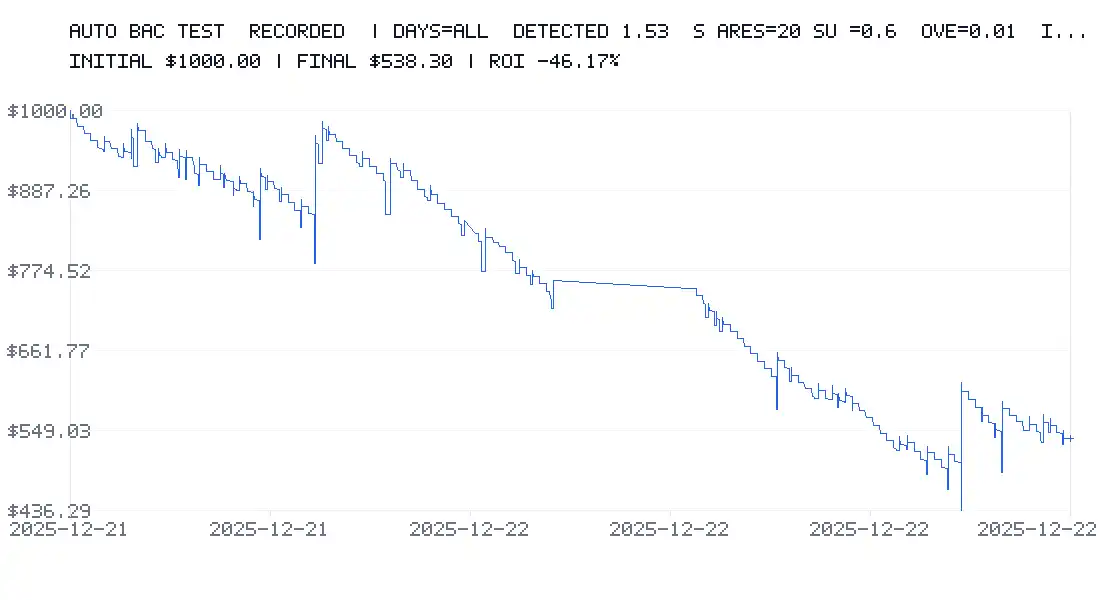
This clearly shows that parameter selection is the most critical factor. It can make you a lot of money or lead to significant losses.

Limitations of Backtesting

Even with fees and spreads included, backtesting has its limitations.

· First, it only used a few days of data, which might not be enough for a comprehensive market perspective.

· It relies on recorded best-ask snapshots; in reality, orders might be partially filled or filled at different prices. Furthermore, order book depth and available volume are not modeled.

· Micro-fluctuations below the second level are not captured (data is sampled once per second). The backtest has 1-second timestamps, but a lot can happen between seconds.

· In the backtest, slippage is constant, and variable latency (e.g., 200–1500 ms) or network spikes are not simulated.

· Each leg of the trade is considered "instantly" executed (no order queuing, no pending orders).

· Fees are charged uniformly, whereas in reality fees might depend on: market/token, maker vs. taker, fee tier, or conditions.

To be pessimistic (prudent), I applied a rule: if Leg 2 fails to execute before the market closes, Leg 1 is considered a total loss.

This is deliberately conservative but doesn't always match reality:

· Sometimes Leg 1 can be closed early,

· Sometimes it ends in-the-money (ITM) and wins,

· Sometimes the loss can be partial rather than total.

While losses might be overestimated, this provides a practical "worst-case" scenario.

Most importantly, backtesting cannot simulate the impact of your large orders on the order book or attracting other traders to hunt you. In reality, your orders can:

· Disturb the order book,

· Attract or repel other traders,

· Cause non-linear slippage.

The backtest assumes you are a pure price taker with no influence.

Finally, it does not simulate rate limits, API errors, order rejections, suspensions, timeouts, reconnections, or the bot being busy and missing signals.

Backtesting is extremely valuable for identifying good parameter ranges, but it is not a 100% guarantee, as some real-world effects cannot be modeled.

Infrastructure

I plan to run this bot on a Raspberry Pi to avoid consuming resources on my main machine and maintain 24/7 operation.

But there is still significant room for improvement:

· Using Rust instead of JavaScript would provide far superior performance and processing times.

· Running a dedicated Polygon RPC node would further reduce latency.

· Deploying on a VPS close to Polymarket's servers would also significantly reduce latency.

There are certainly other optimizations I haven't discovered yet. Currently, I am learning Rust as it is becoming an indispensable language in Web3 development.


Domande pertinenti

QWhat is the core strategy used by the Polymarket trading bot described in the article?

AThe bot's core strategy is to wait for a sharp price drop (a 'flash crash') in the BTC 15-minute UP/DOWN market, buy the side that just crashed (Leg 1), and then wait to hedge by buying the opposite side once the combined price of UP and DOWN tokens meets a specific threshold, ensuring that priceUP + priceDOWN < 1.

QWhy couldn't the author perform a backtest using historical data from the Polymarket API?

AThe author couldn't perform a backtest using the Polymarket CLOB API's historical data because, for the specific BTC 15-minute UP/DOWN market, the historical data endpoint consistently returned empty datasets. No historical price ticks were available, which are required to detect the rapid price movements the strategy relies on.

QHow did the author create a dataset to backtest the bot's strategy despite the lack of historical API data?

AThe author created their own historical dataset by running a custom logger alongside the bot. This logger recorded real-time snapshots of the best-ask prices, timestamps, round identifiers, and other market data. These snapshots were then replayed in a 'recorded backtest' to deterministically apply the bot's logic.

QWhat was the result of the backtest using the conservative parameter set (sumTarget=0.95, movePct=15%, windowMin=2)?

AThe backtest using the conservative parameter set (20 shares per trade, sumTarget=0.95, movePct=15%, windowMin=2 minutes) showed a return on investment (ROI) of 86%, turning an initial $1,000 into $1,869 over a few days, even after applying a constant 0.5% fee and 2% spread.

QWhat are some key limitations of the backtesting method mentioned by the author?

AKey limitations include: using only a few days of data; relying on best-ask snapshots without modeling order book depth or partial fills; not capturing sub-second micro-fluctuations; assuming constant slippage and instant order execution; not simulating the market impact of large orders; and not accounting for API errors, network latency, or rate limits.

Letture associate

Cook's Curtain Call and Ternus Takes the Helm: The Disruption and Reboot of Apple's 4 Trillion Dollar Empire

Tim Cook has officially announced he will step down as CEO of Apple in September, transitioning to executive chairman after a 15-year tenure during which he grew the company’s market value from around $350 billion to nearly $4 trillion. He will be succeeded by John Ternus, a 50-year-old hardware engineering veteran who has been groomed for the role through increasing public visibility and internal responsibility. Ternus’s appointment signals a strategic shift toward hardware and engineering leadership, with Johny Srouji—head of Apple Silicon—taking on an expanded role as Chief Hardware Officer. This consolidation aims to strengthen Apple’s core technological capabilities. However, Cook’s departure highlights a significant unresolved issue: Apple’s delayed and fragmented approach to artificial intelligence. Despite early efforts, such as hiring John Giannandrea from Google in 2018, Apple’s AI initiatives—particularly around Siri—have struggled with internal restructuring and reliance on external partnerships, including with Google. The transition comes at a critical moment as Apple faces paradigm shifts with the rise of artificial general intelligence (ASI). The company’s closed ecosystem of hardware, software, and services—once a major advantage—now presents challenges in adapting to an AI-centric world where intelligence may matter more than the device itself. Ternus must quickly articulate a clear AI strategy, possibly starting at WWDC, to reassure markets and redefine Apple’s role in a new technological era. His task is not only to maintain Apple’s operational excellence but also to reinvigorate its capacity to innovate and lead in the age of AI.

marsbit2 h fa

Cook's Curtain Call and Ternus Takes the Helm: The Disruption and Reboot of Apple's 4 Trillion Dollar Empire

marsbit2 h fa

Trading

Spot
Futures

Articoli Popolari

Come comprare CFG

Benvenuto in HTX.com! Abbiamo reso l'acquisto di Centrifuge (CFG) semplice e conveniente. Segui la nostra guida passo passo per intraprendere il tuo viaggio nel mondo delle criptovalute.Step 1: Crea il tuo Account HTXUsa la tua email o numero di telefono per registrarti il tuo account gratuito su HTX. Vivi un'esperienza facile e sblocca tutte le funzionalità,Crea il mio accountStep 2: Vai in Acquista crypto e seleziona il tuo metodo di pagamentoCarta di credito/debito: utilizza la tua Visa o Mastercard per acquistare immediatamente CentrifugeCFG.Bilancio: Usa i fondi dal bilancio del tuo account HTX per fare trading senza problemi.Terze parti: abbiamo aggiunto metodi di pagamento molto utilizzati come Google Pay e Apple Pay per maggiore comodità.P2P: Fai trading direttamente con altri utenti HTX.Over-the-Counter (OTC): Offriamo servizi su misura e tassi di cambio competitivi per i trader.Step 3: Conserva Centrifuge (CFG)Dopo aver acquistato Centrifuge (CFG), conserva nel tuo account HTX. In alternativa, puoi inviare tramite trasferimento blockchain o scambiare per altre criptovalute.Step 4: Scambia Centrifuge (CFG)Scambia facilmente Centrifuge (CFG) nel mercato spot di HTX. Accedi al tuo account, seleziona la tua coppia di trading, esegui le tue operazioni e monitora in tempo reale. Offriamo un'esperienza user-friendly sia per chi ha appena iniziato che per i trader più esperti.

506 Totale visualizzazioniPubblicato il 2026.03.19Aggiornato il 2026.03.19

Come comprare CFG

Cosa è WL

I. Introduzione al ProgettoWorldLand è una L2 o side chain di Ethereum, progettata come una soluzione dal basso verso l'alto per migliorare l'ecosistema di Ethereum.II. Informazioni sul Token1) Informazioni di BaseNome del token: WL (WorldLand)III. Link CorrelatiSito web:https://worldland.foundation/Esploratori:https://bscscan.com/address/0x8aaB31fbc69C92fa53f600910Cf0f215531F8239Social:https://x.com/WorldLand_space Nota: L'introduzione al progetto proviene dai materiali pubblicati o forniti dal team ufficiale del progetto, che sono solo a scopo di riferimento e non costituiscono consulenza per gli investimenti. HTX non si assume alcuna responsabilità per eventuali perdite dirette o indirette risultanti.

287 Totale visualizzazioniPubblicato il 2026.03.28Aggiornato il 2026.03.28

Cosa è WL

Come comprare WL

Benvenuto in HTX.com! Abbiamo reso l'acquisto di WorldLand (WL) semplice e conveniente. Segui la nostra guida passo passo per intraprendere il tuo viaggio nel mondo delle criptovalute.Step 1: Crea il tuo Account HTXUsa la tua email o numero di telefono per registrarti il tuo account gratuito su HTX. Vivi un'esperienza facile e sblocca tutte le funzionalità,Crea il mio accountStep 2: Vai in Acquista crypto e seleziona il tuo metodo di pagamentoCarta di credito/debito: utilizza la tua Visa o Mastercard per acquistare immediatamente WorldLandWL.Bilancio: Usa i fondi dal bilancio del tuo account HTX per fare trading senza problemi.Terze parti: abbiamo aggiunto metodi di pagamento molto utilizzati come Google Pay e Apple Pay per maggiore comodità.P2P: Fai trading direttamente con altri utenti HTX.Over-the-Counter (OTC): Offriamo servizi su misura e tassi di cambio competitivi per i trader.Step 3: Conserva WorldLand (WL)Dopo aver acquistato WorldLand (WL), conserva nel tuo account HTX. In alternativa, puoi inviare tramite trasferimento blockchain o scambiare per altre criptovalute.Step 4: Scambia WorldLand (WL)Scambia facilmente WorldLand (WL) nel mercato spot di HTX. Accedi al tuo account, seleziona la tua coppia di trading, esegui le tue operazioni e monitora in tempo reale. Offriamo un'esperienza user-friendly sia per chi ha appena iniziato che per i trader più esperti.

203 Totale visualizzazioniPubblicato il 2026.03.28Aggiornato il 2026.03.28

Come comprare WL

Discussioni

Benvenuto nella Community HTX. Qui puoi rimanere informato sugli ultimi sviluppi della piattaforma e accedere ad approfondimenti esperti sul mercato. Le opinioni degli utenti sul prezzo di A A sono presentate come di seguito.

活动图片