10 Claude Code Usage Tips: The Sooner You Know, The Sooner You Benefit

marsbitPubblicato 2026-04-08Pubblicato ultima volta 2026-04-08

Introduzione

Here is an English summary of the article "10 Must-Know Claude Code Tips: The Sooner You Know, The Sooner You Benefit": This article shares essential tips for using Claude Code, an AI coding assistant, to significantly boost productivity. It is divided into three main sections. First, it covers three ways to launch Claude: 1) A simple GUI desktop app for non-programmers, 2) A command-line method with a key tip (`claude -c`) to resume from a specific point in the chat history, avoiding restarting context, and 3) A headless mode (`-p` flag) for automation tasks using a subscription token. Second, it details three crucial in-session techniques: 1) Using `Esc` to gracefully interrupt a response and `Esc+Esc` to revert to a previous checkpoint, 2) Using the `!` syntax (e.g., `!ls`) to run shell commands without leaving the chat, and 3) Managing context with `/clear` to remove history or `/compact` to optimize it when performance slows down. Finally, the article recommends companion software to solve human-AI collaboration bottlenecks: 1) **Superpowers**, a structured workflow methodology for higher-quality code output. 2) Voice input tools like **Typeless** and **Douban Input法** to overcome typing speed limit. 3) Tools like **Cmux** (a terminal for managing multiple AI agent instances) and **Vibe Island** (for seamless context switching between tasks) to solve the problem of lost focus when multitasking. The overall goal is to help users focus more deeply on their programming...

Below are the Claude code usage tips that I've often lamented not knowing earlier over the past six months.

They have saved me a massive amount of time, allowing me to enter a state of smooth flow while coding and writing content.


The article is divided into three parts:

1. Three Ways to Launch

2. Usage Tips While Running

3. Using Companion Software to Solve Human-Machine Collaboration Efficiency Issues

All of this is about: allowing you to focus more on programming and other activities at hand.

I wish someone had sent me this guide a few months ago, so I could have taken fewer detours and started smoothly:

1. Save this guide, spend 30 minutes this weekend to master Claude code techniques.

2. Send it to anyone who tells you "I think Claude code is difficult, but I've never tried it".

Alright, first let's start with the simplest launch (you read that right, even launching has its tricks)

Three Ways to Launch Claude

Simple Launch

Launching Claude is a very simple thing, simply in the command line.

But for friends who don't like command-line tools, Claude code actually has a visual interface.

How to do it?

Go to this website: https://claude.com/download, under Claude Desktop, follow the steps below and you'll get a visual Claude.
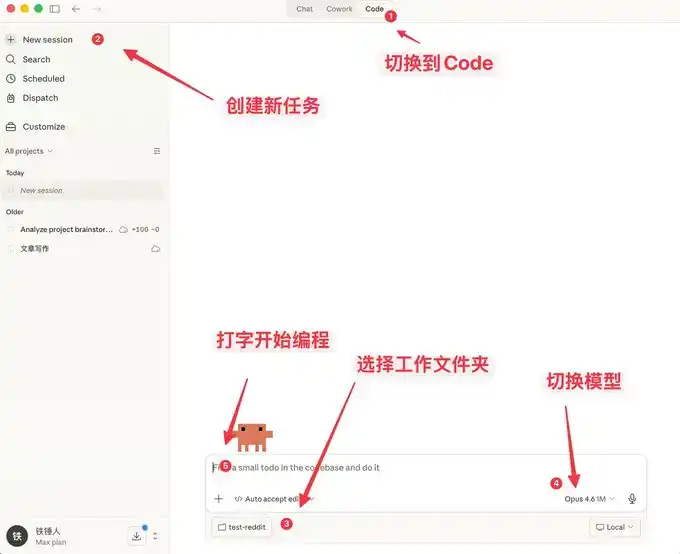
Here you can not only chat, but it also comes with many features similar to OpenClaw.
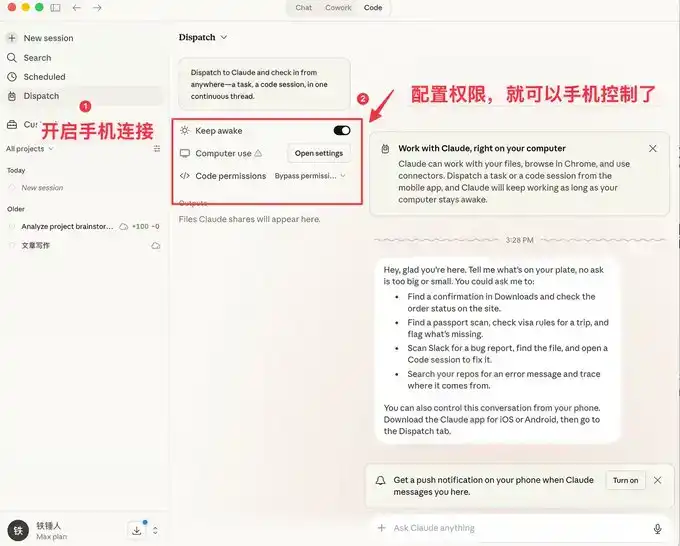
The visual interface is easier for ordinary people to use, but programmers prefer the command-line launch method.

Below I'll introduce a few commands to speed up launching.

Command Line Launch

Launch with Specific History

During our use of Claude code, we often encounter situations that require restarting. Every time we restart, we need to restore the previous conversation context:


I used to always use:

But the official actually provides some pretty good launch commands:
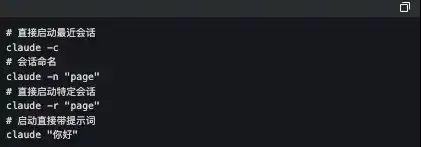
The one I use frequently here is `claude -c`, a short command that has saved me a lot of life.


-p Launch in Automated Mode

Claude Code can be launched without a UI, simply use the following command:

It's worth noting that if you want to use a local subscription Token to automate tasks, this is currently the only way to do it.

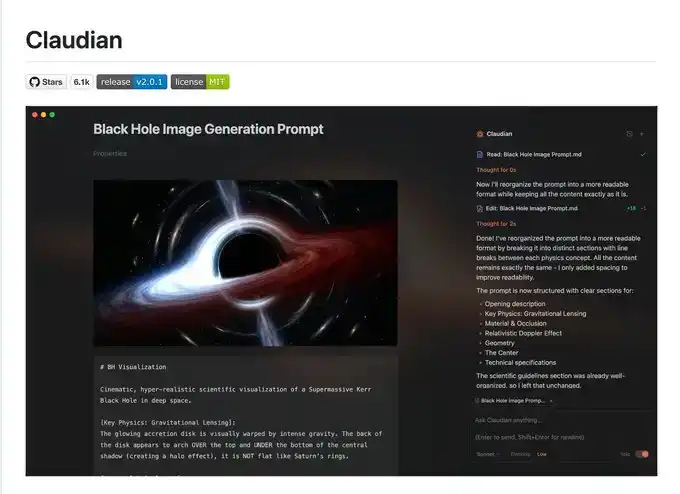
The famous Obsidian + Claude Code tool below made its own SDK to use the local subscription Token this way.
I admit what I said earlier might be a bit complicated, let's talk about a few simple commands to use during operation.

3 Must-Know Small Tips While Using Claude code

Elegantly Terminate and Rollback Tasks

When first using claude code, everyone still likes to use Ctrl+C to close the current conversation, only to find it closes Claude entirely. The correct way is to press the Esc key once, which will interrupt the conversation immediately, preventing things from getting worse.

If Claude suddenly goes crazy, we can press Esc+Esc twice, then a list will pop up:
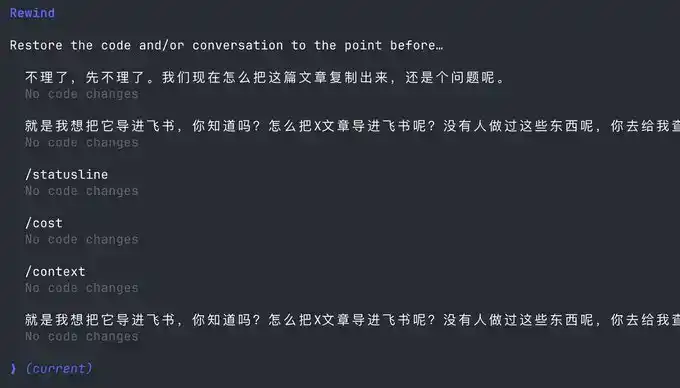
You can use this function to return to any checkpoint, avoiding Claude code messing up the code.

Execute Commands Without Leaving Claude

Sometimes we want to run a test command ourselves, but to not interrupt the current Claude, we have to open another command window.

Actually, we can use the ! syntax:

Context Management

As the conversation continues, the more chat history we accumulate, the more tokens are consumed per interaction, and Claude code will run slower and slower.

You have two choices, open a new window or use the /clear command

A simple command to clean up useless context is like closing 20 chrome tabs at once.

But what if I don't want to clear this context? Use /compact to compress it.

It's like giving claude a Red Bull to wake up and refresh.

I hope the above small tips help you use Claude code more smoothly.

But this is far from enough. Since Claude code is a command-line tool, no matter how many commands you learn, it's a mental burden.

Fortunately, the community has produced quite a bit of companion software to solve the following pain points:

1. Lack of mature prompt methodology, low programming efficiency

2. Slow typing speed leads to low prompt input efficiency

3. During multitasking, humans are fragmented and unable to increase productivity

If any of the above is your pain point, please read on.

Using Companion Software to Solve Human-Machine Collaboration Problems

Now, we are slowly discovering that humans are starting to跟不上 (cannot keep up with) the speed of machines. To address this, the community has produced a series of software.

First, we need a mature programming methodology:

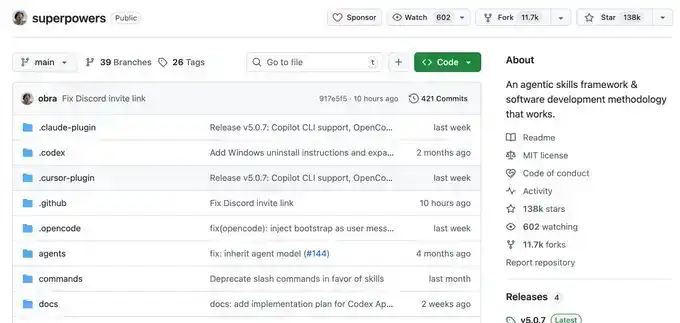
Superpowers

Ordinary people have no method when Vibecoding, they just do whatever comes to mind. This Skills is a programming workflow summarized by an experienced programmer.

He packaged top software engineering best practices into one-click Skills. From requirement梳理 (sorting), Spec confirmation, detailed planning, to TDD test-driven + automatic Code Review, the entire process enforces a structured workflow, allowing AI to output high-quality, maintainable code like a mature engineering team, significantly improving the one-time success rate, so you no longer have to repeatedly put out fires.

This project already has 138k Stars, you can go check it out for details, I won't elaborate here.
Once you have a mature programming Skills, you will find that it requires frequent information input, and then you discover that typing speed becomes your efficiency bottleneck.

You wonder, is there any software that can quietly convert speech to text in the office, with particularly accurate Chinese and English recognition?

Yes, yes, and there are many, but I only recommend two, typeless and Douban Input Method.

Voice Input Software

The advantage of Douban Input Method is that it's fast, has decent Chinese and English recognition, and most importantly, it's free. It's a bit like the Android system, I use it too.

But typeless, aside from needing payment, doesn't have many shortcomings, and you can try it.
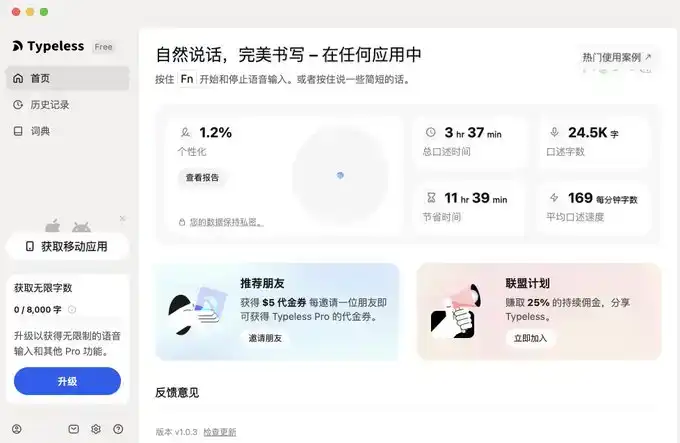
I'll provide links for both below.

typeless (I recommend, affiliate link): https://www.typeless.com/?via=lxfater


Douban Input Method is still in the testing phase, you can search for the installation package.

Once you start voice input, you can provide more context to Claude code, and the one-time success rate will get higher and higher. At this point, the efficiency limitation becomes the running time of Claude code.

We can use multiple Claude code instances simultaneously. At this time, our bottleneck becomes the human problem of losing context when switching between multiple tasks.

Solve Your Attention Switching Problem

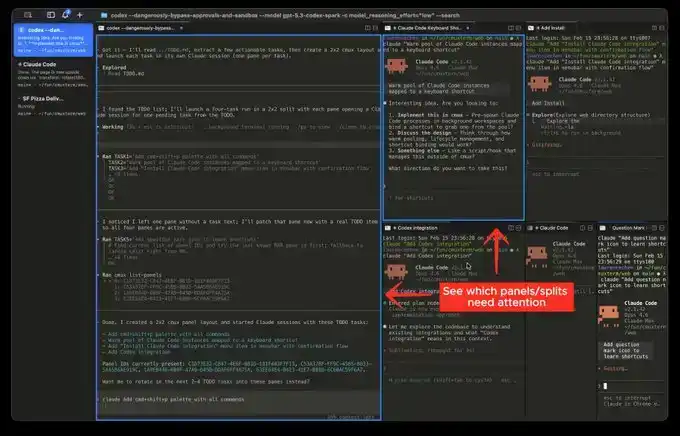
First, I recommend a software called Cmux:

It's a macOS native terminal built based on Ghostty, specifically designed for running multiple coding agents simultaneously: vertical tabs + smart sidebar, flexible split-screen, smart notification highlighting, built-in browser split-screen + Socket API.

This is an open-source project: https://github.com/manaflow-ai/cmux
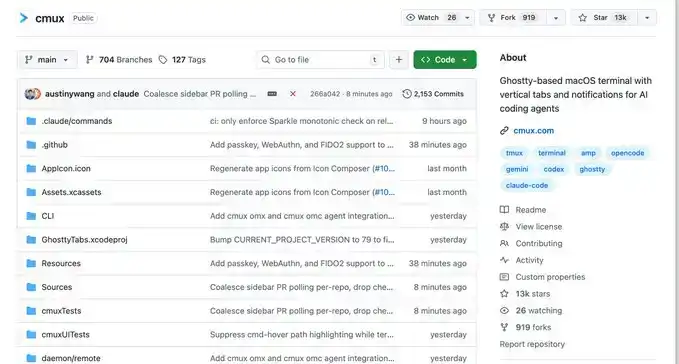
My favorite is the split-screen function, but once you split the screen, you won't know which window completed the task.

Fortunately, this software will directly highlight a certain terminal area, helping you switch to the corresponding window in time.
But the next software I'm about to介绍 (introduce) will make this switching incredibly smooth:

This is a relatively popular product recently, called Vibe Island

The UI is beautiful, right? But the most powerful aspect of this product is its support for switching between many different tools.

And each switch will automatically唤醒 (wake up) and focus the window of the APP you are in, and you can input directly.

Theoretically, as long as you switch fast enough and open enough windows, it will continuously push the windows that need processing in front of you. You'll feel like you're handling an assembly line.

Finally

I hope this content is helpful to you. This is quite beginner-friendly, actually common knowledge for programmers.

But I still hope it can help you. If you feel this content was helpful to you!

Domande pertinenti

QWhat are the three main parts of the Claude code usage guide?

AThe three main parts are: 1. Three ways to launch Claude, 2. Tips for using it while it's running, and 3. Using supporting software to solve human-machine collaboration efficiency problems.

QWhat is the purpose of the `-c` command line argument when starting Claude?

AThe `-c` command line argument is used to start Claude and continue from a specific previous history or context, saving time by avoiding the need to re-establish the previous state manually.

QHow can you gracefully interrupt a Claude code response without quitting the entire application?

AYou can press the Escape (Esc) key once to immediately interrupt the current conversation and prevent it from going further off track.

QWhat command can be used within Claude to execute a system command without leaving the Claude interface?

AYou can use the exclamation mark syntax (`!`) followed by the command to execute a system command without leaving the Claude interface.

QWhat are the two recommended software tools mentioned for voice input to improve efficiency when working with Claude?

AThe two recommended voice input software tools are Typeless and Douban Input法 (Douban Input Method).

Letture associate

Annual Salary of Millions Competing for Electricians, Meta Rushes to Open Its Own Technical School

The AI boom is facing an unexpected bottleneck: a severe shortage of skilled construction workers and electricians. As tech giants like Meta, OpenAI, and Alphabet race to build massive data centers—such as OpenAI's $16 billion "Stargate" project—they are hitting a critical labor wall. The U.S. needs an estimated 130,000 more electricians, 240,000 construction workers, and 150,000 supervisors by 2030 for AI infrastructure alone, but tens of thousands of electrician jobs go unfilled each year. While AI companies offer high premiums, with electricians earning up to $280,000 annually, worker scarcity still causes massive losses—delays on a single project can cost $14.2 million per month. The complexity of building AI data centers, which require immense power (equivalent to powering hundreds of thousands of homes), sophisticated electrical systems, and advanced liquid cooling solutions, demands highly skilled technicians who are in short supply. To combat this, companies are investing heavily in training. Meta has committed $115 million to a free training school offering tuition, housing, and stipends, targeting 5,000 new workers. OpenAI is partnering with unions to secure skilled labor. These efforts are paying off, with a significant rise in Gen Z interest in trade schools over college. However, the power demands are staggering. AI data centers are driving a rapid surge in electricity consumption, projected to account for up to 12% of U.S. power use by 2028 and raising costs for consumers. Furthermore, the construction boom is project-based, leading to a potential future glut of trained workers once building peaks, which could depress wages industry-wide. The race for AI supremacy now depends as much on skilled hands as on advanced chips.

marsbit6 min fa

Annual Salary of Millions Competing for Electricians, Meta Rushes to Open Its Own Technical School

marsbit6 min fa

OpenAI No Longer Sells Its Most Expensive Model for Profit

OpenAI is shifting its business strategy away from promoting its most expensive, flagship models for every task. Recent price cuts—80% for GPT-5.6 Luna and 20% for Terra—signal a deeper change: the company now actively advises users that many tasks don't require the most powerful model. Instead, OpenAI recommends a tiered approach: use the high-end GPT-5.6 Sol for complex planning and analysis, then delegate execution to cheaper models like Luna. This mirrors moves by Anthropic, which recently launched Claude Opus 5 at half the price of its top model, Fable 5. Both companies are de-emphasizing flagship models as primary revenue drivers, using them instead for brand prestige and technological showcases. The industry is entering a "mass-market" phase, similar to automotive, where high-volume, cost-effective models handle daily operations and drive scale. OpenAI's price reductions are partly enabled by AI models themselves optimizing underlying code and infrastructure, creating a self-reinforcing cycle of efficiency gains and cost reduction. Competition is shifting from "who is smartest" to "who offers the best value." The goal is no longer selling individual models but fostering widespread API adoption and ecosystem lock-in. By making AI calls cheap and ubiquitous, companies like OpenAI aim to become the indispensable, utility-like infrastructure powering automated workflows—the "water and electricity" of software, quietly embedded everywhere.

marsbit6 min fa

OpenAI No Longer Sells Its Most Expensive Model for Profit

marsbit6 min fa

Will the Fed Definitely Raise Interest Rates in September? How Will Crypto and U.S. Stocks Withstand the Pressure?

The market's expectation for a September Fed rate hike surged dramatically in early August, jumping from under 50% to over 80% within a week. This shift followed a contentious July FOMC meeting, where a 9-3 vote to hold rates revealed growing dissent from hawkish members advocating for an immediate hike to combat persistent inflation. The primary catalyst for this repricing is rising oil prices, driven by renewed geopolitical tensions around the Strait of Hormuz, which threaten global supply. Energy costs directly influence inflation metrics, making the upcoming July CPI report (due August 12th) a critical data point. If it shows inflation reaccelerating, the probability of a September hike will solidify. For Bitcoin and crypto assets, this is typically bearish news. Bitcoin continues to behave as a high-beta, liquidity-sensitive risk asset. A rate hike raises the opportunity cost of holding non-yielding assets and could drive capital toward money markets, pressuring crypto prices in the short term. However, historical patterns suggest that if a hike is perceived as the end of a tightening cycle rather than the start, any negative price impact may be brief. U.S. stocks, particularly crypto-linked equities like Coinbase and growth-oriented tech stocks, are also vulnerable. Higher rates increase discount rates in valuation models, putting pressure on high-multiple companies. This coincides with a pivotal tech earnings season where investor focus has shifted from massive AI capital expenditure to tangible revenue and cash flow generation. Companies with negative cash flow and weak growth narratives could face heightened volatility if borrowing costs rise in September. In summary, a September Fed hike has evolved into a mainstream market scenario. Key factors to watch are oil prices, the July CPI report, and Fed communications, which will determine the final decision and its impact on volatile crypto and equity markets.

marsbit17 min fa

Will the Fed Definitely Raise Interest Rates in September? How Will Crypto and U.S. Stocks Withstand the Pressure?

marsbit17 min fa

Trading

Spot
活动图片