How Does Codex Use a Computer? Three Entry Points and Permission Boundaries

marsbitPublicado a 2026-06-21Actualizado a 2026-06-21

Resumen

This article explains the three primary methods for Codex to interact with a computer, each with distinct use cases, permission boundaries, and trust levels. **1. Computer Use:** This offers the broadest access, allowing Codex to visually control and interact with the graphical user interface of authorized macOS/Windows apps, system settings, and even iOS simulators. It's ideal for tasks lacking APIs or structured tools, such as operating legacy software or multi-app workflows. However, it's the slowest method and has the widest permission scope, requiring careful supervision for sensitive actions. **2. Chrome Extension:** This grants Codex access to the user's logged-in Chrome browser state, including cookies, profiles, and open tabs. It's best for tasks requiring user identity across websites like Gmail, LinkedIn, Salesforce, or internal dashboards. Its key advantage is multi-tab control for complex workflows. While more powerful for browser-based tasks than Computer Use, it carries higher sensitivity as actions are performed under the user's identity. **3. In-App Browser:** This is a browser isolated within the Codex thread, separate from the user's personal browsing data. It excels in web development and debugging scenarios—previewing local servers, testing responsive layouts, or annotating designs directly on the page. Its isolation is a strength for development but a limitation for tasks requiring login sessions. The core principle is to choose the narrowest, safest...

Editor's Note: This article outlines three entry points for Codex to operate external environments: Computer Use, Chrome Extension, and In-App Browser. While all three appear to address the problem of "letting Codex use a computer," they correspond to different task scenarios, permission boundaries, and levels of trust.

Among them, Computer Use has the broadest coverage, allowing direct operation of authorized native apps, system settings, iOS simulators on macOS/Windows, and even workflows spanning multiple apps. It's suitable for GUI processes without API, plugin, or structured tool support, but the trade-offs are slower speed and the widest permission boundaries. The Chrome Extension is suitable for tasks reliant on login state, cookies, multiple tabs, and browser identity, such as Gmail, LinkedIn, Salesforce, internal dashboards, or logged-in research across multiple websites. The In-App Browser leans more towards development and debugging scenarios, especially for local services, visual bugs, responsive layouts, and design annotations; it does not inherit the login state from the user's normal browser, has narrower capabilities, but also stronger isolation.

The core judgment of the article is that Codex does not have only one way to "use a computer." What's truly important is choosing the narrowest, safest, most structured operational interface based on the task. If a plugin or MCP can be used, visual control shouldn't be the first resort. For tasks only involving web development, prioritize the In-App Browser. When user browser identity and login state are needed, then switch to Chrome. Only when structured tools cannot cover it, and the task must rely on the desktop graphical interface, is Computer Use the last mile.

Appshots, however, are not a fourth way to control the computer, but a tool to "point" the current screen context "for Codex to see." It solves the context input problem, while Browser, Chrome, and Computer Use solve the action problem. Viewed together, this layering actually reveals the key to AI Agent productization: not granting the model unlimited permissions, but continuously narrowing permissions, clarifying boundaries for specific tasks, and allowing users to retain review rights for critical actions.

The following is the original text:

Codex has three ways to use a computer: Computer Use, Chrome Extension, and In-App Browser.

There is some overlap between them, just enough to be confusing.

After reading this article, you'll know how to install and trigger these three methods, when to use each in different scenarios, how Appshots and Developer mode connect them, and what to write in AGENTS.md so Codex can choose the appropriate operational interface itself.

The simple version is:
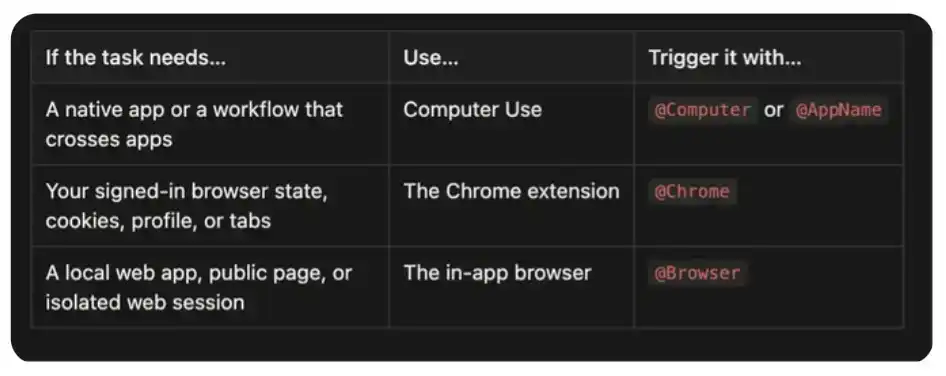
That said, whenever possible, prioritize using plugins or MCP. For example, a Slack plugin can more precisely search a thread than clicking around in Slack; operations generated by a GitHub plugin are also easier to check than letting Codex drive the webpage. Visual control is best used where the capabilities of structured tools reach their limits.

Everything Can Be @Computer

Computer Use is the broadest among these three operational interfaces. It allows Codex to view and operate the graphical interface on macOS and Windows, including windows, menus, keyboard input, and the clipboard within apps you authorize.

It's also usually the slowest. Structured plugins can directly call APIs; Computer Use needs to observe the interface, decide where to click, wait for the app to respond, and then check the next state. This visual loop consumes time but also means Codex can operate apps that have no available API at all.

On macOS, slow doesn't necessarily mean it will disturb you. Computer Use can operate your authorized apps in the background while you can still use other parts of the computer. Often, I open an app while using Codex only to find that Codex has already quietly completed a workflow in the background.

Depending on which apps you have installed and authorized on your computer, these operational targets can include Spotify, Xcode, System Settings, iOS Simulator, or even controlling your iPhone via iPhone Mirroring. It can also switch between multiple apps, handling workflows that span different applications.

Use it when a task relies on:

Native desktop applications, like Spotify or financial apps;

iOS Simulator, iPhone Mirroring, or other processes only operable via GUI;

System or application settings;

Data sources without plugins or APIs;

Workflows requiring switching between multiple apps;

The missing final step in a structured integration.

How to install: Open Codex's Settings > Computer Use, then click Install.

How to trigger: Mention @Computer, or explicitly ask Codex to use Computer Use. As model capabilities improve, it may also invoke it automatically when needed in the future.

Try a few examples first:

One of my favorite examples started when a package was stolen. Amazon told me it would take about 25 minutes to reach a customer service agent. I gave a Codex thread to Computer Use, telling it to check the chat window every five minutes, switch to checking every minute once an agent appeared, and try its best to get me a refund. When I returned from a shower, the refund was completed.

I also use Computer Use as the "last mile" in structured workflows. In one video launch, Codex could read feedback from Slack, modify code, and render a new video, but the Slack integration in that thread couldn't upload files. So Computer Use clicked Add file, filling in that missing step.

It also has the widest trust boundary among the three. Only give it one specific app or process at a time. Keep sensitive apps closed when they're not part of the task; carefully check permission prompts; for financial, account, payment, credential, privacy, and system security changes, it's best to supervise in person.

Use @Chrome for Multi-Tab and Login State Tasks

The Codex Chrome Extension gives Codex access to your already logged-in Chrome state. Use it when tasks depend on accounts, cookies, browser profiles, or tabs you have opened and authenticated.

This operational interface is suitable for work in tools like:

Gmail or LinkedIn;

Salesforce or customer service backends;

Internal dashboards;

Logged-in research across multiple websites;

Forms that rely on your account or browser extensions.

How to install: Open Codex's Plugins, add Chrome, and follow the setup process. Codex will guide you to install the Codex Chrome extension and approve Chrome permissions. When the extension shows Connected, start a new thread.

How to trigger: Mention @Chrome, or explicitly ask Codex to use your logged-in Chrome browser:

Chrome tasks run in tab groups, which helps keep tabs related to a specific Codex thread together. Unlike the In-App Browser, this interface carries your browser identity. This makes it more powerful and also more sensitive.

Another main advantage is multi-tab control. Chrome can associate multiple tabs with the same task, reading context in one page, cross-referencing information in another, and continuing the workflow in a third. Computer Use can also drive the browser visually, but Chrome treats the task as a browser workflow, not a series of screen coordinate operations.

Recently in a thread, I gave Codex an already open Strudel Composer tab and asked it to make the music more interesting. Chrome gave it the selected tab and the WebMCP tools exposed by that page. Codex examined the song structure, rewrote the harmony and the overall four-minute form, modified the tempo, saved the track, and let it play. It didn't need to visually hunt for every control in the interface because Chrome can combine tab context with the structured capabilities the page provides.

I also use it to run a long-term Twitter thread. The general instruction was:

The interesting part isn't that Codex can open Twitter, but that this thread can long-term return to the same logged-in working environment, connect discovered content to local files, and leave a result for me to review.

The trust boundary here is important. Websites may treat Codex's clicks, form submissions, and message sending as actions taken by you personally. Webpage content itself is also untrusted input. Clearly separate higher-consequence steps: research, navigation, and drafting can be automated; sending, posting, purchasing, or submitting require your review first.

If the entire task is completed within the browser, prioritize Chrome over Computer Use. Chrome has the browser-native context needed for this type of task without extending access to the entire desktop.

Use the In-App @Browser for the Website You're Developing

The In-App Browser is a browser that exists inside a Codex thread. You and Codex share the same rendered page, making it particularly suitable for building and debugging web applications.

I usually start here when dealing with:

Local development servers;

File-based preview pages;

Public pages that don't require login;

Reproducing visual bugs;

Checking responsive layouts;

Leaving design feedback on page elements.

Its most important constraint is isolation. The In-App Browser does not use your normal browser profile, cookies, extensions, login sessions, or existing tabs. When a task requires account identity, this is a limitation; but when a task doesn't need an account, this is a useful boundary.

How to set up: Open Codex's Plugins, add the Browser plugin and enable it.

How to trigger: Mention @Browser in the prompt, or explicitly ask Codex to use the In-App Browser:

This creates a tight feedback loop: Codex can edit code, operate the page, check rendering status, take screenshots, and then revalidate the same process after fixes.

My favorite part is annotation. When reviewing a local application, I can directly click on an element or select an area and leave a comment. Style controls also let me preview and give feedback on text, fonts, spacing, and color more precisely. I usually combine it with voice input and process guidance: I review the page, leave comments, and continue queuing more feedback while Codex processes the current batch. The page itself becomes the specification.

This is especially useful for design work. I often ask Codex to organize an idea, a research package, or a project status into a single-file index.html, then open it in the In-App Browser. Instead of trying to describe an entire design in another prompt, I can directly annotate on the real page: "This hierarchy is reversed," "Make this less card-like here," "These controls need more space," or "Use this font size ratio sitewide." Codex receives comments with relevant screenshots and element context, modifies the file, and reopens the same page for the next round.

This loop feels closer to working with a designer on the same canvas than exchanging screenshots and text descriptions.

The In-App Browser is also suitable as a starting point for hybrid workflows. In another thread, I opened an X post in the In-App Browser and asked Codex to investigate related discussions. The visible page helped it confirm which post I was referring to; then Codex switched to the Twitter CLI, retrieving 38 replies, including nested replies hidden from the browser view. This is the practice of the "use the narrowest operational interface" principle: use the browser to confirm on-screen context, then use structured tools for deeper retrieval.

There are trade-offs here too. The isolation of the In-App Browser makes it a great development interface, but also means it's not suitable for handling Google logins, passkeys, or websites that rely on browser extensions. When identity is important, switch to Chrome.

Appshots

Appshot is not a fourth way for Codex to control the computer. It's a method to point Codex at the context in front of you.

On Mac, press the CMD key twice to capture the frontmost window. Codex will attach an image with all available text to the thread. You can take an Appshot of an error, an email, a design, a settings panel, or an unfamiliar form, and then directly say:

This is the mental model I find easiest to remember: Appshots are how you point at something on your computer; Browser, Chrome, and Computer Use are how Codex takes action.

Appshots are currently created via the Codex app on macOS. They capture the frontmost window, not the entire desktop. This makes it a useful way to provide focused context without granting control over that application.

How to Follow These Developments

These operational interfaces change quickly. If you want practical details rather than waiting for a massive release summary:

Follow Ari Weinstein (@AriX) for Computer Use and Appshots;

Follow James Sun (@JamesZmSun) for Browser-related content;

Follow Andrew Ambrosino (@ajambrosino) for Codex app releases and the broader desktop product narrative;

Follow OpenAI Developers (@OpenAIDevs) for broader Codex and OpenAI Platform news.

Preguntas relacionadas

QWhat are the three ways Codex can operate on a computer, as mentioned in the article?

AThe three ways are: Computer Use, the Chrome extension, and the in-app Browser.

QAccording to the article, which method should be prioritized when structured tools (like plugins or MCP) are available?

AWhen available, plugins or Model Context Protocol (MCP) should be prioritized over visual control methods. Structured tools provide more precise, faster, and easier-to-audit operations.

QWhat is the primary purpose of the Appshot feature, and is it considered a method for Codex to control the computer?

AThe primary purpose of Appshot is to provide context by allowing the user to point at something on their screen (capturing the frontmost window). It is not a method for Codex to control the computer; it solves the input/context problem, whereas Browser, Chrome, and Computer Use solve the action problem.

QIn which scenario is the in-app Browser most suitable, and what is its key constraint?

AThe in-app Browser is most suitable for building and debugging web applications, such as working with local development servers, visual bugs, responsive layouts, and design annotations. Its key constraint is isolation—it does not inherit the user's normal browser profiles, cookies, extensions, or login sessions.

QWhat is the core judgment of the article regarding how Codex should interact with a computer?

AThe core judgment is that Codex does not have just one way to 'use the computer.' The important principle is to choose the narrowest, safest, and most structured interface for the specific task. Use plugins or MCP first, use the in-app Browser for web development, switch to Chrome for logged-in browser identity, and use Computer Use only as the last mile when structured tools cannot cover a task that depends on the desktop GUI.

Lecturas Relacionadas

GPT-5.6 Countdown: Abandon the Illusion of a Single API, Computational Iteration Can't Outpace a Single Page of Compliance

In mid-June, three seemingly independent industry events—the compliance-driven throttling of Fable 5, the open-sourcing of GLM-5.2, and the leaked release timeline for GPT-5.6—are pushing the global AI industry toward a watershed moment. These shifts signal a fundamental restructuring of the industry's underlying logic. First, **"usability" has substantially overtaken "advanced capabilities"** as the primary weight, pushing the global large language model (LLM) supply chain into a "dual-track" phase of controlled closed-source and local open-source coexistence. Second, **the competitive moats of closed-source giants are shifting**. Their technical focus is moving from "language intelligence" toward "spatial intelligence (world models)"—a domain heavily reliant on computing power. Third, faced with常态化 transnational compliance risks, **a "model-agnostic" decoupled design has become a survival necessity for application-layer developers to maintain business continuity.** The article details how Anthropic's Fable 5, despite its advanced engineering feats, was restricted for non-U.S. citizens within 72 hours of launch, highlighting how geopolitical compliance can instantly limit even the most advanced models. In response, the open-source camp, exemplified by Zhipu AI's MIT-licensed GLM-5.2, is gaining market share by offering stable performance improvements and significant cost advantages (up to 70% savings for enterprises), while achieving full adaptation with domestic semiconductor platforms. Meanwhile, closed-source leaders like OpenAI are pivoting. The anticipated GPT-5.6 reportedly shifts focus from language to spatial intelligence and world models, aiming to rebuild a generational gap in areas like 3D understanding, simulation, and industrial design that demand immense compute. The core conclusion is that the LLM supply chain's logic has changed. Enterprises must now evaluate infrastructure based on a composite of technical performance and policy compliance. For developers, complete reliance on a single closed-source API poses unacceptable risk. Implementing a truly model-agnostic architecture—enabling swift switches to compliant, locally deployable open-source alternatives—is no longer just good practice but a fundamental baseline for business continuity.

marsbitHace 26 min(s)

GPT-5.6 Countdown: Abandon the Illusion of a Single API, Computational Iteration Can't Outpace a Single Page of Compliance

marsbitHace 26 min(s)

Is the 'Token Subsidy War' Among AI Giants Almost Over?

The article discusses the ongoing "token subsidy war" among AI giants like OpenAI and Anthropic, questioning whether it's nearing its end. It reveals that current AI subscription prices are heavily subsidized, with some plans offering tokens at up to 70 times the actual cost to attract and retain heavy users, especially developers and enterprises. This strategy mirrors past internet-era subsidy battles, but with a key difference: AI tokens lack "lock-in" effects. Unlike ride-hailing or food delivery apps, users can easily switch between AI providers as APIs become standardized, making it difficult for companies to raise prices post-subsidy. The piece highlights a structural asymmetry in the competition. Giants like Google, with massive advertising revenue, can afford to subsidize tokens indefinitely, akin to using "tokens as a weapon." In contrast, venture-backed companies like OpenAI and Anthropic face pressure to become profitable, especially as they approach IPO. The article cites Google Ventures founder Bill Maris, who suggests Google could slash token prices by 80%, putting immense pressure on competitors. Two potential endgames are presented: the "internet service" model (subsidize, monopolize, then raise prices) and the "utility" model (tokens become a standardized, low-margin commodity like electricity). Given the low switching costs, the latter seems more likely. The competition may not have a single winner but could instead accelerate AI's evolution into a foundational, infrastructure-level technology, akin to a public utility. For now, users continue to benefit from heavily subsidized token costs.

marsbitHace 43 min(s)

Is the 'Token Subsidy War' Among AI Giants Almost Over?

marsbitHace 43 min(s)

Beyond the Stadium: The Profitable Games Surrounding the World Cup

"Beyond the Pitch: The Profit Game Around the World Cup" The FIFA World Cup transcends being a sporting spectacle, evolving into a massive global arena for speculation and profit-seeking. The 2026 tournament has amplified this dynamic, creating a multi-layered ecosystem of financial opportunism alongside the football. **Prediction markets** have surged into the mainstream. Platforms like Polymarket and Kalshi saw trading volumes for World Cup contracts soar, attracting new users with their financial trading model and high-profile, chain-based wealth stories that overshadow traditional sports betting in terms of growth and narrative. However, **traditional sportsbooks** remain the dominant force, leveraging established user habits, legal markets, and comprehensive product offerings to handle the vast majority of speculative wagers, with projections suggesting record-breaking betting volumes. Capital markets also react. **"Concept stocks"** in countries like South Korea and Japan experience volatile price swings based on team performance and anticipated fan spending on items like chicken, beer, and viewing parties, effectively becoming a stock market reflecting fan sentiment. The **ticket resale market** has become a sophisticated arena for arbitrage. Prices fluctuate wildly based on team draws and star power, with sellers sometimes listing tickets they don't yet own in a practice akin to short-selling, while FIFA's own "Right to Buy" tokens add another layer of speculative trading. **Collectibles and merchandise** offer another avenue. Panini sticker albums, with their inherent scarcity and nostalgic value, can become high-value collectibles. Limited-edition or locally themed jerseys command significant premiums on secondary markets, and even counterfeit vendors profit from fans' desire for affordable match-day identity. The **cryptocurrency** space has seen a frenzy of speculative, unauthorized World Cup-themed meme coins on chains like Solana. These tokens, often exploiting team names and player imagery, experience extreme pump-and-dump cycles, creating stories of massive gains for a few early entrants and steep losses for many others. Finally, an entire industry thrives on **providing information and tools** to other speculators. Developers create platforms like SeatSidekick to track ticket inventory and prices, while paid Telegram groups and subscriptions sell betting tips and predictions, monetizing the widespread desire for an informational edge. In essence, the World Cup has become a compressed, global laboratory for speculation. While the games determine champions on the field, a parallel, complex network of financial transactions—spanning prediction contracts, bets, stocks, tickets, collectibles, crypto, and information services—settles its own scores in the global market.

marsbitHace 1 hora(s)

Beyond the Stadium: The Profitable Games Surrounding the World Cup

marsbitHace 1 hora(s)

The "Iron Rule" of Chip Equipment Is Being Broken

For years, the semiconductor equipment industry followed an unwritten "iron rule": suppliers offered steep discounts for new tool introductions (Design-in) and faced consistent price pressure during repeat orders, especially during market downturns. This long-standing buyer's market dynamic is now being upended. Recently, SK Hynix's primary equipment suppliers have reportedly requested a 3-4% price *increase*, a nearly unprecedented move. This shift is driven by a severe supply-demand imbalance fueled by the AI compute boom. Securing equipment has become an urgent arms race as chipmakers' expansion speed dictates their ability to fulfill massive AI chip orders. Key areas feeling the strain include: **TCB (Thermal Compression Bonding) Equipment:** Demand is exploding, driven by the simultaneous needs of HBM4 memory stacking, AI chip Chip-on-Substrate (C2S), and logic Chiplet Chip-on-Wafer (C2W) packaging. Players like Hanmi Semiconductor, Hanwha Semitech, and ASMPT are receiving major orders. While hybrid bonding is seen as the future, TCB remains the pragmatic choice for HBM4 mass production, with its lifecycle extended by relaxed specifications and ongoing technological upgrades. **Test Equipment Bottlenecks:** Ironically, AI-driven shortages are now crippling test equipment manufacturing. Critical components like FPGAs, Driver ICs, and CPUs face severe shortages and extended lead times (up to 52 weeks for FPGAs), as AI data center and server vendors prioritize supply. This creates a paradoxical cycle: AI chip shortages drive fab expansion, which requires more test equipment, whose production is delayed because its key parts are diverted to make AI chips. The industry is entering a broad, AI-powered upcycle. SEMI forecasts global semiconductor equipment sales to hit a record $156 billion by 2027, fueled by investment in advanced logic/foundry, HBM-driven DRAM, and advanced packaging (like CoWoS). Major players like TSMC, SK Hynix, and Micron are aggressively ramping capital expenditure. In conclusion, leading equipment vendors are no longer just selling tools; they are selling the critical capability to deliver AI-era capacity. Pricing power is shifting decisively to those with indispensable technology in key process nodes like advanced logic, HBM, and advanced packaging, rewriting the industry's traditional power structure.

marsbitHace 3 hora(s)

The "Iron Rule" of Chip Equipment Is Being Broken

marsbitHace 3 hora(s)

Trading

Spot
Futuros
活动图片