10 Claude Code Usage Tips: The Sooner You Know, The Sooner You Benefit

marsbitPublicado a 2026-04-08Actualizado a 2026-04-08

Resumen

Here is an English summary of the article "10 Must-Know Claude Code Tips: The Sooner You Know, The Sooner You Benefit": This article shares essential tips for using Claude Code, an AI coding assistant, to significantly boost productivity. It is divided into three main sections. First, it covers three ways to launch Claude: 1) A simple GUI desktop app for non-programmers, 2) A command-line method with a key tip (`claude -c`) to resume from a specific point in the chat history, avoiding restarting context, and 3) A headless mode (`-p` flag) for automation tasks using a subscription token. Second, it details three crucial in-session techniques: 1) Using `Esc` to gracefully interrupt a response and `Esc+Esc` to revert to a previous checkpoint, 2) Using the `!` syntax (e.g., `!ls`) to run shell commands without leaving the chat, and 3) Managing context with `/clear` to remove history or `/compact` to optimize it when performance slows down. Finally, the article recommends companion software to solve human-AI collaboration bottlenecks: 1) **Superpowers**, a structured workflow methodology for higher-quality code output. 2) Voice input tools like **Typeless** and **Douban Input法** to overcome typing speed limit. 3) Tools like **Cmux** (a terminal for managing multiple AI agent instances) and **Vibe Island** (for seamless context switching between tasks) to solve the problem of lost focus when multitasking. The overall goal is to help users focus more deeply on their programming...

Below are the Claude code usage tips that I've often lamented not knowing earlier over the past six months.

They have saved me a massive amount of time, allowing me to enter a state of smooth flow while coding and writing content.


The article is divided into three parts:

1. Three Ways to Launch

2. Usage Tips While Running

3. Using Companion Software to Solve Human-Machine Collaboration Efficiency Issues

All of this is about: allowing you to focus more on programming and other activities at hand.

I wish someone had sent me this guide a few months ago, so I could have taken fewer detours and started smoothly:

1. Save this guide, spend 30 minutes this weekend to master Claude code techniques.

2. Send it to anyone who tells you "I think Claude code is difficult, but I've never tried it".

Alright, first let's start with the simplest launch (you read that right, even launching has its tricks)

Three Ways to Launch Claude

Simple Launch

Launching Claude is a very simple thing, simply in the command line.

But for friends who don't like command-line tools, Claude code actually has a visual interface.

How to do it?

Go to this website: https://claude.com/download, under Claude Desktop, follow the steps below and you'll get a visual Claude.
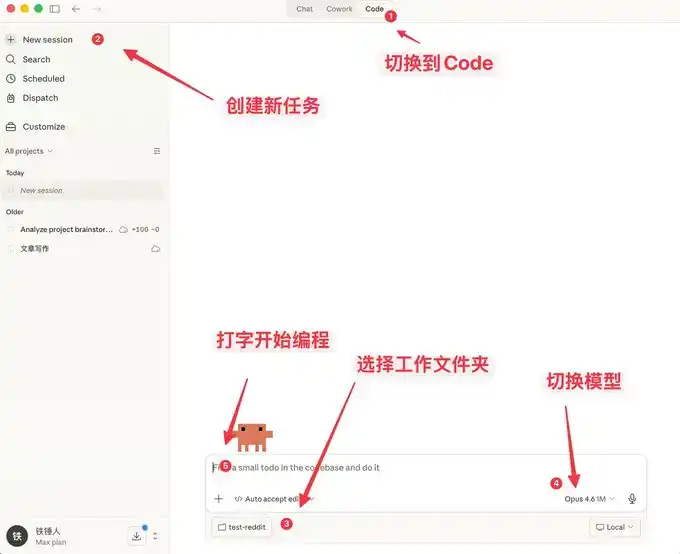
Here you can not only chat, but it also comes with many features similar to OpenClaw.
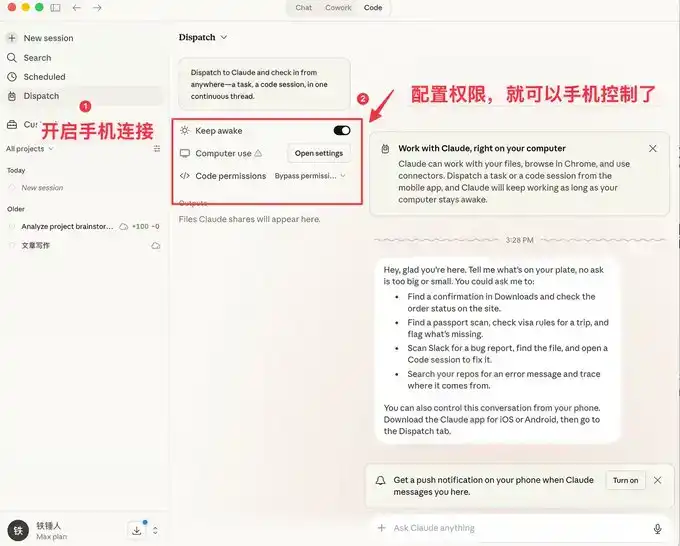
The visual interface is easier for ordinary people to use, but programmers prefer the command-line launch method.

Below I'll introduce a few commands to speed up launching.

Command Line Launch

Launch with Specific History

During our use of Claude code, we often encounter situations that require restarting. Every time we restart, we need to restore the previous conversation context:


I used to always use:
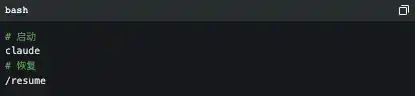
But the official actually provides some pretty good launch commands:
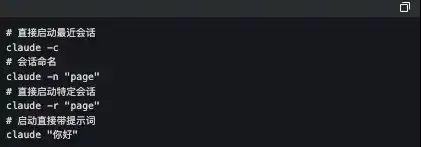
The one I use frequently here is `claude -c`, a short command that has saved me a lot of life.


-p Launch in Automated Mode

Claude Code can be launched without a UI, simply use the following command:

It's worth noting that if you want to use a local subscription Token to automate tasks, this is currently the only way to do it.

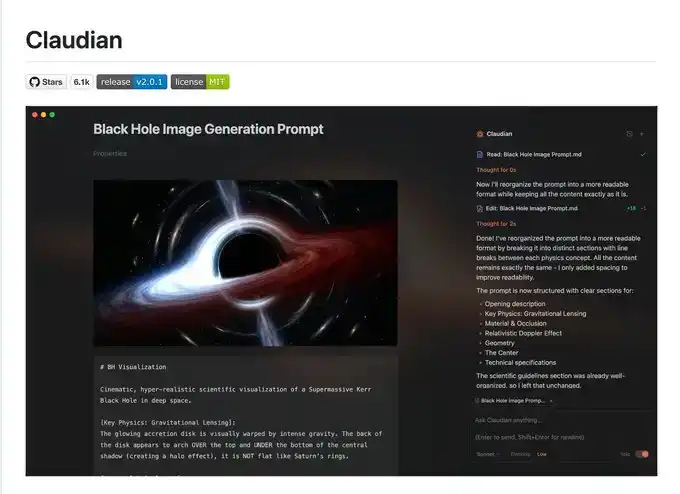
The famous Obsidian + Claude Code tool below made its own SDK to use the local subscription Token this way.
I admit what I said earlier might be a bit complicated, let's talk about a few simple commands to use during operation.

3 Must-Know Small Tips While Using Claude code

Elegantly Terminate and Rollback Tasks

When first using claude code, everyone still likes to use Ctrl+C to close the current conversation, only to find it closes Claude entirely. The correct way is to press the Esc key once, which will interrupt the conversation immediately, preventing things from getting worse.

If Claude suddenly goes crazy, we can press Esc+Esc twice, then a list will pop up:
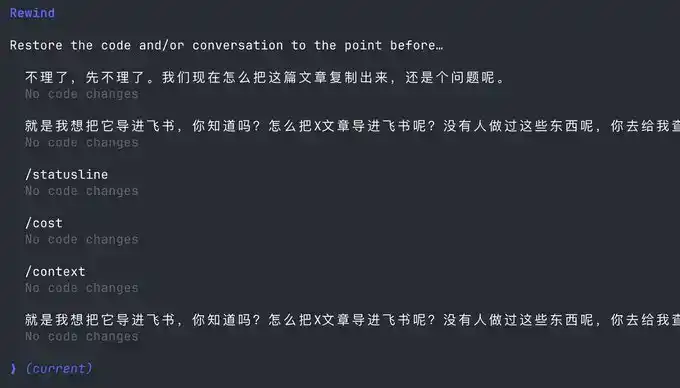
You can use this function to return to any checkpoint, avoiding Claude code messing up the code.

Execute Commands Without Leaving Claude

Sometimes we want to run a test command ourselves, but to not interrupt the current Claude, we have to open another command window.

Actually, we can use the ! syntax:

Context Management

As the conversation continues, the more chat history we accumulate, the more tokens are consumed per interaction, and Claude code will run slower and slower.

You have two choices, open a new window or use the /clear command

A simple command to clean up useless context is like closing 20 chrome tabs at once.

But what if I don't want to clear this context? Use /compact to compress it.

It's like giving claude a Red Bull to wake up and refresh.

I hope the above small tips help you use Claude code more smoothly.

But this is far from enough. Since Claude code is a command-line tool, no matter how many commands you learn, it's a mental burden.

Fortunately, the community has produced quite a bit of companion software to solve the following pain points:

1. Lack of mature prompt methodology, low programming efficiency

2. Slow typing speed leads to low prompt input efficiency

3. During multitasking, humans are fragmented and unable to increase productivity

If any of the above is your pain point, please read on.

Using Companion Software to Solve Human-Machine Collaboration Problems

Now, we are slowly discovering that humans are starting to跟不上 (cannot keep up with) the speed of machines. To address this, the community has produced a series of software.

First, we need a mature programming methodology:

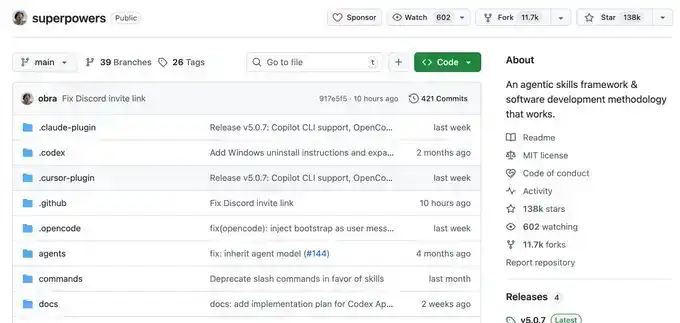
Superpowers

Ordinary people have no method when Vibecoding, they just do whatever comes to mind. This Skills is a programming workflow summarized by an experienced programmer.

He packaged top software engineering best practices into one-click Skills. From requirement梳理 (sorting), Spec confirmation, detailed planning, to TDD test-driven + automatic Code Review, the entire process enforces a structured workflow, allowing AI to output high-quality, maintainable code like a mature engineering team, significantly improving the one-time success rate, so you no longer have to repeatedly put out fires.

This project already has 138k Stars, you can go check it out for details, I won't elaborate here.
Once you have a mature programming Skills, you will find that it requires frequent information input, and then you discover that typing speed becomes your efficiency bottleneck.

You wonder, is there any software that can quietly convert speech to text in the office, with particularly accurate Chinese and English recognition?

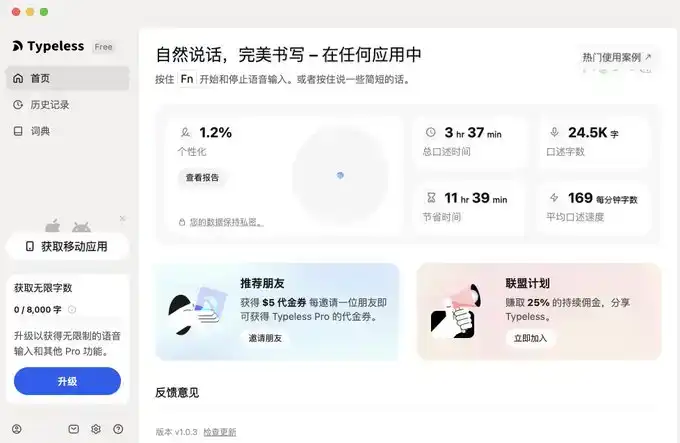
Yes, yes, and there are many, but I only recommend two, typeless and Douban Input Method.

Voice Input Software

The advantage of Douban Input Method is that it's fast, has decent Chinese and English recognition, and most importantly, it's free. It's a bit like the Android system, I use it too.

But typeless, aside from needing payment, doesn't have many shortcomings, and you can try it.
I'll provide links for both below.

typeless (I recommend, affiliate link): https://www.typeless.com/?via=lxfater


Douban Input Method is still in the testing phase, you can search for the installation package.

Once you start voice input, you can provide more context to Claude code, and the one-time success rate will get higher and higher. At this point, the efficiency limitation becomes the running time of Claude code.

We can use multiple Claude code instances simultaneously. At this time, our bottleneck becomes the human problem of losing context when switching between multiple tasks.

Solve Your Attention Switching Problem

First, I recommend a software called Cmux:

It's a macOS native terminal built based on Ghostty, specifically designed for running multiple coding agents simultaneously: vertical tabs + smart sidebar, flexible split-screen, smart notification highlighting, built-in browser split-screen + Socket API.

This is an open-source project: https://github.com/manaflow-ai/cmux
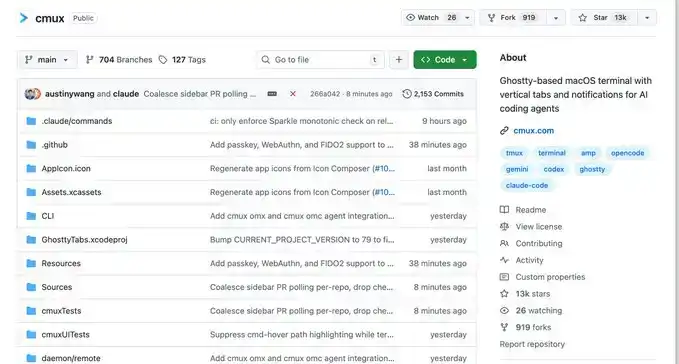
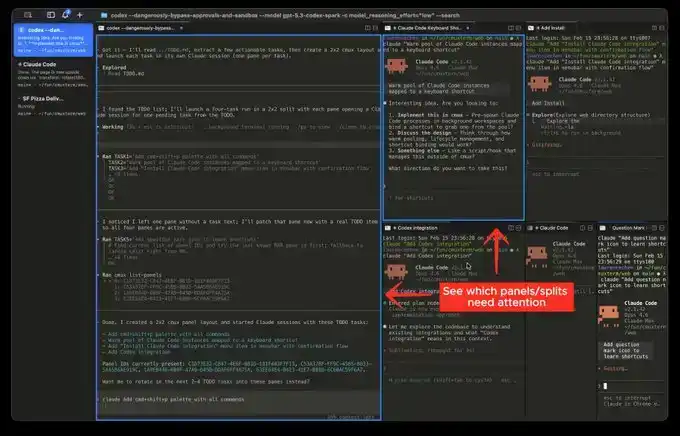
My favorite is the split-screen function, but once you split the screen, you won't know which window completed the task.

Fortunately, this software will directly highlight a certain terminal area, helping you switch to the corresponding window in time.
But the next software I'm about to介绍 (introduce) will make this switching incredibly smooth:

This is a relatively popular product recently, called Vibe Island

The UI is beautiful, right? But the most powerful aspect of this product is its support for switching between many different tools.

And each switch will automatically唤醒 (wake up) and focus the window of the APP you are in, and you can input directly.

Theoretically, as long as you switch fast enough and open enough windows, it will continuously push the windows that need processing in front of you. You'll feel like you're handling an assembly line.

Finally

I hope this content is helpful to you. This is quite beginner-friendly, actually common knowledge for programmers.

But I still hope it can help you. If you feel this content was helpful to you!

Preguntas relacionadas

QWhat are the three main parts of the Claude code usage guide?

AThe three main parts are: 1. Three ways to launch Claude, 2. Tips for using it while it's running, and 3. Using supporting software to solve human-machine collaboration efficiency problems.

QWhat is the purpose of the `-c` command line argument when starting Claude?

AThe `-c` command line argument is used to start Claude and continue from a specific previous history or context, saving time by avoiding the need to re-establish the previous state manually.

QHow can you gracefully interrupt a Claude code response without quitting the entire application?

AYou can press the Escape (Esc) key once to immediately interrupt the current conversation and prevent it from going further off track.

QWhat command can be used within Claude to execute a system command without leaving the Claude interface?

AYou can use the exclamation mark syntax (`!`) followed by the command to execute a system command without leaving the Claude interface.

QWhat are the two recommended software tools mentioned for voice input to improve efficiency when working with Claude?

AThe two recommended voice input software tools are Typeless and Douban Input法 (Douban Input Method).

Lecturas Relacionadas

Bitcoin's 'Rally Ends,' Officially Entering the Later Stage of a Bear Market?

Bitcoin prices declined 13% this week, reversing the recent rebound and signaling a likely transition into the later stages of a bear market. Key on-chain metrics deteriorated, with the short-term holder cost basis falling below the Realized Price—a pattern last seen in early 2022, characteristic of bear market maturity. The rally to ~$82k proved to be a bear market bounce, as evidenced by the 90-day realized profit/loss ratio failing to sustain above the bullish threshold of 2. Daily realized losses surged to $1.35B, including significant selling from long-term holders who accumulated near cycle tops, indicating ongoing supply redistribution. Price was rejected almost precisely at the aggregate US spot ETF cost basis of ~$83k, turning that level into resistance and leaving the average ETF investor underwater again. Spot market selling pressure intensified, with the 7-day volume delta turning significantly negative to its weakest level since February. While a major long liquidation event cleared over $400M in leverage, spot demand has not yet stepped in to absorb the resulting supply. Options markets continue pricing in higher future volatility (elevated volatility risk premium) and maintain a skew toward put options, reflecting persistent demand for downside protection, though not yet panic. Overall, market structure remains fragile. Sustained recovery likely requires a reclaim of the ETF cost basis, a shift back to positive spot demand, and a slowdown in realized loss-taking. Until then, the market risks further downside or extended consolidation within the broader bear trend.

Foresight NewsHace 45 min(s)

Bitcoin's 'Rally Ends,' Officially Entering the Later Stage of a Bear Market?

Foresight NewsHace 45 min(s)

How Risky is the "Death Spiral" of MSTR and STRC?

Summary: This article explores the perceived "death spiral" risk between MicroStrategy (MSTR), its Bitcoin holdings, and its perpetual preferred stock (STRC), drawing comparisons to the LUNA-UST collapse. While both systems feature price anchors, high yields for holders, and potential feedback loops, their core mechanisms differ fundamentally. The MSTR-STRC structure relies on continuous financing to sustain its high dividend payouts, primarily through stock ATM offerings. A negative feedback cycle could occur: falling MSTR stock price makes raising equity capital harder, increasing pressure to sell Bitcoin, which undermines STRC confidence and further depresses MSTR. However, unlike LUNA-UST's automated, direct linkage, the MSTR-STRC loop is weaker and has brakes: STRC dividends can be deferred or rates lowered, and STRC holders have a $100/share liquidation preference in bankruptcy, providing a price floor. The company's sustainability hinges on its ability to continue financing. Its current ~$900 million USD reserves cover only about 6.3 months of its ~$1.71 billion annual interest/dividend burden. The next six months are critical, aligning with both the potential bottom in Bitcoin's four-year cycle and the depletion timeline of its reserves. While a LUNA-style catastrophic collapse is deemed highly unlikely due to structural differences, the key question is whether MicroStrategy can navigate this period through healthy deleveraging to restart its capital engine.

Foresight NewsHace 1 hora(s)

How Risky is the "Death Spiral" of MSTR and STRC?

Foresight NewsHace 1 hora(s)

How Much Debt Does Strategy Really Have? Is There a Risk of Implosion?

MicroStrategy's Debt Risk: A Turning Point in the "Never Sell" Strategy As of June 3, 2026, MicroStrategy holds 843,706 bitcoins (valued at ~$53.1B) but faces significant financial obligations. Its capital structure includes $6.75B in convertible notes and $15.48B in perpetual preferred stock (led by the $8.5B STRC series), creating an annual payout burden of ~$1.71B. With software revenue at only ~$500M, interest and dividend obligations far exceed operating income. A critical shift occurred in late May 2026 when the company sold 32 bitcoins for ~$2.5M to cover dividends, breaking CEO Michael Saylor's long-standing "never sell" pledge. This symbolic move triggered a sharp decline in both Bitcoin's price and MSTR stock, reflecting market fears about cash flow sustainability. The core of the strain is the STRC perpetual preferred stock, designed as a "permanent loan" with no maturity date but requiring high monthly dividends (currently 11.5%). Its business model relies on a three-part cycle: issuing new STRC shares, using proceeds to buy more Bitcoin and fund a USD reserve, and using that reserve to pay dividends. This cycle depends on continuous investor demand for STRC and Bitcoin's price appreciation. Analysis shows Bitcoin needs to appreciate at least 2.3% annually to cover the $1.71B in yearly obligations at current holdings. With Bitcoin price down ~22% from March 2026 highs, this pressure has intensified. The company's $900M USD reserve can only cover about 7 months of payments if STRC issuance stalls. Key risks are not immediate bankruptcy or forced Bitcoin liquidation (as BTC is not collateral), but rather: 1) The erosion of MSTR's premium to its Bitcoin holdings (mNAV), which would cripple its ability to raise cheap capital; 2) A vicious cycle where stagnant Bitcoin prices reduce STRC demand, draining the USD reserve and forcing BTC sales, further depressing prices. The period from February 2027 to September 2028 is a crucial test, with over $5.9B in convertible notes facing put options or maturity. In essence, MicroStrategy has evolved from a simple Bitcoin holder into a complex financial entity acting like a "private Bitcoin bank," leveraging its BTC holdings to create layered financial products. Its survival depends on maintaining Bitcoin's price trend, its stock premium, and market appetite for its preferred shares. The recent token sale marks not a betrayal of its Bitcoin thesis, but an admission that the leveraged strategy must eventually be paid for.

marsbitHace 1 hora(s)

How Much Debt Does Strategy Really Have? Is There a Risk of Implosion?

marsbitHace 1 hora(s)

Trading

Spot
Futuros
活动图片