The best performance from a single Agent found 27 bugs.
Switched to Claude forming its own team, run three times, finding 66 bugs each time.
This is a set of test results just released by Anthropic: 70 bugs were pre-planted in 116,000 lines of code, and both a single Agent and dynamic workflows were run three times each.
The result? Going solo, the best effort didn't even find forty percent; but with teamwork, all three runs found over ninety percent.
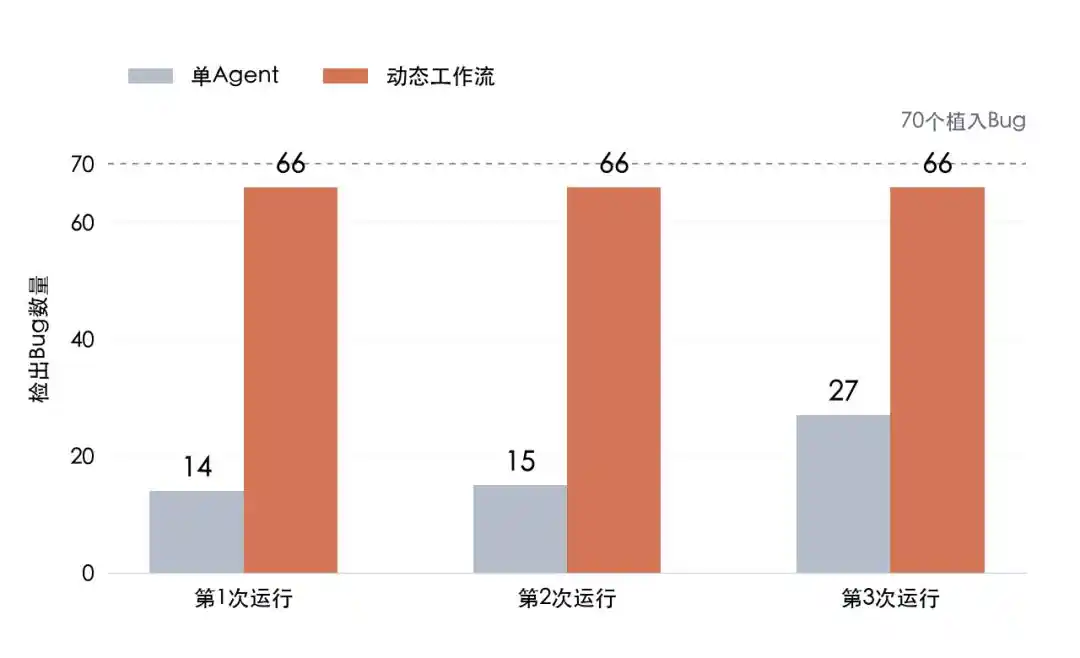
Comparison of bug-finding results between single Agent and dynamic workflow released by Anthropic.
Behind these results lies the fact that Claude is beginning to arrange divisions of labor and organize multiple Agents to collaborate.
On October 10th, Claude's Managed Agents dynamic workflow opened for public testing.
With this feature, a primary Agent, upon receiving a task, can write its own task-splitting program, arrange other Agents to complete the task in stages, and finally consolidate the results.
On the same day, Claude Code Projects also expanded its public testing scope: all Pro and Max users who were previously on the waitlist have now gained access.
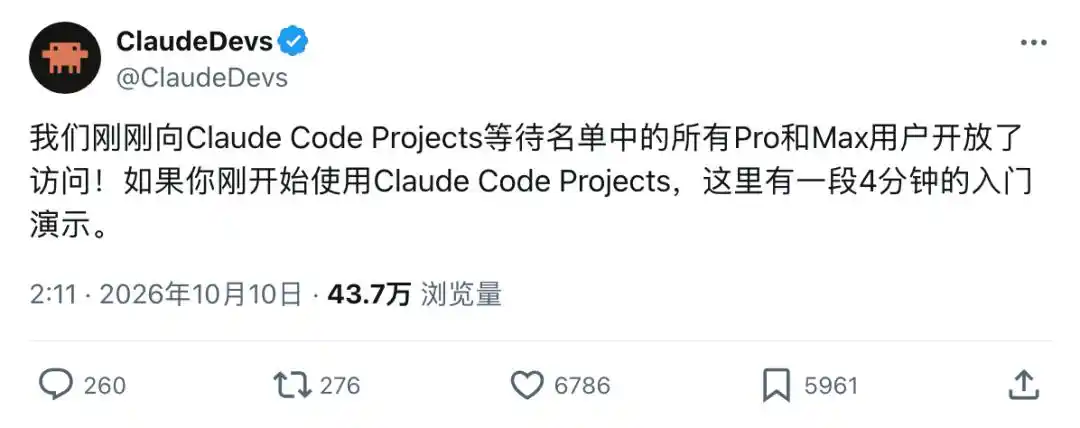
In Projects, you can continuously propose requirements around a project, with Claude responsible for breaking down tasks and coordinating multiple threads to advance in parallel.
One update lets developers integrate multi-Agent collaboration into their own applications, the other lets users directly assign work and track progress within a project conversation.
Both updates point to the same change: beyond just executing tasks, the chores of assigning work, monitoring progress, and handing off results—things that originally required human oversight—are also being taken over by Claude.
You Set the Goal
Claude Assigns the Work Itself
Opening several AI windows at once isn't difficult.
The hassle is re-explaining the background to each window, sending discoveries from one side to the other, and then checking in one by one: How far have you gotten? Where are you stuck? What else is needed?
As windows proliferate, the person ends up busy playing messenger.
Projects aims to take over this part of the work.
You continuously propose requirements within the same project conversation, and Claude decides whether to open a new task thread or assign it to a thread already handling related work.
Each thread can be understood as an independent work conversation advancing a task.
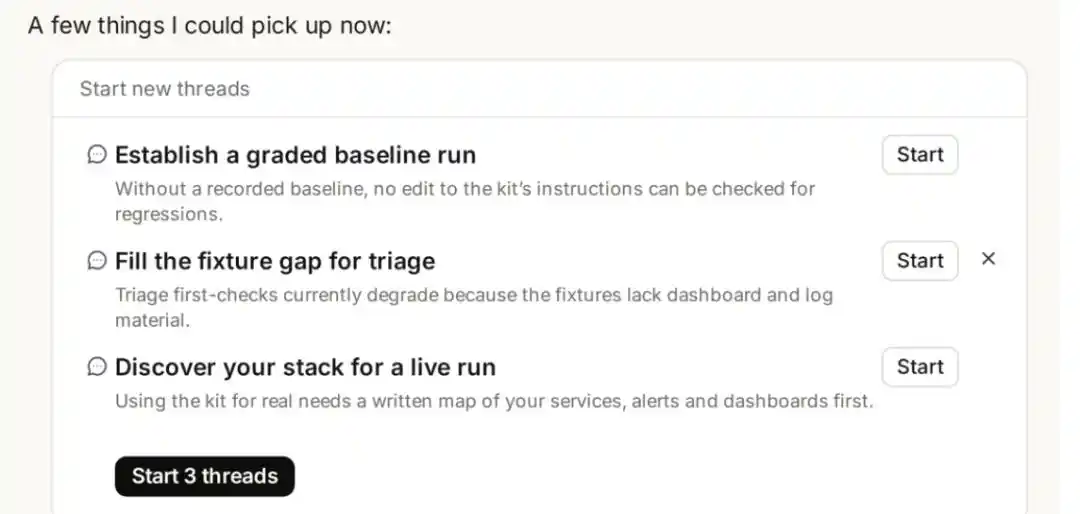
Projects coordinating conversations and task overview.
Anthropic gave an example: having the API, web client, and mobile client simultaneously deprecate an old interface.
This involves multiple code repositories, and modifications in each place need to be coordinated.
Claude can break down tasks by code repository, modify each, run tests, submit merge requests, and then tell you which changes need to be merged first.
Each cloud thread has its own context and code copy, working on its own branch, and then reports results back to the project conversation.
You can still enter a specific thread to see details and correct course. The project overview separately lists tasks that are in progress, waiting for your response, or ready for review.
If you step away and come back later, you don't have to ask each window about progress; you can pick up directly from where your input is needed.
To save time on repeated communication, things explained before must be remembered.
Projects accumulate project memory.
What requirements changed, what decisions were made, and which areas encountered pitfalls can all be recorded for subsequent cloud threads to read.
The official example gives a daily work scenario: the release date changed to Friday, why a certain feature was cut, and who to confirm with before modifying a particular service—such information can be left in the project memory.
The repository also stores uploaded materials and files generated by Claude, allowing subsequent tasks to build upon existing results.

Requirements are distributed to threads on the right, with related decisions and work results gradually accumulating for use by subsequent tasks.
The new version of Projects began phased public testing on September 17th.
This time, it's the access scope that is being expanded; the feature itself is still in public beta, and users not yet enrolled can still join the waitlist.
Cloud threads can continue working after closing the laptop. Tasks requiring local tools or a local database can also run on the computer via Remote Control, but the computer must remain awake.
Once a project has coordination, how should tasks be divided within a complex job?
300 Contracts
Writing the Division of Labor into a Program
Managed Agents dynamic workflows handle exactly this type of problem.
The official documentation gives a specific task example:
Review 300 contracts to find which ones contain change of control clauses—that is, stipulations about how the contract should be handled when company control changes.
Reading each one thoroughly is already laborious, and you also have to ensure each is checked, conclusions are documented, and any missed ones are promptly reviewed.
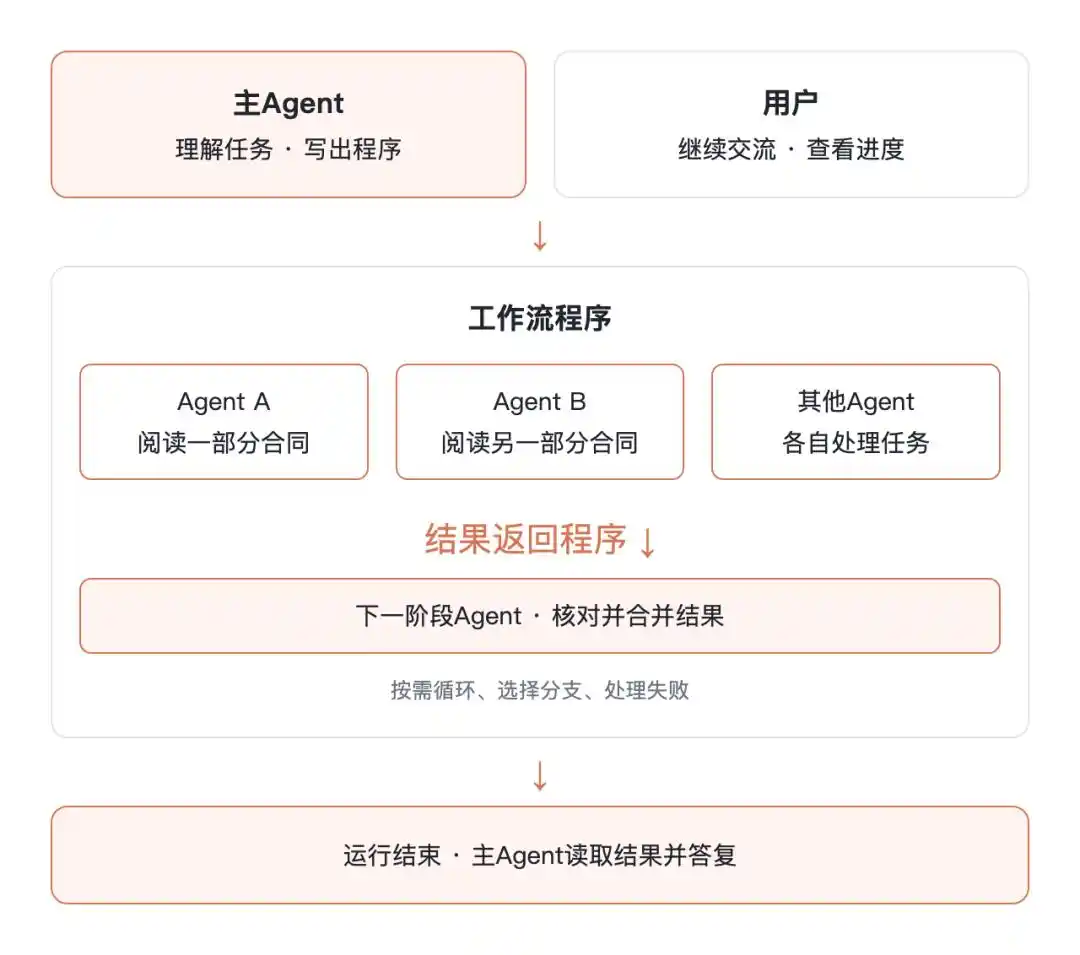
Claude writes a workflow program for the task, arranging which Agents read materials, which steps process results, and how to proceed afterward.
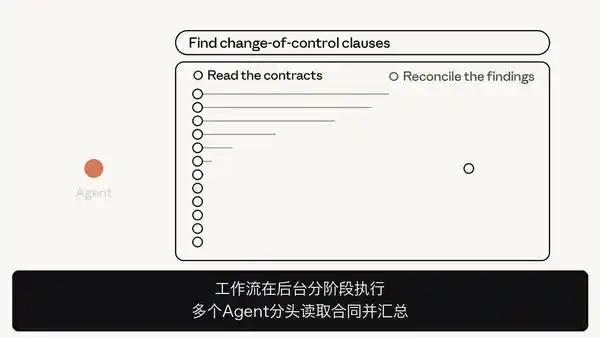
Contract reading tasks proceed in parallel, then move into verification and summarization.
The division of labor and handoffs are written into the program and can be run directly.
An Agent finishes reading the material, and the result is handed to the program. The program then passes the result to subsequent Agents or decides which branch to take next based on it.
Work requiring repeated revisions can also have loops incorporated.
The example in the official documentation is manuscript review: continue revising until approved or a preset number of rounds is reached.
In regular sub-Agent delegation, the primary Agent must read reports and then decide the next step. Dynamic workflows write a large number of intermediate handoffs into the program, advancing in the background.
While waiting, the primary Agent can still communicate with the user and check progress. After the run concludes, it reads the results to reply to the user or initiate the next round of work.
However, after a thread in the workflow returns its result, the primary Agent cannot continue questioning the same thread as it would when calling a regular sub-Agent. Therefore, verification and rework are best scheduled into the process in advance.
The official contract review instruction example stipulates:
First round, each contract is given to one Agent; second round, another Agent re-examines all contracts, including those where no target clause was found in the first round; any failing re-verification is sent back for rework and then verified again.
This gives clauses missed in the first round an extra chance to be discovered.
Of course, the contract case demonstrates the working method.
Anthropic did not disclose the specific division of labor in that set of bug test posts, so one cannot conclude that those 66 bugs were found through the exact same process.
1000 Agents
Must Also Queue Up
A maximum of 1000 Agents per run is one of the most eye-catching numbers in this public test.

It refers to a single workflow being able to launch up to 1000 Agents cumulatively throughout its entire execution.
The currently documented maximum for concurrent working threads is 64, with the official note stating this concurrency limit may be adjusted.
Workflows can execute in batch after batch, or wait for results from a previous stage before arranging the next.
Each Agent has independent conversation history while sharing files and the sandbox from the session—the working environment for running code and processing materials.
Developers can pre-configure specialized Agents or let the workflow define them temporarily based on task needs.
To integrate, set the type to multiagent_20261001 in the multiagent configuration, then configure the model, tools, and task requirements.
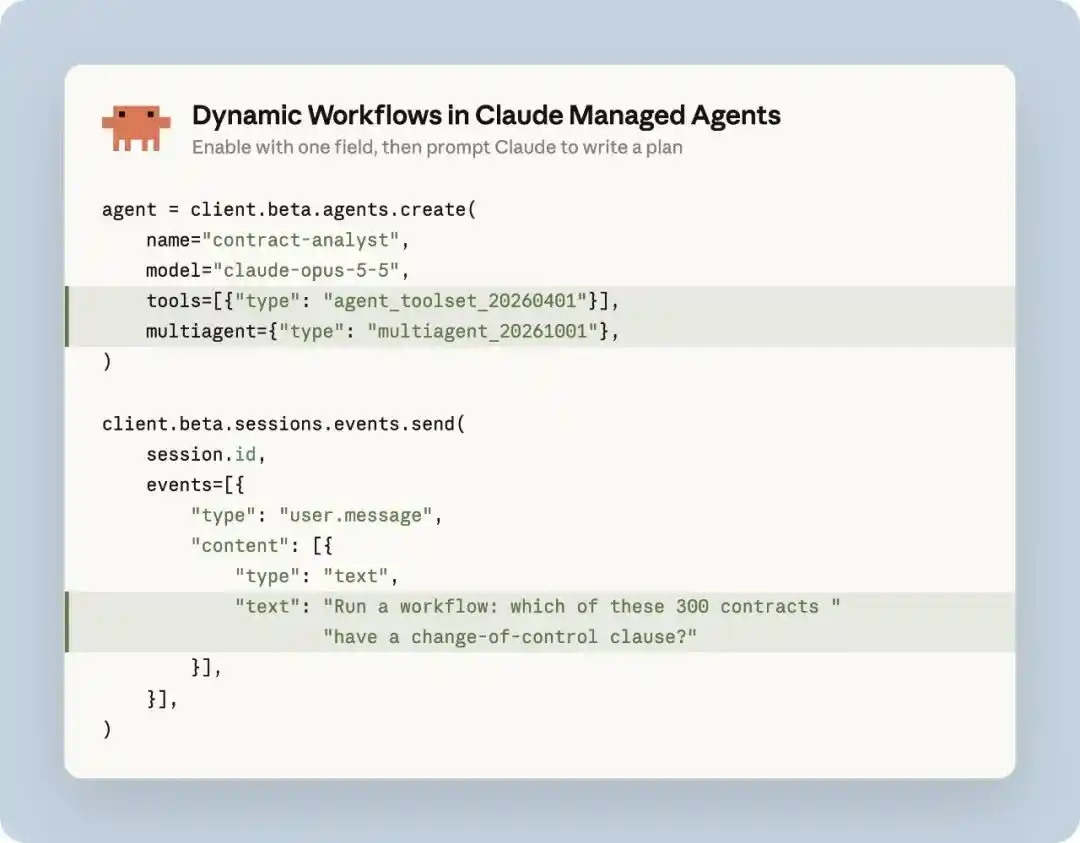
After enabling dynamic workflow, explain the task to Claude, and it can write the division of labor plan. The example in the image is screening 300 contracts for change of control clauses.
However, knowing how to divide labor isn't enough; unfinished parts also need to be clearly accounted for.
One of the official instruction examples requires: if an Agent cannot read a contract, that contract should be listed as "uncovered," and the remaining tasks should continue.
"No issues found" and "not checked at all" must be separated. Otherwise, a neat summary can easily hide gaps in task coverage.
Developers can view execution stage records and individual thread logs, using them to locate problems.
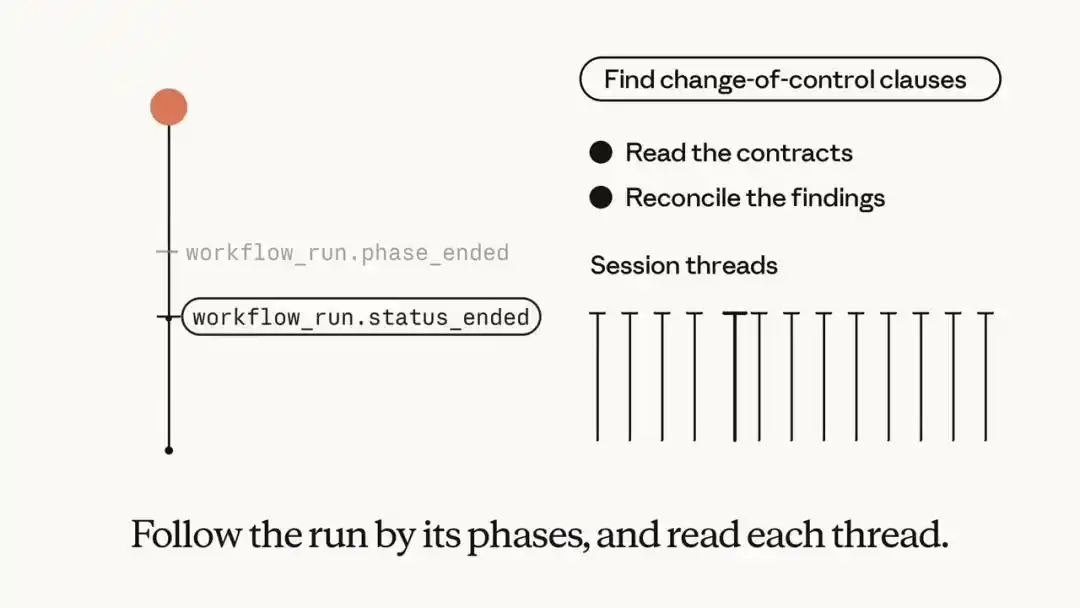
Using contract review as an example, developers can track stages like reading, verification, and check the execution logs of each task thread.
With more Agents, it's necessary both to arrange execution order and to see which tasks are completed and which still have gaps.
It's important to distinguish: the maximum of 1000 Agents launched and the three runs finding 66 bugs each both refer to Managed Agents dynamic workflows, not Projects.
Saving Coordination Time
The Bill Keeps Running
Back to the initial test: single Agent found 14, 15, 27 bugs in three runs; dynamic workflow found 66 each time.
More bugs were found, but how much extra time and cost this incurred is still unclear.
Official sources did not disclose the models used, actual number of Agents, time taken, token usage, or false positive rates, making it temporarily impossible to judge whether this workflow is faster or more cost-effective.
In actual use, the costs of the two features must also be considered separately.
Projects use the existing plan's quota; both work threads and coordination conversations consume usage. More parallel tasks mean faster quota depletion.
Users can adjust models and reasoning intensity or have Claude open fewer threads. Typically, work threads pause when reaching the plan's usage limit and resume after the quota resets.
Managed Agents are billed based on model token usage. Additionally, there's a $0.08 runtime fee per session hour, only counting the time the session is in a running state.
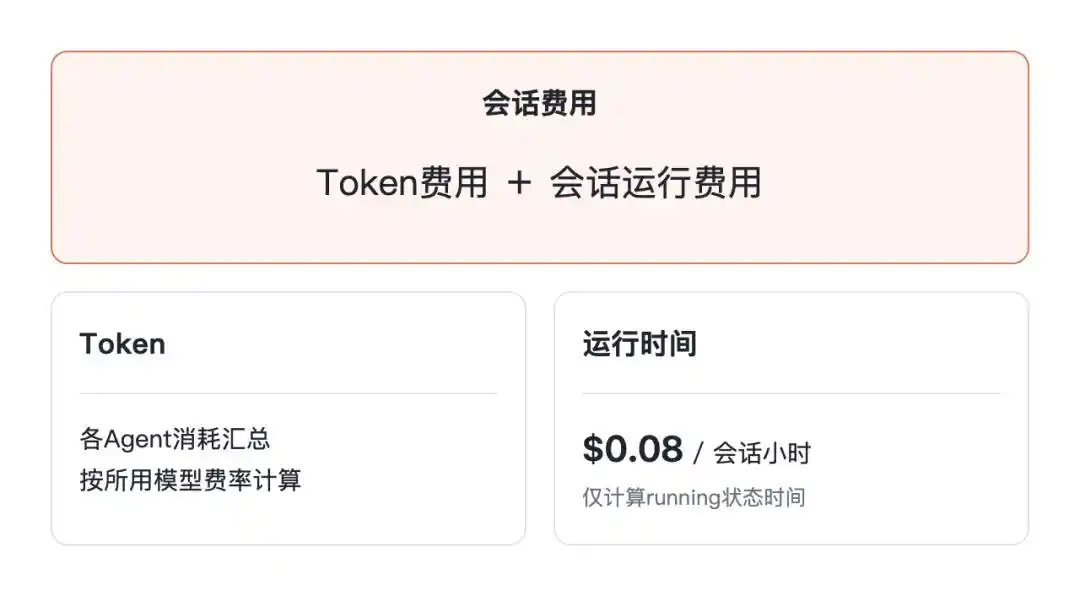
This $0.08 is just the runtime fee; tokens consumed by multi-Agents reading materials and generating answers are billed separately.
Developers can set a session budget, with the workflow's model consumption also counted towards it. Upon reaching the budget, the run pauses, but already issued model requests will still complete, potentially resulting in final costs exceeding the budget.
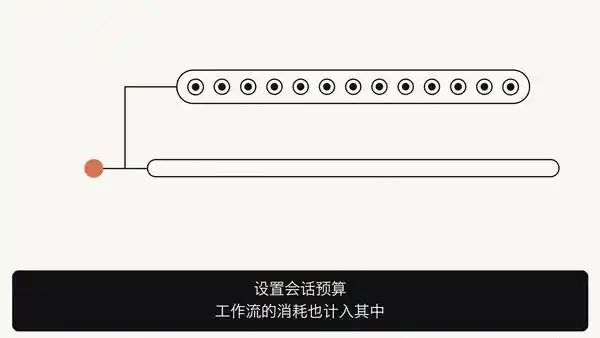
Session budget covers model consumption within the dynamic workflow, facilitating control over multi-Agent collaboration costs.
Therefore, the official recommendation is to start with clearly scoped tasks, understand the consumption, and then gradually increase complexity.
More Agents do not automatically equal better value.
How many more real problems are found, how much model call cost increases, and how much time people need to spend reviewing and fixing errors must all be factored into the same calculation.
Saving time on dividing work, if it leads to more finishing work, may not result in a faster project completion.
These two updates have Claude taking on more organizational work. The user sets the goal, budget, and acceptance criteria; Claude is responsible for division of labor, advancement, and handover.
The next challenge is: after delegating the work, can Claude reduce the need for human oversight and deliver results that can withstand scrutiny?
References:
https://x.com/ClaudeDevs/status/2108591328732856655
https://x.com/ClaudeDevs/status/2108591330129523146
https://x.com/ClaudeDevs/status/2108591331660468538
Editor: Yuanyuan Moxi
This article is from WeChat public account "Xinzhiyuan" (ID:AI_era), author: ASI Revelation.