Core Difference Between Margin Trading and Spot Trading
What differentiates margin trading from spot trading is that the former allows borrowing to trade.
In spot trading, the only way to make profits is by buying at low prices and selling at high prices amid an upward-trending market. Traders have more ways to make profits in margin trading:
Short: Traders can borrow to sell at high prices first and buy back at low when the market goes downhill.
Amplify Earnings: With borrowed funds, traders can scale their profits by much higher amounts than their own assets can offer in buy-low-sell-high trades.
Trading Mode Explained
- Normal Mode: You'll trade with your assets, and no loans will be generated during trading. The earnings from your trades will not be used automatically to repay the outstanding amount and the interest. Your earnings will be automatically credited to your assets.
- Auto-Borrow Mode: When the trading volume exceeds your assets, HTX will automatically grant credit to you according to your purchasing power. The earnings from your trades will not be used automatically to repay the outstanding amount and the interest. Your earnings will be automatically credited to your assets.
- Auto-Repay Mode: You'll trade with your assets, and no loans will be created during trading. The earnings from your trades will be used to repay the interest and loans in priority. When the interest and outstanding are paid, the rest of your earnings will be automatically reflected in your assets.
Trade on Margin with Manual Loans
Step 1: On the margin trading page, click "Transfer" on the left-side trading panel. In the pop-up window, transfer the required collateral to your margin trading account and click "Confirm" to complete the collateral top-up.

Step 2: Click "Borrow" under the left-side trading panel. Enter the cryptocurrency and the amount you want to borrow, and click "Borrow" to complete the manual borrowing process.

Step 3: Select your favorite trading pair, choose Normal mode or Auto-Repay mode, and place an order using your maximum available assets. The maximum available assets include your funds and assets you manually borrowed. No loans will be created during trading.
Trade on Margin with Auto-Borrow
Step 1: On the margin trading page, click "Transfer" on the left-side trading panel. In the pop-up window, transfer the required collateral to your margin trading account and click "Confirm" to complete the collateral top-up.
Step 2: Select your favorite trading pair, choose the Auto-Borrow mode, and place an order using your maximum available assets. The maximum available assets include your funds and the maximum assets you can borrow from HTX based on your collateral and credit. When the order value exceeds your own funds, the Auto-Borrow function will perform according to your credit to place the order.

Repay Loans via Manual Repayment
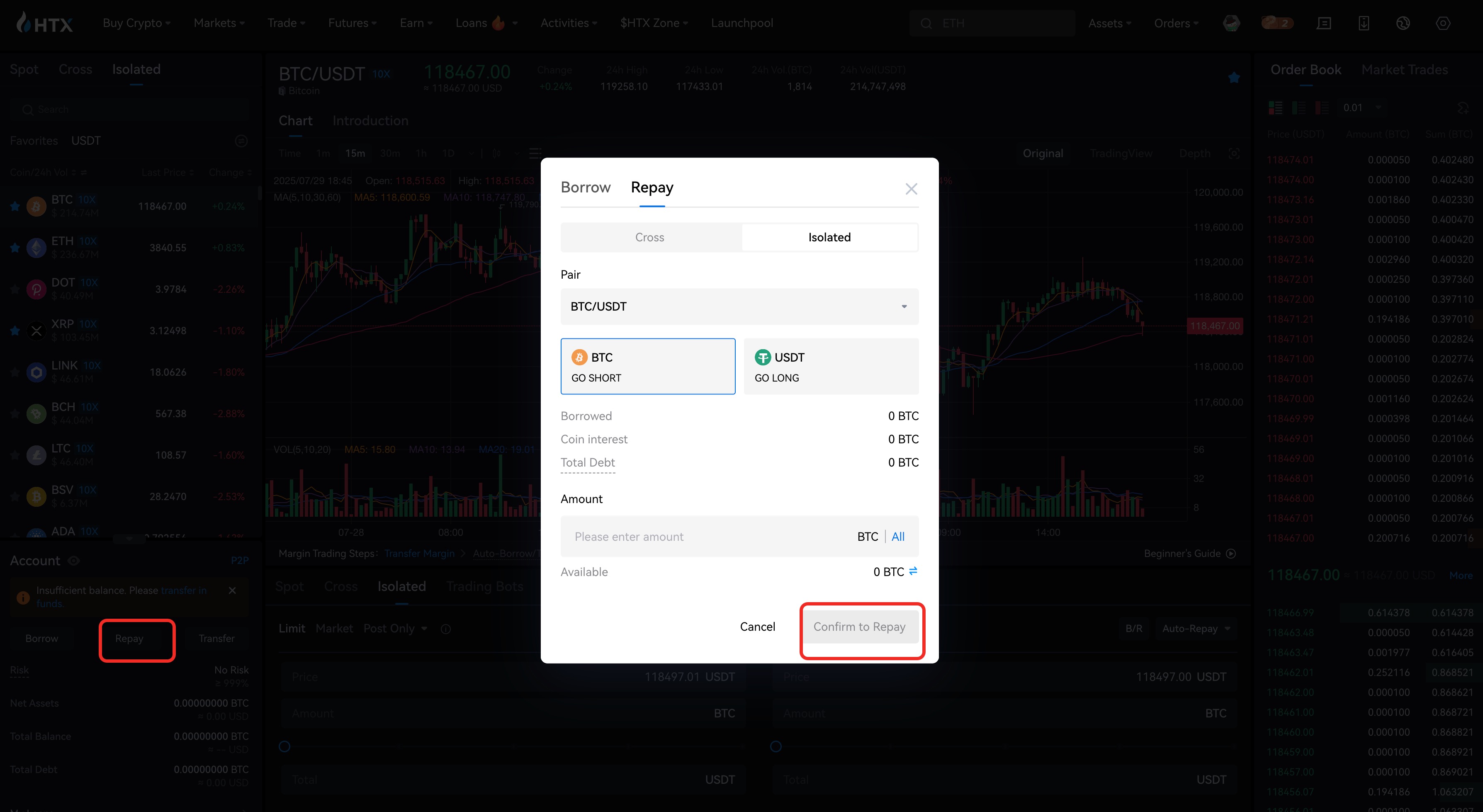
Step 1: On the margin trading page, click "Repay" under the candlestick chart. Select the asset you want to repay and enter the amount in the pop-out window. You can see the outstanding amount of the asset, the interest, and the total amount to repay.
Step 2: Make sure your assets are sufficient for repayment and click "Repay" to complete the repayment. Assets in your Margin account will be automatically deducted to return the interest and outstanding.
Repay Loans via Auto-Repay
Besides manual repayment, you can repay loans through trading under the Auto-Repay mode. Take repaying USDT loans for example. If you are holding BTC with outstanding loans in USDT, you can take the following steps for repayment.
Step 1: On the Trade page, select the BTC/USDT trading pair and click Margin > Cross Margin > Auto-Repay on the left side of the page.
Step 2: Click "Sell BTC" and enter the price and corresponding amount. The amount you need to return will be calculated automatically based on your loan size and current trading volume.
Step 3: Click "Sell". Your outstanding will be paid once the order is filled.

Check Your Current Assets and Outstandings
You can check your holdings and outstandings by clicking the "Assets" and "Outstanding" tabs at the bottom of the page.


