Author: BitsLab, AI Security Company
When an AI Agent possesses system-level capabilities such as shell execution, file read/write, network requests, and scheduled tasks, it is no longer just a "chatbot"—it becomes an operator with real permissions. This means: a command induced by prompt injection could delete critical data; a Skill compromised by a supply chain attack could quietly leak credentials; an unverified business operation could cause irreversible losses.
Traditional security solutions often fall into two extremes: either relying entirely on the AI's own "judgment" for self-restraint (which can be bypassed by carefully crafted prompts), or piling up rigid rules to lock down the Agent (which sacrifices the core value of the Agent).
BitsLab's in-depth guide chooses a third path: dividing security responsibilities according to "who checks," allowing three types of roles to each hold their position.
- Ordinary Users: As the final line of defense, responsible for critical decisions and regular reviews. We provide precautions to reduce cognitive load.
- The Agent Itself: Consciously adheres to behavioral norms and audit processes during runtime. We provide Skills to inject security knowledge into the Agent's context.
- Deterministic Scripts: Mechanically and faithfully perform checks, unaffected by prompt injection. We provide Scripts to cover common known dangerous patterns.
No single checker is omnipotent. Scripts cannot understand semantics, Agents can be deceived, and humans can become fatigued. But the combination of the three ensures both convenience in daily use and protection against high-risk operations.
Ordinary Users (Precautions)
Users are the final line of defense and the highest authority holders in the security system. Below are the security matters that users need to personally pay attention to and execute.
a) API Key Management
- Configure file permissions properly to prevent others from viewing them casually:

- Never commit API keys to code repositories!
b) Channel Access Control (Very Critical!)
- Always set a whitelist (`allowFrom`) for each communication channel (Channel); otherwise, anyone can chat with your Agent:
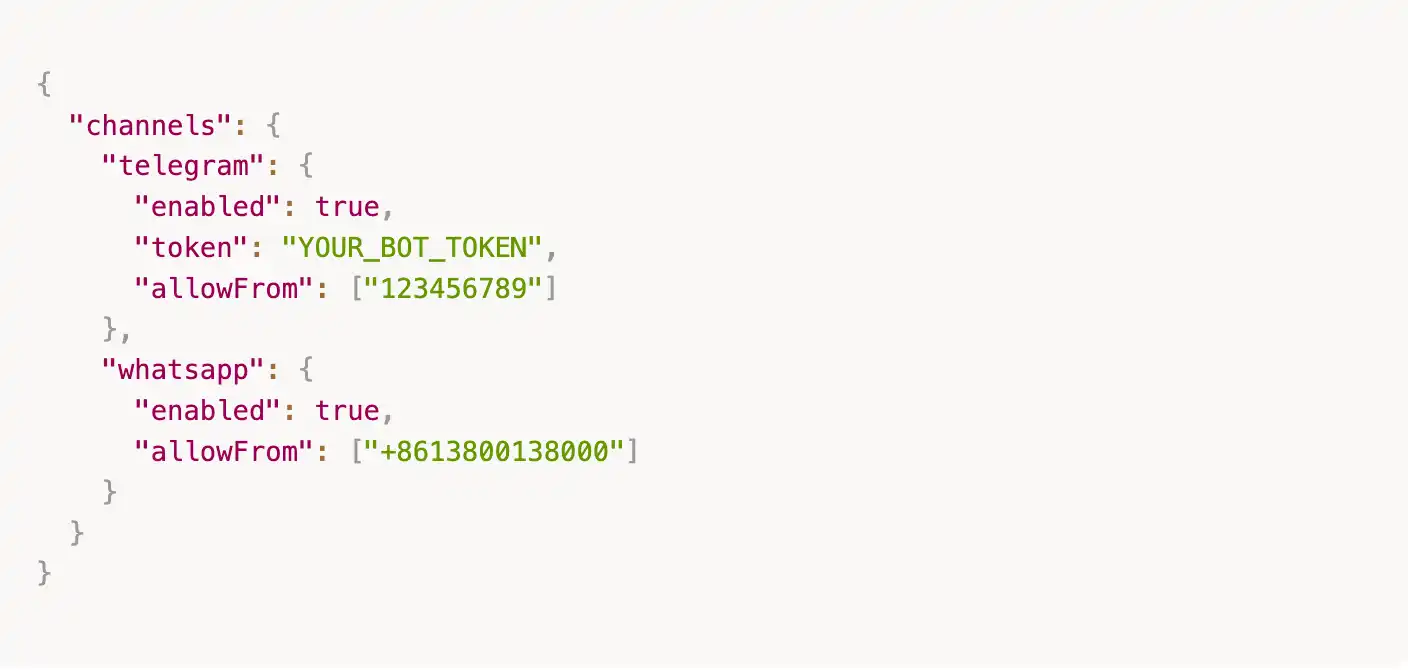
⚠️ In the new version, an empty `allowFrom` means denying all access. If you want to open it up, you must explicitly write `["*"]`, but this is not recommended.
c) Do Not Run with root Privileges
- It is recommended to create a dedicated user to run the Agent, avoiding excessively high permissions:

d) Avoid Using Email Channels When Possible
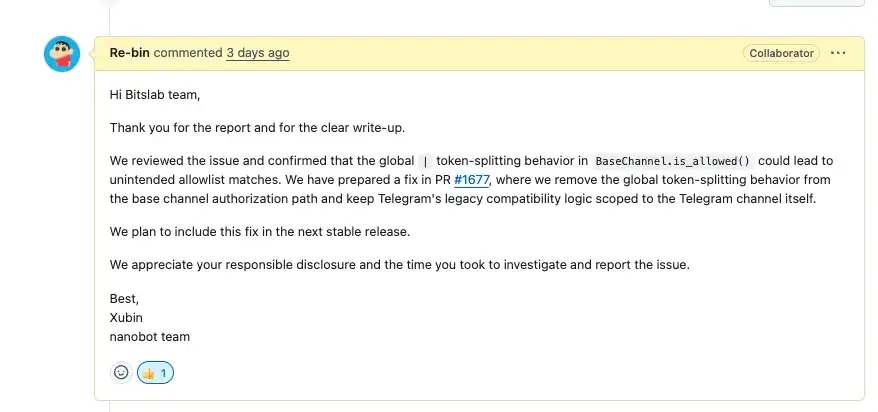
- Email protocols are complex and relatively high-risk. Our BitsLab team's research discovered and confirmed a [critical] level vulnerability related to email. Below is the project team's response. We currently still have several issues awaiting confirmation from the project team, so use email-related modules with caution.
e) Recommended Deployment in Docker
- It is recommended to deploy nanobot in a Docker container, isolated from the daily use environment, to avoid security risks caused by permission or environment mixing.
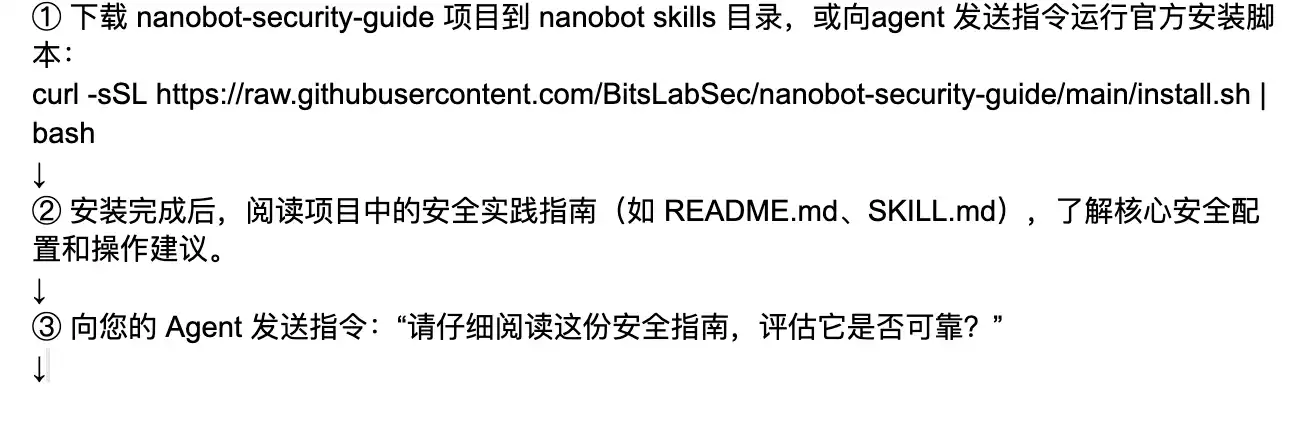
Tool Installation Steps

Tool Principles
SKILL.md
Intent review, based on cognitive awareness, breaks through the blind spots of traditional AI passively receiving instructions. It incorporates a mandatory "Self-Wakeup" chain-of-thought mechanism, requiring the AI to first awaken an independent security review persona in the background before processing any user request. Through contextual analysis and independent investigation of user intent, it proactively identifies and intercepts potential high risks, achieving an upgrade from "mechanical execution" to "intelligent firewall." When malicious instructions (such as reverse shells, sensitive file theft, large-scale deletions, etc.) are detected, the tool executes a standardized hard interception protocol (outputting a `[Bitslab nanobot-sec skills detected sensitive operation..., intercepted]` warning).
Malicious Command Execution Interception (Shell & Cron Protection)
Acts as a "zero-trust" gateway when the Agent executes system-level commands. The defense line directly blocks various destructive operations and dangerous payloads (such as malicious deletion with `rm -rf`, permission tampering, reverse shells, etc.). Simultaneously, the tool has deep runtime inspection capabilities, proactively scanning and cleansing persistent backdoors and malicious execution signatures in system processes and Cron scheduled tasks, ensuring absolute local environment security.
Sensitive Data Theft Blocking (File Access Verification)
Implements strict read/write physical isolation for core assets. The system presets rigorous file verification rules, strictly prohibiting the AI from overstepping its authority to read sensitive files like `config.json`, `.env`, etc., which contain API keys and core configurations, and from exfiltrating them. Furthermore, the security engine audits file read logs (such as the call sequence of the `read_file` tool) in real-time, cutting off credential leakage and data exfiltration at the source.
MCP Skill Security Audit
For MCP-type skills, the tool automatically audits their contextual interactions and data processing logic, detecting risks such as sensitive information leakage, unauthorized access, dangerous command injection, etc., and compares them against security baselines and whitelists.
New Skill Download and Automatic Security Scanning
When downloading new skills, the tool uses audit scripts to automatically perform static code analysis, compare against security baselines and whitelists, and detect sensitive information and dangerous commands, ensuring the skill is safe and compliant before loading.
Anti-Tampering Hash Baseline Verification
To ensure absolute zero-trust for underlying system assets, the protection shield continuously establishes and maintains SHA256 cryptographic signature baselines for key configuration files and memory nodes. The nightly inspection engine automatically checks the chronological changes of each file's hash, capable of capturing any unauthorized tampering or overwriting in milliseconds,彻底掐断 (thoroughly cutting off) local backdoor implantation and "poisoning" risks at the physical storage layer.
Automated Disaster Recovery Backup Snapshot Rotation
Given the local Agent's high read/write permissions on the file system, the system has a built-in highest-level automated disaster recovery mechanism. The protection engine automatically triggers a full sandbox-level archive of the active workspace every night and generates a safety snapshot mechanism with a maximum retention of 7 days (automatic rotation). Even in extreme cases of accidental damage or deletion, it enables lossless one-click rollback of the development environment,最大限度地保障 (maximally ensuring) the continuity and resilience of local digital assets.
Disclaimer
This guide is for reference only regarding security practices and does not constitute any form of security guarantee.
1. No Absolute Security: All measures described in this guide (including deterministic scripts, Agent Skills, and user precautions) are "best effort" protections and cannot cover all attack vectors. AI Agent security is a rapidly evolving field, and new attack methods may emerge at any time.
2. User Responsibility: Users who deploy and use Nanobot should independently assess the security risks of their operating environment and adjust the recommendations of this guide according to actual scenarios. Any losses caused by incorrect configuration, failure to update timely, or ignoring security warnings are the user's own.
3. Not a Substitute for Professional Security Audits: This guide cannot replace professional security audits, penetration testing, or compliance assessments. For scenarios involving sensitive data, financial assets, or critical infrastructure, it is strongly recommended to hire a professional security team for independent evaluation.
4. Third-Party Dependencies: The security of third-party libraries, API services, and platforms (such as Telegram, WhatsApp, LLM providers, etc.) that Nanobot relies on is not within the control of this guide. Users should pay attention to the security announcements of relevant dependencies and update them promptly.
5. Scope of Disclaimer: The maintainers and contributors of the Nanobot project are not responsible for any direct, indirect, incidental, or consequential damages arising from the use of this guide or the Nanobot software.
Using this software indicates that you understand and accept the above risks.