Just Now, Claude Code Evolved Again, Drafting 'Feedback Reports' for Users

marsbitPublicado em 2026-08-27Última atualização em 2026-08-27

Resumo

Claude Code has introduced a new feature where it can automatically draft feedback reports on behalf of the user. This occurs in scenarios such as when a tool persistently fails, Claude cannot fulfill a request, an error is identified, or the user explicitly asks for feedback. Drafts are saved locally and are not sent to Anthropic until the user reviews and approves them. Users can view, edit, or delete these drafts via a feedback queue interface and control the feature's behavior through settings. The tool is available in local, interactive terminal sessions using the Claude API but is disabled in non-interactive modes, web sessions, certain cloud platforms, and for organizations with specific data retention policies.

Claude Code has updated with another quite interesting little feature.

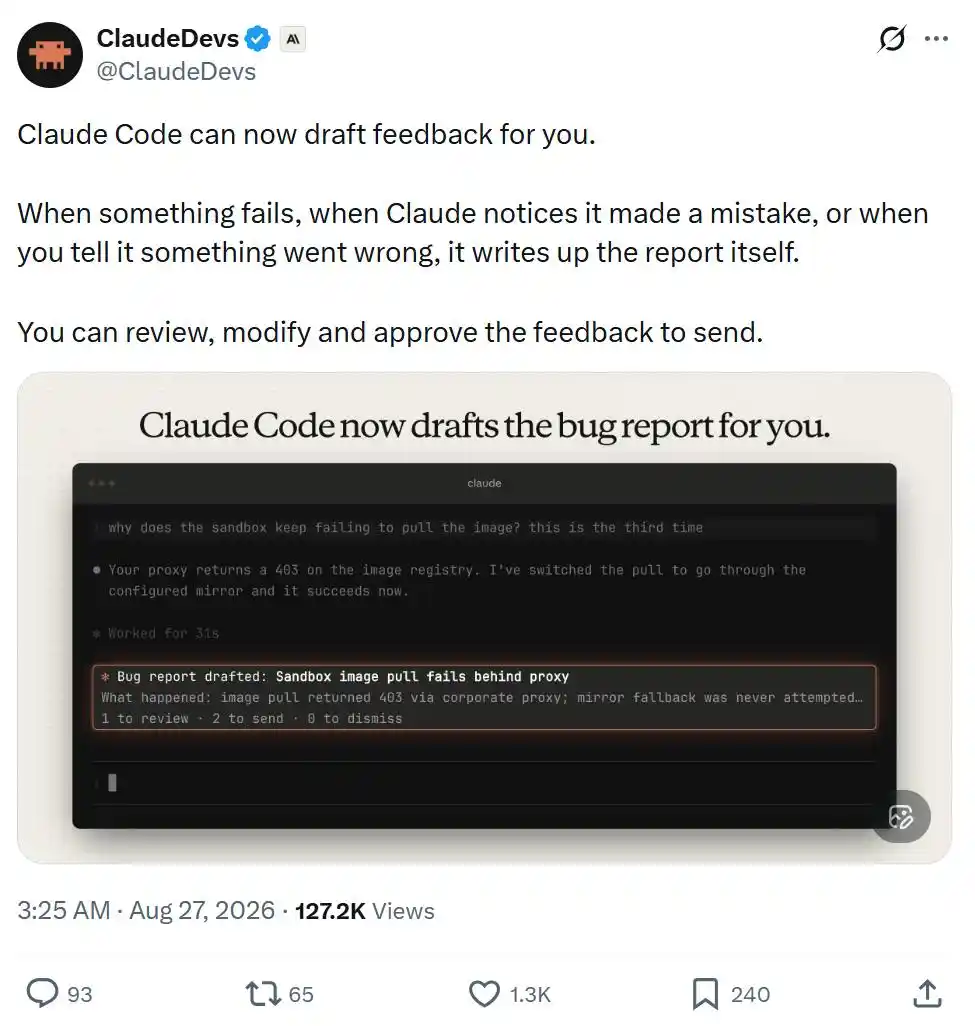
This time, it can help you draft feedback reports.

When a certain feature malfunctions, when Claude realizes it made a mistake, or when you point out where something went wrong, it will automatically compile the relevant situation into a report.

You can review, edit it before sending, and decide whether to approve submission.
However, you can also disable this feature in /config, or modify its behavior settings.
The official team has also compiled detailed documentation; let's take a look at the specific content.

Claude Code Starts 'Writing Feedback Reports' for Itself

Feedback drafted by Claude is a report about Claude Code written by Claude on your behalf. This feature requires using Claude Code v2.1.238 or later.

Claude Code saves each feedback draft on your local device, at the path: ~/.claude/feedback/drafts/. Nothing is sent to Anthropic until you actively send it.

Specifically, Claude will automatically draft feedback via the SendFeedback tool in the following situations:

  • A tool or command continuously fails;
  • Claude cannot complete a certain request you made;
  • You point out that Claude made a mistake, or Claude itself realizes it made an error;
  • You ask Claude to submit feedback.

Documentation address:

https://code.claude.com/docs/en/tools-reference#sendfeedback-tool-behavior

What You See When Claude Drafts Feedback

When Claude queues a feedback draft, you will see a card above the input box, displaying the title of that draft. You can:

  • Press 1 to view the draft;
  • Press 2 twice in a row to send it as-is directly;
  • Press 0 to ignore this card.

Even if you ignore the card, the draft will remain in the feedback queue.

After you ignore a feedback card, Claude Code will ask if you want to turn off Claude's automatic feedback drafting feature. If you choose not to turn it off twice in a row, it will stop asking afterwards.

By default, a maximum of 3 feedback cards are displayed per session.

After exceeding this limit, or when you set feedbackDrafts to quiet, only the number of feedback drafts currently queued will be shown at the bottom of the input box, and no specific cards will pop up.

Viewing and Editing Feedback Drafts

Run /feedback without any parameters to open the feedback queue.

This will list all unprocessed drafts from all your sessions, including those for which you closed the feedback card or never saw a card in the first place.

After selecting a draft, you can review it and perform the following operations:

Edit the title, category, and specific content;

Set Send transcript to yes or no. If the session record corresponding to when Claude created this draft still exists, this option defaults to yes, meaning the conversation segment will be submitted to Anthropic along with the feedback; choosing no sends only the feedback report itself;

Send the draft, delete the draft, or temporarily leave it in the queue to handle later.

If you want to manually write a feedback report yourself, press w to open the standard feedback window.

The /feedback command with text content, as well as the /bug command, will also directly open this standard feedback window.

Sending Feedback Drafts

When you send a draft, Claude Code submits it in the same way as a /feedback report, following the same data retention policies. After sending is complete, the draft is deleted from your local device.

If you send directly from a feedback card, it will show: ✓ Sent. If you send from the feedback queue, a receipt ID will be shown when the window closes.

Note that sending directly from a feedback card does not include the conversation transcript.

Claude Code saves your working directory information in the local draft to find the corresponding conversation transcript, but does not send this working directory.

For organizations with Zero Data Retention (ZDR) enabled, Claude Code does not provide this tool, and /feedback is similarly unavailable.

Deleting or Retaining Feedback Drafts

When you delete a draft, Claude Code simply removes it from your local device.

If you leave a draft in the feedback queue unprocessed, it will automatically expire after 30 days.

The feedback queue can save a maximum of 10 drafts across all sessions.

When Claude creates the 11th draft, Claude Code will automatically delete the earliest one.

Sessions Where Claude Cannot Automatically Draft Feedback

Claude Code only provides this feature in the following scenarios:

Interactive terminal sessions running on the user's own computer and directly using the Claude API, not through a cloud service provider.

The tool is not provided in the following scenarios:

  • Non-interactive -p run modes, and Agent SDK sessions, as these scenarios lack an interface for reviewing the feedback queue;
  • Cloud sessions, such as Claude Code on the web, because it cannot write feedback drafts to your local device;

Sessions run through the following platforms:

  • Amazon Bedrock
  • Claude Platform on AWS
  • Google Cloud Agent Platform
  • Microsoft Foundry

Sessions with the following environment variables or related configurations set:

  • CLAUDE_CODE_SEND_FEEDBACK=0
  • DISABLE_FEEDBACK_COMMAND=1
  • Setting CLAUDE_CODE_DISABLE_NONESSENTIAL_TRAFFIC to any non-empty value
  • Feature-flag fetching is turned off;
  • Organizations that have turned off product feedback functionality;
  • Organizations with Zero Data Retention (ZDR) enabled.

This article is from the WeChat public account "Machine Heart"

Perguntas relacionadas

QWhat is the main new feature introduced in the latest Claude Code update according to the article?

AThe main new feature is that Claude Code can now automatically draft feedback reports for users when issues occur, such as tool failures, errors made by Claude, or user-reported problems.

QWhere are the feedback drafts saved locally on a user's device, and when is the content transmitted to Anthropic?

AThe feedback drafts are saved locally at ~/.claude/feedback/drafts/. The content is not transmitted to Anthropic until the user actively sends the report.

QHow can a user open the feedback queue to review and manage pending drafts in Claude Code?

AA user can open the feedback queue by running the /feedback command without any parameters.

QUnder what conditions will Claude automatically draft a feedback report using the SendFeedback tool?

AClaude will automatically draft feedback when: a tool or command repeatedly fails; Claude cannot complete a user's request; the user points out an error or Claude realizes it made a mistake; or the user explicitly asks Claude to submit feedback.

QIn which types of sessions is the automatic feedback drafting feature NOT available in Claude Code?

AThe feature is not available in: non-interactive -p run modes and Agent SDK sessions; cloud-based sessions like Claude Code on the web; sessions run through platforms like Amazon Bedrock, Claude Platform on AWS, Google Cloud Agent Platform, or Microsoft Foundry; and sessions with specific environment variables or configurations that disable feedback or non-essential traffic, or in organizations that have disabled product feedback or enabled Zero Data Retention.

Leituras Relacionadas

One Vote Could Make SOL's Daily Burn Rate Soar 14 Times

Solana's first formal on-chain governance vote concluded on August 27th, coinciding with SOL hitting a yearly high. Three key proposals aimed at reshaping the network's tokenomics were decided. Solana's core challenge is a massive usage-to-value capture gap. Despite processing 120x more transactions than Ethereum and leading in DEX volume, its fee revenue is significantly lower due to its fee structure. Currently, most fees (priority fees) go to validators, with only a small base fee partially burned. This results in high net inflation (approx. 6k SOL issued vs. ~650 burned daily). The three proposals seek to address this: **SGP-0001** establishes the formal governance framework. **SGP-0002** (Double Deflation Acceleration) proposes doubling the annual reduction rate of new SOL issuance from 15% to 30%, aiming to reach the terminal inflation rate by 2029 instead of 2032, reducing issuance by an estimated 18.9 million SOL. **SGP-0003** (Resource & Entry Fee Restructuring) would split the base fee into a fixed "entry fee" for block producers and a variable, fully burned "resource fee." This could increase daily SOL burns by ~14x to 7,500-9,000. Major stakeholders like Helius, Jupiter, and Jito support the changes. However, opposition exists, notably from Solana Company (HSDT), whose revenue is 99.4% from staking. They argue rapid changes could disrupt institutional adoption. Critics also highlight a potential conflict where validators can vote against reduced staking yields using delegated SOL without explicit voter consent. The outcome of these votes provides a directional mandate. If passed, they represent a significant step towards aligning Solana's immense network activity with tangible economic value for SOL holders.

marsbitHá 2m

One Vote Could Make SOL's Daily Burn Rate Soar 14 Times

marsbitHá 2m

Chinese Venture Capital Is Shifting from 'Selecting People' to 'Selecting Cities'

Chinese Venture Capital: Shifting from "Picking Founders" to "Picking Cities" The article discusses a significant shift in China's venture capital (VC) landscape. Historically, VC investments heavily focused on the individual founder's vision, track record, and capability, as seen in early internet-era successes like Wang Xing (Meituan), Li Bin (Nio), and Li Xiang (Li Auto). The belief was that betting on exceptional people was the key to success. However, the rise of hard tech startups—in fields like semiconductors, robotics, AI, and biotech—has changed this calculus. These industries depend heavily on deep, localized ecosystems: specialized talent pools, established supply chains, manufacturing bases, and application scenarios. A city's industrial "resume" now significantly impacts a startup's chances. Examples include Shenzhen's dominance in robotics, Beijing's concentration of AI firms, Suzhou's biotech cluster, and Hefei's successful bet on semiconductor giant ChangXin. This shift is further driven by changes in funding sources. Government-guided funds and state-owned capital now dominate VC limited partners (LPs). These "patient capital" investors prioritize local economic development, job creation, and industrial chain growth alongside financial returns. Their early bets signal viability to other investors. Ultimately, the VC logic remains about managing risk and increasing the odds of success. In the hard tech era, a supportive city ecosystem provides crucial resources—talent, suppliers, R&D, and policy stability—that a single founder cannot easily assemble. The investment due diligence process has thus expanded from evaluating just the founder to also evaluating the founder's city. Consequently, capital is concentrating in a few regions with strong, focused industrial foundations, challenging other cities to build compelling, credible ecosystems to attract investment.

marsbitHá 57m

Chinese Venture Capital Is Shifting from 'Selecting People' to 'Selecting Cities'

marsbitHá 57m

Trading

Spot
活动图片